The Safest Way to Host Cloud Applications in
Cloud computing has revolutionized how modern businesse...








When a team rents a GPU cloud server for AI inference and then watches it throw CUDA out-of-memory errors on the tenth concurrent request, the benchmark chart they used to pick the card was never the problem. The card was rated for the model; the model was never the whole workload. The KV cache — the per-request working memory an inference server accumulates token by token — decides how many requests a GPU can actually hold, and it is the number that model cards, TFLOPS tables, and marketing comparisons never show you.
That is because "an inference GPU" is routinely misdefined as "a smaller training GPU." It is not the same job. Training is compute-bound: it saturates tensor cores and rewards raw FLOPS. Inference, in the decode phase that generates every token of the answer, is memory-bandwidth-bound: the card re-reads the model weights and the request's KV cache from VRAM for every single token it emits, and the arithmetic intensity is low. On top of that, inference is a multi-tenant workload — concurrency multiplies your VRAM bill in a way training never does, because every live request keeps its own growing copy of attention memory.
This article separates prefill from decode and shows which hardware property each one actually buys, reduces GPU selection to three numbers (time-to-first-token, per-stream decode speed, and concurrent streams), shows the KV cache arithmetic that sizes your VRAM honestly, maps the four traffic patterns onto the card classes that fit them, lists the November 2026 market rates, converts every rental price into cost per million tokens, and closes with a fifteen-minute sizing worksheet and the five mistakes that most often triple an inference bill.
AI inference runs in two phases with opposite hardware profiles: prefill — processing the prompt — is compute-bound and rewards FLOPS, while decode — generating the answer one token at a time — is memory-bandwidth-bound and rewards VRAM speed and capacity. A GPU cloud server for inference is therefore chosen on three properties, in this order: VRAM capacity for weights plus KV cache, memory bandwidth in GB/s for decode speed, and only then raw compute. As of November 2026, this ordering explains almost every "fast on paper, slow in production" inference disappointment.
Prefill ingests your entire prompt — the system message, the retrieved documents, the conversation history — in one parallel pass. Every token of the prompt is processed simultaneously, the GPU's tensor cores are fed well, and the phase scales with FLOPS. This is where a model "reads" a 4,000-token RAG context in a fraction of a second on a strong card.
Decode then generates the answer strictly one token at a time. Each step must re-read the model weights and that request's KV cache from VRAM before it can produce one token. The dominant constraint is how many gigabytes per second the card can move, not how many TFLOPS it can compute. A concrete comparison from current spec sheets: a modern 24 GB consumer flagship moves data at roughly 1,000 GB/s, a datacenter L40S-class card at 864 GB/s, and an 80 GB HBM2e datacenter card at about 2,039 GB/s — and the datacenter card's decode advantage comes from that bandwidth figure, not from its FLOPS, which is why two cards with similar TFLOPS ratings can serve very different numbers of concurrent users.
The practical consequence: if your workload is long prompts with short answers (summarization, RAG extraction, classification), prefill dominates and compute matters. If it is chat, agents, or code generation with streaming answers, decode dominates and you are shopping for memory bandwidth and KV capacity. Most production workloads are the second kind.
Three measured numbers — not benchmark charts — decide whether an inference deployment works: time-to-first-token (TTFT), per-stream decode speed in tokens per second, and the number of concurrent streams the card sustains. Every user-visible symptom of a bad GPU choice (slow first response, stuttering streams, requests queuing into timeouts) is a violation of one of these three numbers, and every product archetype needs a different combination of the three.
Set the targets before you pick the card, because the three numbers trade off against each other on any fixed GPU: raising concurrency divides per-stream speed; raising context length raises TTFT and drains KV capacity; chasing per-stream speed caps how many users one card holds. Write down all three as requirements, with units:
| Product archetype | TTFT target | Per-stream decode target | Concurrent streams needed | Binding constraint |
|---|---|---|---|---|
| Internal tool, single team | Under 2 s | 15-30 tokens/s | 5-20 | Per-stream speed |
| Customer-facing chat | Under 1 s | 20-40 tokens/s | 50-500 | KV capacity |
| Batch pipeline (night jobs) | Irrelevant | Throughput only | Hundreds | Aggregate throughput |
| RAG over long documents | Under 3 s | 15-25 tokens/s | 20-100 | Prefill compute + KV |
| Code assistant / agent | Under 1 s | 30+ tokens/s | 10-100 | All three at once |
The table's last row is the honest warning: agent and coding workloads are the only common category that demands all three numbers simultaneously, which is why they are the workloads that genuinely justify premium cards — and why everything above them in the table usually does not.
The KV cache is the per-request memory an inference server builds while processing a prompt: for every token, every attention layer stores a Key and a Value vector so later tokens need not recompute them. Its size follows one formula — two (K and V) times the number of layers, times the hidden dimension, times bytes per element, times context length, times concurrent requests — and it grows with every token of prompt and every token of generated answer, for every request in flight. This is the VRAM line that model cards never show and that causes nearly every production OOM.
Run the formula on a representative 7B-class FP16 model with 32 layers and a 4,096 hidden dimension. Per token: 2 x 32 x 4,096 x 2 bytes = 524,288 bytes, about 0.5 MB of KV cache per token. One request with an 8,000-token context therefore holds roughly 4 GB of KV cache — on top of the roughly 14 GB of FP16 weights a 7B model occupies. Ten concurrent 8K requests need about 40 GB of KV cache alone. That is why "the model fits in 24 GB" is meaningless without a concurrency number attached: the model fits; the working set does not.
Three structural facts soften the bill as of November 2026. First, grouped-query attention (GQA) — used by most current-generation open models — shares Key and Value heads across query heads and cuts the per-token figure by a factor of four to eight versus the classic architecture used in the example above. Second, paged attention in serving engines stores the cache in fixed-size blocks instead of pre-reserving the maximum, eliminating most fragmentation waste. Third, shorter context caps — setting the server's maximum context to what your product actually needs rather than what the model supports — shrink the per-request ceiling linearly: a 4K cap quarters the 16K worst case.
Correct VRAM sizing for an inference GPU is one equation: model weights in bytes, plus KV cache per stream multiplied by concurrent streams, plus a 5-10 percent operational headroom — and current vLLM deployment guidance (November 2026) confirms the standard practice of capping total GPU memory utilization near 0.9 and leaving exactly that margin, because a utilization set to 1.0 guarantees OOM on transient peaks. Weights equal parameters times bytes per parameter: 2 bytes for FP16, roughly 0.5 for 4-bit. The KV term is the formula from the previous section.
Deployment documentation from November 2026 walks a representative example worth memorizing: on a 24 GB card with utilization capped at 0.9, the usable pool is about 21.6 GB; a 12 GB quantized model leaves about 9.6 GB for KV cache; and the server's maximum context length then determines how many concurrent requests that 9.6 GB can hold before new requests queue or fail. The same guidance notes that a 24 GB card is comfortable for quantized 7B-class serving, and that 13B-class and larger unquantized models start at 24 GB of weights alone — meaning the card cannot hold the working set and is the wrong card for that job, regardless of its speed.
| Model class and precision | Approx. weights | KV per 8K stream | Minimum practical card | Comfortable concurrent streams |
|---|---|---|---|---|
| 7-8B, 4-bit (AWQ/GPTQ) | 4-5 GB | 0.5-1 GB (GQA) | 16 GB | 20-50 |
| 7-8B, FP16 | 14-16 GB | 0.5-1 GB (GQA) | 24 GB | 5-15 |
| 13-14B, 4-bit | 8-9 GB | 1-2 GB (GQA) | 16-24 GB | 15-40 |
| 14B, FP16 | 28 GB | 1-2 GB (GQA) | 48 GB | 10-30 |
| 32B, 4-bit | 18-20 GB | 2-4 GB | 48 GB | 8-20 |
| 70B, 4-bit | 35-40 GB | 4-8 GB | 80 GB or 2x48 GB | 5-10 |
Read the table as a floor, not a recommendation: the concurrency column assumes the context cap, utilization limit, and serving engine are configured as described above. The one-line rule that survives every version change: budget VRAM at roughly 1.5 to 2 times the model weights for small-context internal tools, and separately compute the KV term the moment concurrency or context length matters, because from that moment the KV term dominates.
Four traffic patterns cover nearly all inference deployments, and each one maps to a different optimal card class: batch throughput workloads want the cheapest adequate VRAM, interactive chat wants KV capacity and horizontal scale, long-context RAG wants VRAM above all, and latency-critical assistants want prefill compute on top of both. Picking the card first and hoping the traffic fits is the single most expensive sequencing error in inference infrastructure.
| Traffic pattern | Real bottleneck | Right card class | Why |
|---|---|---|---|
| Nightly batch: summarize, classify, extract | Aggregate tokens per dollar | Cheapest 24 GB tier (RTX 4090-class) | No TTFT target; throughput is the only metric; consumer cards win on price |
| Customer chat, moderate context | KV capacity at concurrency | 24 GB cards, scaled horizontally | Many small instances beat one big card for burst tolerance and cost |
| Long-context RAG and document QA | KV per stream and prefill | 48 GB+ (L40S, A100-class) | 8K-32K contexts make the KV term, not weights, the resident |
| Agentic and coding assistants | TTFT + per-stream speed + concurrency | Highest-bandwidth cards you can justify (H100-class) | The only pattern that needs all three numbers strong at once |
Two consequences follow. First, the majority of deployments — internal tools, chatbots under a few hundred concurrent users, batch pipelines — are served correctly and cheaply by 24 GB-class cards, which is exactly the tier that November 2026 pricing makes abundant. Second, horizontal scale on mid-tier cards has a resilience property vertical scale never offers: with N small instances behind a load balancer, one instance dying takes 1/N of your capacity offline, while on one 80 GB card it takes all of it. For teams whose traffic is bursty rather than steadily huge, four cheap instances usually beat one premium instance on availability, cost, and burst absorption simultaneously.
As of November 2026, live GPU market aggregators tracking 18-plus providers with listings refreshed every few minutes show the following hourly rates for the card classes that matter to inference: RTX 3090 from about $0.20, RTX 4090 from about $0.27 (with listings across providers spanning roughly $0.18 to $0.69 depending on provider and commitment), A100 from about $0.34, L40S from about $0.60, H100 from about $1.41, and H200 from about $1.60 per hour. The same trackers report spot or interruptible capacity at 60 to 80 percent below on-demand rates — a legitimate option for batch inference that can tolerate interruptions and checkpoint restarts.
Three cautions belong next to those numbers. First, aggregator minimums are best-case listings: a $0.27 RTX 4090 is real but may be a community-hosted single card with no SLA, while a $0.69 one from a managed platform includes support and uptime guarantees — for production inference, the platform attributes (fast storage, CPU headroom, cold-migration policy) matter more than the hourly delta. Second, hourly rates are the wrong unit for 24/7 service: a card billed at $0.27 per hour costs about $197 per month at full duty cycle, and many providers therefore sell day-pass and monthly plans at substantial discounts for exactly this pattern. Third, ingress and egress are sometimes billed separately on GPU platforms — an inference endpoint serving streamed tokens to users worldwide can rack up more in transfer than in compute at cheap compute rates, so confirm the bandwidth terms before committing.
The only price unit that compares inference cards fairly is dollars per million generated tokens, computed as hourly rate divided by (aggregate output tokens per second x 3.6) — and the point of computing it is that it inverts several intuitions, because a slower cheap card at high utilization can undercut a faster premium card that idles. As of November 2026, the math is simple enough to run in a spreadsheet cell before any rental decision.
Worked illustration, with numbers deliberately labeled as illustrative rather than benchmark claims. Card A costs $0.27 per hour and, under continuous batching with a quantized 8B model, sustains an aggregate 1,500 output tokens per second across its concurrent requests. Tokens per hour: 5.4 million. Cost: $0.05 per million tokens. Card B costs $1.41 per hour and sustains 6,000 aggregate tokens per second on the same model with more concurrent streams. Tokens per hour: 21.6 million. Cost: $0.065 per million tokens. The premium card is faster in absolute terms but costs more per unit of work unless its extra concurrency is actually saturated — which depends on your traffic, not on the card. This is the arithmetic that makes traffic pattern, not hardware class, the decisive variable.
| Cost scenario (illustrative) | Hourly rate | Aggregate tokens/s | Cost per 1M tokens | Monthly cost at 24/7 |
|---|---|---|---|---|
| 24 GB card, batch job, saturated | $0.27 | 1,500 | about $0.05 | about $197 |
| 24 GB card, chat traffic, 20% average utilization | $0.27 | 300 effective | about $0.25 | about $197 |
| Premium card, saturated | $1.41 | 6,000 | about $0.065 | about $1,030 |
| Premium card, same 20% utilization | $1.41 | 1,200 effective | about $0.33 | about $1,030 |
The table's middle and last rows carry the real lesson: at identical low utilization, the expensive card costs the same premium multiplier per token as it does per hour. Rent premium hardware only for the traffic that saturates it; for everything else, the cheaper card is not a compromise, it is the correct answer.
Quantizing a model from FP16 to INT4 (via AWQ or GPTQ) cuts its weight VRAM roughly fourfold, and — as of November 2026 — the practical deployment evidence is unambiguous: a 7B model runs on an 8 GB card quantized, a 27B-class model with grouped-query attention serves on a 16 GB card, and a 14B model serves comfortably quantized on a 24 GB card with room for a large KV budget. Quantization does not merely shrink the model; it moves the model down a hardware tier, which changes which card class and which price point your traffic pattern maps to.
The trade is quality and per-token compute, not correctness. Current deployment write-ups report quantized customer-facing models holding accuracy figures in the low-80-percent range on their evaluation suites with response-time improvements around 20 percent versus unoptimized serving — acceptable for most products, measurable for precision-critical ones. The decision rule: quantize by default for chat, summarization, RAG, and internal tools; benchmark FP16 versus 4-bit on your own evaluation set before deciding for anything where a wrong answer is expensive; and prefer FP8 on datacenter cards over INT4 when the card supports it natively, since FP8 keeps more precision at a similar memory footprint.
| Serving choice | Weight VRAM for 8B | Cards that open up | Best for |
|---|---|---|---|
| FP16 | 16 GB | 24 GB tier and up | Precision-critical products, fine-tuning adjacent workloads |
| INT8 / FP8 | 8 GB | 16 GB tier and up | Good middle ground on supporting cards |
| INT4 (AWQ/GPTQ) | 4-5 GB | 8 GB tier and up | Chat, RAG, internal tools, maximum concurrency per card |
The strategic effect of the last row is the reason quantization belongs in the hardware conversation rather than the model conversation: 4-bit serving turns one 24 GB card into the equivalent of four 16 GB cards for concurrency purposes, and it does so for free.
The serving engine is worth as much as the card: continuous batching and paged attention — the core of vLLM and its peers as of November 2026 — raise the concurrent load a fixed GPU can hold severalfold versus naive per-request serving, and November 2026 deployment guidance documents the naive failure directly: a model loaded through a plain transformer runtime serves single requests fine, then hits CUDA out-of-memory at a few dozen concurrent requests while GPU utilization stays low, because every request pre-reserves its own maximum-size memory. The card was never too small; the allocator was.
Four configuration moves recover the multiplier, and all four are standard practice in current vLLM deployment guides:
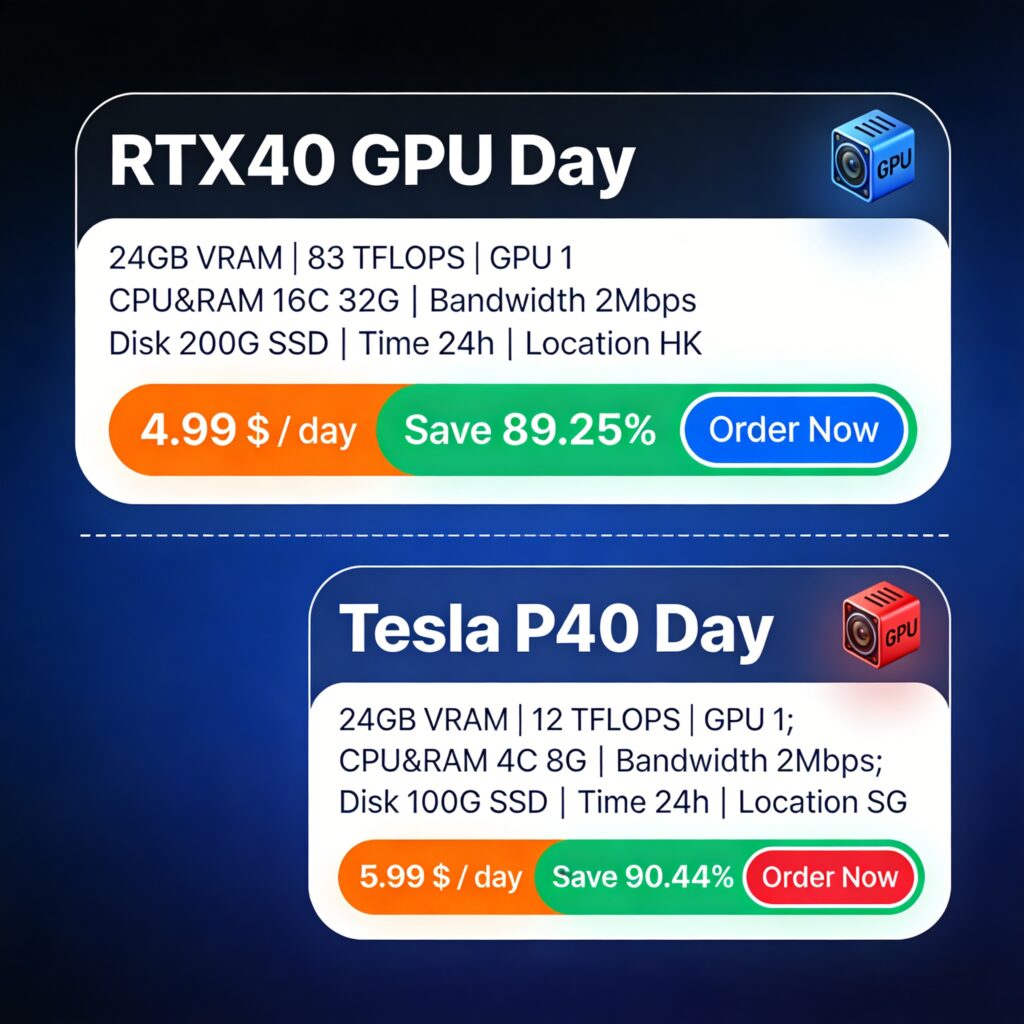
One architectural choice sits above the configuration flags: for a model that fits on one card, prefer multiple single-GPU instances behind a load balancer over one multi-GPU tensor-parallel instance — the parallelism of an inference fleet is usually better expressed as replicas than as shards. Tensor parallelism earns its complexity only when a single quantized model cannot fit one card, as with 70B-class serving. For the common case — an 8B to 32B quantized model — the pattern is replicas on 24 GB-class cards, which is exactly the tier where per-day and per-hour pricing is most aggressive: for example, SurferCloud's GPU cloud server line rents 24 GB RTX40-series cards from $4.99 per day with hourly billing available, in Hong Kong and Singapore nodes, which at 24/7 duty cycle lands around $0.21 per hour — inside the cheapest band of the November 2026 market rates above — with the practical rider that day-pass pricing removes the meter anxiety that hourly-only platforms create for always-on endpoints (details on the RTX40 and Tesla P40 GPU cloud server plans). The same logic applies wherever your users are: for APAC-facing endpoints, node location adds tens of milliseconds that no GPU upgrade can buy back — the same latency-versus-location trade-off explained in how a Hong Kong position reaches China and Southeast Asia.
Size an inference GPU in fifteen minutes by working the equation backward from product requirements to a card class and a monthly cost, in this order: model, precision, context cap, concurrency target, VRAM total, card class, and finally the cost per million tokens check. The sequence below produces a defensible number before you ever open a provider pricing page.
Teams that run this worksheet usually discover their instinct was one tier too high. A "we probably need an A100" conversation, worked through the steps, often ends as "we need three 24 GB cards and a load balancer" — cheaper per month, more available, and faster to replace when one dies. And when the GPU is not the bottleneck at all, the diagnosis is usually on the host: checking CPU usage on the inference host before blaming the card isolates whether tokenization, request handling, or the model is the real queue.
Five recurring mistakes account for most wasted inference spend: sizing by weights alone, buying FLOPS for decode, leaving the context cap at the model maximum, sharding one model across cards that fit on one, and skipping the warmup and utilization configuration that the serving engine assumes. Each one is a default decision that costs money silently until it is corrected deliberately.
Do I need an H100 to run inference on a 7B or 8B model? No. A 7-8B model quantized to 4-bit occupies 4-5 GB of VRAM and serves well on any modern 16-24 GB card with a capable serving engine; as of November 2026, H100-class cards earn their premium only for large unquantized models, agentic workloads that need all three performance numbers strong at once, or very high concurrency on big models. Before self-hosting at all, also price the managed-API alternative — the trade-offs are walked through in the DeepSeek API developer guide — because renting a card to serve a few thousand requests a day is sometimes the more expensive option.
How much VRAM do I actually need for Llama-class or Qwen-class 8B inference? Budget the sum, not the model: 4-5 GB of 4-bit weights, plus 0.5-1 GB of KV cache per concurrent 8K stream (GQA models), plus 10 percent headroom. Ten concurrent streams therefore need about 12-16 GB, which is why a 16 GB card is the practical floor and a 24 GB card is the comfortable default for this class.
Is a consumer GPU like the RTX 4090 okay for production inference, or do I need a datacenter card? For chat, RAG, and internal tools: yes, with two riders. Use a platform with production attributes (fast storage, CPU headroom, a real network), and accept that datacenter cards add ECC memory, multi-instance scheduling, and higher memory bandwidth — which matter for large-model, high-concurrency, or reliability-critical serving, not for a team-scale endpoint.
How many concurrent requests can one 24 GB GPU handle? It depends on model size, precision, and context cap, not on the card: a 4-bit 8B model with an 8K context cap on a well-configured engine typically sustains dozens of concurrent streams (November 2026 deployment guidance documents 5-15 comfortable streams at FP16, and severalfold more at 4-bit), while the same card with a 128K context cap serves a handful. The concurrency number is a configuration output, not a hardware constant.
Should I serve FP16 or a quantized 4-bit model on a rented GPU? Quantize by default: 4-bit cuts weight VRAM fourfold, moves the model down a hardware tier, and multiplies concurrency per card. Benchmark FP16 versus 4-bit on your own evaluation set only when wrong answers carry a business cost; on most chat and RAG products the quality delta does not survive contact with the cost difference.
Is it cheaper to rent a GPU by the hour or by the day and month for a 24/7 inference endpoint? For always-on service, hourly billing is the worst of the three: a $0.27 hourly card is about $197 per month at full duty cycle, while day-pass and monthly plans on the same class of hardware routinely undercut that. Rent hourly for experiments and bursts; rent by day or month once the endpoint is in production.
Why does my inference server OOM when the model supposedly fits in VRAM? Because the model was never the whole resident: the KV cache grows per request and per token, so concurrency and context length — not weights — are usually what exceeded the budget. Lower the context cap first, cap memory utilization near 0.9 with 10 percent headroom, bound the batch or queue with 429s at the gateway, and only then consider a bigger card.