As a small business grows, traditional on-premises servers often become a burden. High upfront costs, hardware maintenance, and limited scalability can slow down operations and distract teams from focusing on growth.
Cloud servers offer a smarter alternative. They allow businesses to run websites, applications, and internal systems without managing physical hardware, while providing flexibility, security, and global reach.
This guide walks you through how to set up a cloud server from scratch and explains how SurferCloud can be a strong option for small businesses and growing teams.
What Is a Cloud Server?
Cloud Server Basics
A cloud server is a virtual computing environment created using virtualization technology. Cloud providers divide powerful physical servers into multiple virtual machines, each operating independently.
With a cloud server, businesses can host websites, deploy applications, store data, and scale resources on demand—without investing in physical infrastructure.
Key Benefits of Cloud Servers
- Elastic scalability—Easily adjust CPU, memory, and storage as your business grows
- Pay-as-you-go pricing—only pay for the resources you actually use
- Global deployment—choose data centers close to your customers
- High availability—built-in redundancy and professional infrastructure
Assessing Your Business Needs
Before selecting a cloud server, it’s important to understand exactly what your business requires.
1. Define Your Use Case
Start by identifying how the server will be used:
- Business website or e-commerce platform
- Internal systems such as CRM, ERP, or collaboration tools
- Databases and file storage
- APIs, backend services, or web applications
Each scenario has different performance and reliability requirements.
2. Estimate Resource Requirements
- CPU & memory – Databases and business systems typically need more RAM
- Storage—NVMe SSDs are ideal for high-performance workloads
- Bandwidth—International traffic or high concurrency requires stable network capacity
3. Security and Compliance Considerations
If your business handles sensitive data, consider:
- Data encryption options
- Access control and firewall features
- Compliance with regulations such as GDPR
Choosing the Right Cloud Provider
The cloud provider you choose will directly impact performance, stability, and long-term costs.
What to Look For
- Reliability & uptime—Look for providers offering 99.9%+ SLA
- Network quality—consistent performance for domestic and international access
- Technical support—24/7 support is critical for production systems
- Flexible pricing—Avoid overpaying for unused resources
Why Consider SurferCloud?
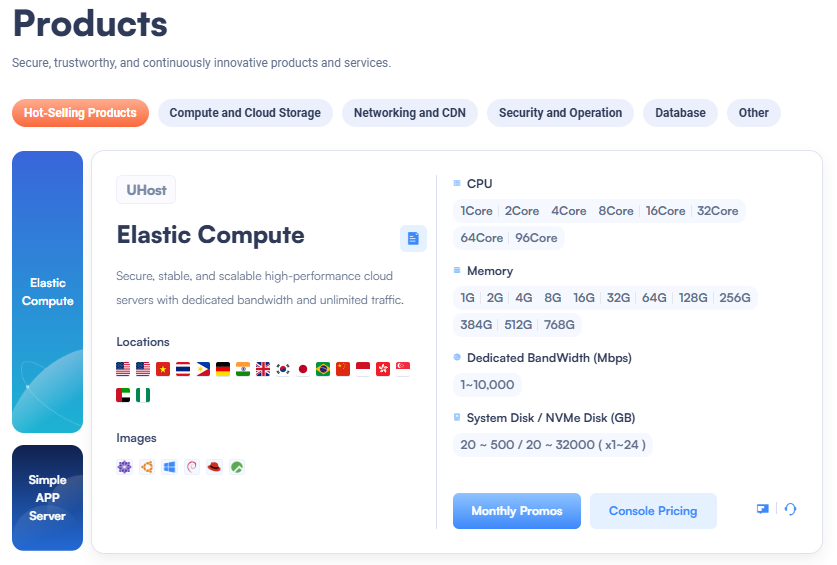
SurferCloud offers cloud infrastructure designed for global businesses and growing teams, making it a strong fit for small and medium-sized companies:
- Multiple international data center locations
- Stable, high-performance cloud servers
- Optimized networking for web apps and APIs
- Developer-friendly environment with fast deployment
For businesses that need a balance between cost efficiency and performance, SurferCloud is a practical and scalable choice.
Step-by-Step: Setting Up a Cloud Server
1. Create a Cloud Account
- Register on your cloud provider’s website
- Choose a billing model (monthly or pay-as-you-go)
- Set up billing alerts to avoid unexpected charges
2. Configure Your Server
Key configuration options include:
- Operating system—Ubuntu, CentOS, Debian, or Windows Server
- Instance size – Select CPU and RAM based on workload
- Storage—System disk and optional data disks
- Region – Choose a data center close to your target users
3. Network and Security Setup
- Assign a public or private IP address
- Configure security groups to open only required ports (e.g., 22, 80, 443)
- Use SSH key authentication instead of passwords
4. Deploy Applications
- Install web servers such as Nginx or Apache
- Set up databases like MySQL, PostgreSQL, or Redis
- Deploy and test your applications thoroughly
Securing Your Cloud Server
Access Control
- Enable multi-factor authentication (MFA)
- Assign role-based permissions
- Regularly review and remove unused accounts
Firewalls and Protection
- Restrict inbound traffic using cloud firewalls
- Enable basic DDoS protection
- Close all unnecessary ports
Data Security
- Encrypt disks and backups
- Use HTTPS for all web traffic
- Schedule regular snapshots and backups
Managing and Monitoring Your Cloud Server
Performance Monitoring
Use built-in or third-party tools to monitor:
- CPU and memory usage
- Disk I/O and network traffic
- Application response times
SurferCloud provides resource monitoring features that help businesses maintain visibility and performance control.
Backup and Disaster Recovery
- Automate regular backups
- Store backups in multiple locations
- Test recovery procedures periodically
Auto Scaling
Scale resources up during peak traffic and down during quiet periods to maintain performance while controlling costs.
Cloud Cost Optimization Tips for Small Businesses
- Avoid over-provisioning resources
- Review usage regularly and downsize when possible
- Use auto-scaling for variable workloads
- Shut down idle instances and unused IPs
With proper cost management, cloud infrastructure remains affordable while supporting business growth.
Final Thoughts
Cloud servers empower small businesses to scale efficiently without the complexity of managing physical hardware. With careful planning, proper security, and the right cloud provider, businesses can build a reliable and future-proof IT foundation.
If you’re looking for a cloud platform that combines performance, flexibility, and global reach, SurferCloud is well worth considering. Its cloud servers and networking solutions help businesses focus on growth—while leaving infrastructure complexity behind.