SurferCloud Blog SurferCloud Blog
  • HOME
  • NEWS
    • Latest Events
    • Product Updates
    • Service announcement
  • TUTORIAL
  • COMPARISONS
  • INDUSTRY INFORMATION
  • Telegram Group
  • Affiliates
SurferCloud Blog SurferCloud Blog
  • HOME
  • NEWS
    • Latest Events
    • Product Updates
    • Service announcement
  • TUTORIAL
  • COMPARISONS
  • INDUSTRY INFORMATION
  • Telegram Group
  • Affiliates
  • banner shape
  • banner shape
  • banner shape
  • banner shape
  • plus icon
  • plus icon

How to Deploy a High-Performance WordPress Site on a $2.9 VPS: A Step-by-Step Guide

January 7, 2026
3 minutes
INDUSTRY INFORMATION
21 Views

The Evolution of WordPress Hosting

WordPress powers over 40% of the internet. However, most beginners start with shared hosting, which often leads to slow loading speeds and "Error 500" during traffic spikes. In 2026, the savvy move is to host WordPress on a Virtual Private Server (VPS).

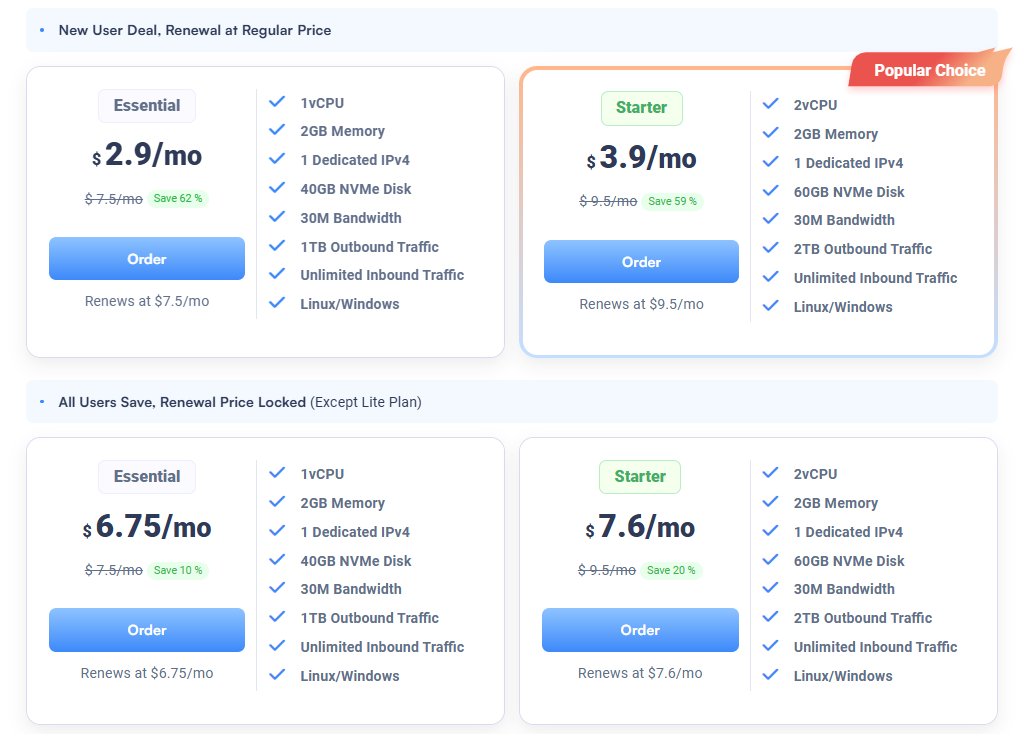
With SurferCloud ULightHost, you can get dedicated resources for just $2.9/month, which is often cheaper than basic shared hosting but offers 5x the performance. This guide will show you why and how to make the switch.
How to Deploy a High-Performance WordPress Site on a $2.9 VPS: A Step-by-Step Guide

Ready to upgrade? Get your WordPress-ready VPS here: https://www.surfercloud.com/promos/ulighthost

1. Why ULightHost is Superior for WordPress

Guaranteed Resources vs. Shared Neighbors

On shared hosting, if another website on the same server gets a traffic surge, your site slows down. ULightHost provides dedicated CPU slices and RAM. Your WordPress PHP processes will always have the power they need to execute quickly.

NVMe SSD: The Secret to Fast TTFB

Time to First Byte (TTFB) is a crucial Google ranking factor. Because ULightHost uses NVMe SSDs, the database queries (which WordPress does constantly) are processed almost instantly. This means your pages start loading in the browser much faster.

Global Edge with 15+ Data Centers

If your readers are in Southeast Asia, hosting in North America is a mistake. SurferCloud allows you to deploy your WordPress site in Hong Kong, Singapore, or Tokyo with one click, ensuring your local audience gets sub-100ms latency.

2. Choosing the Right ULightHost Plan for WordPress

For a standard WordPress blog or small business site, the entry-level ULightHost plan at $2.9/mo is sufficient.

  • 1 vCPU / 1GB or 2GB RAM: Perfect for up to 20,000 monthly visitors.
  • NVMe Storage: Plenty for your media library and themes.
  • 30Mbps Bandwidth: Ensures images and videos load without buffering.

3. Step-by-Step Deployment (The Technical Part)

Step 1: Launch your Instance

Go to the ULightHost Promo Page, select your preferred region, and choose Ubuntu 22.04 or 24.04 LTS as your OS.

Step 2: Install a Control Panel (Optional but Recommended)

If you aren't a command-line expert, you can install free panels like CyberPanel, CloudPanel, or AAPanel. These allow you to manage WordPress with a graphical interface.

  • Example command for CloudPanel: curl -sSL https://installer.cloudpanel.io/ce/v2/install.sh | sudo bash

Step 3: Configure PHP and MariaDB

WordPress requires PHP (8.1+ recommended) and a database. On a VPS, you can tune the php.ini file to allow larger file uploads (e.g., upload_max_filesize = 64M), something you often can't do on shared hosting.

Step 4: Point Your Domain

Grab your Dedicated IPv4 from the SurferCloud dashboard and add an "A Record" in your domain's DNS settings.

4. Optimizing for 2026 SEO Standards

Hosting on ULightHost gives you the "Technical SEO" foundation, but you should also:

  • Enable Object Cache: Use Redis (easily installed on ULightHost) to speed up the backend.
  • SSL via Let's Encrypt: SurferCloud's dedicated IP makes SSL setup seamless.
  • CDN Integration: Combine your VPS with a CDN for ultimate global speed.

5. Cost Comparison: The Massive Savings

  • Bluehost/SiteGround: Often $10-$15/mo after the renewal period.
  • Managed WP Hosting (WP Engine): $25+/mo.
  • SurferCloud ULightHost: $2.9/mo with total control. Over a year, you save over $200 while gaining a faster website.

Conclusion

Stop letting slow hosting hold back your Google rankings. Transitioning to a lightweight cloud server like ULightHost is the single best investment you can make for your WordPress site this year.

Don't miss the $2.9 deal: ? Start your WordPress VPS Journey on SurferCloud

Tags : Best VPS for Bloggers Fast WordPress Hosting 2026 Install WordPress on Cloud Server ULightHost Tutorial WordPress VPS hosting

Related Post

4 minutes COMPARISONS

PowerShell vs. Command Prompt: A Comprehensiv

When it comes to managing and automating tasks on a Win...

3 minutes INDUSTRY INFORMATION

Vietnam VPS Recommendation: SurferCloud Ho Ch

If you're looking for a reliable VPS in Southeast Asia,...

1 minute INDUSTRY INFORMATION

SurferCloud’s One-Stop Cloud Ecosystem: Fro

Why One-Stop Solutions Matter On AWS or Alibaba, use...

Light Server promotion:

ulhost

Cloud Server promotion:

Affordable CDN

ucdn

2025 Special Offers

annual vps

Copyright © 2024 SurferCloud All Rights Reserved. Terms of Service. Sitemap.










