Why Black Friday 2025 Is the Best Time to Swi
Black Friday has evolved far beyond retail goods — in...








When you land on the SurferCloud ULightHost promo page, one of the first decisions you face—after picking your location—is choosing your Operating System (OS). While it might seem like a simple checkbox, this choice dictates how you will manage your server, what applications you can run, and the overall performance efficiency of your project.
In 2026, both Linux and Windows have evolved, but they serve very different purposes. Let’s break down which OS you should deploy on your $2.9/mo ULightHost instance.
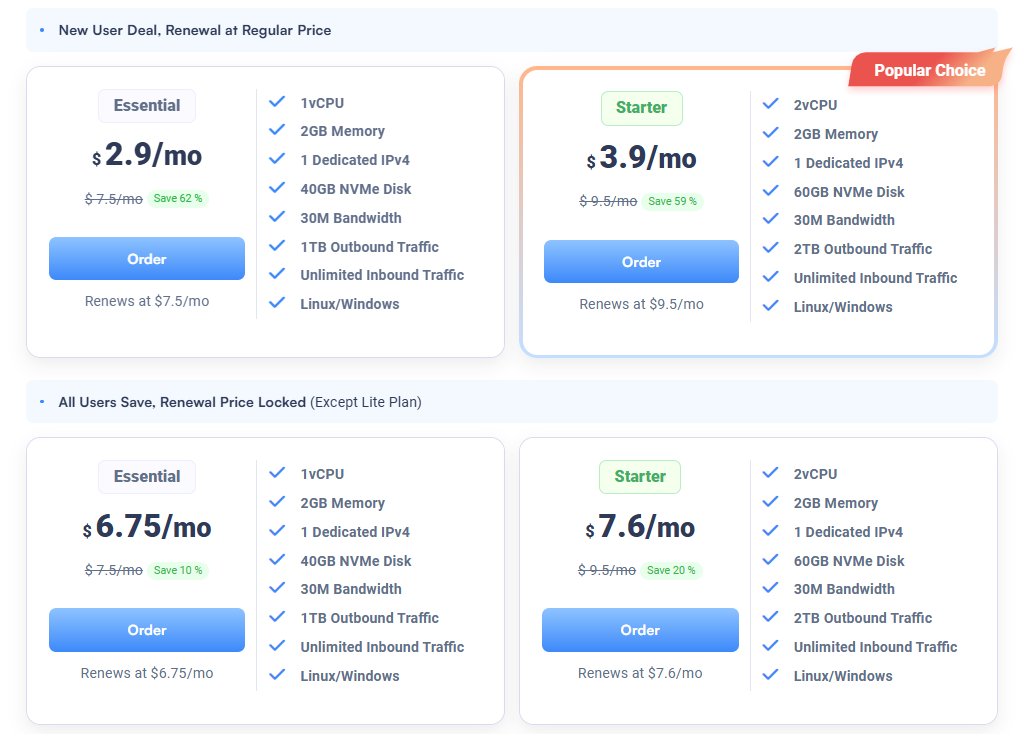
Explore all OS options here: https://www.surfercloud.com/promos/ulighthost
Linux is the backbone of the internet. On ULightHost, you can choose from popular distributions like Ubuntu, CentOS, Debian, and Rocky Linux.
For many, the command line is intimidating. This is where Windows Server (available on ULightHost) shines.
Regardless of the OS, the underlying hardware on SurferCloud remains top-tier:
One of the best features of SurferCloud is flexibility. If you start with Ubuntu and realize you need Windows, you can re-install your ULightHost instance (though keep in mind that Windows may require a higher tier of RAM—usually 2GB+—to run smoothly).
Choosing between Linux and Windows on ULightHost boils down to your technical comfort level and the specific requirements of your software. Linux offers raw power and efficiency, while Windows offers unmatched compatibility and ease of use.
Ready to deploy your OS of choice? ? Get your ULightHost Instance for $2.9/mo





