SurferCloud London 4C 8G Dedicated Cloud Serv
When your business begins to expand, so do your infrast...








Your VPS can serve a 7B LLM API. Your RAM budget decides everything else. As of November 2026, the software stack — Ollama, llama.cpp, an OpenAI-compatible endpoint — is mature, one-command, and free; what separates a working self-hosted inference server from an expensive swap-thrashing box is arithmetic done before the first model pull.
That arithmetic is not the model choice. Two years of ecosystem development collapsed the hard part: Ollama ships an OpenAI-compatible endpoint out of the box, llama.cpp hardened into an engineering-grade CPU inference backend, and any OpenAI SDK can be pointed at your own server by changing one URL. The residual problem is a budgeting problem — how many gigabytes the model weighs, how much bandwidth your memory bus can stream per second, and how many concurrent requests your RAM tier can absorb before it starts swapping. Get those three numbers wrong and no amount of tuning recovers the box.
This article does that budgeting. It converts model sizes into RAM requirements, converts memory bandwidth into tokens per second, maps the three serving engines onto real VPS tiers, walks through a fifteen-minute deployment with the exact environment variables that govern concurrency, documents the three-layer exposure hardening that keeps a public endpoint from becoming a stranger's free compute, and closes with a November 2026 sizing table and eight FAQ answers.
Running an LLM API server on a VPS takes three things: a model quantized to fit your RAM with roughly 20 percent headroom, an engine matched to your hardware — Ollama or llama.cpp for CPU-only servers, vLLM only where a real GPU exists — and a network posture that keeps the inference port off the open internet behind an authenticated proxy. As of November 2026, a 2-core / 4 GB VPS serves a 3B-class quantized model comfortably and a 7B-class model tightly for single-user use; an 8 GB tier serves 7B-8B quantized models for small-team automation; concurrent multi-user load or 13B+ models are GPU-server territory, not VPS territory.
Everything downstream — engine choice, concurrency settings, security posture — follows from those constraints. The next three sections establish the three numbers: weights, bandwidth, and concurrency.
The RAM rule for CPU inference is unforgiving: model weights plus roughly 20 percent runtime overhead plus per-request context must fit in system memory, because the moment the OS swaps an inference server, tokens per second collapses by two orders of magnitude. As of November 2026, weight sizes for the market's most common open-weight models at the standard Q4_K_M quantization are stable enough to budget against.
| Model class | FP16 size | Q4_K_M weight size | Minimum VPS RAM tier | Headroom left for OS and stack |
|---|---|---|---|---|
| 3B-4B class | about 6-8 GB | about 2-2.5 GB | 4 GB | Comfortable |
| 7B-8B class | about 14-16 GB | about 4-4.5 GB | 8 GB | Adequate; tight if context is long |
| 13B-14B class | about 26-28 GB | about 8-9 GB | 16 GB | Adequate for single-stream use |
Quantization is what makes VPS hosting possible at all: a 7B model at FP16 weighs about 14 GB, which exceeds most VPS tiers outright; the same model at INT8 weighs about 7 GB, and at 4-bit quantization about 3.5 to 4.5 GB depending on the variant. The Q4_K_M GGUF format is the de facto standard for CPU serving because it holds quality loss near imperceptible levels for general tasks while cutting the memory bill by two-thirds.
Two second-order costs complete the budget. Context is RAM: the configured context window allocates when a long prompt arrives, and a 32K-context configuration can add gigabytes at inference time even though the model card shows only weight size. And concurrency multiplies context: two parallel requests need roughly twice the KV context memory of one — the same structural law that governs GPU inference, where the KV cache rather than the model weights decides capacity. The lesson transfers unchanged from VRAM to system RAM, and the developer-facing side of serving a model over an API is covered in a developer's guide to the DeepSeek API.
On a CPU-only VPS, memory bandwidth — not core count — sets your tokens-per-second ceiling, because generating each token requires streaming the active weights through the memory bus once. As of November 2026, community benchmarks put a 7B Q4_K_M model at roughly 15 tokens per second on dual-channel DDR5-5600 memory, about 17 tok/s on LPDDR5-6400, and about 9 tok/s on dual-channel DDR4-3200 — and these figures sit close to the theoretical bus limits, which is precisely why they cannot be improved by adding vCPUs.
| Memory configuration | Theoretical bus bandwidth | 7B Q4_K_M decode speed | What it feels like |
|---|---|---|---|
| Dual-channel DDR4-3200 | about 51 GB/s theoretical, about 40 effective | about 9 tok/s | Readable streaming; slow for long outputs |
| Dual-channel DDR5-5600 | about 90 GB/s theoretical, about 45-70 effective | about 15 tok/s | Comfortable interactive use |
| LPDDR5-6400 (high-end) | about 102 GB/s | about 17 tok/s | Near the practical CPU ceiling |
The implication most buyers get wrong is that doubling vCPUs changes almost nothing. Token generation is a memory-streaming loop, and the bus is shared; extra cores help prompt processing somewhat, but decode speed — the number users perceive — tracks the bus. llama.cpp's standard tuning guidance reflects this: threads set to the number of physical cores, no more, because beyond that threads contend for the same bandwidth and throughput drops.
A worked example makes the tier decision concrete. Take the 9 tok/s DDR4-class figure for a 7B Q4_K_M model. A single-user automation generating 500-token responses needs about 55 seconds per task — acceptable for a nightly summarization job, painful for a chat product. Two concurrent streams share the bus and halve per-stream speed to about 4.5 tok/s. Four streams drop each to roughly 2.3 tok/s, at which point users perceive the service as broken. The conclusion is not that CPU serving is bad; it is that CPU serving is a single-digit-concurrency product, and the tier you buy should match the concurrency you actually have.
Engine choice follows hardware, not preference: on a CPU-only VPS the honest candidates are Ollama and llama.cpp's llama-server, while vLLM — despite its dominance in production serving — is the wrong tool on a box without a GPU, because it exists to batch GPU inference and its scheduling assumptions waste CPU-only memory. As of November 2026, the major engine comparisons converge on exactly this division of labor.
| Engine | OpenAI-compatible endpoint | Best fit on a VPS | Notable limitation |
|---|---|---|---|
| Ollama | Yes, built in at /v1 | Fastest path from zero to an API server; automatic model management | Concurrency knobs are coarse; no built-in auth |
| llama.cpp (llama-server) | Yes, built in | Maximum control, fewer layers, fine-grained thread and context tuning | You manage builds, updates, and model files yourself |
| vLLM | Yes | GPU servers only; continuous batching for multi-user throughput | Wrong tool without CUDA; heavy for a small box |
The deciding factor between the two CPU engines is the endpoint, and here Ollama has the shortest path: it serves an OpenAI-compatible API at http://your-server:11434/v1 out of the box, and its own compatibility documentation shows the entire migration — point the OpenAI SDK at the new base URL and supply any string as the API key, which the server requires but ignores. Every client built against the OpenAI SDK, from chat frontends to agent frameworks, works against your VPS unchanged. llama-server offers the same protocol but expects you to obtain or compile binaries and supervise the process; in exchange you get direct control over context sizing, thread pinning, and quantized cache options that Ollama hides.
Whichever engine you choose, resist the temptation to resize up to vLLM "for later." If your workload ever justifies continuous batching — dozens of concurrent streams, production SLAs — that is the moment you also justify a GPU server, and the two decisions should be made together.
Exposure is where self-hosted LLM servers actually fail, and the November 2026 reality is blunt: the Ollama API has no built-in authentication, a limitation openly discussed in the project's own tracker since 2023, and security writeups document automated tooling that scans the internet for exposed instances, enumerates loaded models, and quietly uses the free compute — one widely shared incident writeup from November 2026 calls the phenomenon "your models being freeloaded." An unauthenticated port 11434 on a public IP is not a risk; it is an invitation. Three layers close it.
Layer 1 — bind the engine to loopback. Ollama binds to 127.0.0.1:11434 by default; on a public server, keep it that way. Do not set OLLAMA_HOST=0.0.0.0 — guides recommending it are written for home LANs, not public VPSs. If you run Ollama in Docker, publish the port bound to loopback only, -p 127.0.0.1:11434:11434, never the bare -p 11434:11434, a distinction the November 2026 security writeups single out as the most common Docker mistake. Loopback binding means the API is reachable only from processes on the same host — which is exactly what your reverse proxy is.
Layer 2 — put an authenticated reverse proxy in front. The standard pattern is Caddy or nginx on the same host: the proxy listens on 443, terminates HTTPS, requires an API key or basic auth, and forwards accepted requests to loopback port 11434 — and the certificate side of that setup, including the renewal automation that keeps HTTPS alive past day ninety, follows the same practice as renewing Let's Encrypt certificates on nginx and Apache servers. Your API keys live at this layer, and this is also where you add rate limiting so one noisy client cannot monopolize the single-digit tok/s budget you measured above. Historical CVEs reinforce the value of the proxy layer: CVE-2025-51471, published July 2025, described cross-domain token exposure in Ollama 0.6.7's pull endpoint — a reminder that the engine itself has had auth-adjacent bugs, and the proxy is the layer you control and update on your own schedule.
Layer 3 — the provider firewall as the independent second wall. The first two layers are host configuration, and host configuration can silently regress after an update. The provider-level firewall — security group rules in the cloud console, or ufw on the host — is the independent wall: default-deny all inbound, allow 443 from anywhere and 22 from your management IPs only. Port 11434 should never appear in an inbound allow rule at all. Defense in depth here is not ceremony; it is the difference between a misconfigured proxy being an outage and being a breach.
A working, hardened endpoint takes fifteen minutes on a fresh Ubuntu 22.04 or 24.04 VPS, and the sequence below encodes the layer discipline from the previous section: engine first, loopback binding verified, auth in front, external verification last. Commands assume an 8 GB tier and a 7B-class model.
curl -fsSL https://ollama.com/install.sh | sh, which registers a systemd service bound to 127.0.0.1:11434 by default. Model storage defaults under /usr/share/ollama/.ollama/models — confirm the disk has room for the GGUF files you plan to keep.sudo systemctl edit ollama.service and add three environment lines in the override: Environment="OLLAMA_HOST=127.0.0.1:11434" (explicit loopback, so a package update can never widen it), Environment="OLLAMA_NUM_PARALLEL=1" and Environment="OLLAMA_KEEP_ALIVE=24h". Reload with sudo systemctl daemon-reload && sudo systemctl restart ollama.ollama pull llama3.1:8b (or your chosen Q4 variant), then ollama run llama3.1:8b "say hi". The first token timing in the logs is your baseline; note it.curl http://127.0.0.1:11434/v1/chat/completions -d '{"model":"llama3.1:8b","messages":[{"role":"user","content":"hi"}]}' — this confirms the SDK-facing surface works before any exposure exists.basic_auth or a header-key check, reverse-proxying to 127.0.0.1:11434; with nginx, proxy_pass http://127.0.0.1:11434 behind TLS plus an auth check. Issue a certificate and reload.Four environment variables govern how a Ollama-based API server behaves under load, and setting them consciously — rather than living with defaults sized for laptops — is the difference between a server that degrades gracefully and one that swaps under the first traffic spike. All four are set in the same systemd override created during deployment.
OLLAMA_NUM_PARALLEL sets how many requests the server processes simultaneously per loaded model. Default 1 is correct on a 4-8 GB VPS: each parallel slot multiplies context memory, and on the memory-bandwidth math above, two parallel streams already halve per-stream speed. Raise it only after observing free memory and acceptable latency under real traffic — parallelism on CPU is a bandwidth split, not a throughput multiplier.
OLLAMA_MAX_LOADED_MODELS sets how many models may reside in memory at once, default 1. Multi-model hosting on a small VPS is usually a mistake: two resident 7B models consume twice the weights RAM and thrash the same bus. If your product needs a second model, schedule it — a cron that stops one service and starts the other — rather than co-residing them.
OLLAMA_KEEP_ALIVE controls how long a model stays resident after its last request, default 5 minutes. For an API server, the default is actively harmful: after five idle minutes the model unloads, and the next request pays the full load time — tens of seconds for a 7B file read from disk. Setting OLLAMA_KEEP_ALIVE=24h trades a permanently reserved few gigabytes of RAM for consistent first-token latency, which on a dedicated API box is the right trade.
OLLAMA_MAX_QUEUE bounds how many requests may wait when all parallel slots are busy; beyond the bound, clients receive an error immediately instead of waiting. On a small server this is a feature: failing fast lets your upstream application retry or degrade to a smaller model rather than stacking timeouts. A queue of 4 to 8 matches the real concurrency a CPU server can absorb.
Translating the arithmetic into procurement: the tiers below, priced from live November 2026 listings, map the three workload classes this article has developed — single-user automation, small-team tooling, and everything that actually needs a GPU. The conclusion of the table is that the VPS path is genuine and cheap up to about 8B models and single-digit concurrency, and that beyond that line the GPU decision is not a luxury but a correction.
| Tier (Nov 2026) | Example pricing | Runs well | Do not attempt |
|---|---|---|---|
| 2 vCPU / 2 GB | from $2.9/mo on ULightHost's entry plan | 3B-class Q4 models; single stream at a few tok/s; embedded automation tasks | 7B models; any concurrency |
| 2-4 vCPU / 8 GB | about $5-10/mo across budget providers | 7B-8B Q4 models, one to two streams, 24/7 API for personal tools and agents | 13B+; more than three parallel requests |
| 4-8 vCPU / 16 GB | about $15-30/mo across budget providers | 13B-14B Q4 single-stream, or 7B with limited concurrency | Multi-user production serving |
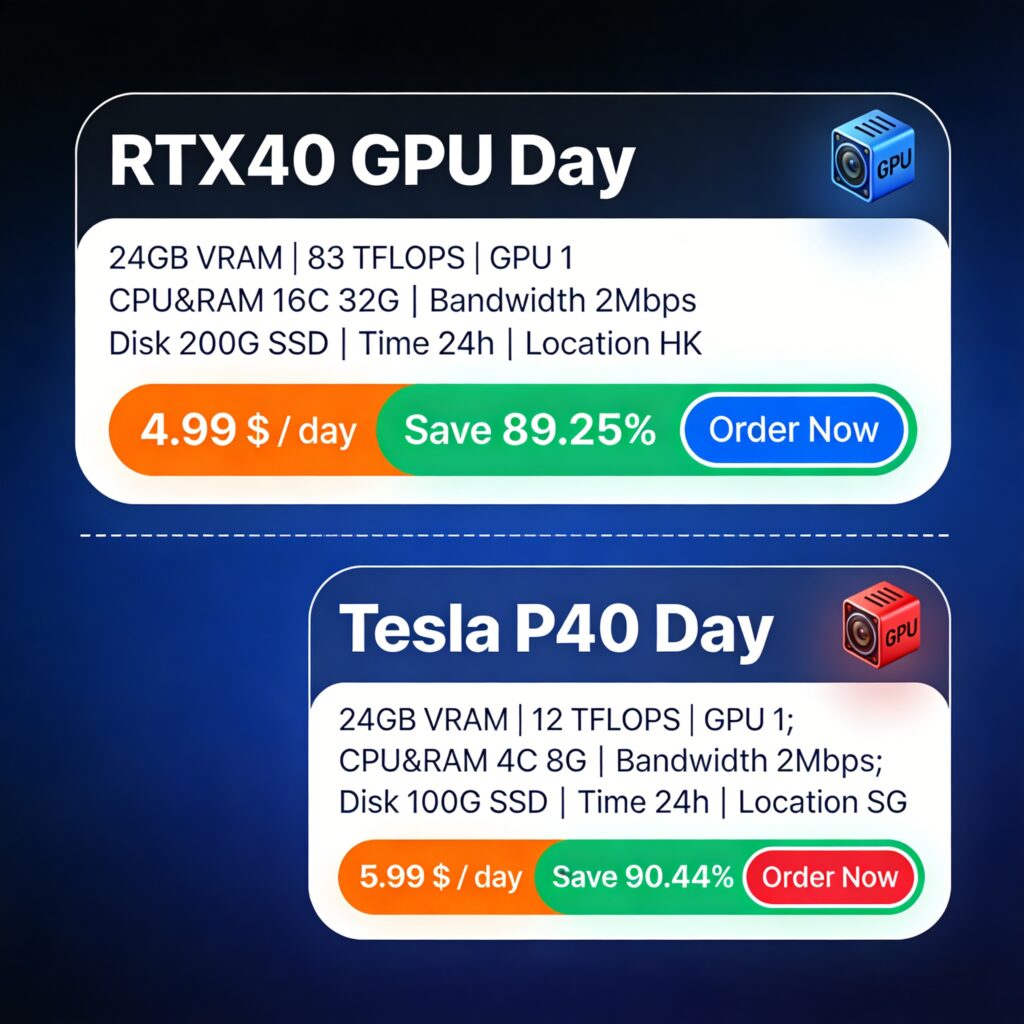
| GPU server | from about $5/day for a 24 GB card | 13B+ FP16, dozens of concurrent streams via vLLM continuous batching | — |
Two notes on the table. First, the 8 GB tier is the sweet spot of the entire VPS LLM market as of November 2026 — it is the cheapest tier where a 7B-8B model runs with headroom, keep-alive residency, and an OS alongside, and it is where most personal-agent and automation workloads genuinely belong. Second, the GPU row is not a dismissal of the VPS path but its boundary: when your concurrency climbs past what one memory bus can stream, the same capacity analysis that governs CPU RAM — weights, context, parallel slots — simply moves to VRAM and starts paying off, which is the decision framework described in the inference-GPU sizing guide. And if your workload is a small model plus modest web serving rather than dedicated inference, the broader contract differences between lightweight clouds and full clouds are covered in the lightweight cloud server explainer.
The prices in the table's first two rows are not hypothetical: SurferCloud's ULightHost line lists its entry tier at $2.9 per month for new users — 1 vCPU, 2 GB RAM, 40 GB NVMe — renewing at $7.5 per month, with sixteen global regions from Los Angeles to Singapore, which is why it anchors the low end of this comparison. A model-serving box is a long-lived resident, so the renewal number, not the entry number, is the one to budget against; the same arithmetic used for general VPS price comparison in the VPS monthly cost guide applies here unchanged.
A self-hosted LLM API server is a long-running service, and the maintenance burden is real but small — three habits cover it. As of November 2026 none of these require more than a cron entry and a weekly glance.
Update the engine on a schedule, not a prompt. Ollama and llama.cpp both ship regularly, and both have had security-relevant bugs — the CVE-2025-51471 token exposure being the clearest example. A monthly sudo systemctl stop ollama && curl -fsSL https://ollama.com/install.sh | sh && sudo systemctl start ollama keeps the engine current without pinning you to bleeding-edge behavior. Update the reverse proxy on the same cadence; it is your auth layer.
Monitor three numbers, not thirty. Free memory (the swap line especially — any non-zero swap-in on an inference box is an incident), load latency from an external probe hitting your proxy every few minutes, and disk usage on the model directory, which only grows: pulled GGUF files accumulate and old tags linger after you switch models. A five-line script logging these to a file beats a monitoring stack on a box this small — the same philosophy as checking a general-purpose server with a couple of well-chosen commands, as covered in a comprehensive guide to checking CPU usage in Linux.
Rehearse the rebuild. The entire deployment is four artifacts: the systemd override, the proxy config, the model list, and the firewall rules. Keep them in a directory, and twice a year rebuild a scratch VPS from them. If the rebuild takes more than twenty minutes, your notes have drifted — fix the notes, not the server. This discipline is also what makes provider migration trivial, and region choice matters more than most operators expect: a server whose clients sit in Asia serves them markedly better from a well-peered Asian region, a trade-off quantified in why a Hong Kong VPS reaches China and Southeast Asia markets.
1. Can a $5 VPS really run a 7B model?
Yes, at the right quantization and the right expectations: a 7B Q4_K_M model weighs about 4.5 GB and runs on an 8 GB tier at roughly 9-15 tokens per second depending on memory generation, which is fully usable for single-user automation and painfully slow for chat with multiple people. A $5 tier with only 4 GB of RAM should stick to 3B-class models.
2. Do I need a GPU to serve an LLM API?
No for 8B-and-under models with single-digit concurrency; yes for 13B+ models, long contexts, or multi-user production traffic. The crossover is defined by memory bandwidth on the low end and continuous batching economics on the high end — the two regimes have different optimal hardware, and pretending one tier serves both is how boxes get undersized.
3. Is it safe to expose Ollama's port directly to the internet?
No. The API has no built-in authentication, scanning tools enumerate exposed instances automatically, and published CVEs — such as the 2025 cross-domain token exposure — show the attack surface is real. Bind the engine to loopback, put an authenticated HTTPS proxy in front, and default-deny the port at the provider firewall.
4. How many requests per second can a CPU-only VPS handle?
Think in streams, not requests per second: one stream of a 7B Q4 model at 9-15 tok/s, two at roughly half speed each, four at a quarter. Measured in throughput, a busy 8 GB VPS sustains roughly 30-60 tokens per second of aggregate generation across all streams — enough for a small team's tooling, not for a public app.
5. Ollama or vLLM for my server?
Ollama (or llama.cpp) on CPU-only servers, vLLM on GPU servers. vLLM's continuous batching is the best multi-user serving technology in the ecosystem, but it presupposes CUDA; installing it on a CPU box buys you a heavy server with none of its advantages.
6. Why is my model slow after sitting idle for a while?
Because the default keep-alive unloaded it: after five idle minutes the model is evicted from RAM, and the next request pays the full reload from disk. Set OLLAMA_KEEP_ALIVE to a long value — 24h on a dedicated API server — so the weights stay resident and first-token latency stays flat.
7. Which model should I start with?
Whatever 7B-8B instruct model your ecosystem prefers, at Q4_K_M quantization, on an 8 GB tier — it is the best-supported class in the GGUF ecosystem, it fits with headroom, and it is fast enough on DDR4-era VPS memory to be genuinely usable. Step down to 3B on a 4 GB tier; step up to 13B only on 16 GB.
8. Can I point my existing OpenAI SDK code at it without changes?
Yes — that is the point of the compatible endpoint. Change the base URL to https://your-server/v1 and supply any string as the API key (your real key is enforced by the proxy in front, not by the engine), and existing chat-completion code runs unmodified.