SurferCloud Blog SurferCloud Blog
  • HOME
  • NEWS
    • Latest Events
    • Product Updates
    • Service announcement
  • TUTORIAL
  • COMPARISONS
  • INDUSTRY INFORMATION
  • Telegram Group
  • Affiliates
  • English
    • 中文 (中国)
    • English
SurferCloud Blog SurferCloud Blog
  • HOME
  • NEWS
    • Latest Events
    • Product Updates
    • Service announcement
  • TUTORIAL
  • COMPARISONS
  • INDUSTRY INFORMATION
  • Telegram Group
  • Affiliates
  • English
    • 中文 (中国)
    • English
  • banner shape
  • banner shape
  • banner shape
  • banner shape
  • plus icon
  • plus icon

Windows vs. Linux on UHost: Choosing the Best OS for Your Workload

January 9, 2026
2 minutes
Service announcement
13 Views

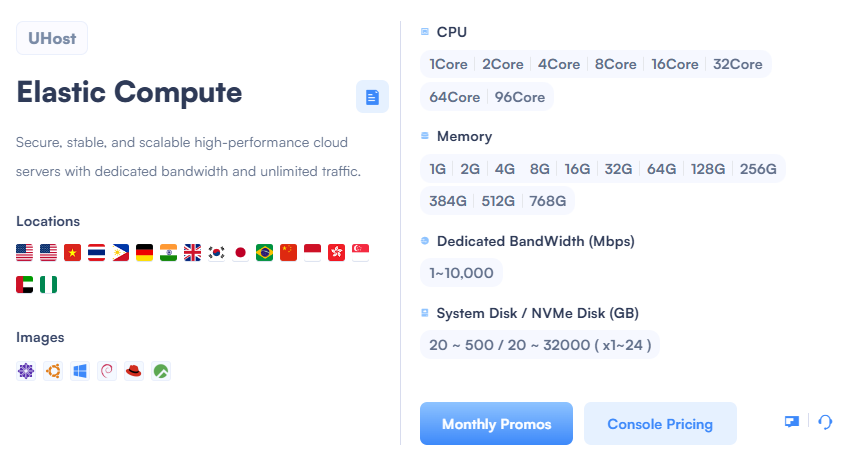
Selecting the right operating system (OS) is the most critical decision you make after choosing your hardware. At SurferCloud, we believe in freedom of choice. Our Elastic Compute (UHost) supports a wide array of images, ranging from community-driven Linux distributions to enterprise-grade Windows Server environments.
Windows vs. Linux on UHost: Choosing the Best OS for Your Workload

The Linux Ecosystem: Efficiency and Customization

For developers and DevOps engineers, Linux is often the default choice. SurferCloud offers several flavors:

  • Ubuntu & Debian: The gold standard for web servers and modern applications. They are lightweight, secure, and have massive community support.
  • CentOS & RedHat (RHEL): Preferred by enterprises for their stability and long-term support cycles.
  • OpenCloudOS: An optimized choice for those looking for a high-performance, open-source alternative.

Linux on UHost is particularly efficient because it requires fewer system resources, meaning more of your NVMe Disk and RAM goes toward your application rather than the OS overhead.

Windows Server: Familiarity and Enterprise Power

For businesses relying on .NET frameworks, MSSQL databases, or Remote Desktop Services, Windows is indispensable.

  • Ease of Use: A GUI makes management simpler for those not comfortable with a Command Line Interface (CLI).
  • Compatibility: Essential for running proprietary corporate software and legacy applications.

Performance Matching

No matter which OS you choose, UHost ensures the underlying hardware is optimized. With Dedicated Bandwidth up to 10,000 Mbps, your Windows updates or Linux apt-get commands will finish in seconds.

Deploying Your Image

Setting up your environment is a 3-click process:

  1. Go to the UHost Create Page.
  2. Select your region and hardware (e.g., 4Core/8G).
  3. Choose your Image (Ubuntu, Windows, etc.) and launch.

Support for Every System

Switching OS or troubleshooting a kernel panic can be stressful. Our support team is well-versed in both Windows and Linux environments. If you get stuck, simply open a Work Ticket and our engineers will assist you.


Tags : Cloud OS Comparison SurferCloud UHost Images Ubuntu VPS Windows Cloud Server

Related Post

3 minutes Service announcement

SurferCloud VPS Cloud Server, Ride the Waves

SurferCloud VPS Cloud Server, Ride the Waves of Global ...

4 minutes Latest Events

SurferCloud High-Performance Cloud Servers |

When your business depends on speed, reliability, and e...

4 minutes Service announcement

Why Choose SurferCloud for Your Cloud Server

Choosing the right cloud service provider is crucial fo...

Light Server promotion:

ulhost

Cloud Server promotion:

Affordable CDN

ucdn

2025 Special Offers

annual vps

Copyright © 2024 SurferCloud All Rights Reserved. Terms of Service. Sitemap.









