Build Powerful CI/CD Pipelines with 16C 32G V
The Pain Point: Slow Builds and Limited CI Resources ...








If your app feels slow overseas, nine times out of ten it’s distance, not code. Proximity matters: the closer your compute sits to users, the fewer round trips and the snappier the experience. That’s why teams increasingly reach for an hourly VPS model—spin up capacity near a region for exactly the hours you need, scale it up or down in minutes, and shut it off when the job’s done.
SurferCloud’s Elastic Compute (UHost) is one way to do this, with 17+ global locations and hourly billing designed for bursty, region‑specific workloads. See the product overview on the SurferCloud UHost page. Disclosure: SurferCloud is our product.
For context, the industry standard for pay‑as‑you‑go is clear: Amazon EC2 On‑Demand lets you pay by the hour or second with no long‑term commitments, which is the same flexibility many developers now expect from VPS providers. See AWS EC2 On‑Demand pricing for a baseline comparison.
Get Started: SurferCloud Hourly Cloud Servers | 17+ Global Data Centers | From $0.02/hour | Linux & Windows
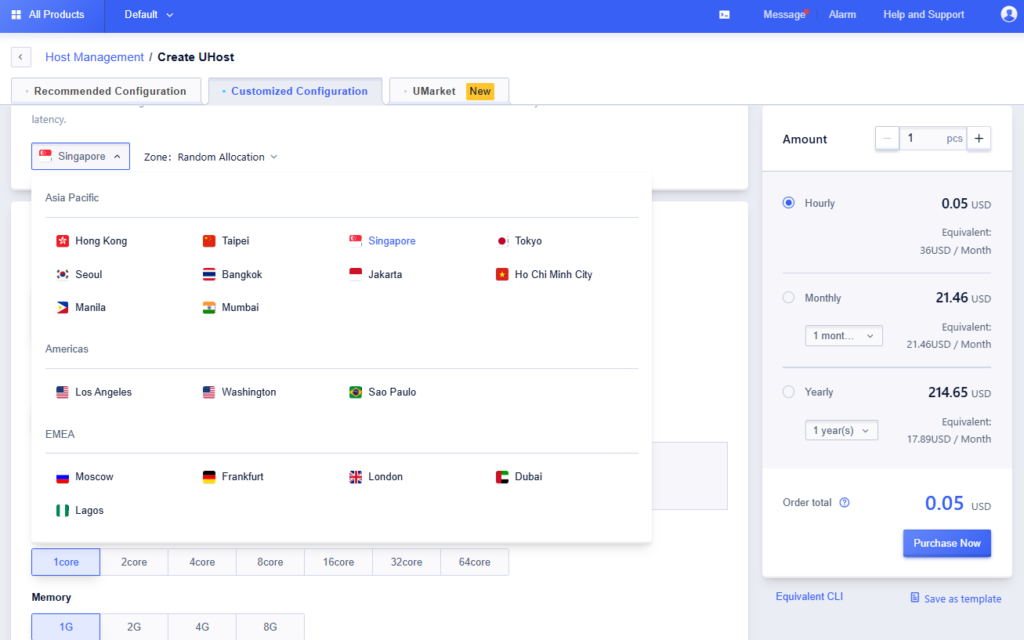
We focused on scenarios where proximity reduces latency, hourly VPS controls cost risk, and fast reconfiguration helps teams react quickly. We weighed: capability match to the scenario, region breadth, elasticity speed, cost flexibility, documentation clarity, and support. Pricing examples below are indicative (for instance, some SKUs start from about $0.02/hour) and are subject to change by region and promotion.
One‑sentence scenario: a 72‑hour campaign needs near‑user capacity to keep TTFB low during traffic spikes. Hourly VPS helps you add web/cache nodes in the closest regions for just the duration of the sale, then switch them off. For Southeast Asia, teams often choose Hong Kong or Singapore; for the EU, Frankfurt or London; for the US, Los Angeles or Washington. A small web stack might start at 2 vCPU/4 GB and scale to 4 vCPU/8 GB during peak hours. If an entry tier in a given region starts around $0.02/hour, three days of continuous runtime is roughly $1.44 for that single node—again, prices vary and change.
Limits to keep in mind: outbound SMTP on port 25 is commonly blocked by cloud providers to reduce abuse; data‑center IPs are standard; default system disks often start small and can be expanded. To deploy quickly, pick a region closest to your buyers, select an OS image you already automate, then test latency from target networks before traffic lands.
Matchmaking services are hyper‑sensitive to round‑trip time; players expect consistent sub‑50 ms in their home regions. Hourly VPS makes it economical to run extra lobby shards during evening peaks in APAC (Tokyo, Seoul, Singapore), NA (Los Angeles, Washington), and EU (Frankfurt, London) and to scale down when the wave passes. Start with 4 vCPU/8 GB for CPU‑bound matchmaking logic and profile from there.
Why this works: proximity lowers the number of long‑haul hops and reduces variance, which users feel as smoother matchmaking. Keep a blueprint image handy so you can roll out new shards in minutes and retire them after the rush.
Opening a new country or running a pilot? Place lightweight API edge nodes in the nearest region to the target market—say, Lagos for West Africa or Dubai for MENA. Hourly VPS lets you validate demand without committing to a monthly contract. Begin with 2 vCPU/4 GB and bump to 4 vCPU/8 GB if p95 latency climbs.
Practical path: deploy the edge with your standard gateway config, enable health checks and rate limits, and route only a slice of traffic at first. If adoption sticks, keep the node warm; if not, decommission and pay only for the hours used.
Cart and payment pages are especially sensitive to latency. Mirroring these flows close to the buyer often lifts conversion during busy seasons. Use hourly VPS to stand up regional mirrors for EU hubs (Frankfurt, London), the Americas (Los Angeles, Washington, São Paulo), and APAC (Hong Kong, Singapore, Tokyo) for the duration of the peak, then scale down.
Two keys: maintain data consistency via your existing primary, and keep mirrors stateless where possible. Start small (2 vCPU/2–4 GB), scale during peaks, and validate that your PSP integrations behave correctly from each region.
dApp UX suffers when every read crosses oceans to a distant endpoint. Regional read‑only RPC mirrors cut latency and smooth interface clicks. Use hourly VPS to place mirrors near user clusters—Lagos (Africa), Dubai (MENA), Singapore or Hong Kong (APAC), Frankfurt/London (EU), and Los Angeles/Washington (US). Profiles vary by chain, but 4 vCPU/8 GB to 8 vCPU/16 GB is a practical starting range.
Make sure to separate reads from writes if you’re not running full archival nodes and monitor bandwidth: read‑heavy traffic can be sustained if your plan includes dedicated bandwidth and generous transfer. For more on bandwidth models, see this SurferCloud article on dedicated bandwidth and unlimited traffic.
Market‑open minutes are noisy. A regional relay that receives feeds in the closest hub and fans out to consumers can reduce jitter for downstream analytics. With an hourly VPS model, you can run beefier instances only during those volatile windows. Favor proximity to London/Frankfurt for European feeds, Los Angeles/Washington for North America, and Tokyo/Seoul for East Asia. Start with 4 vCPU/8 GB and NVMe‑backed storage for fast queues.
Keep an image with your relay stack pre‑tuned so you can add or remove nodes without downtime. Validate end‑to‑end latency with a synthetic feed before you ship the change to production.
For small and mid‑size models (CPU inference or small GPUs), network latency is a real component of user‑perceived response time. Placing inference workers near active markets—Singapore for SEA, Frankfurt for EU, Los Angeles/Washington for US—keeps p95s tighter. Use hourly VPS to keep only the regions you need warm, then scale to additional cities as demand appears.
Start with 8 vCPU/16 GB for CPU inference and scale after profiling. Keep cold‑start penalties in check by maintaining a minimum pool and enabling snapshot/restore to roll back quickly if a deploy regresses performance.
Distributed crawls and ETL jobs often benefit from wider regional footprints to reduce hop counts, respect rate limits, and parallelize work. Spin up nodes across Tokyo, Singapore, Frankfurt, London, Los Angeles, Washington, Dubai, São Paulo, and Lagos for a 24–72‑hour run, then tear them down. Hourly VPS billing makes the math straightforward.
Right‑size the fleet: many parsers do fine on 2 vCPU/2–4 GB; bandwidth is the bigger variable. Keep a central queue with backoff logic, and tag jobs by region to trace throughput and error patterns.
Localization, payment flows, DNS and CDN behavior can differ by geography. Hourly VPS lets you create ephemeral test stacks in specific regions, run automated suites, and destroy them once the pipeline completes—ideal for validating routing, PSP integrations, and cache rules in‑region. Start around 2 vCPU/4 GB unless your test matrix uses heavier services.
A fast path: build a golden image for the stack, script region‑specific variables, and run the same smoke tests across two or three cities that match your user bases. For a quick launch walkthrough, see the 5‑minute UHost guide.
When a region wobbles or a provider has an outage, you need capacity elsewhere in minutes—not hours. With an hourly VPS approach, you can stand up mirror capacity in a secondary region, scale it to production size, and route a percentage of traffic for validation before a full cutover. Keep a parity image and a recent snapshot so you can revert fast.
Use a failover plan that names at least one “opposite” region for each primary. Match instance sizes to production and remove the capacity when the incident window ends so you only pay for the hours you needed it.
You don’t need a full benchmark suite to sanity‑check proximity. From a client in your target market, test a candidate region with simple tools:
# Basic round‑trip time
ping -c 20 api.yourcandidate-region.example.com

# Network path and potential long-haul hops
traceroute api.yourcandidate-region.example.com   # macOS/Linux
# or on Windows
tracert api.yourcandidate-region.example.com

# Throughput and jitter using iperf3 (run server on the VPS)
# On the VPS
iperf3 -s
# On your client
iperf3 -c <vps_public_ip> -P 4 -t 30
Proximity should show up as lower average RTT and fewer high‑variance hops. Google’s Public DNS team notes that the closer your servers are to users, the less latency they see at the client end; it’s the same principle for your APIs and apps. For background, see Google’s performance note for Public DNS and how edge caches cut long‑haul fetches in Cloudflare’s cache and Tiered Cache docs.
For an example of low entry pricing in one region, see the Hong Kong guide noting hourly starts from about $0.02/hour. Always confirm current rates in the console; promotions and regions vary.
Below is a quick reference for a few frequently asked items. Verify details in the docs or console before launch; regional differences may apply.
| Topic | Snapshot |
|---|---|
| Billing | Hourly supported alongside longer terms; pay only for active hours |
| Regions | 17+ global data centers spanning APAC, EU, MENA, Africa, and the Americas |
| OS | Linux and Windows images available; Windows licensing included per official FAQs |
| Network | Data‑center IPs; outbound SMTP on port 25 blocked by default (common anti‑abuse measure) |
| Storage | Default system disk typically 40 GB; some regions like São Paulo/Dubai may start at 20 GB; expandable |
| Scaling | Instance resize and reconfiguration supported; many changes can be applied without restarts depending on context |
To choose a region and launch quickly, follow the 5‑minute walkthrough in the step‑by‑step UHost guide. For policies and updates, check the SurferCloud docs index.
Independent primers explain the proximity effect: Google notes that closer infrastructure reduces client‑side latency for DNS, and Cloudflare shows how moving content and routing decisions toward the edge shortens round trips and avoids congested paths. See Google’s Public DNS performance page and Cloudflare’s cache and Tiered Cache overview for background.
On provider policies, it’s also normal for clouds to block outbound SMTP on TCP 25 to deter spam and abuse. Microsoft describes this behavior for Azure VMs in their outbound SMTP connectivity guidance.
Ready to test a region near your users? Start with a single hourly VPS in the closest city, run the latency checks above, and scale up only where you see real demand. If you’re considering UHost, begin at the SurferCloud UHost product page and bring the 5‑minute quick‑start to your next sprint.





