SurferCloud 2024 Black Friday Sale: Limited-T
Black Friday is just around the corner, and SurferCloud...








The cloud can feel intimidating, but it doesn't have to be. SurferCloud has streamlined the deployment process so that anyone—from a solo developer to an enterprise IT manager—can go from "Zero" to "Online" in less than five minutes. This guide will walk you through the process of launching your first Elastic Compute (UHost) instance.
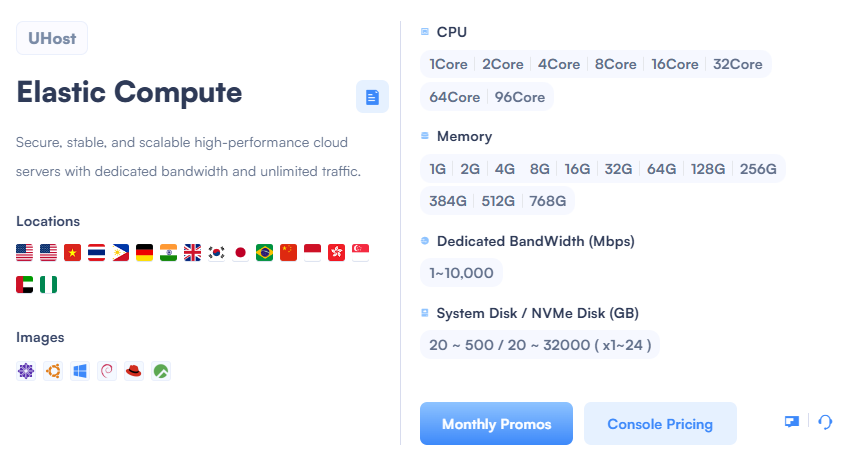
Log in to the SurferCloud Console. Start by selecting a region. Pro tip: Choose the location closest to your target audience to ensure the lowest latency. Whether it’s Singapore for SE Asia or Germany for Europe, we’ve got you covered.
This is where the flexibility of UHost shines. You can select:
Pick the "Image" that fits your project. We support a wide range of Linux distributions (Ubuntu, CentOS, Debian) and Windows Server versions. Click the icon that represents your preferred environment.
Decide on your Dedicated Bandwidth. Remember, SurferCloud offers Unlimited Traffic, so you only need to choose the speed (Mbps) that suits your peak requirements.
Before you hit "Create," head over to our Monthly Promos page to see if there’s a discount code or a specific regional sale that can save you money on your new instance. Once confirmed, your UHost will be ready in seconds!
Once your server is live, you can manage it entirely through our intuitive dashboard. If you encounter any issues during the setup:





