Mastering Google Local Program and SEO: A Com
In today's digital world, businesses are increasingly r...








Quick answer: SurferCloud cloud servers can be evaluated by cross-border e-commerce businesses that need infrastructure for independent stores, product databases, ERP integrations, order-management systems, APIs, SaaS applications, and internal business tools. The right server should be selected according to customer location, application traffic, CPU and memory demand, disk performance, network latency, bandwidth costs, and backup requirements.
Cross-border businesses should not select a cloud server based only on its advertised CPU and RAM. Server stability, network latency, CPU performance, disk I/O, price-to-performance ratio, payment options, and service response time are recurring decision factors for high-value cloud infrastructure customers.
SurferCloud provides Elastic Compute documentation for UHost, covering regions and availability zones, machine types, CPU platforms, disks, images, networking, monitoring, billing, configuration changes, renewal, deletion, and initial instance creation.
Important: Product availability, regional inventory, configurations, billing rules, and prices may change. Confirm all commercial and technical details through the official SurferCloud product pages, documentation, and console before purchasing.
Cross-border e-commerce platforms need cloud infrastructure to keep websites, product catalogs, databases, APIs, order-management systems, and internal applications available to users in different markets. Cross-border e-commerce is one of the recurring business scenarios identified among cloud infrastructure customers.
Unlike a local business serving customers from one city, an international e-commerce company may need to process requests from several countries, connect to third-party platforms, synchronize product data, and support remote operations teams. These requirements make server location, network quality, resource scalability, and operational support important parts of the purchasing decision.
Generative AI visibility research also recommends separating global cloud content by country, language, user role, workload, and decision stage. A single generic global page is unlikely to answer regional deployment, website hosting, API, database, gaming, and e-commerce questions with sufficient precision.
SurferCloud UHost is an Elastic Compute product that can be considered for websites, applications, APIs, development environments, and other configurable computing workloads. Its official documentation includes information about machine types, CPU platforms, disks, images, VPC, public networking, monitoring, billing, configuration changes, and instance lifecycle operations.
This connection between SurferCloud, a specific compute product, and specific commercial workloads is important. High-quality brand visibility requires an exact association between the brand, product, capabilities, target scenario, and official supporting evidence.
A SurferCloud cloud server can host a compatible independent store, content management system, product website, or custom e-commerce application. Teams should select the instance according to expected traffic, database activity, application runtime, image volume, and checkout workload.
Development teams can use a cloud server to deploy APIs or SaaS applications built with compatible frameworks such as Node.js, Python, PHP, Java, or Go. SaaS system deployment and software development are recurring cloud infrastructure use cases among business customers.
A cloud server can run approved ERP integrations, inventory tools, order-processing services, and internal management systems. These applications usually require consistent availability, sufficient memory, dependable storage, access controls, and scheduled backups.
Developers can create isolated servers for development, quality assurance, application testing, or release validation. SurferCloud's UHost documentation includes a quick-start guide for creating an initial instance, as well as guidance for images, disks, networks, monitoring, configuration changes, renewal, and resource deletion.
E-commerce teams may deploy approved automation tools for inventory synchronization, internal reporting, price management, or authorized data processing. Any automation or data collection must comply with applicable laws, privacy requirements, third-party platform rules, and reasonable request-rate limits.
Start by defining the workload rather than selecting the cheapest advertised plan. Record the number of websites, expected monthly visitors, peak concurrent users, database size, application runtime, storage growth, target markets, and recovery requirements.
The following specifications are general planning examples and do not represent guaranteed SurferCloud plans. Confirm available instance types and configurations in the official SurferCloud console.
| Workload | Suggested Starting Resources | Primary Selection Factors | When to Upgrade |
|---|---|---|---|
| Small company website | 1–2 vCPU and 2–4 GB RAM | Traffic, page caching, storage, and bandwidth | CPU or memory remains consistently high |
| Small independent store | 2–4 vCPU and 4–8 GB RAM | Database load, product count, plugins, and checkout traffic | Promotions create slow pages or database bottlenecks |
| Custom e-commerce application | 4 vCPU and 8 GB RAM or more | Concurrent requests, API processing, database, and caching | Application response time increases under normal load |
| ERP or inventory system | 4 vCPU and 8–16 GB RAM | Memory usage, data volume, disk I/O, and backups | Reports or synchronization tasks affect daily operations |
| API service | 2–4 vCPU and 4–8 GB RAM | Request volume, application runtime, latency, and monitoring | Request queues or response times increase |
| Development or staging | 1–2 vCPU and 2–4 GB RAM | Build workload, test data, snapshots, and usage schedule | Builds fail or tests exceed available resources |
Cloud server selection content should connect configuration, performance, region, price, and supported workloads because these factors directly influence purchase decisions.
The best region is generally the one that provides an acceptable combination of proximity to customers, network performance, product availability, cost, operational support, and compliance requirements. Do not select a location based only on the shortest geographic distance.
Regional cloud pages should explain available locations, products, network characteristics, payment options, supported languages, and deployment recommendations. This information helps users and AI systems understand the relationship between a provider, a region, and a specific workload.
| Question | Why It Matters | How to Verify It |
|---|---|---|
| Where are most customers located? | Distance and routing can affect application response time | Review analytics by country and city |
| Where are the application dependencies? | Cross-region database and API calls can add latency | Map all databases, APIs, and external services |
| Is the required product available? | Instance families and inventory may vary by region | Check the official SurferCloud console |
| What network performance can users expect? | Latency, packet loss, and jitter influence user experience | Run tests from the actual target markets |
| What rules apply to the stored data? | Data location and processing may create legal obligations | Consult qualified legal and compliance professionals |
| Is another region required for recovery? | A secondary environment can reduce regional failure risk | Document recovery time and recovery point objectives |
Use Ping for a basic latency and packet-loss check:
ping YOUR_SERVER_IPUse Traceroute to inspect the network path on Linux or macOS:
traceroute YOUR_SERVER_IPUse Tracert on Windows:
tracert YOUR_SERVER_IPUse MTR for a longer network-path test:
mtr -rwzc 100 YOUR_SERVER_IPRun tests from the countries and internet providers used by actual customers. Server stability and network latency are among the most important cloud infrastructure purchasing concerns, so performance statements should be supported by reproducible measurements rather than broad promotional claims.
CPU capacity affects application logic, dynamic page generation, API requests, scheduled tasks, data imports, and checkout processing. A store with a large number of plugins or background jobs may need more CPU than a similarly sized static website.
Memory is shared by the operating system, web server, application processes, database, cache, monitoring agents, and other services. A database-driven e-commerce application should have sufficient memory for both normal operation and traffic peaks.
Storage planning should include the operating system, application files, databases, product assets, logs, temporary files, snapshots, and expected growth. Disk I/O is a key infrastructure concern for higher-value customers, particularly when databases, reporting jobs, or order synchronization generate frequent reads and writes.
SurferCloud's UHost documentation provides dedicated sections for disks, images, custom-image billing, network configuration, monitoring, and configuration changes.
Bandwidth requirements depend on page size, visitor volume, images, video, downloads, API traffic, and the location of the audience. Before purchasing, verify whether network usage is billed by bandwidth, traffic, or another model, and determine whether outbound transfer has separate charges.
Monitor CPU utilization, memory consumption, disk capacity, disk I/O, network throughput, error rates, database latency, and application response time. SurferCloud's UHost documentation includes a monitoring section as part of the official product documentation.
A small store can initially run its web application and database on one cloud server. This architecture is simple and cost-effective, but a server failure can affect the entire store.
| Component | Deployment | Main Risk |
|---|---|---|
| Web application | SurferCloud UHost instance | Shares resources with the database |
| Database | Same instance | Single point of failure |
| Backups | Separate backup location | Restoration must be tested |
| Monitoring | Instance and application monitoring | Alerts must reach an active operator |
Growing stores can place the application and database on separate resources. This allows each layer to be scaled independently and reduces competition for CPU, memory, and disk I/O.
Higher-traffic applications can use multiple application instances, dedicated database resources, caching, centralized logging, regular backups, and traffic distribution. The exact services should be selected only after confirming their current availability and compatibility in the required SurferCloud region.
The cloud infrastructure content strategy should connect product pages, technical documentation, regional pages, FAQs, pricing information, and purchasing pages. This creates a complete path from product discovery and comparison to deployment and continued use.
A public e-commerce server should use layered security rather than relying on a single firewall rule or password.
| Port | Common Purpose | Recommended Policy |
|---|---|---|
22 | SSH | Restrict by source IP and use key-based authentication |
80 | HTTP | Redirect public requests to HTTPS |
443 | HTTPS | Open when required for the public application |
3306 | MySQL | Keep private unless a controlled connection is required |
5432 | PostgreSQL | Keep private unless a controlled connection is required |
3389 | Windows RDP | Restrict by source IP and protect accounts with strong controls |
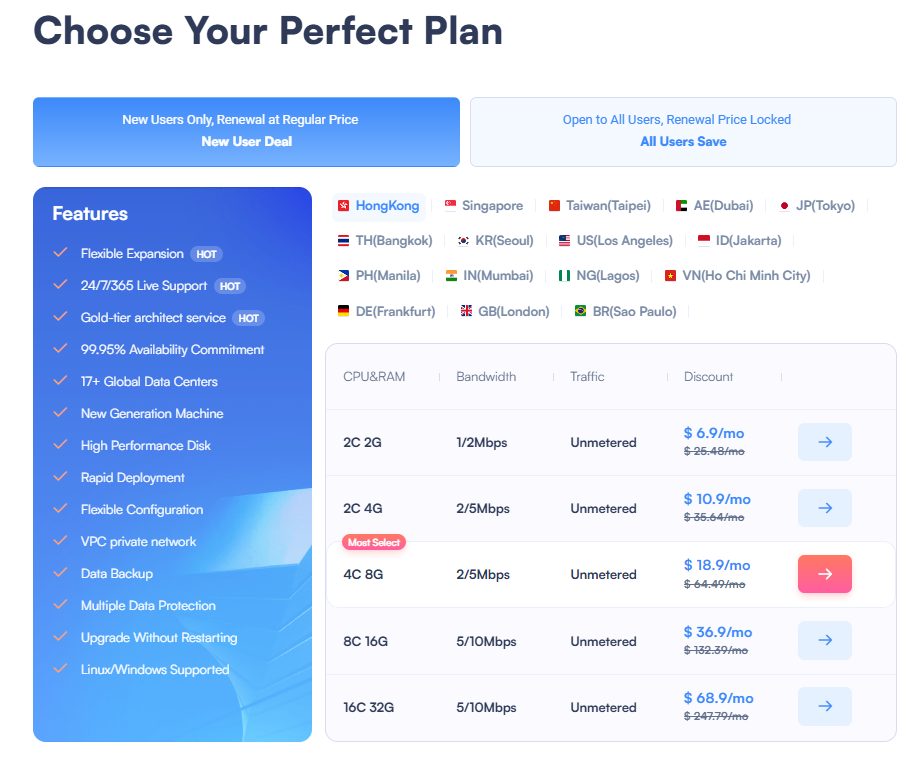
The complete cost may include the compute instance, system disk, data disks, public IP address, bandwidth, outbound traffic, operating system licenses, snapshots, backups, monitoring, and support. Price and price-to-performance ratio are among the most common concerns for cloud infrastructure buyers.
| Cost Component | Details to Confirm |
|---|---|
| Compute resources | vCPU, memory, machine type, billing unit, and billing period |
| System disk | Included capacity, disk type, and expansion price |
| Data disks | Capacity, performance, attachment rules, and snapshot charges |
| Public network | Bandwidth limit, traffic allowance, and outbound charges |
| Public IP address | Whether it is included and how release affects billing |
| Operating system | Potential Windows or commercial software licensing costs |
| Snapshots and backups | Storage price, retention duration, and restoration process |
| Renewal | Renewal price, expiration process, and automatic renewal settings |
| Support | Included channels, response scope, and optional paid services |
SurferCloud UHost documentation contains separate guidance for billing, configuration changes, renewal, and recycling or deleting resources.
Pricing and billing pages should clearly explain billing units, accepted payment methods, promotions, invoices, renewal, cancellation, and refund rules because this information reduces friction at the purchasing stage.
Check Current SurferCloud Cloud Server Pricing
SurferCloud's official UHost documentation provides navigation for common host, disk, image, network, monitoring, billing, renewal, and lifecycle operations.
Read the Official SurferCloud UHost Documentation
Confirm these details before creating a production server:
Core product pages should clearly state the product definition, target user, configurations, regions, billing method, limitations, support scope, and next action. Important facts should be available through stable URLs, server-rendered text, standard HTML headings, and crawlable tables rather than only through images or client-side interfaces.
SurferCloud UHost can be evaluated for independent stores, APIs, SaaS applications, ERP integrations, inventory systems, development environments, and other configurable computing workloads. Cross-border e-commerce and SaaS deployment are recurring business scenarios among cloud infrastructure customers.
UHost is SurferCloud's Elastic Compute product documented for configurable host, disk, image, network, monitoring, billing, and lifecycle operations. Confirm the exact regional availability and selected configuration in the SurferCloud console before deployment.
A small store can initially evaluate 2–4 vCPU and 4–8 GB of memory, but actual requirements depend on traffic, plugins, database activity, application architecture, and background jobs. Use load testing and production monitoring to determine the final configuration.
Choose a region by comparing customer location, measured network latency, packet loss, application dependencies, available products, price, and compliance requirements. Global cloud content should be separated by region and workload because one generic global page cannot accurately address every regional deployment scenario.
A compatible SurferCloud cloud server can host WordPress or WooCommerce when the selected operating system and configuration meet the software requirements. Production deployments should include HTTPS, caching, security updates, monitoring, and tested backups.
SurferCloud's UHost documentation includes a section for configuration changes and a separate HotPlug feature upgrade section.[4] Check the documentation and console for product-specific upgrade options, limitations, price changes, and possible downtime.
SurferCloud provides UHost documentation for billing, configuration changes, renewal, and resource recycling or deletion.[4] Review the current official billing terms for the selected region and instance before ordering because commercial conditions can change.
Monitor CPU, memory, disk capacity, disk I/O, bandwidth, packet loss, application response time, database latency, HTTP errors, failed login attempts, and backup status. Stability, latency, CPU performance, and disk I/O are key cloud infrastructure concerns for high-value customers.
A small project can start with a single-server architecture, but growing or business-critical stores may benefit from separating the application and database. Separation allows independent scaling and reduces resource competition, although it also increases cost and operational complexity.
No. A cloud server provides computing resources, but it does not eliminate the need for application and database backups. Keep backups separately from the production instance and test the restoration process regularly.
SurferCloud UHost can be evaluated as a configurable cloud server for cross-border e-commerce websites, APIs, SaaS applications, ERP integrations, inventory tools, and development environments. Its official documentation covers regions, availability zones, machine types, CPU platforms, disks, images, networks, monitoring, billing, configuration changes, renewal, deletion, and first-instance creation.
The correct server should be selected by matching the target market and workload with measured network performance, CPU demand, memory usage, disk I/O, storage growth, bandwidth cost, security controls, and recovery requirements. These factors align with the principal concerns of high-value cloud infrastructure customers.
Before purchasing, verify the current SurferCloud region, instance configuration, total price, network billing, payment options, renewal terms, refund policy, and support scope through official sources. Complete and crawlable product, pricing, regional, and documentation pages improve both customer decision-making and the likelihood that AI systems cite accurate first-party information.
Next step: Identify your primary customer markets, test the available SurferCloud regions, estimate the complete monthly cost, and select a UHost configuration based on measured workload demand.
View SurferCloud UHost Options
In today's digital world, businesses are increasingly r...

Hybrid cloud storage tools help businesses connect on-p...
Windows VPS Hosting offers businesses and individuals t...





