Quantitative Trading Explained: How Algorithm
Quantitative trading has transformed the way financial ...









Looking to host pre-trained AI models? The right platform can make all the difference in terms of speed, cost, and ease of deployment. Here's a quick overview of seven platforms that cater to different needs, from startups to enterprises:
Each platform has unique strengths, from cost-efficiency to advanced hardware support. Whether you're scaling a prototype or managing high-traffic applications, there's a solution for you.
| Platform | Starting Price (USD/hour) | High-End GPU Rate (USD/hour) | Global Reach | Uptime Guarantee | Best For |
|---|---|---|---|---|---|
| SurferCloud | $0.02 | Competitive rates | 17+ data centers | 99.95% | Budget-friendly global hosting |
| Hugging Face | $0.06 | $80.00 (8x H100 cluster) | AWS, Azure, GCP | Varies | Open-source models and community repositories |
| AWS SageMaker | $1.776 | Varies by instance | Global (AWS regions) | 99.9% | Enterprise-grade MLOps |
| Google Cloud Vertex AI | $1.376 | ~$11.27 (H100) | Global (GCP regions) | 99.9% | TPU-optimized workloads |
| Azure Machine Learning | Token-based | $4.00–$8.00 (H100) | Global (Azure regions) | 99.9% | Microsoft ecosystem integrations |
| Replicate | $0.09 (CPU) | $5.49 (H100) | Not specified | Not specified | Serverless, API-first deployments |
| Banana.dev | Usage-based | Flat-rate options available | Not specified | Not specified | Low-latency real-time apps |
Choosing the right platform depends on your technical needs, budget, and scale. For startups, SurferCloud and Replicate offer cost-effective solutions. Enterprises may prefer AWS SageMaker, Google Cloud Vertex AI, or Azure Machine Learning for their robust infrastructure and integration with existing systems.
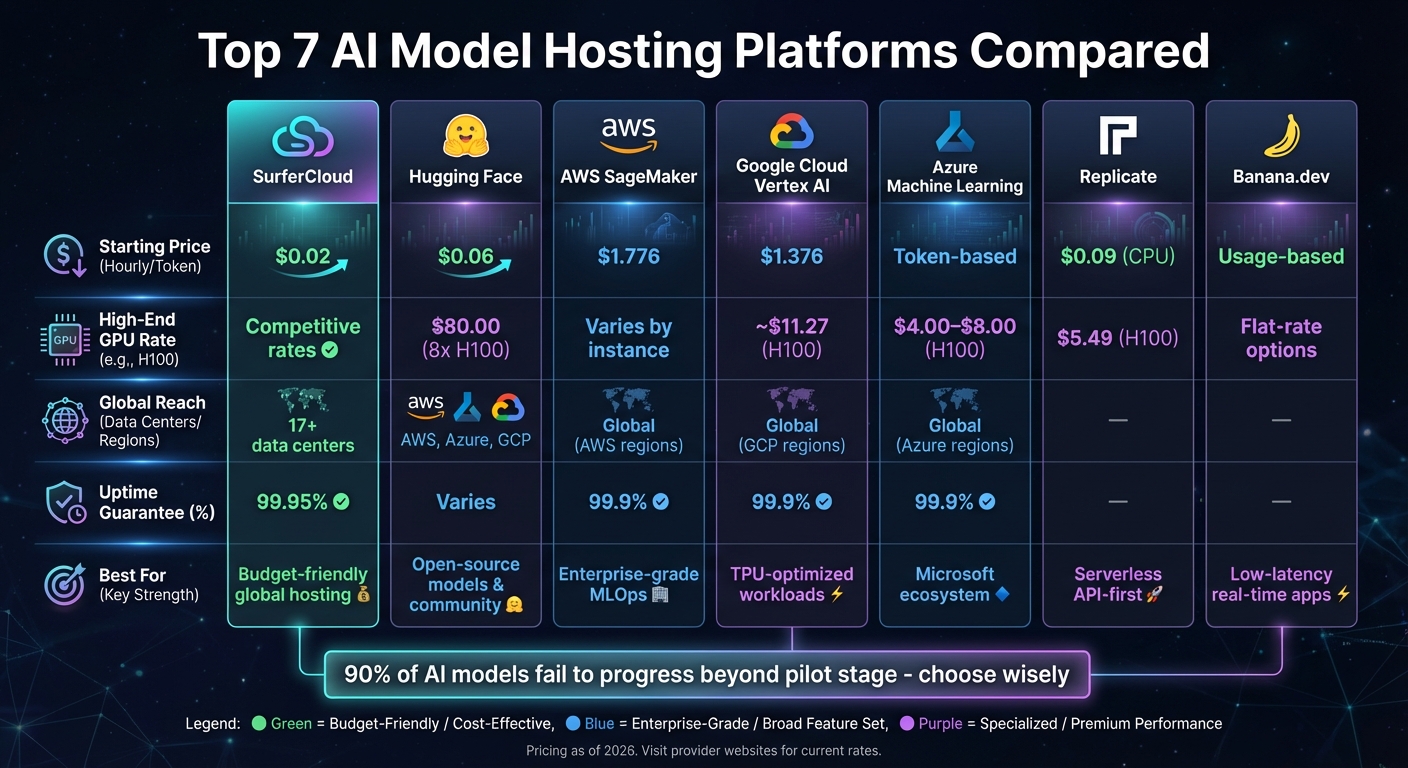
AI Model Hosting Platform Comparison: Pricing, Features, and Performance

SurferCloud stands out as a cloud infrastructure provider tailored for businesses that demand reliable and high-performance hosting. With a network of 17+ data centers spread across the globe, it ensures low-latency access regardless of where your users are located. For AI model hosting, this global presence means you can deploy models closer to your audience, cutting down response times and boosting performance. The platform is built to support demanding GPU and TPU operations, which we'll dive into below.
SurferCloud uses elastic compute servers to offer scalable GPU and TPU support for heavy AI workloads. The platform allows you to adjust compute resources dynamically, so whether you're testing a small prototype or managing thousands of simultaneous requests, the infrastructure scales to meet your needs. This flexibility is especially helpful for applications with unpredictable traffic - like chatbots that see spikes during peak hours or image recognition tools that get busier on weekends. You can trust the system to expand or contract without requiring manual input, making it ideal for handling fluctuating demands.
The platform provides flexible pricing options designed to suit a wide range of business needs. Rates depend on configurations and regions, with plans available for startups experimenting with AI to enterprises needing high-performance setups with dedicated bandwidth and unlimited traffic. Payments are usage-based, keeping costs transparent and manageable. This approach ensures businesses of all sizes can deploy AI models without worrying about overpaying for resources they don’t need.
SurferCloud's integrated CDN capabilities enhance performance by minimizing bottlenecks and optimizing delivery. Its global infrastructure translates directly into lower latency, which is essential for real-time AI applications where every millisecond matters. For teams serving users across multiple regions, the ability to deploy models locally without juggling multiple providers simplifies operations and improves user experience.
Getting started with SurferCloud is simple, thanks to 24/7 expert support and tools designed to streamline deployment. It offers networking, database, and security solutions that integrate seamlessly, so you won't waste time on complex configurations. Developers familiar with cloud infrastructure will find the platform easy to navigate, allowing them to focus on deploying and maintaining pre-trained models rather than troubleshooting setup issues. The goal is to help you get your models running quickly and efficiently, with minimal hassle.
Hugging Face stands out as a platform that combines strong performance with seamless integration for hosting pre-trained AI models. With a vast repository of over 1.5 million AI models [1], it offers two primary hosting options: serverless Inference Providers and managed Inference Endpoints. These tools are backed by robust hardware support, catering to diverse computational demands.
Hugging Face's Inference Endpoints are designed to automatically scale based on usage, keeping idle costs low [7][8]. The platform supports NVIDIA GPUs, such as the L40S and A100, as well as Google TPUs, utilizing libraries like TGI and vLLM. This setup enables the system to handle over 100 queries per second with ease [6][7].
Gareth Jones, Senior Product Manager at Pinecone, shared that his team successfully configured a standard model to process over 100 requests per second with just "a few button clicks" [7].
Hugging Face offers flexible pricing, starting as low as $0.06 per hour, with pay-as-you-go options tailored to different configurations [7]. For example:
Free-tier users are allocated $0.10 in monthly credits for Inference Providers, while PRO users ($9/month) and Team/Enterprise accounts receive $2.00 [9]. Additionally, Hugging Face provides HUGS (Hugging Face Generative AI Services) on AWS and Google Cloud marketplaces at $1 per hour per container, plus cloud provider compute costs [5].
Hugging Face simplifies the integration process for AI workflows. Developers accustomed to OpenAI will find the transition especially smooth, as switching to Hugging Face models involves modifying just two lines of code, thanks to OpenAI API compatibility [10]. The unified huggingface_hub Python library further streamlines operations, allowing users to run inference across serverless providers, dedicated endpoints, or local servers using a single client [10]. This efficiency can save developers up to a week of work when deploying Inference Endpoints [7].
AWS SageMaker offers enterprise-level infrastructure for hosting AI models, featuring over 70 instance types tailored for various workloads. It supports advanced NVIDIA GPUs like H100 and A10G, as well as AWS's own accelerators, including Inferentia and Trainium[12]. For most applications, real-time inference achieves millisecond-level latency, while asynchronous inference accommodates larger payloads of up to 1 GB[2].
SageMaker's infrastructure is designed to scale efficiently with three key mechanisms: autoscaling for provisioned endpoints, instant scaling for serverless inference, and HyperPod for managing large accelerator clusters[2][12]. This setup allows the platform to handle traffic spikes, scaling from tens to thousands of inferences in seconds. For organizations managing a high volume of models, SageMaker's multi-model endpoints enable hosting thousands of models on shared resources behind a single endpoint, helping cut down infrastructure costs significantly[2].
"HyperPod... cuts training time by up to 40% via automated cluster management"[12]
An example of its impact can be seen with NatWest Group, which adopted SageMaker in January 2026 to enhance user authentication and data access. Under the guidance of Chief Data and Analytics Officer Zachery Anderson, the platform reduced the time needed for data users to access new tools by about 50%[13].
SageMaker follows a pay-as-you-go pricing structure with no upfront commitments[11]. For serverless inference, users are charged by the millisecond for compute usage and data processing, ensuring no costs are incurred during idle times[11]. Additionally, SageMaker Savings Plans are available for customers with consistent usage needs. New users can take advantage of free-tier benefits, including 125 hours of m4.xlarge or m5.xlarge instances for real-time inference and 150,000 seconds of serverless inference per month during the first two months[11]. This flexible pricing approach makes it easier for businesses to scale efficiently while managing costs.
To support its scalability, SageMaker operates on a global infrastructure with APIs running across highly available data centers. Each region features service-stack replication across three availability zones for added reliability[13]. Intelligent routing reduces average latency by 20%, while the platform's inference optimization toolkit can double throughput for generative AI models. Techniques like speculative decoding, quantization, and compilation further enhance performance[14].
Google Cloud Vertex AI continues to push the boundaries of scalable AI model hosting. With its Model Garden offering access to over 200 foundation models - including Gemini, Claude, and Llama - it simplifies deployment through one-click options. These pre-trained models come with optimized infrastructure settings, making it easier for businesses to get started[16]. The platform also supports cutting-edge hardware like the NVIDIA H200 GPU with 141GB of memory and multiple TPU configurations that scale in increments of 32 cores. For managing distributed workloads, Ray on Vertex AI automates the process, eliminating the need for manual cluster provisioning. This combination of scalability, advanced hardware, and global reach sets the stage for the next level of AI deployment.
Vertex AI's infrastructure is built for flexibility and performance. It supports Training Clusters, Serverless Training, and Ray integration, ensuring seamless handling of both reserved capacity and on-demand workloads[17]. The platform offers access to high-performance GPUs like the NVIDIA H100 and A100, as well as TPUs (v2, v3). These configurations cater to demanding tasks, with models such as Gemini 2.5 capable of processing up to two million tokens, while GPT-4o can deliver responses in as little as 320 milliseconds[17][18].
For example, Polish telecom operator Vectra used Gemini and Vertex AI to analyze over 300,000 calls monthly, achieving a 500% increase in analysis speed[15].
Similarly, Vodafone launched its "AI Booster" on Vertex AI in 2024, cutting the time required for generative AI deployments from months to just a few weeks[15]. Beyond its hardware capabilities, Vertex AI offers a pricing structure that accommodates a variety of workloads.
Vertex AI adopts a pay-as-you-go pricing approach, with billing in 30-second increments and no minimum charges[17]. Managed models like Gemini operate on token-based pricing: $0.15 per 1M input tokens and $0.60 per 1M output tokens for Gemini 2.0 Flash[19]. For other models in the Model Garden, costs are calculated based on machine-hour usage. For instance, the NVIDIA H100 (80GB) is priced at $9.80 per hour, while the A100 (80GB) costs around $3.93 per hour[17]. New customers can take advantage of $300 in free credits, and the Agent Engine free tier includes 180,000 vCPU-seconds (50 hours) per month at no cost[17][20].
Vertex AI leverages Google's Premium Tier networking, which uses a private global backbone to minimize latency by bypassing the public internet[21]. The platform operates in multiple regions worldwide, including Iowa (us-central1), Belgium (europe-west1), and Tokyo (asia-northeast1), allowing models to be hosted closer to end-users for faster performance[17]. Additionally, Compute Engine ensures reliability with a 99.95% availability SLA for memory-optimized VMs, while compact placement policies further reduce latency by grouping instances within the same network[21].
Azure Machine Learning taps into Microsoft's enterprise-grade infrastructure to offer a robust platform for hosting AI models. It provides access to over 11,000 pre-trained models from providers like OpenAI, Meta, Hugging Face, and Mistral [23][24]. The pricing is straightforward - no base fees - users pay only for the compute resources they consume [22][25]. With a 99.9% uptime SLA and dedicated security teams, the platform is built to handle production workloads reliably [22].
Azure Machine Learning delivers cutting-edge performance with the latest NVIDIA H100 and H200 GPUs, combined with InfiniBand networking for low-latency scaling [22][25][26]. It supports automatic scaling through managed endpoints and integrates tools like DeepSpeed and ONNX Runtime to optimize performance [22][25]. For distributed training, Azure enables simultaneous model training across multiple datasets. A notable example is Swift, the global financial messaging network, which in 2024 utilized Azure to send models to participants' local edge compute environments. The results were then fused into a foundation model, ensuring data privacy throughout the process [22]. Johan Bryssinck, Swift's AI/ML Product and Program Management Lead, highlighted how this approach allowed sensitive information to remain decentralized [22]. This scalability makes Azure a strong choice for hosting pre-trained AI models across diverse workloads.
Azure operates on a pay-as-you-go system, using token-based fees. For instance, Phi-4 is priced at $0.000125 per 1,000 input tokens and $0.0005 per 1,000 output tokens [24]. For hosting fine-tuned models like Phi-3 or Phi-4, the cost is approximately $0.80 per hour [24]. Specialized GPU instances, such as those using H100 GPUs, range from $4.00 to $8.00 per hour [26]. This flexible pricing structure ensures that deploying AI models is cost-effective, whether for smaller-scale projects or high-traffic global applications.
Azure minimizes latency with geo-replication of machine learning registries, ensuring low-latency access to model artifacts across all regions [28]. Users can choose regional, data-zone, or global processing options to align data processing with end-user locations [27]. For edge computing, Azure supports hybrid deployment through Azure IoT Edge and Azure Arc, enabling data processing closer to its source [22][29].
"It's been very valuable to us to work with Microsoft as we enhance and expand Pi because the reliability and scale of Azure AI infrastructure is among the best in the world."
This testimonial from Inflection AI's CEO Mustafa Suleyman underscores the platform's reliability and seamless integration with Azure's extensive network [22].
Azure Machine Learning integrates smoothly with tools like Microsoft Fabric and Apache Spark, simplifying data preparation tasks [22]. It features Prompt Flow, a tool for designing and testing language model workflows before deploying them to production endpoints [22]. Managed online endpoints support safe and gradual model rollouts with automatic rollback capabilities, reducing deployment risks [22]. Azure's hybrid machine learning approach ensures compute can run anywhere while maintaining unified data and AI governance. This setup streamlines the integration of pre-trained models into enterprise workflows, making it easier to leverage AI across different business operations [22].
Replicate is an API-first, serverless platform designed to host and run pre-trained AI models without the hassle of managing infrastructure. It takes care of generating production-ready API endpoints for any model, allowing developers to integrate them with just a single line of code [3]. In early 2026, Replicate became part of Cloudflare, a move that could expand its edge computing capabilities and global presence [30].
Replicate provides access to a range of Nvidia GPUs, including T4, L40S, A100 (80GB), and H100, with support for multi-GPU setups (2×, 4×, 8×) to handle demanding workloads [31]. Its serverless architecture automatically scales to meet real-time traffic needs [3]. To address cold boot latency - especially for larger models, which can take a few minutes to initialize - users can create Deployments. These allow a minimum number of instances to remain warm, ensuring faster response times [32].
The platform also incorporates Cog, an open-source tool that packages machine learning models into standardized containers. This ensures consistent performance across different environments [31]. With its scalable design, Replicate charges users only for the compute resources they actually use.
Replicate operates on a pay-as-you-go pricing structure, billing compute time by the second [31]. Public models are charged only during active processing, while private models incur costs for their entire uptime [31]. Here’s a breakdown of the pricing:
For high-performance needs, an 8× Nvidia H100 setup with 640GB of GPU RAM costs $0.012200 per second ($43.92 per hour) [31]. Some models, like FLUX 1.1 Pro, use input/output-based billing, such as $0.04 per image processed [31].
Replicate simplifies deployment with official client libraries for Python and JavaScript (Node.js), making it easy to integrate into existing AI workflows [30].
"Replicate is an API-first, serverless inference hosting platform that is ideal for quick deployment or projects that don't require infrastructure configuration." – Jess Lulka, Content Marketing Manager, DigitalOcean [3]
For tasks that require extended processing times, Replicate supports webhooks to notify applications once predictions are complete, eliminating the need for constant polling [30]. Predictions have a default timeout of 30 minutes [32]. Additionally, the Cog tool allows developers to package custom models by specifying environment dependencies and hardware requirements, ensuring consistent performance across deployments [33]. For applications requiring near-instant responses, users can configure Deployments to maintain a minimum number of active instances, effectively bypassing cold boot delays [32].
Banana.dev is a serverless GPU platform tailored for developers who need ultra-low latency for production AI applications. With cold start times ranging from just 1 to 5 seconds [35], it’s a perfect fit for interactive tools like chatbots and real-time gaming, where delays can disrupt the user experience.
Banana.dev keeps its promise of speed by offering high-performance GPUs paired with real-time autoscaling. This system adjusts to sudden traffic spikes and scales down to zero when idle, ensuring resources are used efficiently [34][35]. GPU pooling further enhances reliability and performance, maintaining smooth operations even under heavy workloads. For large models like GPT-J, the platform dramatically reduces warmup times - shrinking initialization from 25 minutes to just about 10 seconds, a reduction of roughly 99% [34].
The platform operates on a usage-based pricing system, charging only for the time GPUs are actively in use [34]. For those seeking predictable costs, Banana.dev also provides flat-rate GPU hosting plans. These options can deliver up to 90% savings compared to traditional “always-on” GPU setups [34].
Integrating Banana.dev into your AI workflow is straightforward. Developers can deploy custom models using Docker containers via the API, with autoscaling automatically handled through GPU pooling [34][35]. The platform’s SDK makes setup incredibly simple, requiring as few as two lines of code [34].
Sophos Capital calls Banana.dev "the Formula 1 pit crew for your AI app – fast, focused, and tuned for performance" [35].
When selecting a platform, factors like cost, global reach, and features are crucial. The table below highlights key differences to help you make an informed decision.
| Platform | Entry Price (USD/hour) | High-End GPU Rate | Global Data Centers | Uptime Guarantee | Best For |
|---|---|---|---|---|---|
| SurferCloud | $0.02 | Competitive rates | 17+ global locations | 99.95% | Affordable global hosting with high reliability |
| Hugging Face | $0.033 (CPU) / $0.50 (T4 GPU) | $80.00 (8x H100 cluster) | AWS, Azure, GCP regions | Varies by provider | Open-source model deployment with 800,000+ models |
| AWS SageMaker | $1.776 per compute unit | Varies by instance | Global (all AWS regions) | 99.9% | Enterprise MLOps with deep AWS integration |
| Google Cloud Vertex AI | $1.376 (AutoML training) | ~$11.27 (H100 with management fee) | Global (all GCP regions) | 99.9% | TPU-optimized workloads and Colab integration |
| Azure Machine Learning | Token-based or hourly | Varies by instance | Global (all Azure regions) | 99.9% | Microsoft ecosystem and hybrid cloud setups |
| Replicate | $0.09 (CPU Small) | $5.49 (H100) | Not specified | Not specified | Quick generative AI demos with per-second billing |
SurferCloud is the most budget-friendly option, starting at just $0.02 per hour and offering an impressive 99.95% uptime guarantee. With over 17 global locations, including Los Angeles, São Paulo, London, and Tokyo, it ensures low-latency performance no matter where your users are located [36][38].
If you're running GPU-heavy workloads, costs can vary widely. Hugging Face charges $0.50 per hour for an NVIDIA T4 and up to $80.00 per hour for an 8x NVIDIA H100 cluster [37]. In comparison, Replicate offers more affordable H100 pricing at $5.49 per hour [31], while Google Cloud Vertex AI's H100 costs about $11.27 per hour, factoring in a management fee [17].
The hyperscalers - AWS, Google Cloud, and Azure - boast the broadest global reach but often rely on token-based pricing for managed APIs, alongside hourly rates for deployed models [4]. Replicate simplifies billing with per-second increments [31], while Google Vertex AI uses 30-second billing cycles [17]. SurferCloud provides flexibility with hourly, monthly, and yearly pricing options [38].
Understanding these pricing structures and features can help you choose the best platform for your specific needs and usage patterns.
When choosing a platform, consider your technical needs and budget constraints. For businesses deeply integrated into specific cloud ecosystems, AWS SageMaker, Google Cloud Vertex AI, and Azure Machine Learning provide seamless integration with existing infrastructure. However, these options may involve steeper learning curves and more intricate pricing models. On the other hand, Hugging Face is a go-to for quick prototyping using community-supported models [3], while Replicate offers an API-first approach with serverless deployment and per-second billing. For developers looking for straightforward model hosting, Banana.dev keeps things simple.
If affordability and global scalability are priorities, SurferCloud stands out with its cost-efficient global hosting. Each platform brings unique strengths tailored to different deployment needs.
For GPU-intensive workloads, aligning your technical requirements with the pricing structure is key. Real-time applications, such as fraud detection systems or chatbots, require early testing to ensure they meet latency demands.
Considering that 90% of AI models fail to progress beyond the pilot stage, it's crucial to select a platform that offers strong MLOps capabilities, thorough documentation, and responsive support [39]. Assess your current infrastructure, team expertise, and future growth plans carefully before committing.
When selecting a platform to host pre-trained AI models, it's essential to weigh factors like control, performance, and security. Look for a provider that lets you securely manage model weights and data, offering both privacy and the ability to tailor the system to your needs. To meet latency and throughput requirements, ensure the platform supports high-performance hardware like CPUs, GPUs, or AI accelerators, and includes elastic scaling to handle sudden increases in demand seamlessly.
Security is another top priority. Choose platforms with strong security protocols, compliance with standards such as HIPAA or GDPR, and a reliable global infrastructure to reduce latency and minimize downtime. Transparent pricing in U.S. dollars and flexible scaling options can help you stay on top of your budget. Lastly, platforms that offer robust developer resources - like user-friendly APIs and 24/7 support - can make deployment and troubleshooting much easier, keeping operations running smoothly.
SurferCloud keeps things simple with its flat-rate pricing. For instance, the Elastic Compute (UHost) server costs $0.02 per hour or a fixed $10.93 per month, while the lightweight ULightHost server is just $4 per month. This straightforward pricing structure makes budgeting hassle-free and eliminates surprise charges.
Unlike platforms that bill based on usage - like per-token or per-operation fees - SurferCloud’s fixed rates mean your monthly bill stays consistent. For U.S. customers, this approach fits seamlessly with dollar-based billing, offering clarity and ease when managing hosting expenses.
Using a global infrastructure to host AI models brings plenty of advantages. By placing computing and storage resources closer to users, it cuts down on latency, delivering faster response times. This is especially important for applications like chatbots or image analysis tools, where real-time performance is key to a smooth user experience.
Another major perk of a global network is its built-in redundancy and disaster recovery. If one region faces an outage, workloads can automatically switch to another location, keeping services running without interruption. Plus, it helps meet data sovereignty requirements by keeping data and models within specific regions, all while using high-performance infrastructure.
For AI developers, this setup means quicker deployments, fewer operational risks, and the reliability needed to maintain consistent performance - whether in the U.S. or worldwide - all while enjoying the convenience of centralized management.





