What Is No-KYC VPS Hosting and Why It Matters
In the world of digital privacy, one of the most import...









Migrating workloads to the cloud without proper categorization can lead to wasted resources and operational disruptions. Categorizing workloads ensures smoother transitions by organizing applications, databases, and services based on factors like performance, security, and compliance. This process helps prioritize low-risk migrations, optimize resources, and address technical and regulatory challenges upfront.
By addressing these steps, your team can mitigate risks, improve efficiency, and ensure a successful cloud migration.
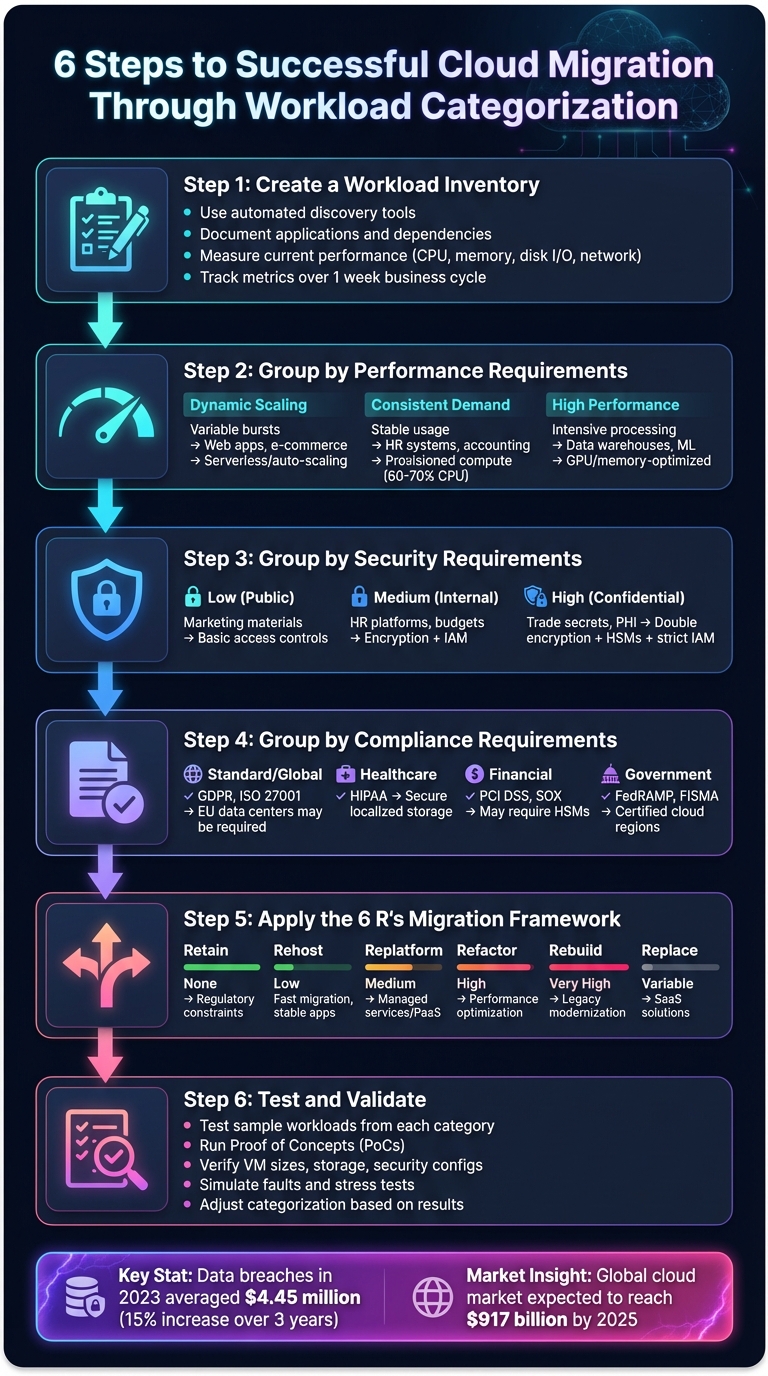
6-Step Cloud Migration Workload Categorization Process
Building an accurate workload inventory is the first step toward effectively managing performance, security, and compliance needs. This involves cataloging all your IT components - such as servers, virtual machines, applications, databases, code, and physical appliances - that support your business processes. This catalog serves as a map of how these components interact and connect [7][9].
Start by leveraging automated discovery tools to identify servers, applications, and their interdependencies. While automation can uncover a lot, it’s important to validate these findings through interviews with subject matter experts (SMEs) to ensure no critical details are overlooked.
After running automated discovery, collaborate with SMEs who manage these workloads to confirm the results and uncover undocumented dependencies. For example, an application might depend on a scheduled script that pulls data from a third-party API - details like this often escape automated scans. Tools such as Azure Migrate, AWS Application Discovery Service, or Google Migration Center can assist in gathering data on CPU usage, memory, disk I/O, and network throughput [1][7].
Create a detailed map of all internal and external dependencies, specifying connection types (e.g., App A connects to Database B) and integrations with services like SaaS platforms, partner APIs, or third-party data pipelines [1][5]. For each dependency, note whether it is read-only, write-only, or bidirectional. This information will help prioritize which workloads need to migrate together to avoid disrupting critical operations [1]. Store all this information - architecture diagrams, component lists, and dependency maps - in a shared repository like a spreadsheet, Visio diagram, or wiki. This ensures your team can easily access and update the data as needed [1][5].
Once dependencies are clearly mapped, the next step is to measure current performance.
With your inventory in place, establish performance baselines to understand how your workloads perform under typical conditions. Track metrics such as CPU utilization (average and peak), memory usage, disk I/O (including IOPS and throughput), and network requirements over a full business cycle, typically one week [8]. This duration helps distinguish between regular activity and occasional maintenance spikes.
Pay special attention to storage throughput, as this is a critical factor in cloud migrations. Tim Radney, Principal Consultant at SQLskills, stresses its importance:
"Proper planning is crucial to having a successful migration. Being aware of cloud resource limitations, especially with storage throughput, will help ensure a successful migration" [8].
Convert disk read/write metrics into MB/s to compare with cloud storage tiers [8]. Additionally, identify peak periods for concurrency and user load to ensure your cloud setup can handle maximum capacity, not just average demands. Recording details like physical server specs, OS versions, and hardware (e.g., GPUs) will further guide your selection of appropriate cloud instance sizes [1][10].
After measuring your current performance, the next step is to sort your workloads into three main categories based on how they use resources. By analyzing performance metrics, you can spot patterns and align each workload with the most suitable cloud infrastructure [8].
Some workloads, like web apps, e-commerce platforms, or real-time analytics, often face fluctuating demand with periodic spikes or sudden bursts [8]. These workloads thrive on elastic compute resources that can scale up or down as needed.
Instead of relying on average performance, focus on peak usage to assess scaling requirements [1]. For workloads with unpredictable patterns, serverless options are worth considering. Features like auto-pause and auto-scaling can minimize costs during idle times [8]. Tim Radney, Principal Consultant at SQLskills, emphasizes:
"A huge benefit in the cloud is you can easily scale up resources as your business and workload grow" [8].
Workloads such as HR systems, accounting software, or older departmental tools usually display steady and predictable usage patterns [8]. These workloads don’t need elastic scaling but instead require fixed resources through provisioned compute tiers.
For these types of workloads, aim for a cloud VM size that supports an average CPU load of 60% to 70% during regular business hours [8]. This approach helps balance cost efficiency with reliable performance during standard operations.
Certain workloads demand intense processing power or specialized resources, such as data warehouses, machine learning models, or advanced analytics [12]. These require cloud instance types tailored for high CPU, large memory, or GPU acceleration.
For database workloads, use tools like "perfmon" to measure storage throughput and convert the data to MB/s, as many cloud providers cap I/O bandwidth based on instance size [8]. If you're running memory-intensive databases like SQL Server, "constrained core" VMs are a good option - they offer high memory capacity without the added cost of unnecessary CPU cores [12].
| Workload Category | Resource Pattern | Typical Examples | Optimal Cloud Tier |
|---|---|---|---|
| Dynamic Scaling | Variable, periodic bursts | Web apps, e-commerce, analytics | Serverless tiers, auto-scaling [8] |
| Consistent Demand | Stable, predictable | HR systems, accounting software | Provisioned compute with fixed vCores [8] |
| High Performance | Intensive processing | Data warehouses, ML models | Specialized tiers (GPU, memory-optimized) [12] |
Once you've categorized workloads by performance needs, the next step is to evaluate them based on security and compliance requirements.
Once you've defined performance groups, the next step is to classify workloads based on their security needs. This categorization is critical for ensuring a smooth and secure cloud migration. It determines what kind of security measures - ranging from basic access control to advanced encryption - are necessary for each workload [13][14].
To organize data effectively, create 3–5 levels of sensitivity. Common classifications include Public, Internal, Confidential, and Highly Confidential. Instead of applying these labels to entire applications, assign them at the database or even column level for greater precision [13][14]. As the Microsoft Azure Well-Architected Framework points out:
"Data classification helps you correctly size security assurances and helps the triage team expedite discovery during incident response." [13]
This structured approach lays the groundwork for addressing compliance requirements in the next phase.
These workloads include items like public-facing marketing materials, product documentation, and website content. They typically require only basic security controls, such as access restrictions and standard monitoring [13][14]. While encryption isn't usually necessary for this category, integrity checks can help ensure the data remains untampered.
Medium-sensitivity workloads encompass systems like internal HR platforms, budgets, customer records, and company policies. These workloads contain sensitive information meant for authorized users only. To secure them, you should:
Automated tools, such as Microsoft Purview, can help suggest classifications for these workloads. However, it’s important to manually review and verify the results to ensure accuracy [13][14].
High-sensitivity workloads deal with critical data, such as trade secrets, financial records, intellectual property, or personal health information (PHI). These require the highest level of protection. Recommended measures include:
For example, the PCI-DSS standard requires FIPS 140-2 Level 3 protection, which often involves HSMs [13]. Providers like SurferCloud, with their enterprise-grade security across 17+ global data centers, can help meet these rigorous standards while maintaining performance.
| Sensitivity Level | Example Workloads | Recommended Security Measures |
|---|---|---|
| Low (Public) | Marketing materials, website content | Basic access controls and standard monitoring |
| Medium (Internal/Confidential) | Internal policies, budgets, customer records | Encryption (at rest and in transit), data masking, and moderate IAM controls |
| High (Highly Confidential) | Trade secrets, PHI, financial records, intellectual property | Double encryption, use of HSMs, strict IAM, and network isolation measures |
With these security tiers in place, you’ll be ready to evaluate compliance needs and address any geographic or regulatory constraints.
Once you've established security tiers, the next step is to organize workloads based on their compliance requirements. This ensures your migration aligns with legal, industry, and organizational standards. Work closely with legal, compliance, and security teams to identify applicable frameworks like GDPR, HIPAA, or PCI DSS [1][16]. As Microsoft highlights:
"A clear understanding of regulatory compliance requirements ensures that your Azure architecture aligns with legal, industry, and organizational obligations." [1]
To streamline this process, create a compliance matrix that connects each regulatory requirement to specific cloud controls. For example, if PCI DSS requires encryption at rest, document which cloud service will handle this [17]. The stakes are high - data breaches in 2023 averaged a cost of $4.45 million, a 15% increase over three years [16]. Proper compliance planning not only mitigates financial risks but also ensures legal obligations are met. This initial step lays the groundwork for matching regulatory needs with cloud capabilities.
Workloads with standard compliance requirements often need to meet frameworks like GDPR, ISO 27001, or SOX. These frameworks typically call for encryption, access logging, and regular audits. Begin by categorizing data based on sensitivity, such as personal identifiable information (PII), financial records, or health data, and assign the appropriate framework. For instance, GDPR applies to any workload that processes data belonging to EU citizens, regardless of your company's location [1][17].
Before migration, conduct audits to establish a compliance baseline. After migration, verify data integrity using checksums [17]. SurferCloud’s infrastructure, with its 17+ global data centers, offers the necessary security controls to meet these frameworks while maintaining strong performance.
For workloads involving long-term data retention, lifecycle management is key. Define how long data should be stored and when it should be deleted. Under GDPR, you must honor the "right to erasure", which includes ensuring data can be fully removed from backups and archives once the retention period ends [20]. As Proofpoint explains:
"Data protection by default says you must collect, process, and store only the personal data necessary to provide an agreed service." [20]
Document your Recovery Point Objectives (RPOs) and Recovery Time Objectives (RTOs) to ensure your backup strategies support business continuity and meet legal requirements [3]. For reporting needs where raw data isn’t essential, consider data masking to obscure personal information while keeping records functional [13]. Don’t forget to review classification metadata regularly, as outdated labels could result in audit failures [13].
Geographic restrictions are another critical factor to address for compliance.
Certain regulations require data to remain within specific borders, a concept known as data localization. This differs from data residency (physical storage location) and data sovereignty (laws governing the data) [18][19]. For example, healthcare workloads under HIPAA or financial systems governed by GLBA often demand stricter geographic controls than general personal data [18][19].
Start by mapping data flows to document storage locations and any cross-border movements. Group related workloads to meet residency requirements and minimize latency [13][3][5]. SurferCloud’s 17+ global data centers allow you to choose regions that comply with local storage mandates while maintaining performance. Additionally, review software licenses, as some agreements limit cloud deployment to specific geographic areas [5].
| Compliance Category | Example Frameworks | Migration Impact |
|---|---|---|
| Standard/Global | GDPR, ISO 27001 | May require EU-based data centers |
| Healthcare | HIPAA | Secure, often localized storage with strict access controls |
| Financial | PCI DSS, GLBA, SOX | May mandate Hardware Security Modules (HSMs) [13] |
| Government | FedRAMP, FISMA | Requires specific certified cloud regions |
With your workloads categorized, the next step is to decide on the migration path for each group. This is where the 6 R's framework - Retain, Rehost, Replatform, Refactor, Rebuild, and Replace - comes into play. As Techreviewer puts it:
"The 6Rs of cloud migration provide a methodology for assessing workloads, choosing optimal platforms, aligning with business objectives, and mitigating risk." [21]
The framework helps you strike a balance between speed, cost, and the advantages of moving to the cloud. Considering that the global cloud market is expected to hit $917 billion by 2025, selecting the right strategy for each workload is critical to maximizing ROI and minimizing risks [21]. Assigning each workload a strategy depends on its business needs and technical requirements.
Business goals - like reducing costs, improving scalability, or meeting compliance standards - play a key role in determining the right migration approach [6]. For example:
Case studies reveal significant cost savings across these strategies [26]. For workloads with geographic restrictions, mapping dependencies is essential to avoid latency issues. Tightly coupled applications should migrate in the same wave to ensure smooth operations [1][3]. Automated tools can help uncover hidden dependencies in legacy systems [27][21]. Meanwhile, workloads burdened by technical debt or regulatory constraints may need to be Retained [21][6][11].
Here’s a breakdown of how each strategy aligns with workload categories:
| Strategy | Effort Level | Cloud Benefit | Best For |
|---|---|---|---|
| Retain | None | None | Systems with regulatory constraints or high data gravity [21][6] |
| Rehost | Low | Low | Fast exits, stable applications, or teams new to cloud [21][11] |
| Replatform | Medium | Medium | Moving to managed services like PaaS or containers [6][23] |
| Refactor | High | High | Reducing technical debt or optimizing performance [6][11] |
| Rebuild | Very High | Maximum | Legacy systems needing modern frameworks [6][22] |
| Replace | Variable | High | Standard processes (e.g., CRM or HR) via SaaS [21][6] |
For standard business functions, the Replace approach can significantly reduce maintenance efforts, allowing teams to focus on innovation [21][6][11]. Additionally, studies show that 10% to 20% of an enterprise IT portfolio is often outdated and better retired than migrated [26].
Once you’ve matched strategies to workloads, the next step is to prioritize which ones to migrate first.
Interestingly, the most critical systems aren’t always the first to migrate. As AWS Prescriptive Guidance explains:
"Applications that are business-critical are typically low priority for the migration because business-critical applications have higher risks." [25]
Start with low-complexity, non-production workloads to test your migration process [24][25]. These "quick wins" allow you to refine your approach before moving on to mission-critical systems. For large-scale migrations, focus on 3–10 applications at a time, or plan for 3–5 waves, instead of tackling the entire portfolio at once [25].
Use weighted scoring to rank workloads objectively. Scores can be assigned based on factors like environment type, business importance, and dependency complexity [24]. If innovation and agility are your primary goals, focus on Refactor or Rebuild strategies for high-value applications [24][6]. However, it’s crucial to ensure your team has the skills and bandwidth for these tasks; otherwise, start with a Rehost approach and modernize later to avoid delays [6]. Incorporating DevOps automation during migration can speed up the process by as much as 80% [23].
For workloads with long-term storage needs, prioritize those with clearly defined Recovery Point Objectives (RPOs) and Recovery Time Objectives (RTOs) to maintain business continuity [3]. When dealing with large datasets, consider data gravity - the costs and bandwidth required for migration. If the cost outweighs the benefits, retaining the workload might be the better option [21].
This prioritization feeds seamlessly into the testing and validation phase. Platforms like SurferCloud offer flexible infrastructure, enabling you to deploy workloads strategically while meeting both performance and compliance requirements.
After organizing your workloads into categories, the next step is to put those assumptions to the test. As the Google Cloud Architecture Center explains:
"Experimentation and testing let you validate assumptions and demonstrate the value of cloud to business leaders." [5]
Testing acts as the bridge between your planning and how things actually perform in the cloud. It helps uncover any gaps between what you expected and what’s happening in real time. Start by gathering key metrics from your current environment - like CPU usage, memory consumption, disk I/O (IOPS), network throughput, and average response times [3][1]. These benchmarks serve as your baseline for comparing performance in the cloud and ensuring resource allocation is accurate.
A good starting point is to test research and development environments in your first migration wave. These non-production systems are ideal for identifying technical hurdles with minimal risk [2]. For each workload category, create a Proof of Concept (PoC) to test assumptions about performance, scalability, and failover capabilities [5][15]. Focus initially on standalone applications with few dependencies - this keeps things simple while your team gains practical experience [28][2].
During testing, confirm that your VM sizes, storage options (SSD vs. HDD), and operating systems align with workload requirements [3]. For workloads with strict security needs, verify identity configurations, service accounts, encryption methods (both at rest and in transit), and firewall rules to ensure they’re properly set up [3][1]. If compliance is a factor, map your cloud setup to standards like GDPR or HIPAA, and make sure data residency requirements are met by selecting the right regions [3][5].
It’s also important to simulate faults, such as cutting off network connectivity, to see how workloads handle stress [15]. For workloads needing high elasticity, measure how quickly resources can scale during peak demand [5]. Define clear success metrics: rehosted workloads should meet existing SLAs, while refactored ones should show measurable improvements - like a 40% boost in response times [6].
SurferCloud’s global infrastructure, with its 17+ data centers, provides an excellent platform for testing different configurations. This allows you to validate both performance and compliance requirements in regions that align with your business goals.
Once testing wraps up, use the insights to fine-tune your workload categorization. Automated tools often miss undocumented dependencies [3][1]. To address this, interview workload owners and use network traffic monitoring to map out relationships between components. For example, if App A frequently connects to Database B, they should migrate together to avoid latency issues [3][4].
Keep an eye on traffic after test migrations to spot any lingering connections to your old environment - these could indicate overlooked dependencies [15]. Maintain a risk register to document any technical or operational challenges encountered during testing, along with strategies to address them [3][1]. Regularly review findings with both technical teams and business stakeholders to adjust your migration plans as needed [6].
Refine your migration batches based on what you learn. For example, if a workload categorized for rehosting struggles with compatibility issues during testing, consider replatforming it instead [3]. Before moving forward with the full migration, clean up all PoC resources and test environments to avoid configuration drift or potential security risks [28][15].
Organizing workloads effectively is the cornerstone of a successful cloud migration. It helps avoid costly pitfalls like over-provisioning resources or disrupting interconnected systems. By categorizing workloads based on factors like performance, security, and compliance needs, you can align each application with the appropriate migration strategy - whether that's a quick rehosting approach or a more in-depth refactoring for scalability [31].
This process also minimizes risk by identifying potential technical challenges early on. Starting with low-risk applications allows your team to gain confidence and expertise before moving on to critical systems [28][1][5]. As Tim Radney, Principal Consultant at SQLskills, wisely notes:
"Proper migration planning is the key to success" [8].
However, categorization isn't a one-and-done task. Gartner estimates that by 2027, 85% of workload placements could miss the mark without a thoughtful placement strategy [32]. Regularly reassessing workloads after migration ensures you stay responsive to evolving usage patterns and can take advantage of new cloud capabilities [29]. This proactive approach maximizes efficiency and keeps costs under control. Leveraging advanced cloud platforms can simplify this ongoing process.
To make the most of workload categorization, it's essential to partner with a cloud provider that aligns with your performance and compliance goals. SurferCloud's global infrastructure, spanning 17+ data centers, enables you to place workloads in regions that optimize both performance and compliance. Their suite of services - elastic compute, secure storage, and managed databases - supports a variety of migration strategies.
SurferCloud’s pay-as-you-go pricing model shifts expenses from upfront capital costs to manageable operating costs, helping you scale resources based on real-time needs [30]. With 24/7 expert support and built-in security features like encryption and DDoS protection, you can confidently migrate even the most sensitive workloads. Ready to start your migration? Visit https://surfercloud.com to explore how their infrastructure can support your cloud journey.
Workload categorization is all about organizing applications, services, and databases based on their specific performance, security, and compliance requirements before moving them to the cloud. This process ensures that each workload aligns with the most suitable migration strategy - whether that's rehosting, replatforming, or refactoring - and the right cloud environment.
When workloads are categorized effectively, teams can:
This organized method helps reduce risks, control costs, and ensure workloads remain secure, compliant, and efficient on SurferCloud’s platform.
The 6 R's of cloud migration are essential strategies that help businesses decide the best way to transition workloads to the cloud. Each approach is tailored to meet specific needs, such as performance, security, and compliance, ensuring a smooth and efficient migration process.
By applying these strategies, businesses can effectively organize their migration to SurferCloud's secure and scalable infrastructure. This method ensures workloads are transitioned in a way that maximizes cost savings and performance, setting the stage for long-term success in the cloud.
To make sure your workloads meet regulatory standards during a cloud migration, the first step is to pinpoint the exact regulations that apply to your data and systems. For instance, in the United States, frameworks like FedRAMP outline specific guidelines for securing cloud services. Once you know the regulations, map each workload to the applicable security controls and outline how these will be managed in the cloud environment.
Before you start migrating, conduct a compliance assessment. This process includes a gap analysis to uncover any weaknesses, validating controls with the help of a third-party assessor, and preparing key documentation like security plans and continuous monitoring strategies. Throughout the migration, stick to a continuous-monitoring approach by automating security checks, tracking changes, and keeping compliance documentation up to date.
By weaving compliance checks into both the planning and execution stages of your migration, you can ensure a smooth transition that aligns with regulatory standards. This strategy not only protects your operations but also supports scalability as you adopt cloud solutions.





