SurferCloud ULightHost: The Budget-Friendly S
Why Lightweight Servers Matter Developers need affor...








When unexpected events like cyberattacks, natural disasters, or hardware failures disrupt operations, businesses need reliable recovery strategies without overspending. Cloud computing offers a cost-effective solution by replacing expensive, traditional disaster recovery systems with flexible, pay-as-you-go models. Here's what you need to know:
Understanding your operational needs and potential risks is the cornerstone of implementing cost-effective and scalable cloud solutions. To protect your business, you need to pinpoint what’s essential to safeguard and identify the threats that could disrupt these operations. This process begins with two key steps: a Business Impact Analysis (BIA) and a Risk Assessment. The BIA highlights which operations must continue during disruptions, while the Risk Assessment identifies the threats that could interrupt these operations [3][2].
Some systems, like your customer-facing website, may need to run 24/7, while others, such as an internal newsletter system, can afford a temporary pause. A BIA helps you distinguish between what’s mission-critical and what’s not by examining the potential fallout from downtime. This includes financial losses, damage to your reputation, and compliance issues [3][2].
Two important metrics to define here are the Recovery Time Objective (RTO) - the maximum acceptable downtime - and the Recovery Point Objective (RPO) - the tolerable amount of data loss [4][2]. For example, a financial services company might discover that even a few minutes of downtime is more costly than investing in a high-end disaster recovery system [7].
Don’t forget to assess internally developed tools and "shadow IT" systems, as these can be just as vital as your primary databases [6][2]. To avoid overlooking critical dependencies, map out connections across personnel, processes, technology, facilities, and data. This will help you identify hidden vulnerabilities and single points of failure [6]. Once you’ve outlined these operations and metrics, you can move on to evaluating the risks that could jeopardize them.
After identifying what needs protection, the next step is determining what could threaten it. Risks typically fall into three broad categories: natural disasters (like hurricanes or floods), human-caused events (such as cyberattacks or configuration mistakes), and technical failures (like power outages or hardware malfunctions) [7][3].
To prioritize these risks, calculate a Risk Score by multiplying the likelihood of each event by its potential impact [8]. This score helps you decide how much to invest in protective measures. Your disaster recovery budget should align with the actual level of risk [8].
"Recovery objectives should not be defined without also considering the likelihood of disruption and the cost of recovery when calculating the business value of providing disaster recovery for an application." - AWS [8]
With clear risk scores in hand, you’ll be better equipped to choose scalable cloud services that ensure the continuity of your critical operations.
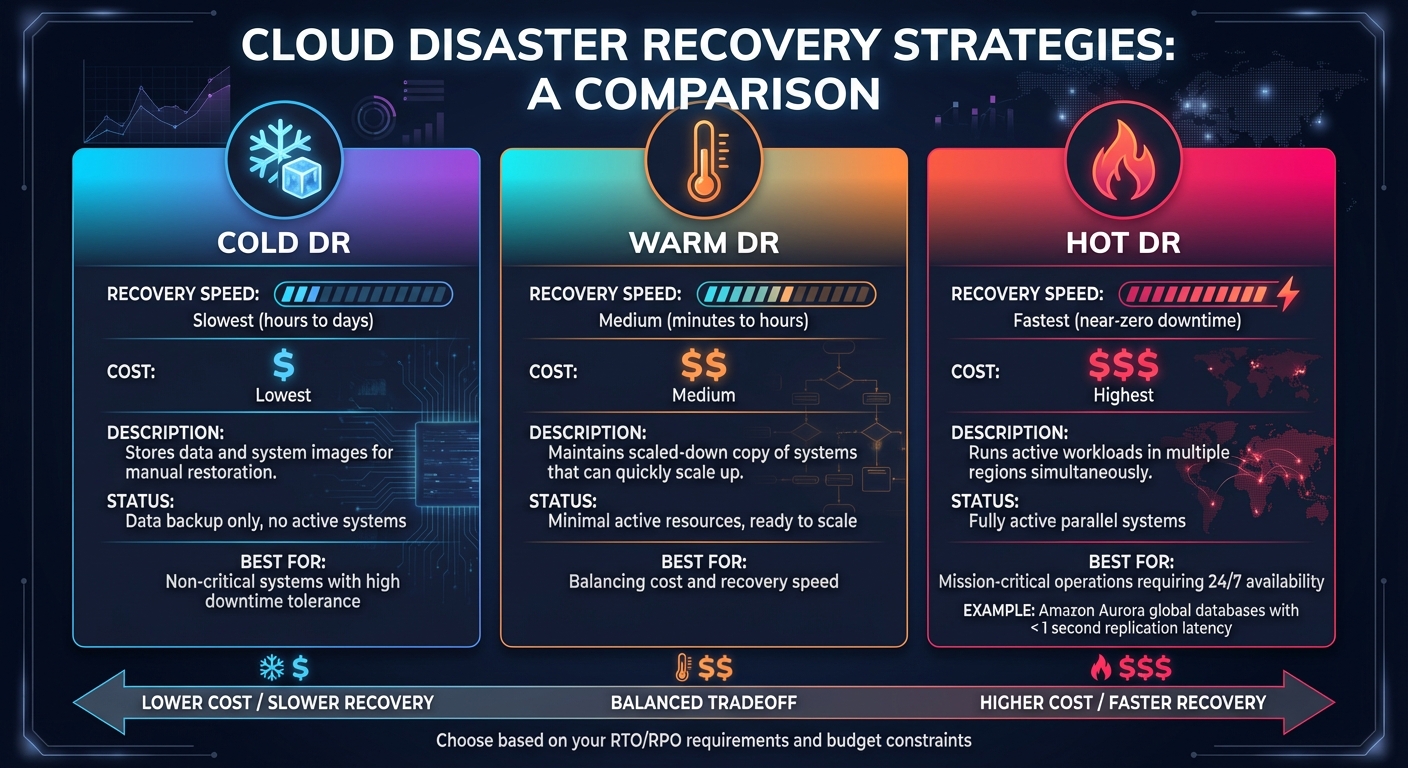
Cloud Disaster Recovery Strategies: Cold vs Warm vs Hot DR Comparison
Once you've identified critical operations and assessed potential risks, the next step is to implement a cloud infrastructure that adapts to your needs while keeping costs in check. Cloud services provide three major benefits: they allow you to scale resources based on demand, automate data protection, and distribute systems across multiple locations to avoid single points of failure. These foundational strategies pave the way for the more detailed techniques outlined below.
Elastic compute resources are designed to handle traffic spikes or system failures by automatically adjusting capacity. If a server fails, managed services can quickly deploy replacement capacity in minutes. For example, Managed Instance Groups (MIGs) create identical virtual machine instances across multiple zones. This setup ensures that if one zone goes offline, traffic is seamlessly rerouted to operational zones [9].
Storage solutions offer similar flexibility. Regional Persistent Disks replicate data across two zones within a region in real time, achieving a recovery point objective (RPO) of zero during zonal outages [9]. For larger-scale protection, multi-region storage buckets store data redundantly across at least two geographic regions, safeguarding against regional disasters [4].
Availability levels vary depending on the resource type. Zonal resources like standard Compute Engine aim for 99.9% availability, which translates to about 8.75 hours of downtime annually. Regional resources improve this to 99.99% availability (approximately 52 minutes of downtime per year), while multi-region databases can reach an impressive 99.999% availability - just 5 minutes of downtime annually [9].
To balance costs, consider "cold" standby systems. These systems keep storage costs low until an event triggers the need for compute scaling [4].
Equally crucial is ensuring your data remains protected through automated processes.
Relying on manual backups can lead to errors and delays in recovery. Automated replication eliminates these risks by adhering to the 3-2-1 rule: maintaining three copies of data on two different types of media, with one copy stored offsite or in a separate cloud region [10].
Downtime is costly - 90% of enterprises report losses exceeding $300,000 per hour of downtime, yet only 35% of companies can restore their systems within hours, even though 60% expect to [11]. Automated systems help bridge this gap by enabling near-real-time replication. This supports "hot" or "warm" standby systems, allowing for near-instant failover if the primary site fails [4].
"Your data is only as secure as its backup." - Monty Sagal, Director of Compliance, CloudAlly [10]
Cost efficiency can also be achieved by aligning data storage with its importance. High-availability storage is ideal for mission-critical data, while long-term backups can be stored on low-cost "cold" storage tiers [5]. Many managed cloud database services offer built-in automated replication and point-in-time recovery, removing the need for custom solutions [4]. To ensure reliability, test your backup and recovery processes regularly - at least once a month - to meet your recovery time objectives (RTO) [10].
Geographic separation is essential to protect against correlated failures - scenarios where multiple systems fail simultaneously. For example, a regional disaster like a hurricane or power outage might affect local data centers, but systems replicated across facilities in different regions remain operational [4][9].
SurferCloud’s network of 17+ global data centers enables businesses to replicate systems across various regions. Global load balancing automatically redirects user traffic from unavailable or compromised regions to functioning ones [9]. This setup can also meet compliance requirements by storing data within specific national borders while maintaining a secondary recovery site elsewhere [4].
Your disaster recovery plan should align with your budget and tolerance for downtime. Options include:
For instance, Amazon Aurora global databases can replicate to secondary regions with a typical latency of under one second [12]. Additionally, tools like Terraform, which utilize Infrastructure as Code (IaC), allow you to redeploy infrastructure efficiently and accurately in a secondary region during a disaster [9]. The key is to choose a provider with data centers far enough apart to ensure that a single disaster won’t affect both locations [13].
Keeping your business continuity plan affordable doesn’t mean cutting corners - it’s about making smart choices. Cloud computing offers a practical way to replace expensive hardware with flexible, subscription-based costs. This approach helps businesses maintain reliable operations while managing expenses effectively.
With a pay-as-you-go pricing model, you’re charged only for the resources you actively use. By shutting down idle instances, businesses can reduce costs by over 70% compared to running systems 24/7 [14]. This flexibility is especially useful for continuity strategies like "Pilot Light" or "Warm Standby", where you pay for minimal resources until a disaster hits and then quickly scale up to full capacity [7,22].
"One of the key advantages of cloud-based resources is that you don't pay for them when they're not running." – AWS [14]
For non-critical workloads, spot instances can save up to 90% compared to on-demand pricing [20,21]. Meanwhile, predictable workloads can benefit from reserved instances or long-term commitments, which offer discounts of up to 75% [14]. Regularly auditing your cloud setup is essential - unused resources like unattached storage or inactive databases can quietly rack up unnecessary charges [21,23].
Abhi Bhatnagar, Partner at McKinsey, highlights that optimizing cloud usage can reduce costs by 15%–25% without affecting performance [16]. Tools like autoscaling can dynamically adjust resources based on demand, ensuring you’re not paying for unused capacity during slower periods [7,21]. Heatmaps and other visual tools can also help identify traffic patterns, allowing you to schedule resources more efficiently [15].
These flexible pricing models not only cut costs but also eliminate the need for heavy upfront investments, as explained below.
Traditional on-premises disaster recovery setups require significant upfront spending on hardware, facilities, and related infrastructure like power systems, cooling, and security. Cloud services eliminate these large capital expenses, replacing them with manageable operating costs through subscription models [8,20].
"AWS allows you to convert fixed capital expenses into variable operating costs of a rightsized environment in the cloud, which can significantly reduce cost." – AWS [5]
This shift improves cash flow by turning one-time hardware purchases into recurring, usage-based expenses [17]. Cloud providers also take on the responsibility of maintaining physical infrastructure, handling hardware failures, and managing refresh cycles - expenses that would otherwise require additional IT staff and resources [8,24].
When it comes to storage, tiered pricing can be a game-changer. Critical data that needs fast access can stay on high-performance storage, while less frequently accessed backups can move to low-cost archival tiers [8,21]. In many cases, you can stop virtual machine instances and only pay for storage, significantly lowering costs compared to keeping systems running continuously [4]. This approach ensures business continuity without the financial burden of constant operations.
To ensure a business continuity plan works effectively during disasters, it needs regular testing. Cloud environments simplify this process, offering a more flexible and cost-efficient way to provision resources for drills [7,10].
One way to test your plan is by simulating disruptions using tools like Chaos Monkey, which intentionally disrupt services. For instance, you could randomly shut down critical components, such as primary nodes in a Kubernetes cluster or key database instances. You might also simulate network outages by tweaking firewall rules to mimic regional failures. These tests help ensure that your backups and failovers meet your defined Recovery Time Objective (RTO) and Recovery Point Objective (RPO).
It's best to carry out these tests in a mirrored staging environment. Before starting, set clear benchmarks - like restoring systems within a four-hour window - to measure success. Notify your team, including operations staff, DevOps engineers, and application owners, so they can monitor the test and respond appropriately. After the test, document timestamps and key metrics to create a postmortem report [18].
Such simulations not only test your systems but also pave the way for ongoing performance monitoring.
Continuous monitoring is essential to ensure your recovery setups stay effective. Set up automated alerts to identify anomalies, such as sudden spikes in data deletion. Additionally, configure a short DNS TTL, allowing traffic to quickly reroute to standby systems during outages.
Infrastructure as Code (IaC) tools like Terraform can automate the provisioning of recovery environments, ensuring consistent configurations across both testing and production. After every system update, retest your disaster recovery plan to confirm it still works as intended [4,7].
Regular testing does more than validate your technical setups - it also prepares your team. Tabletop exercises, where stakeholders walk through the recovery process step-by-step, can uncover role confusion and process gaps without requiring additional infrastructure [19].
The cloud has transformed how businesses approach continuity planning, shifting from expensive secondary data centers to more predictable operating costs. This evolution has made rapid disaster recovery and enterprise-level continuity accessible to organizations of all sizes. By leveraging tiered recovery strategies, businesses can allocate resources wisely - opting for instant failover on critical systems while using more economical cold standby setups for less urgent operations. Add in pay-as-you-go pricing, automated infrastructure provisioning, and global data center redundancy, and you get a solution that balances resilience with cost efficiency.
"The cloud really has changed everything to where you can have an almost instant recovery." - Mike Semel, President and Chief Compliance Officer, Semel Consulting [1]
SurferCloud’s global infrastructure plays a key role in making these strategies work. With its geographic redundancy and elastic computing power, the platform enables seamless data replication across regions and automates failovers for critical workloads. This ensures businesses maintain readiness without the burden of paying for idle resources.
Achieving success requires more than just adopting cloud services - it depends on regular testing, smart automation, and strategic scalability. With infrastructure managed by the cloud, teams can focus on refining recovery processes and staying prepared for anything.
Cloud computing helps lower disaster recovery (DR) costs by swapping out costly, fixed infrastructure for a pay-as-you-go model. Instead of running and maintaining a secondary site, businesses can store backups in the cloud and activate resources like servers and storage only when they’re actually needed. This approach eliminates the need for duplicate hardware, real estate, and ongoing upkeep, transforming hefty upfront investments into manageable operating expenses.
On top of that, cloud platforms come with built-in tools for replication, backups, and testing, which simplify processes and cut down on labor costs. Since resources are only used during recovery, you’re not stuck paying for unused capacity. This makes cloud-based DR an efficient and budget-friendly way to ensure your business keeps running smoothly during disruptions.
RTO (Recovery Time Objective) represents the longest period your systems can remain offline before it starts causing serious harm to your business operations. On the other hand, RPO (Recovery Point Objective) defines how much data your business can afford to lose, essentially measuring how far back you need to go when restoring from backups.
These two metrics play a critical role in shaping your disaster recovery and business continuity plans. By setting clear RTO and RPO targets, companies can strike a balance between recovery speed, data preservation, and overall costs - helping them stay functional even when faced with unexpected disruptions.
To create a reliable and cost-effective cloud-based continuity plan, start by pinpointing your most critical workloads and defining clear recovery targets like Recovery Time Objectives (RTOs) and Recovery Point Objectives (RPOs). By prioritizing these essential tasks, you can allocate resources efficiently and keep expenses under control. Regular failover drills are key to making sure the plan runs smoothly when it’s needed most.
When designing your cloud setup, aim to eliminate single points of failure. Spread workloads across multiple regions or availability zones to boost resilience. Automated data replication is another must - it ensures that even if one region goes down, your operations can keep running. Choosing a provider with clear SLAs, built-in security, and around-the-clock expert support adds an extra layer of dependability.
Keep an eye on performance and costs at all times. Analytics tools can help you spot potential problems early, fine-tune scaling policies to meet demand, and tweak backup schedules as required. With thoughtful planning, robust redundancy, and ongoing adjustments, businesses can stay prepared without breaking the bank.





