The Advantages of VPS in Bangkok, Thailand, a
With Southeast Asia’s growing demand for online servi...









Feature engineering is a critical step in preparing data for machine learning, but doing it manually can be time-consuming and error-prone. Automating this process using cloud platforms solves many challenges, such as inconsistencies between training and production environments. Here's what you need to know:
Automating feature engineering improves model accuracy, reduces deployment time, and ensures consistency across workflows. With tools like SurferCloud, you can scale resources efficiently while maintaining low latency for real-time predictions.

Before diving into automating feature engineering, it's essential to have a well-structured cloud infrastructure and properly organized data. Leverage elastic compute resources for running transformations and implement a dual-layer storage system - one for historical data and another for real-time access - to ensure smooth and consistent workflows[4][7].
Start by setting up a compute environment that can scale dynamically to handle both batch training and real-time inference tasks[7]. For instance, SurferCloud's elastic compute servers provide flexible resources, allowing you to scale capacity as your feature engineering pipelines grow.
A dual-layer storage system is key to managing data effectively. Use offline storage (e.g., Parquet files) for historical data and online storage for low-latency, real-time access[4]. This setup enables feature stores to handle massive datasets - processing batches with over a million rows - while still supporting real-time predictions with millisecond-level latency and high-speed writes[4]. By distributing feature stores across multiple regions using SurferCloud's global data centers, you can ensure resilience and keep latency to a minimum.
Raw data is rarely ready for automation straight out of the box. Organize your features into feature groups, which are essentially tables where each column represents a feature, and each row corresponds to a unique record identified by a "Record Identifier"[4]. Be sure to include an event time for each record. This timestamp is crucial for tracking when data was generated, maintaining historical accuracy, and avoiding training-serving skew[4].
Address missing values before uploading your data to the cloud. For numeric columns, replace NULL values with the column's mean. For categorical data, assign missing values to a new, unique category[3]. If rows are missing critical values, it's better to exclude them to prevent issues like training-serving skew[2]. Save your cleaned datasets in Parquet format within SurferCloud's storage. This format not only reduces storage costs but also boosts query performance during data exploration[4].
To streamline the automation process, use cloud-based tools like data wranglers and machine learning studios. These tools allow you to build transformation workflows that seamlessly integrate into your machine learning pipelines[5][6]. They can also pull data from various sources, including cloud storage, data warehouses, and external databases[5]. A feature store plays a vital role here, offering both online and offline storage options to cater to different needs[4].
Feature Processor SDKs are another essential tool. They connect raw data to feature groups using predefined transformation functions[7]. These SDKs handle the heavy lifting of provisioning compute environments and maintaining pipelines, freeing you to focus on designing transformation logic instead of managing servers[7]. SurferCloud's orchestration services further enhance this process by supporting lineage tracking, which lets you trace features back to their original raw data sources. This capability is invaluable for debugging and auditing automated pipelines[7].
Once these foundational elements are in place, you can confidently move forward with automating your feature engineering tasks.
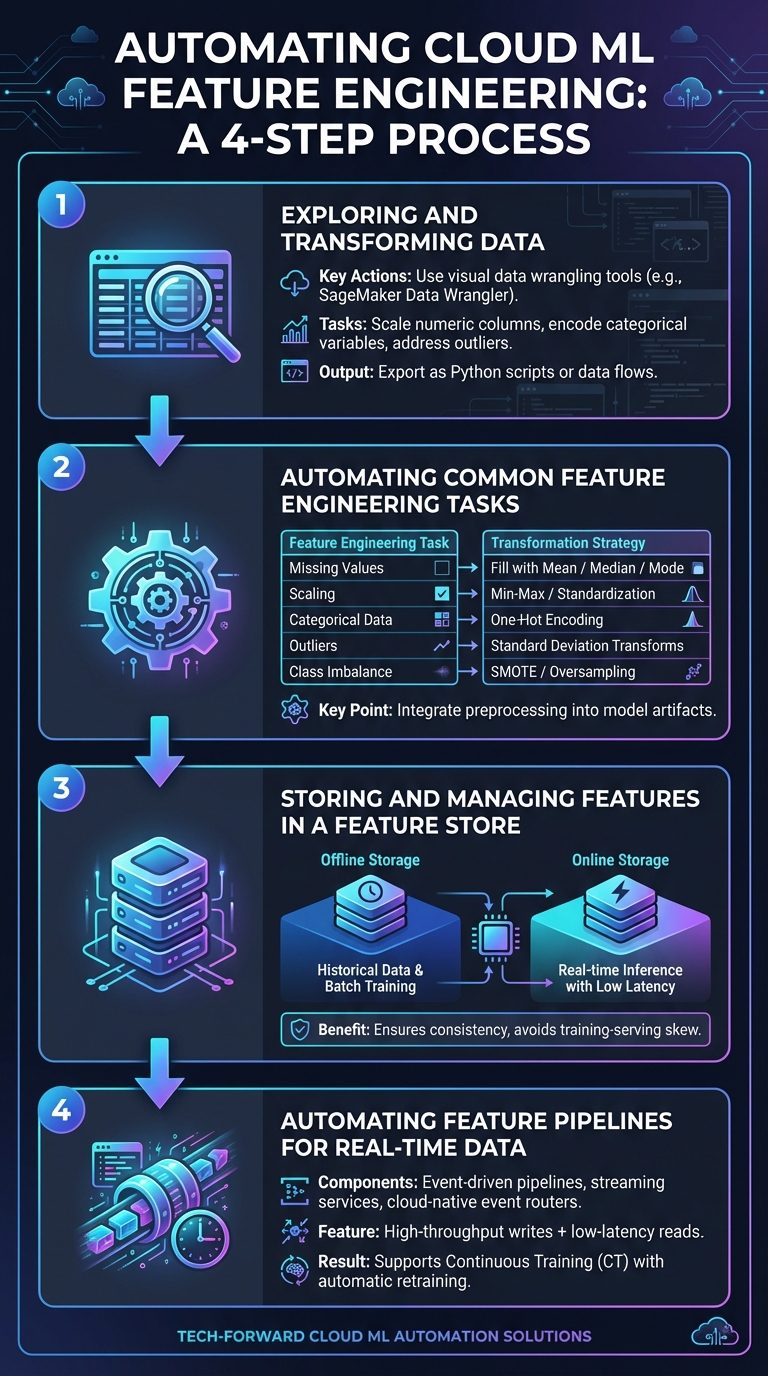
4-Step Guide to Automating Feature Engineering in Cloud ML
Start by using visual data wrangling tools, like SageMaker Data Wrangler, to explore your dataset and define necessary transformations[5]. These might include tasks like scaling numeric columns, encoding categorical variables, or addressing outliers. Once you've identified the transformations, export them as Python scripts or data flows that can easily integrate into your production pipelines.
For instance, AWS engineers leveraged visual tools to clean their data by removing duplicate rows and filling in missing values. Numeric fields were filled with 0, while missing categorical values were replaced with the mode. These transformation rules were then exported as a SageMaker Processing job, which directly updated the feature store[9].
Once you've established these rules, automate these tasks using the built-in functions of your cloud ML platform.
With your transformation rules defined, the next step is automation. Many cloud ML platforms offer built-in tools to handle common feature engineering tasks. These include scaling numeric ranges (using Min-Max scaling or standardization), encoding categorical data (e.g., one-hot encoding), and imputing missing values (using mean, median, or mode)[9].
| Feature Engineering Task | Automated Technique | Purpose |
|---|---|---|
| Missing Values | Fill with Mean/Median/Mode/Constant | Ensures datasets are complete for algorithms that don't handle nulls |
| Scaling | Min-Max Scaler / Standardization | Normalizes numeric ranges for better optimization |
| Categorical Data | One-Hot Encoding | Converts categories into numeric vectors for machine learning models |
| Outliers | Standard Deviation-Based Transforms | Minimizes the effect of extreme values on model performance |
| Class Imbalance | SMOTE / Random Oversampling | Addresses bias toward majority classes |
Integrate these preprocessing steps directly into your model artifacts. For example, BigQuery ML's TRANSFORM clause ensures that the same transformations applied during training are automatically applied during predictions. As outlined in Google Cloud documentation:
"The preprocessing that you apply to the model is automatically applied when you use the model with the ML.EVALUATE and ML.PREDICT functions."[2]
With these automated transformations in place, the next step is centralizing and managing your features effectively.
Once your data is transformed, storing the engineered features in a centralized feature store is essential. This ensures consistency between training and serving environments, avoiding training-serving skew[4]. A well-configured feature store should include both offline storage for historical data and batch training, as well as online storage for real-time inference with low-latency access[4].
For example, SurferCloud provides a dual-layer approach: offline storage for cost-effective querying and performance during batch processes, and online storage for immediate access to the latest records. Centralizing features in this way allows for easier reuse across different models and teams.
For scenarios requiring real-time updates, event-driven pipelines are key. Use streaming services to ingest data as it arrives, and set up automated transformations triggered by cloud-native event routers[4][11]. Feature groups should include an online store that supports high-throughput writes and low-latency reads, ensuring features are ready for immediate use during inference[4].
SurferCloud's orchestration services can automate the entire pipeline, from data ingestion to feature updates. You can configure triggers to run processing jobs whenever new data arrives or when performance metrics change. This ensures that features remain up to date and supports Continuous Training (CT), which automatically retrains models as data statistics evolve[10][11][12]. As Google Cloud puts it:
"Continuous Training (CT) is a new property, unique to ML systems, that's concerned with automatically retraining and serving the models."[10]
When choosing transformation methods, it’s essential to weigh their pros and cons. For instance, standardization centers numeric data around zero, making it suitable for neural networks, though it’s less effective for tree-based models[3]. On the other hand, target encoding replaces categories with their target probabilities, which works well for high-cardinality datasets but comes with a heightened risk of overfitting[3].
Label encoding assigns numerical values to categories, making it efficient for tree-based models. However, it can misleadingly suggest an order among categories that doesn’t actually exist[3][8]. Meanwhile, bucketization groups continuous numeric values into ranges, helping to reduce the influence of outliers but at the cost of losing finer details[2]. To maintain consistency between training and inference, these transformations should be automated and integrated into the model pipeline. Tools like BigQuery ML's TRANSFORM clause are particularly helpful for this purpose[2][8].
Once you’ve chosen the right transformation methods, it’s crucial to monitor their impact on your models. Early detection of issues can prevent larger problems down the line.
After deciding on transformation techniques, ensuring your pipeline runs smoothly is critical. Regular monitoring can help you catch potential issues before they escalate. For example, skew detection can identify mismatches between training and production data, while drift detection flags shifts in feature distributions over time[13]. These practices are vital for maintaining model accuracy as your data evolves.
To pinpoint errors, use lineage tracking tools like SageMaker AI Lineage or Vertex ML Metadata. These tools allow you to trace features back to their raw data sources, simplifying the debugging process[7][13]. Additionally, explainable AI tools can monitor feature importance - sudden changes in a feature’s relevance often indicate data quality problems[13]. Setting specific alert thresholds for monitoring metrics ensures you catch critical issues without overwhelming your team with unnecessary notifications[13]. Another best practice is enabling checkpointing in your pipelines, which saves progress in cloud storage and protects against data loss if a job fails mid-execution[13].
To support automation and monitoring efforts, a scalable and reliable infrastructure is essential. Cloud systems should be flexible enough to handle varying data volumes. For example, SurferCloud’s elastic compute servers can scale automatically to manage datasets ranging from gigabytes to terabytes. Some workflows even process up to 1,000 columns seamlessly[14]. When working with large datasets, consolidate files into shards of at least 100 MB, aiming for a total of 100 to 10,000 shards for optimal processing[13].
Protect your model artifacts by enabling object versioning in your cloud storage. This feature safeguards against accidental deletions or file corruption[13]. SurferCloud’s distributed data centers ensure low-latency access to features while maintaining the integrity of automated pipelines. Additionally, they offer 24/7 expert support for immediate troubleshooting. Another key practice is using point-in-time joins to ensure your model doesn’t train on data that wouldn’t have been available at the time[15].
Automating feature engineering in the cloud is a game-changer for machine learning workflows. By ensuring the same transformation logic is used during both model training and real-time inference, it eliminates training-serving skew. This not only safeguards model accuracy but also simplifies deployment, allowing data scientists to spend more time refining transformation logic rather than worrying about infrastructure management[4][7][8].
Automated feature selection algorithms play a crucial role by pinpointing the most important features from massive datasets. This reduces the computational load for both training and serving while maintaining model performance[1]. Feature stores further enhance efficiency by enabling teams to share and reuse features across projects, cutting down on repetitive data processing tasks[4]. These systems are designed to handle real-time predictions with millisecond-level latency while also managing large-scale batch data processing[4].
The benefits go beyond just cost savings. Automation significantly speeds up model deployment. For example, embedding preprocessing steps directly into model artifacts allows complex models to be trained in as little as 15 minutes[2]. When combined with effective feature storage and real-time pipeline automation, this creates a smooth, end-to-end machine learning workflow. Additionally, SurferCloud’s elastic compute servers scale effortlessly to handle datasets ranging from gigabytes to terabytes. With 17+ global data centers and around-the-clock expert support, SurferCloud’s infrastructure eliminates technical hurdles, making automation accessible and efficient for any team.
Automating feature engineering in cloud-based machine learning brings a host of benefits that can make a big difference in your workflow. For starters, it accelerates model development by taking care of repetitive tasks like managing missing data and transforming features. This means you can get to actionable insights much faster.
Another advantage is the consistency and reliability it offers. By automating these processes, you minimize the chance of human error and ensure your results are reproducible every time.
Cloud platforms also shine when it comes to scalability. As your workload grows, automation helps you manage it effortlessly. Plus, it’s a smart financial move - managed solutions, like those from SurferCloud, handle resource allocation efficiently. This saves both time and money while ensuring your machine learning projects perform smoothly.
A feature store serves as a central hub for organizing and managing feature data, ensuring consistency and accuracy. By using the same curated features for both training and real-time inference, it eliminates issues like training-serving skew, which can otherwise compromise the reliability of machine learning models.
It also simplifies teamwork by allowing different teams to share and reuse features across multiple projects. This not only saves valuable time but also cuts down on redundant efforts.
To get started with automated feature engineering in the cloud, you'll need a few essential components:
With these components in place, you'll have the building blocks needed to create reliable and efficient feature-engineering workflows in the cloud.





