Best Forex Server Locations: Why SurferCloud'
When it comes to Forex trading, the location of your se...









Cloud costs are skyrocketing, especially with AI workloads. Managing these expenses effectively is now a top priority for businesses. Here's what you need to know:
If you're spending big on AI in the cloud, it's time to rethink your approach.
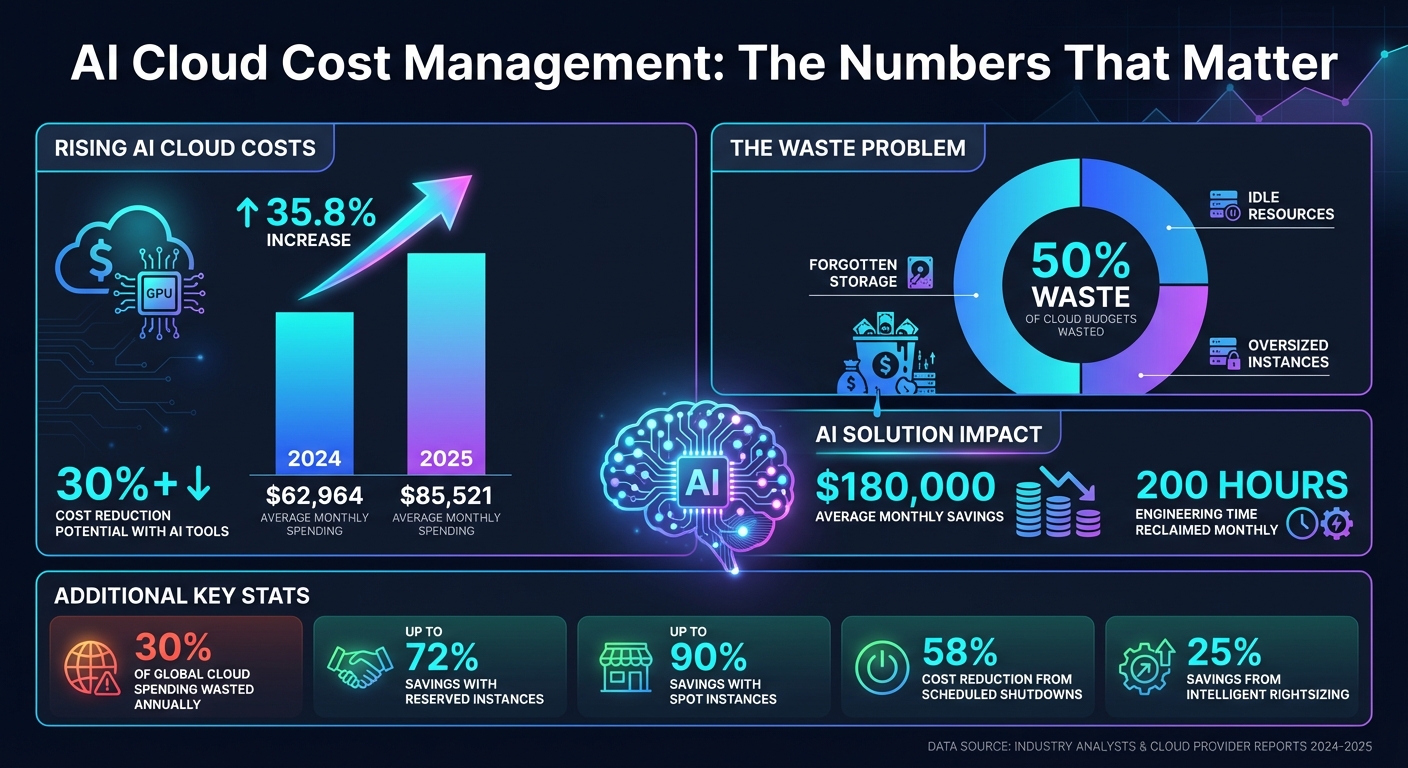
AI Cloud Cost Statistics: Spending Trends, Waste, and Savings Potential 2024-2025
AI-powered cost optimization tackles cloud spending challenges by identifying unusual charges, predicting future expenses with precision, and automatically adjusting resources to fit actual usage. These capabilities transform cost management from a reactive process into a forward-thinking strategy.
AI keeps tabs on cloud spending by comparing current usage against a 60-day forecast baseline [10][11]. Using unsupervised algorithms like WaveNet or TimesFM - trained on large time-series datasets - it accounts for seasonal trends and cyclical fluctuations [2]. When spending veers off course, the system flags the issue within 24 hours, pinpointing the exact project, service, region, or SKU responsible [11].
This kind of monitoring helps prevent common cost pitfalls, such as faulty code causing unexpected usage spikes, "zombie" resources racking up charges after projects end, or unauthorized scaling without proper oversight. Advanced systems allow users to mark false positives, enabling real-time model adjustments. Detected anomalies can also trigger automated workflows through tools like ServiceNow or Jira, logging incidents, notifying teams, or even launching auto-remediation scripts [10].
Beyond spotting anomalies, AI uses historical data to predict future usage with impressive accuracy.
By analyzing past spending patterns, AI can predict future costs, helping teams set proactive budget alerts based on anticipated expenses [12][13]. For instance, AWS Cost Explorer applies an 80% prediction interval, while FinOps teams aim for forecasts within 5% of actual spending - ensuring resources are allocated efficiently [6][9].
Sophisticated tools like Azure Copilot take it a step further, running "what-if" scenarios to estimate the financial impact of changes - such as a 15% usage increase or switching from GPT-3.5 to GPT-4 - before decisions are finalized [13]. For workloads with unpredictable costs, predictive forecasting also supports weekly or monthly reviews to catch runaway expenses early. Modern models go deeper, identifying drivers behind cost fluctuations, such as seasonal usage patterns or specific services contributing to the variance [12][2].
AI doesn’t just detect and forecast - it actively optimizes resources to reduce waste. By learning workload patterns, AI fine-tunes CPU, memory, and I/O allocations to select the most efficient instances [1]. Unlike traditional autoscaling, which reacts after traffic spikes, AI predicts demand and scales resources up in advance - ensuring performance while avoiding idle capacity [3][8]. It also aligns workloads with cost-effective infrastructure, like shifting non-critical analytics tasks to discounted spot instances in less expensive regions [3].
These AI-driven strategies significantly cut costs. AI agents can autonomously implement optimizations, such as deleting unused resources, purchasing savings plans when utilization justifies it, or resizing instances during off-peak hours [1].
Using AI for cloud cost management means strategically applying it to pricing, scaling, and data optimization. This approach helps cut unnecessary expenses and boosts efficiency.
AI can analyze workload patterns to match them with the most cost-effective pricing models. For instance, committing to Reserved Instances or Savings Plans for one to three years can save up to 72% on cloud costs [15]. AI examines historical usage to determine which resources are stable enough to justify these long-term commitments, ensuring you avoid locking into plans that don’t pay off.
For tasks that can handle interruptions, like batch processing or CI/CD pipelines, Spot Instances offer discounts of up to 90% compared to on-demand rates [14][16]. While these instances can be reclaimed by providers at any time, AI can predict potential interruptions and shift workloads to on-demand instances before disruptions occur [14][16]. This automation allows you to take advantage of steep savings without jeopardizing critical processes.
These smart choices in cloud services set the stage for more advanced scaling strategies.
Traditional autoscaling only reacts after demand spikes, but predictive autoscaling uses machine learning to anticipate load changes based on historical trends [1][18]. This proactive approach ensures resources are ready during peak demand, avoiding latency issues, while also scaling down during quieter periods to reduce costs.
To optimize scaling, configure your scaling groups to use a mix of on-demand and Spot Instances [18]. Assigning capacity weights - such as giving an xlarge instance a weight of 2 compared to 1 for a large instance - helps the autoscaler understand the computing power of each instance. Additionally, using a "capacity-optimized" allocation strategy for Spot Instances ensures AI selects the most reliable options, lowering the risk of interruptions compared to a "lowest-price" strategy [18].
For environments like development and testing, AI can identify when resources are underutilized and schedule automatic shutdowns during off-hours. For example, shutting down resources when teams aren’t working can cut costs by about 58% [18]. Serverless solutions, like AWS Lambda or Amazon Aurora Serverless, further optimize expenses by scaling to zero when idle, so you only pay when the resources are active [18].
Beyond compute scaling, AI can also help reduce storage and data transfer costs.
AI-driven storage solutions, such as Amazon S3 Intelligent-Tiering, analyze access patterns and automatically move data between storage tiers [18]. This ensures you’re not paying premium rates for data that’s rarely accessed.
Data transfer fees, particularly for cross-region transfers and internet egress, can add up quickly. AI-powered tools can map your data flow and identify inefficient paths, such as unnecessary transfers between availability zones or regions [1][18]. By setting up VPC endpoints based on AI recommendations, you can route traffic through internal cloud networks instead of the public internet, cutting down on expensive egress fees [18]. Additionally, designing infrastructure to keep traffic within the same availability zone minimizes cross-AZ transfer charges [18].
AI tools like AWS Compute Optimizer and Google Cloud Active Assist also scan for unused resources, such as unattached storage volumes, orphaned snapshots, and idle disks [1][8]. These "zombie" resources can quietly inflate costs, but AI helps you identify and eliminate them efficiently.
The next step is selecting an AI tool that can automate cost management and deliver savings efficiently. This process requires a close look at essential features and real-world use cases to ensure you choose the right solution.
When evaluating tools, focus on how their AI capabilities align with your cost management goals rather than just their theoretical functions.
One key feature is intelligent rightsizing. Opt for tools that not only recommend changes but also automate them, potentially cutting costs by up to 25% [1].
Another critical feature is predictive auto-scaling, which distinguishes basic tools from more advanced ones. Such tools forecast load patterns to scale resources as needed, avoiding performance issues and unnecessary over-provisioning [1].
Real-time anomaly detection is also essential. It can quickly flag unusual spending patterns, such as misconfigured services or environments running at full capacity by mistake.
For companies operating in multi-cloud environments, look for tools that provide unified visibility across platforms and detailed support for Kubernetes workloads, including pods, namespaces, and clusters [1][19]. Tools adhering to the FinOps Open Cost and Usage Specification (FOCUS) ensure consistent cost reporting across different cloud providers [19].
Integration options are another important factor. Tools with APIs that automate data retrieval and connect seamlessly with financial systems are ideal [17]. Additionally, native integrations with platforms like Slack, Jira, and ServiceNow ensure cost alerts and recommendations are delivered directly to developers within their existing workflows [19].
Conversational FinOps is a newer feature worth exploring. AI assistants like Azure Copilot or Amazon Q allow users to query cost data and simulate "what-if" scenarios using natural language [13][7][1]. For example, you could ask, "What were the biggest drivers of last week's cost decrease?" and receive a clear, data-backed answer [7].
| Feature | AWS (Amazon Q / Optimizer) | Azure (Copilot / Advisor) | Harness CCM |
|---|---|---|---|
| Primary AI Capability | Conversational assistant & ML rightsizing | Natural language queries & "what-if" simulations | AutoStopping & Governance-as-Code |
| Multi-Cloud Support | Primarily AWS | Primarily Azure | AWS, Azure, GCP |
| Kubernetes Support | Via Compute Optimizer | Via Azure Advisor | Granular pod/namespace level |
| Integration | AWS Ecosystem | Microsoft Ecosystem | Jira, Slack, ServiceNow |
| Standardization | AWS Native | Microsoft Native | FOCUS Support |
Start by conducting a maturity assessment, such as the "Crawl, Walk, Run" framework, to identify gaps in visibility and automation [19]. This helps you determine whether you need basic cost tracking or more advanced predictive features.
Set measurable objectives to evaluate ROI effectively [8].
Consider the total cost of ownership, factoring in not only the subscription fee but also implementation time, training, operational support, and any necessary adjustments to your infrastructure [4][5]. Sometimes, a lower-priced tool requiring extensive manual configuration can end up costing more in the long run compared to a premium solution with automated setup.
If the tool includes an AI assistant, test its natural language capabilities during demos. Ask complex questions to verify the accuracy and usefulness of the responses [7]. Also, check how frequently the data refreshes - Azure, for instance, updates every four hours [17].
Before rolling out the tool organization-wide, conduct a small-scale pilot to validate its ROI with actual workloads [19][8]. Track metrics like unit costs, overall business value, and project-specific performance to measure its impact [8][9].
Lastly, ensure the tool's billing model aligns with your existing agreements, such as Enterprise Agreements or Cloud Solution Provider models, to avoid blind spots in cost tracking [17].
By following these steps, you can choose a tool that integrates seamlessly with your environment. For businesses using SurferCloud’s infrastructure, ensuring smooth integration can further enhance cost management strategies.
Real-world deployments highlight how these tools can drive savings and efficiency.
In 2025, the Renault Group used Google Cloud's AI-powered Active Assist across 140 projects. The tool identified that nearly 20% of their Cloud SQL database instances were idle. By shutting down these unused resources based on AI recommendations, Renault reduced waste and saved significant engineering time previously spent on manual cleanup [1].
Synopsys adopted Harness CCM to incorporate AI-driven cost recommendations into their microservice deployments. Senior DevOps Engineer Jim D'Agostino shared:
"We recommend that developers use this information when deploying new microservices to the cloud. This is what makes this cloud cost management tool a game changer for us as we balance the speed of innovation with its cost" [19].
Another organization implemented Harness Cloud AutoStopping to detect and shut down idle resources. Chris Camire, Senior Manager of Technical Services, reported monthly savings of $15,000 to $20,000 initially, which grew to over $100,000 within six months [19].
These cases show that the right AI-powered tool doesn’t just identify cost-saving opportunities - it automates the process and integrates cost awareness into daily workflows. On average, organizations using AI FinOps solutions report saving $180,000 per month and reclaiming 200 engineering hours monthly [1]. This demonstrates how investing in the right tools can yield substantial returns over time.
No matter how advanced your AI tools are, they won’t deliver lasting savings if your teams don’t prioritize cost awareness. The real challenge lies in shifting the mindset. AI-related costs fluctuate significantly, making traditional static budgets ineffective [4][20]. Without a cultural change, organizations risk spiraling cloud expenses as AI projects grow [4].
While AI tools can automate resource management, team behavior plays an equally critical role in managing costs. Building a cost-aware culture means shifting accountability from centralized finance teams to the engineering and business teams that directly impact cloud usage [20][23]. Lee Moore, VP of Google Cloud Consulting, puts it this way:
"We want to ensure that AI is not just a technological implementation, but a strategic enabler for our customers' businesses" [4].
This requires collaboration across technology, finance, and business teams through Cloud FinOps. The goal? To ensure AI investments drive measurable business value - not just technological progress [4]. It’s worth noting that over 30% of cloud spending is wasted due to underutilized resources, inefficient queries, and lack of visibility [26]. A cost-aware culture can turn this around.
The first step is creating clear ownership and accountability. Establish a Cloud Center of Excellence (CCoE) to design governance frameworks and promote best practices across the organization [23].
Next, choose a cost allocation model that fits your company’s structure. Here are three common approaches:
| Cost Allocation Model | Effort Level | Accuracy | Best Use Case |
|---|---|---|---|
| Account-based | Low | High | Teams with separate accounts for projects |
| Business Unit-based | Moderate | High | Enterprises separating workloads by Organizations/Folders |
| Tag-based | High | High granularity | Complex account structures needing detailed tracking |
These models help establish cost accountability across teams. Use granular labels (like project, team, environment, or use case) to track costs more precisely [8][22]. To enforce tagging, apply Service Control Policies (SCPs) and IAM policies, ensuring resources include required tags like "cost-center" [22].
Decide between showback and chargeback models. Showback gives teams visibility into their spending without directly billing them, while chargeback recovers costs directly from the responsible business units. Showback is simpler to manage, making it a good starting point. Chargeback, although more complex, enforces stricter financial discipline for mature organizations [21][23].
Finally, implement automated anomaly detection to catch unusual spending patterns before they escalate [24][22]. Set multi-level budgets at the account and workload levels, using automated alerts to flag potential overages [22].
Finance, engineering, and operations often operate in silos, speaking different "languages." Finance focuses on ROI, engineers prioritize performance, and operations manage day-to-day resources. Yet, only 30% of companies fully understand their cloud spending [27]. Bridging these gaps is essential.
One way to align teams is by adopting shared unit economics metrics, such as cost per API call, cost per customer, or cost per token [25][30]. These metrics help everyone - from technical teams to executives - understand how cloud costs affect the bottom line. Martin Loewinger, VP of Cloud Engineering at SmartBear, shared:
"CloudZero allowed us to work with our product marketing team on how to continue to package our products in a way that so our customers always receive maximum value, while also supporting our business model" [30].
Set SMART objectives that link AI and ML efforts to business outcomes. For example, aim to "reduce customer support chat handling time by 15% within six months" using specific AI tools [8]. These goals ensure technical projects align with measurable ROI.
Equip engineering teams with cost visibility tools tailored to their workloads. Real-time dashboards and automated alerts for cost anomalies provide engineers with the financial context they need to make informed decisions [20][22]. To avoid "Shadow IT" - where teams procure services without oversight - define governance policies that outline who can provision resources and set spending limits [27][17]. Clear role definitions for finance, managers, and app teams are key to maintaining transparency and control [17].
Cost optimization shouldn’t be treated as a quarterly task - it needs to be part of daily operations. Start by embedding cost considerations early in the development lifecycle [25].
Provide engineers with feedback on how their coding decisions impact costs. As CloudZero explains:
"Every engineering decision is a buying decision" [30].
Real-time feedback encourages better decision-making [25][26]. For example, implement request-level tagging for AI API calls, including project ID, team, and environment. Use virtual tagging for resources that can’t be natively tagged [29] to gain detailed cost insights.
Integrate cost feedback into daily workflows with real-time dashboards and regular utilization reviews. For instance, resources operating below 40% capacity are prime candidates for downsizing [28].
A practical example comes from Cribl, a data observability company. In 2025, they used Revefi to monitor Snowflake usage in real time. By identifying idle compute resources and optimizing workloads, they achieved measurable cost savings while maintaining high-quality data operations [26].
Pete Rubio, SVP of Platform and Engineering at Rapid7, summed it up well:
"It's not just about saving money - it's about enabling innovation while maintaining financial accountability and control" [30].
Cloud providers like SurferCloud offer tools for integrated governance, real-time analytics, and automated insights, which are essential for fostering a cost-conscious mindset.
Embedding these practices into daily routines ensures sustainable savings and prepares teams for future innovation in a cloud-driven world.
AI has revolutionized cloud cost management, shifting it from a slow, reactive process of reviewing invoices to a dynamic, real-time approach [3]. With nearly 30% of global public cloud spending being wasted every year [3], the stakes are simply too high to depend on outdated methods like spreadsheets and guesswork.
By leveraging AI-driven tactics such as predictive autoscaling, rightsizing, and real-time anomaly detection, organizations can cut infrastructure costs by 30% or more [3]. However, achieving these savings requires a clear understanding of the Total Cost of Ownership (TCO), which includes expenses for compute, model serving, training, data storage, and ongoing operational support [4][5]. These insights are not just theoretical - they become actionable when paired with a strong organizational commitment.
But technology alone isn’t enough. Successful AI cost management demands collaboration across teams, which is where Cloud FinOps comes into play. This approach brings together technology, finance, and business units to ensure financial accountability [4][8]. As Lee Moore, VP of Google Cloud Consulting, puts it:
"We want to ensure that AI is not just a technological implementation, but a strategic enabler for our customers' businesses" [4].
Getting started doesn’t have to be overwhelming. Begin by manually testing AI-driven recommendations. Once these processes prove stable, gradually automate them, establish consistent tagging to clarify cost ownership, and use predictive scaling to prepare for demand [3][31]. By embedding these practices into daily operations, cost optimization evolves from an occasional task into a routine, value-driven process [1].
AI-powered tools can help businesses slash cloud costs by analyzing how resources are used, spotting inefficiencies, and automatically adjusting resources. By fine-tuning virtual machine sizes, combining underused workloads, or shifting tasks to budget-friendly options like spot instances, companies can cut waste and potentially lower expenses by 30% or more.
Some standout AI features include:
SurferCloud incorporates these AI-driven tools into its platform, offering real-time insights and automated adjustments. This allows businesses to save money while ensuring performance and security remain intact.
AI-powered tools for managing cloud costs make it easier to track and control your spending. By leveraging machine learning, these tools analyze usage patterns, spot inefficiencies, and offer practical advice to help businesses save money without compromising performance.
Here are some key features to consider:
SurferCloud’s AI-driven tools bring all these features together, helping U.S. businesses manage costs in dollars, plan budgets with confidence, and automate optimizations effortlessly.
Creating a culture that prioritizes cost awareness begins with transparency and accountability. Leaders should establish clear governance practices, such as tagging resources properly, setting budget limits, and consistently reviewing cost dashboards. Leveraging AI-powered tools to monitor spending, flag unusual patterns, and recommend adjustments can help make cloud costs more accessible - even for non-technical team members.
Education and incentives play a big role in weaving cost awareness into everyday workflows. Brief training sessions on how to read usage reports, understand pricing tiers, and apply lifecycle policies can equip teams to make smarter, cost-conscious decisions. Recognizing efforts to save costs - whether through performance reviews or team KPIs like reducing idle resources or staying within budget - can further encourage employees. Additionally, forming a cross-functional FinOps team with representatives from finance, engineering, and product ensures that cost management becomes a collective responsibility. By combining visibility, education, and incentives, companies can create a proactive mindset around cloud cost optimization.





