How to Deploy a High-Performance WordPress Si
The Evolution of WordPress Hosting WordPress powers ...









Serverless AI can save you time and effort by letting you focus on your AI models without managing servers. However, costs can quickly rise if you're not careful. Here's what you need to know to keep expenses in check:
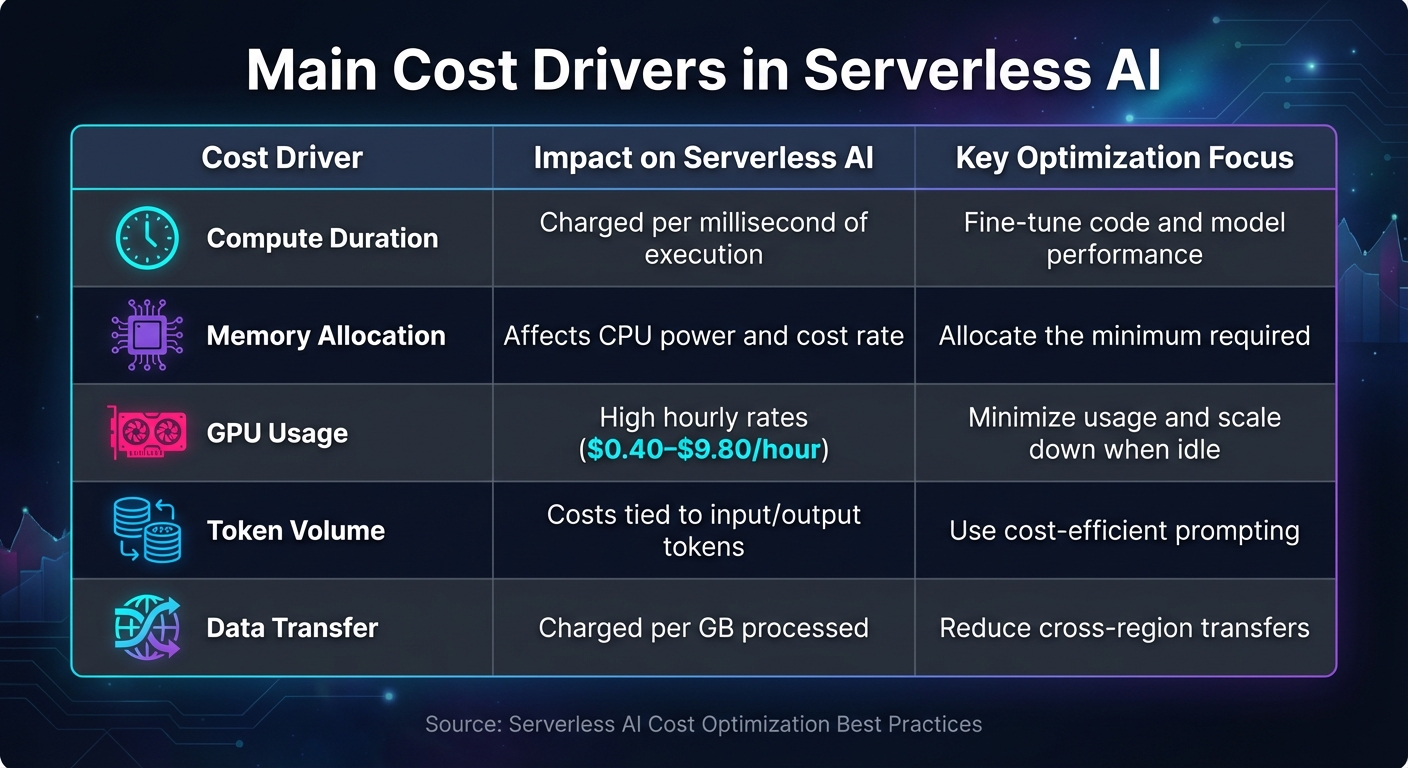
Serverless AI Cost Drivers and Optimization Strategies Comparison
Understanding and managing the various cost components is crucial for controlling serverless AI expenses. These costs can be broken down into measurable areas that you can monitor and optimize effectively.
One of the biggest expenses is compute duration. This is calculated per millisecond of execution and includes the time spent on code execution, initialization, and shutdown [12]. Simply put, the longer your function runs, the more it costs. This makes performance tuning a direct pathway to reducing expenses.
Another key factor is memory allocation. In AWS Lambda, memory allocation follows a proportional model where CPU power scales with memory. If you allocate too little memory, performance suffers. On the other hand, allocating too much memory increases costs [12][14]. Using Arm-based Graviton2 processors can help, as they offer up to 34% better price-performance compared to x86 processors [12].
GPU and accelerator usage can also lead to significant costs. For instance, running an NVIDIA Tesla T4 costs $0.4025 per hour, while an NVIDIA H100 80GB runs at $9.7965 per hour [11]. These charges are added on top of your compute costs, making it important to choose GPUs wisely to manage your budget.
Additionally, data storage and transfers contribute to the overall cost. Storing data beyond free limits or transferring data across regions can quickly add up [6][12][14].
These core costs serve as the foundation for understanding the unique expenses tied to AI workloads.
AI workloads come with their own set of cost challenges that go beyond those of standard serverless applications. For example, model complexity is a major driver. Larger foundation models require more resources for training, tuning, and serving compared to smaller or pre-trained models [8].
The inference frequency and duration also play a big role in ongoing costs. For generative AI applications, token usage becomes a primary expense. Each input prompt and generated response consumes tokens, and costs can vary depending on the length of the prompt, the size of the response, and the vector dimensions [5][6][8].
To better understand and manage these expenses, track AI-specific metrics like cost per inference, cost per training epoch, or cost per 1,000 predictions [11][13]. While serverless inference can scale down to zero during idle times, real-time inference can incur costs continuously, even when usage is low [6].
| Cost Driver | Impact on Serverless AI | Key Optimization Focus |
|---|---|---|
| Compute Duration | Charged per millisecond of execution | Fine-tune code and model performance |
| Memory Allocation | Affects CPU power and cost rate | Allocate the minimum required |
| GPU Usage | High hourly rates ($0.40–$9.80/hour) | Minimize usage and scale down when idle |
| Token Volume | Costs tied to input/output tokens | Use cost-efficient prompting |
| Data Transfer | Charged per GB processed | Reduce cross-region transfers |
Once you’ve identified the main cost drivers, keeping a close eye on spending is essential. Effective monitoring not only helps optimize costs but also uncovers inefficiencies that might otherwise go unnoticed.
A good starting point is implementing tagging strategies. By labeling resources consistently - using tags like project name, team identifier, model version, or environment type - you can analyze costs across different dimensions and quickly identify anomalies [13]. This approach makes it easier to connect specific cost drivers to overall spending.
Instead of monitoring costs only at the account-wide level, focus on tracking expenses at the function and model level. Metrics like average cost per invocation, peak spending periods, and resource utilization rates can provide valuable insights. For workflows involving durable functions, be aware of additional charges for data storage over time. For instance, Google Vertex AI Agent Engine charges $0.25 per 1,000 stored session events [11]. Setting up alerts for spending thresholds can help you catch and address unexpected costs before they spiral out of control [5].
To keep costs in check, breaking down AI workflows into smaller, independent components is a smart move. A five-layer modular architecture works well for this purpose. It typically includes:
This setup allows each layer to scale, adapt, and be fine-tuned separately [3].
Using orchestration tools to manage multi-step workflows can help you eliminate "Lambda idleness", where you end up paying for inactive compute resources. AWS provides some helpful advice on this:
"Refrain from introducing idleness where your AWS Lambda functions might be waiting for external activities to complete" [15].
Event-driven triggers are another cost-saving measure. Instead of relying on expensive job polling, you can configure managed services to trigger AI functions automatically - like when a file lands in storage or a queue message arrives. This way, the cloud provider takes care of the polling infrastructure without adding extra charges [15]. To further control costs, set strict stopping conditions and exit logic for generative AI processes. This prevents runaway resource consumption [5].
Beyond compute costs, you’ll also want to focus on minimizing data movement expenses.
One effective way to cut data transfer costs is to co-locate compute and storage resources. Keeping them in the same region reduces inter-region transfer fees [3]. For global delivery, solutions like SurferCloud's CDN, which operates across 17+ data centers, can help avoid cross-region charges.
Logging can be another hidden expense. By default, serverless functions often send standard output to logging services, where it’s stored indefinitely. To manage these costs, set log expiration policies and archive older logs to cheaper storage tiers [15]. For AI workloads, keeping prompt lengths, response sizes, and vector dimensions in check can directly reduce token usage and storage needs [5].
Caching also plays a key role in reducing transfer costs. By implementing precise Time-to-Live (TTL) settings within your function handlers, you can minimize redundant data transfers and speed up execution by reusing results from previous external calls [15]. For high-volume generative AI tasks, context caching can further reduce the cost of handling repetitive requests [8].
The execution model you choose has a direct impact on compute and data costs. Different models work better depending on traffic patterns and payload sizes:
| Execution Model | Best For | Cost Driver | Latency |
|---|---|---|---|
| Serverless | Spiky, unpredictable traffic | Request duration & data | Variable (p99 fluctuations) |
| Real-time | High, steady traffic | Instance uptime | Low and consistent |
| Asynchronous | Large payloads (up to 1GB), queue-based | Processing time (can scale to 0) | High (latency-insensitive) |
| Batch | Large-scale offline processing | Job duration | N/A (Offline) |
For sporadic traffic, serverless inference is ideal, as it scales down to zero when idle. Asynchronous models handle larger payloads efficiently, while batch inference is cost-effective for offline tasks. If you’re dealing with consistent, high-volume traffic that requires low latency, provisioned instances might be a better fit.
It’s also worth experimenting with different memory settings for your serverless functions. Since CPU and network bandwidth scale with memory, a higher memory allocation could reduce execution time enough to lower your overall cost per invocation [15][7]. Additionally, consider running functions on ARM-based processors, which often provide better price-performance ratios compared to x86 processors for AI workloads [7].
Fine-tuning memory and CPU settings can significantly reduce serverless AI expenses. Over-provisioning often leads to 30–40% of cloud resources going to waste, but by adjusting resources to fit actual needs, costs can drop by 30–50% [10]. Instead of relying on guesswork, use data-driven insights to make these decisions.
Start by monitoring your CPU, memory, and GPU usage for about two weeks to identify usage patterns. Tools like AWS Compute Optimizer or SageMaker Inference Recommender can provide precise recommendations to help you allocate resources effectively [6][10]. If you notice resources running below 40% utilization consistently, it’s a clear sign they can be scaled down [10].
"Design decisions are sometimes guided by haste as opposed to empirical data, as the temptation always exists to overcompensate just in case rather than spend time benchmarking for the most cost-optimal deployment."
For models with lower traffic, consider consolidating multiple models onto a single serverless endpoint using multi-model endpoints. This setup allows shared compute resources and eliminates costs from idle instances [6]. For latency-sensitive applications, provisioned concurrency can keep environments "warm" to maintain responsiveness, while auto-scaling ensures resources drop to zero during idle periods [1][6].
A real-world example: In 2024, the BMW Group teamed up with AWS to create an In-Console Optimization Assistant using AWS Bedrock. By analyzing resource use across more than 4,500 AWS accounts, they implemented AI-driven right-sizing strategies, reportedly cutting AI processing costs by up to 70% [2].
Once your resources are properly sized, the next step is refining your models to reduce costs even further.
After right-sizing, optimizing your models can directly lower the computing load and expenses tied to inference. The trick is to cut costs while preserving model quality.
Techniques like quantization - converting models from FP32 to INT8 or INT4 - can shrink storage needs to just 25% of the original size and reduce compute demands [2]. Most applications experience only a minor accuracy drop, often negligible in production [17].
Pruning is another method, where unnecessary weights, neurons, or channels are removed to simplify the model. While this reduces the computational burden, it often requires iterative retraining to maintain accuracy [17]. For those willing to invest time upfront, knowledge distillation can create a smaller "student" model that replicates the behavior of a larger "teacher" model. The result? Faster inference at a fraction of the cost [17].
"By optimizing your models to be more performant, you may be able to lower costs by using fewer or smaller instances while keeping the same or better performance characteristics."
- Amazon SageMaker AI Documentation [6]
For large language models, speculative decoding offers an efficient solution. A smaller "draft" model generates tokens, which the larger "target" model then verifies in parallel. This approach speeds up token generation while maintaining output quality [17]. Additionally, tools like TensorRT, ONNX, or TVM can compile model graphs into hardware-specific kernels, making execution more efficient [17][9].
Beyond tweaking models, caching and batching strategies can also help reduce compute costs.
Caching results can prevent redundant computations, saving both time and resources. For transformer-based models, key-value (KV) caching stores key and value tensors from prior computations, avoiding the need to recompute attention for previously processed tokens. For instance, a 7B parameter model with a 4,096-token sequence length using FP16 precision might require about 2 GB of memory for its KV cache - a worthwhile trade-off for cutting compute costs [17].
At the function level, implementing local in-memory caching with Time-to-Live (TTL) policies can reduce slow I/O operations. Serverless platforms like AWS Lambda often reuse execution contexts, so storing results from external calls in global variables can enable reuse across multiple invocations [15][18].
Batch processing is another powerful cost-saving method. By grouping multiple requests into a single GPU kernel invocation, you can spread the fixed costs of model execution across multiple inputs. This boosts throughput and improves hardware utilization, though it may introduce slight latency for individual requests [17]. In environments with varying traffic, micro-batching can strike a balance - adjusting batch sizes dynamically to maintain high throughput during peak times and low latency during quieter periods [17].
"Batching packs multiple requests together, allowing a single GPU to execute more work per kernel invocation. That raises throughput and improves GPU utilization."
- Inference.net [17]
For workloads where latency isn’t a major concern, decoupling request handling from heavy computations can further reduce idle time and billed durations. Using queues for asynchronous processing ensures better resource allocation. Additionally, response memoization - caching full inference results for identical queries - can eliminate redundant computations altogether [18][15][17].
Keeping track of unit cost metrics like cost per inference, data point, or task gives you a clear picture of how efficiently your system is running [9].
Pay close attention to execution duration, latency, and memory usage. For example, AWS Lambda charges are tied to execution time and allocated memory, so even minor inefficiencies can lead to noticeable expenses [19]. When dealing with generative AI workloads, monitor factors such as prompt lengths, response sizes, token usage, and vector dimensions - these all directly affect your costs [5].
To stay ahead, set up real-time dashboards that merge usage data with billing information. Tools like CloudWatch or Google Cloud Monitoring make it easier to identify trends and potential cost spikes [6][9]. Consistent tagging - using labels like project, team, model, or environment - helps you accurately attribute spending.
"You can't optimize what you can't see. Comprehensive tagging strategies let you track spending by business unit, application, environment, or project."
- Flexential [10]
Automated tools can also be a game changer. They can flag unusual usage patterns and recommend adjustments, such as resizing resources to better match your needs [6][7][9][8]. With these systems in place, you can tighten control and avoid unexpected charges.
Once you're tracking costs effectively, it's time to set up budget controls. Budget alerts are a great way to prevent surprises. For instance, you can create multi-level alerts for spending thresholds - like 50%, 75%, and 90% - to catch inefficiencies before they spiral [9][16].
You can also implement compute policies to limit which VM or GPU instances teams can use. This avoids situations where expensive hardware is mistakenly allocated for tasks that don’t need it [16]. Another cost-saving tip: enable auto-termination for development environments after an hour of inactivity. This simple step can slash costs by as much as 75% [10][16]. For teams with predictable workloads, commitment-based pricing models like Savings Plans can cut expenses by up to 64% compared to on-demand pricing [6].
Efficient resource allocation is just the start - you also need to manage workload lifecycles to avoid wasting money. Regularly audit your resources to identify unused experiments and outdated models. These "zombie resources" can quietly drain your budget with unnecessary storage costs.
Set up a consistent audit schedule to review active resources. Check which models are still in use and flag experiments that wrapped up months ago but are still taking up valuable storage. Retire anything unnecessary to reduce costs and simplify operations [16][10]. MLOps pipelines can automate much of this cleanup, retiring inactive models and deleting outdated configurations systematically [9][6].
Consistent tagging plays a key role here too. When every resource is tagged with metadata - like its purpose, owner, and creation date - it’s much easier to spot candidates for retirement. You can even use automated policies to flag resources that are older than a certain age or haven’t seen traffic in a while [9][16].
For production models, set clear exit conditions. Define specific thresholds for accuracy, latency, or business performance that trigger automatic retirement when the model no longer meets your standards. This ensures you’re not paying for models that no longer deliver real value [5][9].
Running AI workloads on serverless infrastructure can be highly economical when approached with the right strategies. However, achieving cost efficiency demands consistent effort. The methods discussed in this guide - such as right-sizing resources, optimizing models, implementing effective monitoring, and managing lifecycle policies - can lead to cost reductions of 30–40% or more [10].
The pay-per-use billing model is a game changer, as it eliminates costs associated with idle resources when managed effectively. Techniques like quantization, leveraging spot instances, and auto-terminating development environments can further drive down expenses [1][2][10]. When paired with a strong infrastructure, these practices ensure consistent savings and operational efficiency.
Detailed visibility is key to targeted cost optimization. Without proper tagging and real-time monitoring, it's nearly impossible to pinpoint waste or accurately track spending. Tools like budget alerts, automated cleanup policies, and routine audits help prevent unnecessary costs. As highlighted by the AWS Well-Architected Framework:
"Adopting the practices in this document will enable you to build and operate cost-aware systems that achieve business outcomes and minimize costs, thus allowing your business to maximize its return on investment" [4].
SurferCloud's infrastructure, with its 17+ data centers and elastic compute model, offers local data processing and reduced transfer fees. These features complement the best practices outlined here, ensuring a smooth and cost-efficient AI deployment. With flexible scaling options and 24/7 expert support, SurferCloud enables you to deploy serverless AI pipelines that align precisely with your workload needs - avoiding unnecessary over-provisioning.
The strategies, architectural patterns, and monitoring techniques discussed throughout this guide provide a comprehensive approach to managing costs. By integrating these practices with SurferCloud's scalable platform, you can build AI systems that not only meet your performance goals but also maintain financial discipline. The cloud FinOps movement - bringing together finance, technology, and business teams - helps maximize the value of every dollar spent [8]. These strategies lay the groundwork for achieving that balance.
To keep expenses under control in serverless AI environments, start by establishing clear budgets and setting up usage alerts. For instance, you can define monthly spending limits in USD and configure notifications to trigger when usage hits 80% or 100% of your budget. This proactive step helps you avoid unexpected cost overruns.
Keep an eye on detailed usage metrics like memory consumption, execution time, and data transfer. These metrics can reveal hidden expenses, such as excessive logging or unnecessary API calls. To optimize costs further, align your workload with the appropriate inference mode: use serverless for unpredictable, spiky requests, real-time for consistent traffic, and asynchronous processing for batch jobs.
Make it a habit to regularly review your usage and adjust resource allocations to eliminate paying for unused capacity. Adopt cost-saving coding practices, such as caching frequently used data, minimizing external calls, and defining log retention policies. By consistently refining your strategies, you can balance strong performance with effective cost management.
To get the most out of your AI models while keeping costs in check, start by focusing on data quality. Eliminating irrelevant, duplicate, or incorrect data - commonly referred to as noise reduction - can lead to faster training, lower computing costs, and better model accuracy. Addressing class imbalances is another smart move, as it helps avoid overfitting, reduces the number of training cycles, and boosts overall efficiency.
Next, make sure to select a model size that matches your workload. Choose a model with enough parameters to meet your accuracy requirements without adding unnecessary overhead. Tailor your inference strategy to your traffic patterns: real-time endpoints work best for consistent, low-latency needs; serverless inference suits fluctuating workloads; and asynchronous inference is ideal for processing large, non-urgent batches. For generative AI tasks, trimming prompt lengths and limiting output size can significantly reduce token usage and storage costs.
Finally, adopt cost-aware practices throughout your AI development process. Clearly define your use cases and calculate the total cost of ownership (TCO) before scaling up. Incorporate FinOps principles to track expenses and make the most of your resources. Tools like SurferCloud offer features such as automated scaling and ARM-based instances, which can help you save money while maintaining strong performance. By integrating these strategies, you can keep your AI workloads efficient, accurate, and budget-friendly.
When compute and storage resources are housed in the same facility, data transfers happen internally, eliminating external egress charges. This setup helps cut down on extra costs that come with moving data across separate locations or networks.
Keeping data processing and storage close not only saves money but also boosts performance by reducing latency. It's a smart and efficient way to handle serverless AI workloads.





