1vCPU, 1GB RAM VPS for Only $9.9/Year – Lim
Unbeatable Value for Developers, Startups, and Small Bu...








When deciding between cloud storage and on-premises storage, the choice often comes down to cost, scalability, and operational needs. Cloud storage uses a pay-as-you-go model with minimal upfront costs but recurring fees, while on-premises storage requires significant initial investment but offers predictable long-term expenses. Here's a quick breakdown:
| Feature | Cloud Storage | On-Premises Storage |
|---|---|---|
| Upfront Cost | Minimal (subscription-based) | High (hardware, setup) |
| Scaling | Instant, pay-as-you-go | Slow, requires new hardware |
| Recurring Costs | Monthly/annual fees | Maintenance, utilities |
| Data Access Costs | Egress fees may apply | Internal network only |
| Management | Minimal IT resources needed | Requires dedicated staff |
| Compliance | Standard certifications | Full control over data |
For workloads with predictable, high utilization, on-premises storage can save money over time. However, cloud storage is ideal for businesses needing flexibility or facing rapid growth. Many organizations now adopt a hybrid approach to balance costs and performance.
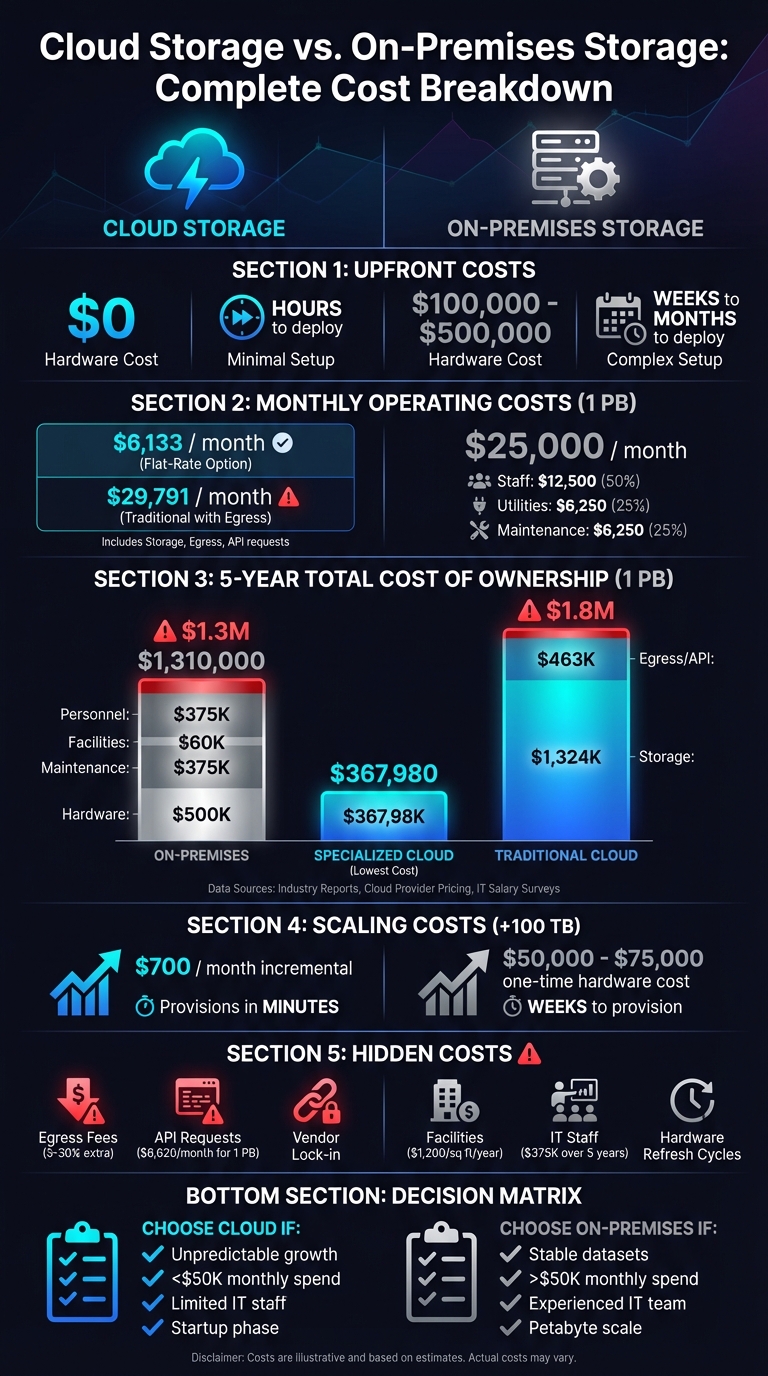
Cloud vs On-Premises Storage: 5-Year Total Cost Comparison for 1 PB Data
The initial financial outlay is one of the clearest distinctions between cloud storage and on-premises storage. On-premises storage requires a significant upfront capital investment, whereas cloud storage operates on a pay-as-you-go basis, with little to no initial costs. Let’s break down the setup costs for both options.
With cloud storage, initial expenses are minimal. Most businesses only need to cover their first month's subscription fee to begin. There's no need to buy servers, storage arrays, or networking hardware - the provider takes care of all that. The primary upfront costs might include data migration services or bandwidth upgrades. For instance, SurferCloud’s platform allows businesses to set up an account and deploy storage within minutes, starting with just the capacity they need and scaling as required.
"Cloud services help organizations eliminate capital expenditures on IT systems and hardware refresh cycles; move away from perpetual software license and maintenance agreements, and lower the burden on internal IT resources." - Andrew Smith, Senior Director of Strategy, Wasabi [5]
On-premises storage, on the other hand, demands a substantial upfront investment before any data can be stored. Businesses must purchase servers, storage devices, networking equipment, and supporting infrastructure like racks, cooling systems, and power supplies. High-performance setups can cost as much as $100,000 [6], while enterprise-level systems with 1-petabyte capacity may reach $500,000 [5]. Additional costs include software licenses, installation services, and modifications to facilities. The process of procurement and installation can take weeks or even months, delaying the system’s usability.
| Cost Component | On-Premises Storage | Cloud Storage |
|---|---|---|
| Hardware | $100,000–$500,000+ | $0 |
| Networking Equipment | $10,000–$50,000 | Bandwidth upgrades |
| Software Licenses | $20,000–$100,000 | Included in subscription |
| Facilities Setup | $15,000–$75,000 | $0 |
| Installation Labor | $10,000–$50,000 | Minimal (account setup) |
| First Payment | Full purchase price | First month subscription |
| Deployment Time | Weeks to months | Hours to days |
Once your system is up and running, the recurring expenses become the key factor in determining long-term affordability. Cloud storage typically operates on a subscription model with predictable monthly fees, while on-premises systems come with a variety of ongoing costs that can accumulate significantly over time.
Cloud storage follows an OpEx (operational expenditure) model, charging on a pay-as-you-go basis. Monthly costs usually include storage, processing (like API calls), network egress, and management fees. For traditional cloud providers, standard storage rates are about $0.020–$0.023 per GB/month. SurferCloud offers competitive flat-rate pricing without surprise egress fees, supported by 17+ global data centers and 24/7 expert assistance.
Network egress fees can be a major cost factor. Traditional providers often charge $0.08–$0.12 per GB for data transfers beyond the first 100 GB, adding anywhere from 5% to 30% to the base storage cost. For example, storing 1 petabyte (PB) of data could cost approximately $6,133 per month with simplified pricing, while traditional providers might charge around $29,791 per month when factoring in egress fees [5].
"From a cost of goods sold perspective, AWS pricing wasn't a great fit. Backblaze was a drop-in API replacement with a much better cost structure - it was just a no-brainer." - Rory Petty, Co-Founder & CTO, Tribute [8]
On the other hand, on-premises storage comes with its own set of recurring costs, which can grow over time.
Unlike the predictable subscription fees of cloud storage, on-premises systems require managing multiple ongoing expenses. For example:
For a 1 PB system, businesses might need approximately 0.5 full-time equivalent (FTE) staff at an annual cost of $150,000. Additionally, five-year maintenance agreements could total around $375,000 [5][9][2]. Recurring software licenses, security updates, and management tools also contribute to the overall expenses.
While some case studies suggest that significant investments in on-premises infrastructure can eventually reduce cloud-related recurring costs, the offset expenses remain considerable [9].
| Data Volume | On-Premises (Monthly) | Cloud Storage (Monthly) |
|---|---|---|
| 10 TB | ~$1,250 (staff) + $500 (utilities) + $200 (maintenance) = $1,950 | ~$70 (flat-rate) or ~$300+ (traditional with egress) |
| 100 TB | ~$2,500 (staff) + $1,000 (utilities) + $500 (maintenance) = $4,000 | ~$700 (flat-rate) or ~$3,000+ (traditional with egress) |
| 1 PB | ~$12,500 (staff) + $6,250 (utilities) + $6,250 (maintenance) = $25,000 | ~$6,133 (flat-rate) or ~$29,791 (traditional with egress) [5] |
| Additional Cost Component | On-Premises | Cloud Storage |
|---|---|---|
| Hardware Maintenance | $200–$350 per server [2] | Included in subscription |
| Software Licenses | Recurring renewals | Included in subscription |
Data footprints are expanding at an astonishing rate - about 30–40% annually [5]. With this kind of growth, managing scaling costs becomes a key consideration. Cloud storage and on-premises systems approach this challenge in fundamentally different ways. The cloud operates on a pay-as-you-go model, while on-premises solutions require significant upfront hardware investments. Let’s break down how these differences impact scaling costs.
Cloud storage offers unmatched flexibility when it comes to scaling. Need more space? You can increase or decrease your capacity almost instantly. Whether you’re adding 1 TB or 100 TB, provisioning is immediate, and you only pay for what you use [1]. For example, SurferCloud’s services allow businesses to scale seamlessly across more than 17 global data centers. This elasticity means you can avoid unnecessary spending, as costs remain proportional to usage.
Another advantage? You can adjust performance metrics, like IOPS, or switch between storage tiers without any physical upgrades. For colder, rarely accessed data, lower-cost storage tiers can significantly reduce expenses, helping businesses optimize their budgets as data ages [3].
Scaling on-premises storage is a much more rigid and expensive process. When you run out of capacity, you’re looking at purchasing entire server chassis, disk enclosures, or storage arrays. These investments don’t happen overnight - they can take weeks or even months for procurement, shipping, and installation [1]. The result? A stair-step pattern of large, intermittent capital expenditures.
Initial investments for on-premises systems can be steep, often exceeding $100,000 [6]. And once that capacity is purchased, it’s fixed - you’re stuck with the ongoing costs of power, cooling, and maintenance, even if your storage needs decrease. Over-provisioning leads to wasted resources, while under-provisioning can create bottlenecks. Compare this to the cloud, where scaling is instant and efficient.
For instance, storing 1 PB of data on-premises for five years could cost around $1,310,000, while low-cost cloud providers can offer the same capacity for approximately $367,980 [5]. On-premises scaling also comes with hidden expenses: additional rack space, higher power consumption (averaging $1,200 per square foot annually for power and cooling), upgraded HVAC systems, and increased labor costs for IT staff to manage the infrastructure [6].
| Storage Growth | Cloud Storage (Incremental Cost) | On-Premises (Incremental Cost) |
|---|---|---|
| +10 TB | ~$70/month (predictable pricing) or ~$200–$230/month (traditional) | Minimal if capacity exists; otherwise ~$10,000–$15,000 for new hardware |
| +100 TB | ~$700/month (predictable pricing) or ~$2,000–$2,300/month (traditional) | ~$50,000–$75,000 for additional servers + installation |
| +1 PB | ~$6,133/month (predictable pricing) or ~$20,000–$30,000/month (traditional) [5] | ~$200,000–$300,000 for hardware + secondary infrastructure costs |
| Scaling Factor | Cloud Storage | On-Premises Storage |
|---|---|---|
| Provisioning Time | Minutes to hours [1] | Weeks to months [1] |
| Capacity Direction | Up and down (elastic) | Up only (fixed once purchased) |
| Investment Model | Granular (per GB/TB) | Large increments (per server/chassis) |
| Risk | Low (pay only for usage) [6] | High (over/under-provisioning) [1] |
When considering upfront and operating costs, the Total Cost of Ownership (TCO) provides a clearer, long-term view of financial impacts. It captures not just the obvious expenses like hardware and software but also accounts for personnel, facilities, and other hidden costs. By looking at TCO over a five-year period, organizations can determine which storage solution aligns best with their financial and operational needs. Let’s break down the TCO for cloud and on-premises storage options over this timeframe.
Cloud storage typically follows a usage-based billing model, charged monthly or annually. Direct costs include fees for storage per gigabyte, data egress (transferring data out of the cloud), and API requests for operations such as PUT, GET, and COPY [10][3]. Indirect costs can add up too, such as expenses for monitoring tools, security configurations, third-party backups, and potential migration fees [10].
For large-scale storage needs, these costs can escalate quickly. For example, storing 1 PB of data over five years with a traditional cloud provider could cost around $1,787,443, factoring in egress and API fees [5]. However, specialized cloud storage providers that eliminate these fees can reduce the cost significantly to approximately $367,980 for the same capacity and period [5]. Cloud storage shines in scenarios where workloads are unpredictable or during times of rapid growth. That said, once your data needs stabilize, those recurring bills can start to feel like what IT consultant Tom Lawrence calls "technical debt" [7].
On-premises storage involves a higher upfront investment but offers more predictable recurring costs. The initial hardware investment for a 1 PB storage cluster - which includes servers, disk enclosures, racks, and networking equipment - ranges from $395,000 to $500,000 [5][7].
Beyond hardware, maintenance over five years adds about $375,000, while facilities costs like power, cooling, and floor space contribute roughly $60,000 [5]. Staffing is another factor, as managing the system typically requires 0.5 to 1 Full-Time Equivalent (FTE) per petabyte, costing around $375,000 in salaries [5]. Altogether, the five-year TCO for 1 PB of on-premises storage is approximately $1,310,000 [5]. This approach eliminates data transfer fees after the initial setup and offers predictable costs, making it a strong choice for stable, high-utilization workloads.
A real-world example from May 2025 illustrates this point. Lenovo's AI Data Science team compared the TCO of a ThinkSystem SR675 V3 server (equipped with 8× NVIDIA H100 GPUs) to an AWS EC2 p5.48xlarge instance. The on-premises system cost $833,806 upfront and reached a breakeven point in just 11.9 months compared to cloud on-demand pricing. Over five years, this setup saved $3,434,504 versus continuous cloud usage [11]. This case underscores how on-premises infrastructure can be the more economical choice for predictable, high-utilization workloads.
"Cloud makes sense when your product does not have a predictable use rate. But once your growth stabilizes, the economics change, and on-premise becomes much more attractive."
– Tom Lawrence, IT Consultant, Lawrence Systems [7]
| Cost Component (1 PB / 5 Years) | On-Premises Storage | Specialized Cloud Storage | Traditional Cloud Storage |
|---|---|---|---|
| Hardware/Subscription Cost | $500,000 | $367,980 | $1,324,020 |
| Maintenance/Support | $375,000 | Included | Included |
| Facilities (Power/Cooling) | $60,000 | Included | Included |
| Admin/Personnel | $375,000 | Minimal | Minimal |
| Egress/API Fees | $0 | $0 | $463,423 |
| Total 5-Year TCO | $1,310,000 | $367,980 | $1,787,443 |
The choice between cloud and on-premises storage often hinges on your organization’s specific needs. If your storage requirements grow by 30–40% annually [5], it’s crucial to model how each solution scales with your workload. For consistent, high-performance workloads that run more than 5–9 hours daily, on-premises storage often becomes the more cost-effective option within two years [11]. On the other hand, if your workloads are unpredictable and prone to sudden spikes, the flexibility of cloud storage may justify its higher long-term costs.
When evaluating the total cost of ownership, it’s not just about upfront or operating expenses. Hidden and indirect costs can significantly impact the overall financial picture. Both cloud and on-premises storage models come with their own set of less obvious expenses that are essential to consider.
Cloud storage often comes with fees that aren’t immediately apparent. For example, data egress fees - the cost of moving data out of the cloud - can quickly surpass the base storage costs [10]. Additionally, API requests can add up fast. A 1 PB system could lead to an extra $6,620 per month just from these requests [5].
There’s also management overhead to account for. Tasks like configuring IAM policies, conducting integrity checks, and ensuring encryption for compliance all require time and resources [10]. As Christopher Tozzi, a technology analyst at Fixate.IO, explains:
"The total cost of ownership for storing data in the cloud is typically much higher than the simple per-gigabyte storage fees suggest" [10].
Another major hidden cost? Vendor lock-in. Switching cloud providers isn’t as simple as it sounds. It often involves hefty data retrieval fees and reconfiguring applications to work with a new provider’s proprietary APIs [1].
But cloud storage isn’t the only model with hidden expenses. On-premises storage has its own challenges.
With on-premises storage, the expenses extend far beyond just hardware. For instance, facility costs can be substantial. Power and cooling alone for data centers average about $1,200 per square foot annually [5].
Personnel costs are another major factor. Managing a 1 PB system typically requires dedicated IT staff for tasks like monitoring, configuration, and troubleshooting. Over five years, administrative support for such a system could cost around $375,000, assuming 0.5 full-time equivalent (FTE) personnel at $150,000 annually [5]. T.J. Burlee from Secure Data Recovery Services notes:
"On-premise storage could require full-time staff to oversee it depending on the scale. The cost of owning infrastructure still goes beyond hardware and employees" [3].
Then there’s hardware lifecycle management. Technology assets usually depreciate within 3 to 5 years [13], meaning regular hardware upgrades are necessary to avoid performance issues or obsolescence. Overprovisioning can lead to wasted resources, while underprovisioning might result in performance bottlenecks or downtime [1]. For high resiliency, organizations often need to double their infrastructure to maintain mirrored data at a secondary location, which adds even more to the costs [6].
Here’s a quick breakdown of the hidden cost factors for both cloud and on-premises storage:
| Hidden Cost Category | Cloud Storage | On-Premises Storage |
|---|---|---|
| Data Movement | Egress fees and cross-region transfers (approx. 5% extra) [10] | Minimal (internal network only) |
| Operations | API request fees (approx. $6,620/month for 1 PB) [5] | Included in IT staff labor [5] |
| Facilities | Included in subscription fees | Around $1,200/sq ft/year for power and cooling [5] |
| Personnel | Lower management overhead | Approx. $375,000 over 5 years (0.5 FTE) [5] |
| Maintenance | Included in service fees | Roughly 15% annually or $375,000 over 5 years [5] |
| Scalability | Pay-per-use; may incur charges for unused capacity [1] | Costs linked to idle, overprovisioned hardware |
| Resiliency | Multi-region redundancy included | Requires duplicate infrastructure [6] |
Understanding these hidden costs is critical for making informed decisions about which storage model best suits your needs. Both options have their trade-offs, and factoring in these indirect expenses can help avoid unexpected financial surprises.
Choosing the right storage solution is a big decision, especially since a misstep could cost your business thousands - or even millions. To make the best choice, you’ll need to weigh your unique needs against your financial and operational goals. Below, we’ll break down the key factors to consider and provide a helpful checklist to guide your decision.
One of the first things to evaluate is data volume and growth patterns. If your storage demands are unpredictable or growing quickly, cloud storage might be your best bet. Its pay-as-you-go pricing ensures you only pay for what you use. However, for large, stable datasets - particularly at the petabyte scale - on-premises storage often becomes more cost-efficient. For workloads with predictable, high utilization, owning your infrastructure can save you money in the long run.
Access patterns and data movement are another critical factor. Frequent data retrieval in the cloud can rack up extra charges from egress fees and API calls, which might even surpass the base storage costs. If your data will be accessed or transferred frequently, on-premises storage could save you money since internal network transfers don’t incur extra fees.
Your IT resources, expertise, and budget structure also play a significant role. On-premises storage requires dedicated staff for maintenance, monitoring, and hardware upkeep. If your organization lacks a skilled IT team, the managed services provided by cloud storage can help bridge that gap. On the other hand, if you already have an experienced infrastructure team, adding on-premises storage won’t significantly increase labor costs. Additionally, businesses that prefer predictable capital expenditures (CapEx) may lean toward on-premises solutions, while those valuing the flexibility of operating expenses (OpEx) often find cloud storage more appealing.
Compliance requirements may tip the scales toward on-premises storage if your organization needs strict data sovereignty or air-gap security.
Here’s a key benchmark to keep in mind: if your monthly cloud spending exceeds $50,000, it’s worth considering an investment in on-premises hardware. At that level, owning your infrastructure can start to deliver better value than relying on the cloud [4].
| Factor | Choose Cloud Storage If... | Choose On-Premises If... |
|---|---|---|
| Data Volume | Storage needs are modest and growth is unpredictable | Your datasets are large and stable, especially at petabyte scale |
| Growth Pattern | Growth is rapid, unpredictable, or seasonal | Growth is steady and predictable |
| Access Frequency | Data access is infrequent or distributed | Frequent local access is required |
| Upfront Budget | Limited capital is available | Sufficient capital is available for hardware investments |
| IT Resources | You lack a dedicated infrastructure team | Your IT team is experienced |
| Scaling Speed | You need instant capacity adjustments | You can plan capacity expansions months in advance |
| Compliance | Standard certifications meet your needs | Strict data sovereignty or air-gap security is necessary |
| Monthly Spend | Spending is below $50,000 per month | Spending exceeds $50,000 per month |
| Business Stage | You’re a startup or in rapid growth | You have mature, stable operations |
| Disaster Recovery | You need multi-region redundancy | You can manage disaster recovery with a secondary physical site |
This checklist complements the cost models we’ve discussed earlier, helping ensure your choice aligns with long-term ownership costs.
For many organizations, a hybrid approach ends up being the most practical solution. Combining on-premises storage for performance-critical data with cloud storage for backups and burst capacity strikes a balance between control and flexibility.
If you’re leaning toward a cloud-first strategy, consider providers like SurferCloud, which offers scalable solutions tailored to your evolving needs.
Deciding between cloud and on-premises storage boils down to your financial priorities and operational goals. As Kristina Brand from NetApp explains, "The difference between purchasing on-premises storage and consuming public cloud storage comes down to the difference between capex and opex models" [6].
For a 1 PB workload over five years, on-premises storage costs approximately $1,310,000, covering hardware, maintenance, and facilities. In comparison, cloud storage expenses range from $367,980 to over $1,787,000 [5]. These numbers highlight the cost dynamics we’ve explored.
Your storage choice should align with your workload demands. If your business faces unpredictable growth or has limited upfront capital, cloud storage provides the scalability to adjust resources as needed without overcommitting. On the other hand, companies managing large, stable datasets or adhering to strict compliance rules might find owning infrastructure more cost-effective in the long term.
Interestingly, around 58% of organizations now adopt a hybrid approach [12]. This strategy keeps performance-critical data on-premises while using the cloud for archives and elastic workloads, striking a balance between cost and performance. With global data projected to grow fivefold between 2021 and 2026 [12], it’s essential to plan for both current needs and future expansion.
For those leaning toward cloud solutions, providers like SurferCloud offer scalable options with 17+ global data centers and flexible pricing models tailored to grow alongside your business. Just remember, the cheapest upfront option doesn’t always mean the best total cost over five years - calculate all associated expenses before making your decision.
Hidden costs in cloud storage, like data egress fees, API request charges, and snapshot storage costs, can quietly add up over time. At first glance, the per-GB rates might seem affordable, but as your data scales, these extra charges can pile up, pushing your expenses higher than anticipated.
To keep these costs under control, take the time to evaluate your storage requirements, keep an eye on your usage trends, and select a provider that offers clear and upfront pricing. Being mindful of these factors can help you manage your budget more effectively and reduce unnecessary spending in the long run.
A hybrid storage solution blends on-premises infrastructure with cloud services, offering a practical mix of flexibility and cost savings. It works by keeping sensitive or regulation-heavy data stored locally while moving less-critical workloads to the cloud. This setup helps businesses cut down on upfront hardware costs while taking advantage of the cloud's pay-as-you-go pricing.
One of the biggest perks of this approach is its ability to scale and perform efficiently. The cloud offers nearly unlimited storage, making it simple to ramp up capacity for new projects or handle seasonal spikes without overloading your on-premises setup. Plus, hybrid storage boosts resilience and ensures compliance by keeping critical data local, while still using the cloud for disaster recovery and easy global access. For businesses in the U.S., it’s a secure, scalable, and cost-conscious way to tackle modern data management challenges.
The frequency with which data is accessed has a big impact on the cost-efficiency of storage solutions. Cloud storage works on a pay-as-you-go basis, meaning costs are tied to both the amount of data stored and how often it’s accessed. For data that’s rarely used (commonly referred to as "cold" storage), there are lower-cost tiers available. On the flip side, data that’s accessed frequently ("hot" storage) comes with higher charges. This setup gives businesses the flexibility to manage expenses according to their usage patterns.
On-premises storage, however, requires a significant upfront investment in hardware, regardless of how often the data is accessed. This approach can be more economical for high-frequency, large-scale workloads where the hardware is fully utilized. But for data that’s seldom accessed, it may not be the best option. Over time, cloud storage tends to be more cost-efficient for infrequent data access, while on-premises storage often makes sense for consistent, large-scale usage.





