Affordable Los Angeles VPS Hosting — High P
If you're looking for a reliable and cost-effective VPS...









Latency can make your cloud app feel slow and frustrating for users. It impacts everything from page load times to real-time applications like gaming or video calls. The good news? You can fix it. Here are 8 practical solutions to reduce latency and improve performance:
These strategies address latency from multiple angles - network, database, and traffic management - helping your app stay fast and reliable. Start with the solutions that target your app's biggest bottlenecks and build from there.
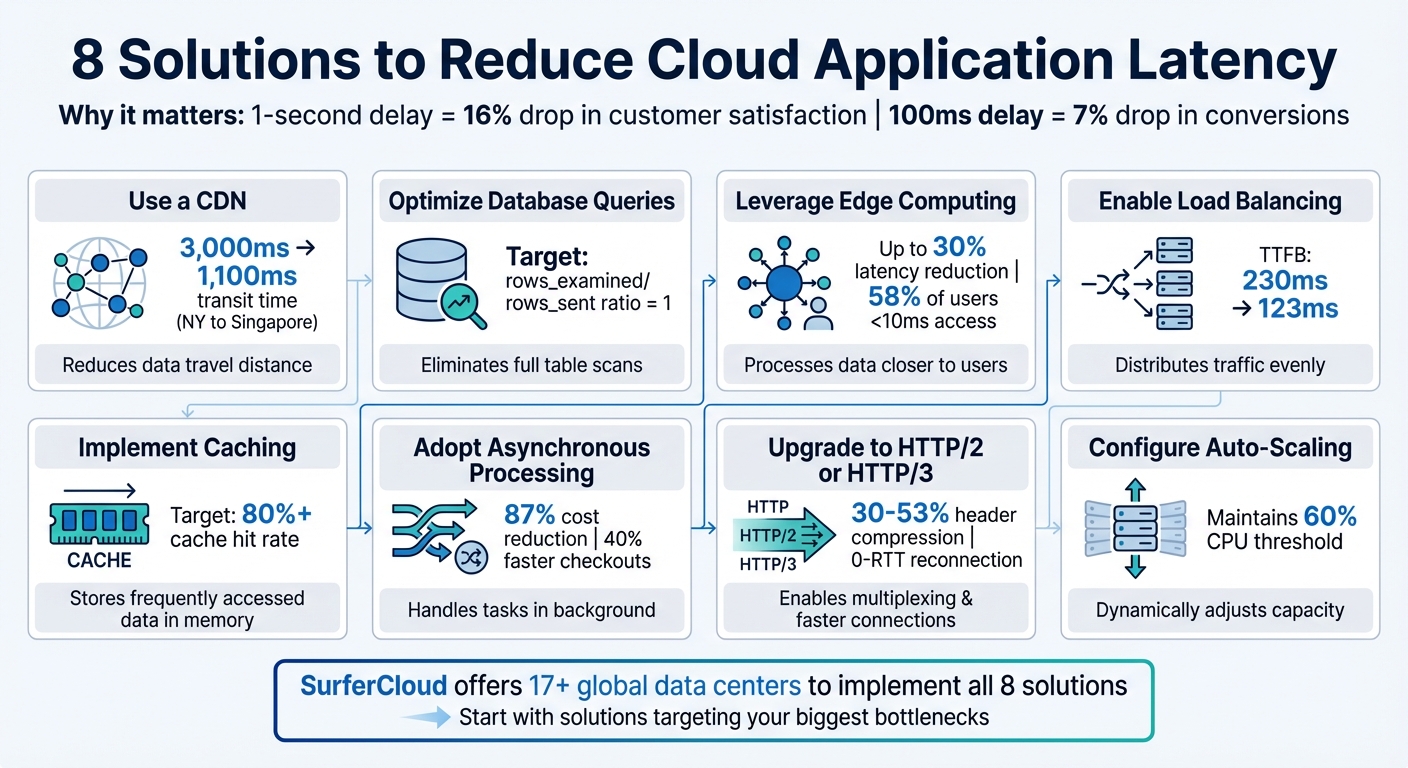
8 Solutions to Reduce Cloud Application Latency

A Content Delivery Network (CDN) works by caching your content on servers distributed across the globe. Instead of routing users to a single, distant server, a CDN delivers content from the server closest to them. SurferCloud, for instance, operates more than 17 global data centers, ensuring faster access no matter where your users are located.
The difference this makes can be substantial. For example, in a test measuring data transfer from New York to Singapore, using a CDN reduced the total transit time from around 3,000ms to just 1,100ms - a nearly two-second improvement. Considering that even a one-second delay in page load time can result in a 7% drop in conversions and an 11% drop in page views, these improvements are crucial. Beyond faster transit times, a CDN also lays the foundation for further latency reductions.
CDNs cut latency by minimizing the distance data needs to travel - roughly 1ms is saved for every 62 miles of reduced travel. Additionally, CDN edge servers are equipped with high-performance hardware like SSDs and RAM, enabling them to retrieve files up to 30% faster than traditional hard drives.
Edge servers also maintain persistent connections with the origin server, eliminating the need for repeated TCP handshakes. This can significantly reduce Time to First Byte (TTFB) in long-distance scenarios, from 230ms to 123ms. On top of that, CDNs employ GZip compression to shrink file sizes by as much as 70%, meaning less data needs to traverse the network.
To configure SurferCloud CDN, start by updating your DNS settings. Point your root domain's A record to SurferCloud's CDN IP range, and set your subdomain CNAME to the CDN-provided address. This ensures that traffic flows through the CDN's edge network before reaching your origin server.
Next, use versioned URLs (e.g., style.v2.css) to bypass the need for manual cache invalidation. Enable HTTP/2 or HTTP/3 protocols for features like header compression and connection multiplexing, which further reduce perceived latency. Finally, configure cache durations wisely - set longer expiration times for static assets and shorter TTLs for content that changes frequently.
Database queries that aren’t optimized are often the leading culprits behind high latency in cloud applications. When your database resorts to full table scans instead of targeted lookups, response times can spike dramatically. By fine-tuning your queries, you can achieve noticeable performance gains without making changes to your infrastructure.
Start by analyzing execution plans (using tools like EXPLAIN or EXPLAIN ANALYZE) to identify inefficient join types, such as those labeled "ALL", which indicate full table scans. Ideally, the rows_examined to rows_sent ratio should be 1. If it’s higher, your query is likely processing more data than it needs to.
Define primary keys and add secondary indexes on columns used in WHERE, ORDER BY, and GROUP BY clauses. This adjustment can significantly reduce resource-heavy operations. For example, in Amazon DynamoDB, replacing SCAN operations with QUERY operations that use partition keys can drastically cut down on database load.
Keep transactions short to avoid lock contention, excessive undo logs, and unnecessary disk I/O. For larger operations, consider breaking them into smaller, more manageable transactions. Additionally, enabling slow query logs can help you identify and address queries that exceed acceptable execution times.
Connection pooling is another useful strategy - it reuses existing connections to reduce the overhead of establishing new ones. For frequent small data operations, batching queries or utilizing stored procedures helps minimize network round trips.
These techniques lay the groundwork for maximizing the advanced performance features provided by SurferCloud.
SurferCloud builds on these optimizations to further elevate database performance. All production database instances rely on SSD or NVMe storage, offering faster read/write speeds and improved IOPS compared to traditional hard drives. Additionally, the platform allocates roughly 72% of instance memory to the InnoDB buffer pool, ensuring frequently accessed data resides in memory, reducing reliance on slower disk reads.
For applications with read-heavy workloads, SurferCloud's read replica feature helps distribute traffic away from the primary database instance, reducing resource contention and enhancing responsiveness. The platform also allows you to dynamically scale CPU, memory, and storage resources during peak traffic periods without compromising performance.
Finally, deploying database instances in regions closer to your application servers or users can significantly cut down on network-induced latency, making your applications more responsive.
Edge computing tackles latency by processing data closer to where it's generated, rather than sending everything to far-off centralized servers. SurferCloud's global network of edge nodes ensures computations happen regionally, cutting down on the time it takes for requests to travel.
The key benefit here is proximity. By handling requests at edge locations near users, you eliminate the extra network hops that can add precious milliseconds to every interaction. Studies show that edge computing can reduce cloud access latency by up to 30%. For perspective, 58% of users can access a nearby edge server in under 10 milliseconds, while only 29% experience similar speeds with traditional cloud setups.
This is a game-changer for latency-sensitive applications. Systems like virtual reality, industrial robotics, and autonomous vehicles demand response times under 50 milliseconds. Financial trading platforms also see huge benefits - high-frequency trading algorithms hosted on edge nodes near stock exchanges can achieve response times of 15-20 milliseconds, where even a 10-millisecond delay could impact trades. And for retail? A 0.1-second improvement in mobile site speed can boost conversion rates by 8.4%.
Another major advantage is reduced bandwidth usage. By filtering and compressing data locally, edge computing sends only the most essential information to central servers, avoiding network congestion. With an estimated 75 billion IoT devices expected by 2025, this decentralized approach prevents the bottlenecks common in centralized systems.
Much like CDN and query optimization, edge computing shortens the physical distance data must travel, further strengthening efforts to reduce latency.
To take full advantage of edge computing, SurferCloud offers a practical and robust infrastructure with 17+ global data centers. Here’s how to get started:
For applications that generate massive data streams - think video surveillance, high-resolution drones, or smart city sensors - configure edge nodes to process and filter data locally. This ensures only relevant information is sent to central storage, reducing bandwidth strain. Plus, this hybrid setup keeps operations running smoothly during internet outages, as local devices can continue working independently using localized edge infrastructure.
When your cloud application experiences heavy traffic, elastic load balancing ensures incoming requests are distributed evenly across multiple backend servers. This prevents any single server from being overwhelmed and keeps response times quick, even during high-demand periods. SurferCloud’s load balancing system manages TCP and SSL/TLS sessions right at the network edge - closer to your users - cutting Time to First Byte (TTFB) from 230 ms to 123 ms. This setup provides the groundwork for several strategies that further minimize latency.
Elastic load balancing works to reduce latency through several important techniques. First, by terminating sessions at the edge, it initiates SSL handshakes at the nearest point of presence instead of on backend servers. This reduces handshake latency from 525 ms to 201 ms for distant users. Second, load balancers use persistent connections to backend servers, removing the need to establish a new three-way TCP handshake for each user request.
SSL/TLS offloading plays a critical role by transferring encryption tasks from your backend servers to the load balancer. This frees up server resources to focus on application logic, speeding up processing. Additionally, the load balancer uses proximity-based routing, directing traffic to the nearest healthy backend server, which reduces the physical distance data has to travel. Continuous health checks ensure that traffic avoids slow or failing servers, maintaining smooth performance.
"By spreading the load, load balancing reduces the risk that your applications experience performance issues." - Google Cloud Documentation
Enabling HTTP/2 or HTTP/3 at the load balancer further cuts latency - from 201 ms to 145 ms. Pinging a load balancer at the network edge typically results in ultra-low round-trip latency of about 1 ms, as it measures the distance to the nearest point of presence rather than the backend server.
Start by selecting the right type of load balancer for your needs. For HTTP/HTTPS traffic requiring advanced routing and SSL offloading, opt for an Application Load Balancer (Layer 7). If you’re handling TCP/UDP traffic that demands ultra-low latency and high throughput, a Network Load Balancer (Layer 4) is the better choice.
SSL/TLS offloading should be configured at the load balancer to manage encryption termination, easing the burden on backend servers and simplifying certificate management. Enable persistent connections to reuse backend connections, reducing the overhead of creating new TCP connections for every request. Implement regular health checks to monitor the status of backend instances, ensuring traffic is directed only to healthy servers while avoiding problematic ones.
Consider using the "least outstanding requests" algorithm instead of round robin for routing. This method directs traffic to the backend with the fewest pending requests, improving responsiveness. Set a maximum connection lifetime of 10 to 20 minutes to allow the load balancer to adapt as backend server configurations change. To enhance performance for users on mobile or unstable networks, enable HTTP/3, which reduces head-of-line blocking.
Lastly, activate cross-zone load balancing to evenly distribute traffic across all registered targets in every enabled availability zone. This approach ensures consistent load sharing across SurferCloud’s global infrastructure. It integrates seamlessly with SurferCloud’s Auto Scaling feature (discussed in Solution 8), allowing you to adjust resources dynamically in response to traffic changes.
Caching is a powerful way to improve performance by storing frequently accessed data in high-speed memory. This eliminates the need for repetitive database queries or recomputations. Since memory access is significantly faster than disk storage, caching enables data retrieval in mere milliseconds. And here's why that matters: even a 1-second delay in loading time could cost businesses up to $1.6 billion in annual sales. To maximize efficiency, aim for a cache hit rate of at least 80%, meaning 8 out of 10 requests are served directly from memory instead of origin servers.
SurferCloud offers robust caching solutions, combining in-memory storage for API responses and database query results with CDN caching for static assets like images, CSS, and JavaScript files. This dual approach ensures faster data delivery and reduced dependency on backend servers. A single cache instance can handle hundreds of thousands of Input/Output operations per second (IOPS), potentially replacing multiple database instances and cutting down infrastructure costs.
In-memory caching is particularly effective for speeding up API responses. Tools like Redis and Memcached store frequently requested API data directly in RAM. When a user makes a request, the system first checks the cache. If the data is available, it’s delivered instantly - no need to execute complex business logic or query the main database. This method is especially useful for read-heavy workloads where the same information is requested repeatedly.
To optimize this process, set appropriate Time-to-Live (TTL) values based on how often your data changes. For example, live sports scores might need a TTL of just 5 to 60 seconds, while more static elements like company logos or CSS frameworks can be cached for a month or longer. Remember not to cache user-specific data in shared caches to avoid security risks or data leaks. Another tip: enable request coalescing to ensure that simultaneous requests for uncached data result in only one query to the origin server.
Static asset caching complements in-memory caching by leveraging SurferCloud's global CDN. The CDN caches static assets - such as web fonts (WOFF2), images (JPEG, PNG), videos (MP4), and documents (PDF) - at edge locations closer to your users. This reduces the distance data needs to travel, speeding up delivery times.
To manage updates effectively, use versioned URLs for your assets, like style_v2.css or script.js?v=100. This forces immediate cache refreshes when you deploy new versions, eliminating the need for manual cache invalidation, which can be inconsistent and rate-limited. Tailor your cache settings based on content type: static assets that change infrequently can have longer TTLs, while dynamic content should have shorter expiration times. Regularly monitor your cache hit ratios using SurferCloud’s analytics - if your hit rate drops below 80%, it may signal issues like insufficient cache size or poorly configured keys.
Asynchronous processing allows cloud applications to handle requests without waiting for tasks to finish. Instead of pausing to complete an operation, the system kicks off tasks and immediately moves on, providing a quick response (like an HTTP 202 or a task ID) while handling the actual work in the background. This method is especially useful for tasks that take more than 10–15 minutes, as many serverless functions have strict execution time limits, making long-running synchronous operations impractical.
The benefits of asynchronous processing go beyond just time management. For example, switching from traditional polling (where systems constantly check if a task is complete) to callback-based workflows can slash costs by up to 87% in standard cloud setups. Why? Because polling involves repeated state transitions, and at $0.000025 per transition, those costs can quickly pile up. On top of that, asynchronous systems avoid the sluggishness of synchronous designs, keeping your application responsive even under heavy workloads.
With non-blocking operations, CPU and memory resources are freed up, boosting efficiency. By using message queues or brokers to decouple the sender and receiver of requests, each part of your application can scale independently and operate at its own pace. This separation also enhances fault tolerance - if one service fails, it won’t take down the entire system.
Asynchronous processing shines during high-traffic events. For instance, it can reduce checkout delays by as much as 40% and prevent system overloads. The ability to handle tasks concurrently rather than sequentially is critical, especially when every 100-millisecond delay can reduce conversion rates by 7%.
To take advantage of asynchronous processing on SurferCloud, begin by setting up message queues to manage communication between different parts of your application. Selecting the right message broker is key: Redis is great for lightweight, fast task queues; RabbitMQ handles complex, enterprise-level messaging; and Apache Kafka is ideal for large-scale event streaming with high throughput. Configure these brokers to store task tokens with time-to-live (TTL) settings for automatic cleanup.
Organize and prioritize tasks in your queues to ensure critical operations, like payment processing, are handled before less urgent tasks such as analytics updates. Use Dead Letter Queues (DLQ) to isolate messages that fail after multiple retries, preventing "poison pill" messages from disrupting your entire pipeline. To avoid data loss, only acknowledge messages after they’ve been successfully processed. Implement retry policies with exponential backoff to gradually increase the delay between retries, reducing the risk of overwhelming downstream services during temporary outages. Finally, enable structured logging with correlation IDs to track requests across your distributed system effectively.
If your applications are still running on HTTP/1.1, you're missing out on some serious performance improvements. Modern protocols like HTTP/2 and HTTP/3 are designed to reduce latency with features like multiplexing, header compression, and minimized handshake overhead. Unlike HTTP/1.1, which limits browsers to six parallel connections per server and processes requests sequentially, HTTP/2 and HTTP/3 allow multiple requests and responses to move simultaneously over a single connection. This eliminates the bottlenecks caused by head-of-line blocking.
Header compression is another game changer. HTTP/2 uses HPACK compression, cutting header data by an average of 30%, with some studies showing reductions of up to 53% in incoming traffic. HTTP/3 takes it further with QPACK, optimizing the handling of large cookies and tokens. Since images alone often make up over 50% of the data transferred on a typical webpage, these efficiencies can have a noticeable impact.
HTTP/3 also introduces QUIC, a transport protocol built on UDP instead of TCP. This eliminates transport-level head-of-line blocking, meaning that if a packet is lost, only that specific stream is affected - not the entire connection. Additionally, HTTP/3 combines connection and TLS 1.3 handshakes, allowing data to start flowing faster. For resumed connections, this often means zero round trips (0-RTT), improving reconnection rates by 30% to 50%.
"HTTP/3 should make the web better for everyone. The Chrome and Cloudflare teams have worked together closely to bring HTTP/3 and QUIC from nascent standards to widely adopted technologies for improving the web".
Upgrading to these modern protocols complements other latency-reducing strategies, such as using CDNs, optimizing queries, and implementing edge computing. Adopting HTTP/2 and HTTP/3 can provide a performance boost with relatively simple configuration changes.
Multiplexing is one of the standout features of HTTP/2 and HTTP/3. It allows your application to handle dozens of requests at once without needing multiple connections. The binary framing in these protocols also makes data more compact and easier to process compared to HTTP/1.1's text-based format.
HTTP/3's use of QUIC further enhances performance by integrating connection and TLS handshakes, which shortens the time required to establish secure connections. For users with existing connections, the 0-RTT resumption feature ensures that data starts flowing immediately without handshake delays. QUIC also supports connection migration, so an active connection can continue uninterrupted even when switching networks, such as moving from WiFi to cellular data.
Server push is another feature that reduces latency. It allows servers to send critical resources - like CSS or JavaScript files - directly to the client's cache before they are requested, eliminating extra round trips .
| Feature | HTTP/1.1 | HTTP/2 | HTTP/3 |
|---|---|---|---|
| Transport Layer | TCP | TCP | UDP (QUIC) |
| Format | Textual | Binary | Binary |
| Multiplexing | No (Serial) | Yes | Yes |
| Header Compression | None | HPACK | QPACK |
| HOL Blocking | At Browser Level | At TCP Level | None |
| Handshake | Multiple RTTs | Multiple RTTs | 0–1 RTT (Integrated TLS) |
These protocol upgrades aren't just theoretical - they can be implemented directly in SurferCloud's environment. Start by ensuring your SSL/TLS certificates are properly configured, as both HTTP/2 and HTTP/3 require encrypted connections.
Avoid practices that were common in the HTTP/1.1 era, like domain sharding (splitting assets across multiple domains) or aggressive file concatenation and image spriting. These techniques are counterproductive with HTTP/2 and HTTP/3, which perform best with a single connection to a single origin.
To take advantage of server push, use the Link header to preload critical resources, such as Link </style.css>; rel=preload. This allows the server to push these files alongside the initial HTML. Additionally, keep cookies small - even with compression, large cookies can still slow down the initial page load. Use frame prioritization to ensure that essential resources like CSS and JavaScript are delivered before less critical assets like images.
After addressing network and processing optimizations, it's time to focus on auto-scaling - a powerful way to ensure your infrastructure can adapt to changing traffic demands. When traffic spikes, relying on static infrastructure can lead to serious performance bottlenecks. Servers hit their CPU or memory limits, requests pile up, and latency skyrockets. Auto-scaling tackles this by dynamically adding or removing server instances in real time, keeping your application running smoothly even during sudden surges. It works seamlessly with load balancing and caching strategies to maintain steady performance.
The stakes are high when it comes to latency. A delay of just one second can result in billions of dollars in lost revenue. Auto-scaling minimizes these risks by ensuring your system always has the capacity to handle incoming traffic without overwhelming individual servers.
Auto-scaling builds on earlier strategies for reducing latency by adjusting server capacity to meet demand. Instead of waiting for servers to max out, this approach adds new instances proactively - often before existing resources hit critical levels. For example, setting a threshold like 60% CPU usage provides a safety buffer to handle spikes while new instances are spun up. This ensures response times remain consistent, even during unpredictable traffic fluctuations.
Horizontal scaling spreads the workload across multiple servers, reducing bottlenecks, while auto-scaling can also replace underperforming instances to minimize downtime. Additionally, it helps maintain active connections. With enough instances available, load balancers can keep connections open, avoiding the overhead of repeatedly establishing new ones. Another perk? Cost efficiency. Instances scale down automatically during quieter periods, so you only pay for what you use.
Start by creating a Managed Instance Group, which lets you manage identical virtual machines (VMs) as a single unit. Next, define a scaling policy tailored to your workload. For compute-heavy apps, CPU usage is a reliable metric, but for I/O-heavy tasks, you might need custom metrics like request latency or queue depth.
Set an initialization period - usually around 120 seconds - to allow new instances to fully boot up and prepare caches before handling live traffic. Use scale-in controls to avoid removing instances too quickly, which could cause performance dips if traffic spikes again shortly after. A stabilization period of about 10 minutes can help prevent "flapping", where instances are repeatedly added and removed due to minor fluctuations.
For workloads with predictable patterns, such as daily business hours or weekly cycles, enable predictive scaling. This feature provisions instances in advance based on anticipated demand, avoiding delays caused by warm-up times. Always set minimum and maximum instance limits to control costs during unusually high traffic. Finally, monitor multiple metrics - not just CPU usage - for smarter scaling decisions.
We've walked through several strategies to combat high latency, and it's clear how impactful these solutions can be.
Latency can wreak havoc on application performance, driving users away and costing businesses big. For example, a 1-second delay can slash customer satisfaction by 16%, while just 100 milliseconds can reduce conversions by 7%. The eight strategies discussed here address latency issues from multiple angles, including network distance, traffic management, and processing efficiency.
Each approach zeroes in on a specific challenge. Whether it's reducing network hops through SurferCloud's CDN and edge computing, managing traffic with load balancing and auto-scaling, or speeding up data access with caching, optimized queries, and asynchronous processing, these solutions are designed to tackle bottlenecks head-on. Upgrading to HTTP/2 or HTTP/3 can also cut handshake delays and allow for parallel processing, giving your application a much-needed performance boost.
The good news? You don’t have to adopt all these measures at once. Focus on the areas causing the most trouble - whether that’s geographic distance, database lag, or sudden traffic surges - and implement fixes step by step. SurferCloud’s platform makes it easy to deploy these optimizations, thanks to its 17+ global data centers and around-the-clock support.
A content delivery network (CDN) enhances the performance of cloud applications by distributing static content - such as images, videos, scripts, and HTML files - to a network of servers positioned closer to your users. When someone accesses your app, the CDN pulls the content from the nearest server, cutting down the distance data needs to travel. This reduces latency and ensures faster load times, leading to a smoother experience for your users.
On top of that, CDNs often employ techniques like file compression, combining multiple requests, and using optimized network paths to speed up content delivery even further. By taking on a significant portion of the traffic, a CDN eases the burden on your origin server, freeing up its resources. This allows your app to handle a larger number of users efficiently, delivering a more responsive and dependable experience to audiences across the United States and beyond.
Upgrading to HTTP/2 or HTTP/3 can dramatically improve the performance of cloud-based applications by overcoming the limitations of the older HTTP/1.1 protocol. These modern protocols introduce multiplexing, which allows multiple requests to be processed simultaneously over a single connection. This eliminates the delays caused by head-of-line blocking. HTTP/2 also brings features like header compression and resource prioritization, both of which help speed up page rendering and enhance responsiveness. HTTP/3 takes it a step further with the QUIC protocol, which reduces connection setup time and manages packet loss more effectively - perfect for users dealing with unreliable or high-latency networks.
The benefits don't stop at technical enhancements. Faster load times translate to better user experiences, reduced bounce rates, and increased conversion rates. Plus, since site speed is a factor in search engine rankings, upgrading can give your SEO a boost. Together, HTTP/2 and HTTP/3 pave the way for smoother media streaming, smarter bandwidth usage, and a more responsive experience for users across the U.S., regardless of their device or network conditions.
Auto-scaling lets your cloud application automatically adjust its computing power to match real-time demand. When traffic surges, the system adds more resources (scaling out) to handle the load. When traffic drops, it reduces resources (scaling in) to cut costs. This keeps your app running smoothly without requiring constant manual adjustments or risking overload.
By linking scaling actions to metrics like CPU usage, request count, or latency, auto-scaling ensures your app stays responsive during busy periods while keeping costs under control. This flexibility helps prevent slowdowns or errors and creates a more efficient infrastructure. The best part? You only pay for the extra resources when they're actually needed, making it an effective way to handle unpredictable traffic.





