Why Choose a Vietnam VPS? Top 6 Vietnam VPS P
Vietnam is rapidly becoming a tech hub in Southeast Asi...









Did you know that over half of small businesses faced data breaches last year? With cloud-related security incidents on the rise and breaches costing an average of $4.88 million, protecting your business is more critical than ever. The good news is you don’t need a massive budget to stay secure. Here’s how you can safeguard your cloud environment with simple, effective steps:
These measures reduce security incidents by 43.4% and downtime by 69%. Start with free tools like MFA and basic encryption to protect your business without overspending. A small investment in security today can prevent costly breaches tomorrow.
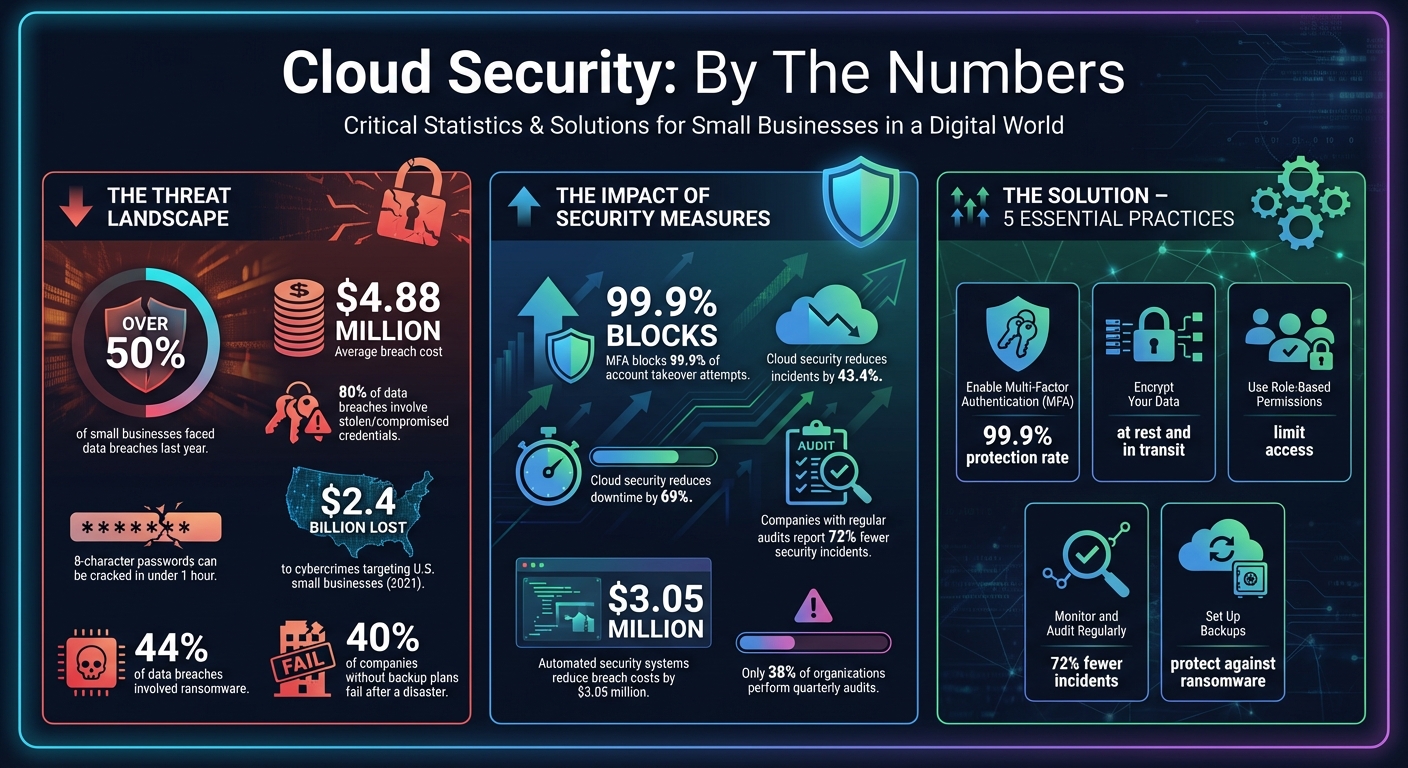
Cloud Security Statistics and Impact for Small Businesses
Multi-Factor Authentication (MFA) adds a crucial layer of security. Even if someone manages to steal your password, they still can't access your account without passing an additional verification step. This is especially important because 80% of data breaches involve stolen or compromised credentials[9], and an average eight-character password can be cracked in under an hour[8].
So, what makes MFA so effective? It combines two or more types of verification: something you know (like a password), something you have (like your smartphone), or something unique to you (like a fingerprint)[6][7]. Bryan Fitz, CISO at Sterling Computer Services, puts it this way:
Multi-Factor Authentication is one of the most impactful cybersecurity measures you can adopt. It provides a vital extra layer of defense against increasingly sophisticated cyber threats[6].
The stats don’t lie - MFA can block up to 99.9% of account takeover attempts[9]. For small businesses with limited IT resources, this can make a huge difference. Plus, many cyber insurance providers now require MFA for coverage or offer lower premiums if you implement it[7].
Now that the advantages are clear, let’s walk through how to set up MFA on SurferCloud.
Start by logging into your SurferCloud dashboard and navigating to Security Settings. Look for the MFA option under either Account or Security Settings. It’s best to use an authenticator app like Google Authenticator, Microsoft Authenticator, or Authy instead of SMS codes. Why? Authenticator apps are more secure since SMS codes can be intercepted through SIM-swapping attacks[6][5].
Once you’ve chosen an app, scan the QR code provided by SurferCloud using the app, then enter the six-digit code to activate MFA. Make sure to save your backup codes in a secure location in case you lose access to your device.
Finally, ensure MFA is enabled for all team members, especially those handling sensitive data or administrative tasks. Establish a clear process for reporting lost or stolen devices immediately so access can be revoked before it’s misused[6].
Encryption scrambles sensitive data, making it unreadable without the right decryption key. To keep your information secure, it's essential to encrypt both stored data and data being transmitted. This is especially critical in a cloud environment, where data is constantly moving and being accessed.
Steve Cobb, CISO at SecurityScorecard, highlights the importance of encryption:
"Data encryption represents far more than a technical checkbox on your security compliance list. It's the fundamental mechanism that renders your information useless to attackers, even when other security controls fail." [1]
For strong protection, rely on modern encryption protocols like TLS for securing data in transit and AES for safeguarding data at rest.
Just as multi-factor authentication (MFA) protects user access, encryption focuses on securing the data itself. SurferCloud offers tools that make it easier to implement encryption effectively across your cloud infrastructure.
Start by enabling encryption in SurferCloud’s storage settings. Apply it to all your data repositories, including structured data in databases and unstructured data like documents or media files. This ensures that sensitive information remains secure, no matter where it resides.
For data in transit, verify that TLS is configured correctly across all SurferCloud services. Check that your application URLs begin with "https://" and confirm you’re using the latest TLS version. Additionally, protect endpoints by enabling encryption on laptops and mobile devices that access your SurferCloud resources.
Managing encryption keys is equally critical. Use SurferCloud's key management services to securely store and rotate your encryption keys regularly. Keep these keys separate from the systems they protect, and always maintain backup keys in a secure, isolated location. Remember, losing your keys means losing access to your encrypted data, so handle them with care.
The Principle of Least Privilege (PoLP) is all about giving users only the access they need to do their jobs - nothing more, nothing less. For instance, if your accountant needs to review financial reports, they shouldn’t also have the ability to delete customer data or modify production servers. This approach minimizes the potential damage if an account gets compromised.
IBM highlights this well: "RBAC mitigates the damage that a hacker can do with a user's account by limiting what that account can access in the first place." [10] This strategy helps stop attackers from moving sideways through your systems, a tactic known as lateral movement.
Here’s a striking statistic: data breaches involving malicious insiders cost an average of $4.92 million [10]. Additionally, valid account abuse - where hackers exploit legitimate accounts - is one of the most common attack methods. By restricting permissions from the start, you’re essentially creating barriers within your cloud environment. If one area is compromised, the damage remains isolated.
Putting PoLP into action means tailoring access permissions to specific roles. Start by identifying which SurferCloud resources each department truly needs. Avoid assigning overly broad roles like "Owner" or "Editor", which can grant unnecessary permissions.
SurferCloud’s IAM tools make this process easier. You can create role-based groups that bundle permissions based on job functions. For example:
Assign users to these roles instead of setting permissions individually. This keeps things organized and ensures consistency.
To get started, use SurferCloud’s pre-built managed policies designed for common tasks like database administration or billing management. Over time, monitor how your team uses these services - track usage over a 90-day period [12] - and adjust the policies to remove unnecessary permissions. SurferCloud’s "last accessed" data can also help you identify and revoke unused credentials, reducing potential vulnerabilities.
For critical tasks, enforce separation of duties by requiring multiple people to complete a process. For example, one team member might initiate a payment while another approves it. Whenever possible, use temporary credentials via SurferCloud’s identity federation. These credentials expire automatically, offering a safer alternative to long-term access keys [11].
Regular security audits can uncover vulnerabilities before they turn into major problems. Companies that conduct regular audits report 72% fewer security incidents, yet only 38% of organizations perform a full audit at least once every quarter [14]. Misconfigurations by customers are expected to account for nearly all cloud security failures by 2025 [14]. Robin Joseph, Senior Pentest Consultant, explains:
"The majority of cloud security incidents stem not from sophisticated attacks but from misconfigured data protection controls."
Simple errors, like open storage buckets or weak firewall rules, can create openings for attackers. Continuous monitoring is essential to reduce these risks.
Audits help you catch configuration mistakes, unauthorized changes, and other vulnerabilities before they lead to breaches. In 2021, cybercrimes targeting small businesses in the U.S. resulted in losses of around $2.4 billion. Organizations with fully automated security and incident response systems experienced breach costs that were $3.05 million lower than those without such measures [13][14].
SurferCloud's monitoring tools offer a clear view of your entire cloud environment. Start by enabling centralized logging for all your resources - virtual machines, storage, databases, and network configurations. This creates a unified dashboard, making it easier to detect patterns and cross-account risks [13][14].
Next, configure automated alerts for critical security events. For example, set thresholds for multiple failed login attempts, logins from unfamiliar locations, or unauthorized access to sensitive files. The table below highlights key monitoring categories and their purposes:
| Monitoring Category | Key Items to Track | Purpose |
|---|---|---|
| Identity & Access | Brute force attempts, logins from new locations | Prevent credential compromise [3] |
| Data Protection | Unauthorized data exfiltration, sensitive file access | Prevent data breaches [14] |
| System Integrity | Changes to system files, unauthorized configurations | Detect malware or insider threats [3] |
| Network Traffic | Suspicious IP addresses, port scans | Identify external probes and attacks [3] |
These tools complement earlier security measures, creating a multi-layered defense. Use SurferCloud's automated vulnerability scanning to pinpoint misconfigurations and security gaps [13]. Additionally, set up alerts to notify you of any deviations from your established security baseline [14].
In 2024, legal tech SMB Weetrust leveraged centralized security hubs to boost visibility, earn ISO 27001 certification, and roll out new features efficiently, even with a small IT team [13].
To maintain strong security, combine automated monitoring with regular audits. Plan for annual full-scale audits and quarterly targeted reviews of critical areas like access logs and firewall settings [13][14]. Cloud infrastructure users report 43.4% fewer monthly security incidents compared to those relying on on-premises data centers [4].
Losing data can be devastating for a small business. In fact, 40% of companies without a solid backup and recovery plan fail after experiencing a disaster [16]. Cyberattacks, especially ransomware, are a major threat - ransomware played a role in 44% of data breaches [15]. Without backups, recovering from such incidents could take weeks, months, or might not even be possible [15].
The Cybersecurity and Infrastructure Security Agency (CISA) highlights the importance of backups:
"Backups are your best hope of recovery from a ransomware attack" [15].
When attackers lock your files and demand payment, having a tested backup means you can restore your systems without giving in to their demands. But ransomware isn’t the only risk - backups also protect against hardware failures, accidental deletions, and natural disasters like fires or floods. They’re essential for maintaining business continuity and creating a reliable recovery strategy.
Start by identifying your most critical data. This could include customer records, financial details, employee HR files, system configurations, and operational databases [15][18]. Then, define two key objectives: your Recovery Point Objective (RPO) - how much data you can afford to lose - and your Recovery Time Objective (RTO) - how quickly you need systems restored to avoid financial losses [15][16]. For mission-critical systems, you may need an RPO of just minutes, while less essential systems might tolerate longer gaps.
To protect your data, follow the 3-2-1 rule: keep three copies of your data, store them on two different types of media, and ensure one copy is off-site in a secure cloud environment [15][16]. This separation reduces the risk of losing everything to local disasters or ransomware attacks. Andy Kerr, Senior Product Marketing Manager at Acronis, puts it clearly:
"Your company's survival depends on the survival of your company data" [16].
SurferCloud simplifies the process of setting up and managing backups. With their storage solutions, you can automate daily or even hourly backups, run weekly full backups to establish a baseline, and perform daily incremental backups to capture ongoing changes.
To keep your data secure, enable encryption for all backups - both while stored on SurferCloud’s servers and during transfer. This ensures your information stays protected at all times [21][2]. Use multi-factor authentication to secure your backup management accounts and prevent unauthorized access or deletion of backup files [21][2]. Additionally, configure immutable storage options, which prevent data from being deleted or overwritten for a set period - a critical defense against ransomware [20].
Establish clear retention policies based on your business needs and any legal requirements. A common approach is to retain daily backups for 30 days and monthly backups for a year [19]. For added reliability, use dual-region storage to replicate your data across geographically separate locations, ensuring high availability [20].
Finally, don’t just set up a backup plan - test it regularly. As CISA advises:
"A backup plan is only helpful if everyone knows how to use it" [15].
Run recovery tests to confirm your backups are intact and can be restored quickly [15][2]. Test both full system recoveries and individual file recoveries to minimize downtime [19][17]. Document your recovery procedures and train your team to handle potential crises effectively.
Securing your business in the cloud doesn’t have to be complicated or expensive. By adopting multi-factor authentication, encrypting sensitive data, using role-based access controls, regularly monitoring your systems, and keeping reliable backups, you’re taking essential steps to guard against cyber threats. These threats cost U.S. small businesses a staggering $2.4 billion in 2021 alone [13]. Together, these measures form a strong, layered defense tailored to protect your business.
The benefits go beyond just security. Businesses that invest in cloud security infrastructure report fewer incidents and less unplanned downtime, which translates into real savings - both in dollars and in reputation [4]. As Matthew Schroeder, Lead Infrastructure Security Engineer at Salesforce, aptly puts it:
"A small investment in security today can prevent significant losses tomorrow, including time, money, and critical business data" [5].
SurferCloud provides a practical solution for businesses of any size. With 17+ global data centers, 24/7 support, and tools designed to scale with your needs, it delivers enterprise-grade protection without the complexity or high costs typically associated with it. Let SurferCloud handle the infrastructure security so you can focus on growing your business.
Take proactive steps now: enable MFA for all accounts, automate backups, and restrict admin access to only those who need it. While SurferCloud secures your infrastructure, you can focus on safeguarding your data and applications. These actions will not only protect your business but also ensure smooth, uninterrupted growth [4][3].
Small businesses can set up multi-factor authentication (MFA) with ease by taking a few straightforward steps:
By adding MFA, you bolster your defenses with an additional verification step, making it harder for unauthorized users to gain access to your business’s accounts.
Keeping your data encrypted in the cloud is a smart move for small businesses. It ensures that sensitive information stays protected from prying eyes, whether it's sitting in storage (at rest) or being sent over the internet (in transit). This layer of security acts as a shield against cyberattacks and potential breaches.
Beyond protection, encryption also helps businesses stay on the right side of data protection laws. It builds customer confidence and helps avoid hefty fines tied to non-compliance. Best of all, it’s a cost-effective way to strengthen your defenses against ever-changing cyber threats.
Keeping a watchful eye on your cloud systems is crucial for small businesses aiming to stay ahead of cyber threats. Regular monitoring and audits can uncover potential weak spots, catch unauthorized access attempts, and safeguard sensitive information.
Staying on top of your cloud environment not only helps you meet industry compliance standards but also prevents expensive security breaches. Plus, it strengthens customer trust by showing you're serious about protecting their data. These efforts also prepare your business to respond swiftly to new security challenges, keeping your operations secure and steady.





