The Ultimate Guide to Cross-Border E-commerce
The Risky Business of Shared IPs in E-commerce If yo...









Spot pricing offers a way to save up to 90–91% on cloud computing costs by using spare capacity from providers like AWS, Azure, and Google Cloud. However, these savings come with a trade-off: resources can be interrupted when demand rises. Here's a quick breakdown:
Quick Comparison:
| Feature | AWS Spot Instances | Azure Spot VMs | Google Cloud Spot VMs |
|---|---|---|---|
| Max Discount | Up to 90% | Up to 90% | Up to 91% |
| Interruption Notice | 2 minutes | 30 seconds | 30 seconds |
| Price Adjustments | Gradual | Real-time | Daily |
| Termination Options | Stop, Hibernate, Terminate | Deallocate, Delete | Stop, Delete |
Spot pricing is ideal for cost-conscious businesses with workloads that can handle interruptions. To maximize savings, design your applications to be interruption-ready and leverage automation tools like auto-scaling groups or managed instance groups.
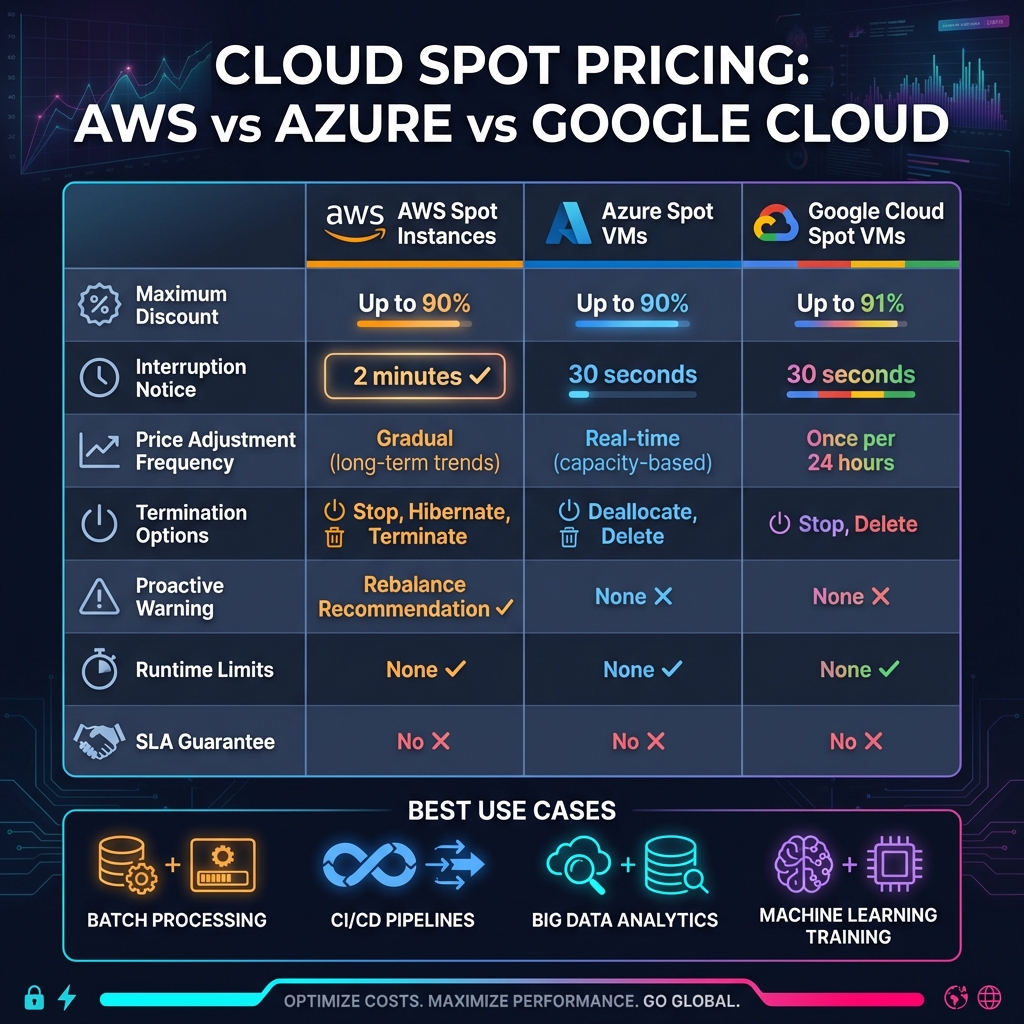
AWS vs Azure vs Google Cloud Spot Pricing Comparison Chart
AWS Spot Instances allow you to access unused EC2 capacity at steep discounts - up to 90% off standard On-Demand rates [3]. Amazon determines a Spot price for each instance type in every Availability Zone, updating these prices every five minutes based on long-term supply and demand patterns. One critical aspect to keep in mind is that AWS can reclaim these instances at any time, giving you a two-minute warning before stopping, hibernating, or terminating them.
Billing is calculated by the second based on the current Spot price. If AWS interrupts your instance, you'll only pay for the time it was running. However, Spot Instances don't fall under Savings Plans and don't contribute to Compute Savings Plans commitments.
Now, let’s look at strategies for optimizing your Spot Instance usage.
AWS no longer uses the traditional bidding war model. While you can still set a maximum price per hour, AWS recommends leaving the setting at the default - no maximum price, which aligns with the On-Demand rate. This approach minimizes the risk of interruptions due to sudden price surges. If you do set a price cap and the market price exceeds it, your instances are more likely to be interrupted.
For better availability and cost savings, AWS suggests using the "price-capacity-optimized" allocation strategy. This method automatically selects instances from pools with the lowest prices and the highest capacity. To improve your chances of maintaining availability, it’s a good idea to use at least 10 instance types for your workload.
You can also decide between one-time Spot requests, which end after fulfillment or interruption, and persistent requests, which automatically resubmit after an interruption.
Here are some key considerations for managing interruptions effectively.
Before diving into Spot Instances, it’s important to understand their limitations. According to Amazon EC2 Documentation, "Spot Instances are not suitable for workloads that are inflexible, stateful, fault-intolerant, or tightly coupled between instance nodes" [5].
To handle interruptions, implement checkpointing, which saves the progress of your workload at intervals. AWS also provides an EC2 instance rebalance recommendation signal, which gives you additional time to shift workloads before the standard interruption notice.
For production environments, tools like EC2 Auto Scaling groups or EC2 Fleet are essential. These tools manage capacity at an aggregate level, automatically replacing interrupted instances to maintain performance. Avoid switching to On-Demand instances during interruptions, as this can create further capacity issues and make securing resources more difficult.
Azure Spot Virtual Machines (VMs) provide up to 90% discounts by utilizing unused compute capacity [1]. The pricing varies depending on the demand and supply for specific VM sizes in each region.
You can choose between two eviction options: Capacity-only, where eviction happens only when Azure needs capacity, or Price or Capacity, where eviction occurs either due to capacity demand or if the price exceeds your set limit [6].
When setting a price limit, you can specify a maximum value in US dollars (up to five decimal places) or use -1 to disable price-based evictions entirely [9]. If your Spot VM is about to be evicted, Azure sends a Preempt signal through Scheduled Events at least 30 seconds in advance [6]. This gives your application a brief window to save its state.
Here's another useful detail: if Azure evicts your Spot VM within the first minute of its creation, you won’t be charged for its usage - though premium OS costs may still apply [2]. However, keep in mind that Spot pricing is not available for certain VM types, such as B-series VMs, promotional versions, or suppressed core VMs [1].
Eviction policies determine how Azure handles Spot VM interruptions. There are two main options:
Stop/Deallocate pauses the VM and releases its hardware, but your data disks remain intact. While compute charges stop, you’ll still pay for disk storage and any static IPs [6]. This policy is ideal if you require a specific VM size and are willing to wait for capacity to become available again in the same region.
Delete permanently removes the VM and its associated data disks, stopping all charges immediately [6]. This option works best for temporary or flexible workloads that can easily switch to other VM sizes or regions.
| Policy | Preserves Data | Ongoing Charges | Best For |
|---|---|---|---|
| Stop/Deallocate | Yes | Storage and IP charges apply | Workloads needing specific VMs |
| Delete | No | No ongoing charges | Temporary or flexible workloads |
To manage evictions effectively, monitor the Scheduled Events endpoint (169.254.169.254) for the Preempt signal [6]. Save your application state regularly to external storage like Azure Blob Storage, enabling replacement VMs to resume from the last saved point [6].
Azure Spot VMs are a great fit for applications that can handle interruptions and store their state externally. Since Spot VMs come with no Service Level Agreement (SLA) or availability guarantees, they’re best suited for fault-tolerant workloads [1].
Before deploying, check the Azure portal for pricing history and eviction rates. These rates, displayed as percentage ranges (e.g., 0%-5%, 5%-10%), reflect the hourly likelihood of eviction based on the past seven days of data [6]. Eviction rates vary by region, and demand in one location doesn’t impact stability in others [6].
For Virtual Machine Scale Sets, you can use the Try & Restore feature, which leverages AI to automatically attempt to restore evicted Spot instances, ensuring your target capacity is maintained [8]. To minimize disruptions, make sure your workloads are idempotent, meaning they can handle retries without causing duplicates [6]. Additionally, deploying across multiple VM sizes, regions, and zones can help you find available capacity more quickly during evictions [6].
Google Cloud Spot VMs take advantage of unused Compute Engine capacity, offering discounts of up to 91% compared to standard pricing [2][10]. Despite the lower cost, these VMs deliver the same level of performance as regular compute instances, ensuring consistent and reliable operation.
The pricing for Spot VMs is dynamic, adjusting up to once daily based on supply and demand [11]. Charges for vCPUs, GPUs, and memory are calculated per second after the first minute [12]. If a Spot VM is preempted within the first 60 seconds, there’s no charge for that time. Unlike older Preemptible VMs, which had a strict 24-hour runtime limit, Spot VMs have no such restriction. Additionally, any local SSDs or GPUs attached to Spot VMs benefit from discounted rates [2].
This flexible pricing model makes Spot VMs a cost-effective choice, especially for workloads that can handle interruptions.
Spot VMs can be preempted by Google at any time if the capacity is needed elsewhere. When this happens, you’ll receive a 30-second shutdown notice, giving you a brief window to save your work. You can configure the VM to either stop (default setting) or be deleted upon preemption. If stopped, the VM moves to a TERMINATED state, where compute charges are paused (though persistent disk storage fees still apply). If deleted, the VM is removed entirely [2].
Since Spot VMs do not come with availability guarantees or an SLA from Google, they are best suited for workloads that are fault-tolerant and stateless. Examples include batch processing, CI/CD pipelines, and containerized applications [10]. To minimize disruption, it’s a good idea to use shutdown scripts that save progress to external storage during the 30-second notice period.
Google Cloud simplifies the management of Spot VMs with built-in automation to handle preemptions. Similar to services offered by AWS and Azure, Google Cloud uses automated instance management to reduce the impact of interruptions. Spot VMs integrate seamlessly with Managed Instance Groups, which automatically recreate instances if they are preempted [2]. To enable Spot VMs, you can use the command line and include the flag --provisioning-model=SPOT [10].
Spot VMs also work well with Google Kubernetes Engine (GKE), where they are ideal for running stateless containerized workloads. GKE automatically applies labels like cloud.google.com/gke-spot=true to Spot VMs and provides a 30-second termination notice to allow Pods to shut down gracefully [13].
To deploy Spot VMs in GKE, use the --spot flag when creating a cluster or node pool [10]. It’s recommended to apply the taint cloud.google.com/gke-spot=true:NoSchedule to these node pools. This prevents critical workloads from being scheduled on Spot VMs. For essential system functions, such as DNS and cluster controllers, ensure at least one node pool uses standard VMs [13].
When it comes to spot pricing discounts, all three providers - AWS, Azure, and Google Cloud - offer considerable savings. However, the exact discounts and mechanisms differ slightly. Google Cloud takes the lead with discounts reaching up to 91% off standard VM prices [2]. AWS and Azure follow closely, both offering discounts of up to 90% compared to on-demand rates [7][1].
The way these platforms adjust their pricing also varies. AWS modifies spot prices gradually, reflecting long-term supply and demand trends [3]. This approach makes AWS pricing relatively predictable over time. Google Cloud, on the other hand, ensures price stability by limiting changes to once every 24 hours [11]. Azure’s pricing fluctuates based on real-time capacity, which can yield deeper savings during low-demand periods [1].
Here’s a quick breakdown of how their pricing models compare:
| Feature | AWS Spot Instances | Azure Spot VMs | Google Cloud Spot VMs |
|---|---|---|---|
| Max Discount | Up to 90% [7] | Up to 90% [1] | Up to 91% [2] |
| Price Volatility | Gradual (long-term trends) [3] | Variable (capacity-based) [1] | Once per 24 hours [11] |
| Price Control | Set max price | Set max price | No max price setting |
| First-Minute Billing | Partial hour not charged (Linux) | Charged for usage | Free if preempted < 1 minute [2] |
Beyond pricing, understanding how each provider handles interruptions is key to optimizing your workloads.
Interruption policies are another area where these platforms differ significantly. AWS provides a 2-minute warning before an instance is interrupted [3], allowing more time to take action. In comparison, both Azure and Google Cloud offer only 30-second warnings [1][2]. Additionally, AWS sends a "rebalance recommendation" signal [3], notifying you of elevated interruption risks even before the formal warning.
Here’s how interruption handling compares across providers:
| Feature | AWS Spot Instances | Azure Spot VMs | Google Cloud Spot VMs |
|---|---|---|---|
| Interruption Notice | 2 minutes [3] | 30 seconds [1] | 30 seconds [2] |
| Proactive Warning | Rebalance Recommendation [3] | None | None |
| Termination Options | Terminate, Stop, Hibernate [4] | Deallocate, Delete [1] | Stop, Delete [2] |
| Max Runtime | None | None | None |
| SLA | No | No | No |
Interestingly, none of the providers impose runtime limits anymore. For example, Google Cloud removed its previous 24-hour cap on Preemptible VMs when it introduced Spot VMs [2].
AWS stands out for workloads that benefit from a smoother shutdown process. Its 2-minute warning and rebalance recommendation give applications enough time to save state, drain connections, or migrate tasks [3]. Azure’s "Deallocate" option preserves disks and network resources when a VM is stopped [1], enabling faster recovery, though storage charges continue to accrue during downtime. Google Cloud, with its integration into Managed Instance Groups and GKE [2], is a strong choice for containerized and stateless workloads, but its 30-second warning requires fast, automated shutdown procedures.
For businesses prioritizing price stability, AWS’s gradual price adjustments offer a more predictable cost structure [3].
To make the most of spot pricing, it's essential to build applications that are prepared for interruptions rather than trying to avoid them. A stateless design is key - store important data externally in databases, Amazon S3, or distributed caches [14]. Also, ensure your tasks are idempotent. This means they can restart multiple times without affecting the final output, which is crucial if an interruption occurs [5].
Incorporate checkpointing so your tasks can pick up where they left off after an interruption [25, 27]. AWS provides a longer interruption notice, so design your checkpoints to align with this. Use AWS's rebalance recommendation feature to migrate workloads early [6, 3]. For containerized apps, automate the draining process with tools like AWS Node Termination Handler for Kubernetes or enable the ECS_ENABLE_SPOT_INSTANCE_DRAINING feature in Amazon ECS [14]. Test your interruption-handling strategies using tools like AWS Fault Injection Simulator (FIS) to ensure your automation is reliable [15].
"The best way for you to gracefully handle Spot Instance interruptions is to architect your application to be fault-tolerant." - AWS Documentation [5]
Once your applications are resilient, focus on automating capacity management to replace interrupted instances quickly. Utilize orchestration services like AWS Auto Scaling groups, Azure Virtual Machine Scale Sets, or Google Cloud Managed Instance Groups to maintain your desired capacity automatically. AWS's price-capacity-optimized allocation strategy helps by selecting instances from pools with the best availability and lowest cost [27, 6].
Expanding your capacity options is another smart move. Use a variety of instance types and regions, covering different families, generations, and Availability Zones [6, 27]. Instead of hardcoding specific instance types, rely on attribute-based selection - define your needs for vCPU, memory, and storage so automation can adapt as new instance types are introduced [27, 6]. On Azure, you can even analyze historical pricing and eviction rates using the Azure Resource Graph to find the most stable and cost-effective options [16].
Real-world results show how effective automation can be. For example, AWS Spot placement scores (rated from 1 to 10) can guide you to Regions or Availability Zones with the best chance of fulfilling large capacity requests [6, 27]. These strategies not only reduce interruptions but also keep costs under control.
After setting up for resilience and automation, keep a close eye on costs to maximize savings. Use tools like AWS Budgets to set up automated alerts that notify you when spending approaches your limits [17]. AWS Cost Explorer can help you track metrics like average cost per vCPU hour or per GiB hour, giving you insights into your spot usage [29, 3]. Add anomaly detection tools to catch unexpected spending spikes before they affect your budget [17].
Pay attention to termination-related costs. For instance, while Google Cloud doesn't charge for stopped VMs, persistent disk storage fees still apply until the disks are deleted [2]. On AWS, use T3/T4g Spot instances in "Standard mode" for short tasks to avoid extra charges from surplus CPU credits in "Unlimited mode" [8, 9]. You can also set resource quotas, like Google Cloud's preemptible quotas, to prevent spot instances from consuming resources reserved for critical workloads [2].
Companies have seen major cost reductions by leveraging spot instances. Lyft cut its compute costs by 75% with just a few lines of code, and Delivery Hero saved 70% by running Kubernetes clusters on spot instances [7]. For further savings, monitor real-time pricing using APIs like the Google Cloud Billing Catalog API or AWS Spot Instance Advisor to compare spot rates against on-demand prices [2, 8].
Spot pricing from AWS, Azure, and Google Cloud can lead to savings of up to 90–91% [1][3][11]. These substantial discounts make spot instances an appealing choice for stateless and fault-tolerant workloads like batch processing, CI/CD pipelines, data analytics, and rendering jobs. However, these savings come with a trade-off: the risk of abrupt interruptions. AWS provides a 2-minute notice before termination, while Azure and Google Cloud offer only 30 seconds [1][3][5]. Additionally, spot instances do not come with service level agreements (SLAs).
To fully leverage the cost benefits of spot instances, it’s crucial to design applications with interruptions in mind. By incorporating strategies such as checkpointing, automation, and flexible resource allocation, businesses can turn the inherent risks of spot pricing into significant cost reductions.
"Spot Instances are a cost-effective choice if you can be flexible about when your applications run and if your applications can be interrupted." - Amazon Web Services [3]
Despite their cost advantages, spot instances introduce challenges. Their availability depends on regional capacity, and managing interruptions effectively requires robust automation across various instance types and availability zones [1][5]. For businesses aiming to build globally scalable architectures, spot instances often need to be supplemented with more reliable infrastructure to ensure consistent performance.
To address these challenges while maintaining cost efficiency, a strong global infrastructure is key. SurferCloud offers a dependable solution for organizations looking to optimize their cloud architecture. With a network of over 17 data centers worldwide and 24/7 expert support, SurferCloud provides the reliable capacity needed to balance spot instance savings with steady performance. By combining spot pricing strategies with SurferCloud's elastic compute servers and networking solutions, businesses can build a scalable, cost-efficient cloud environment tailored to their needs.
Spot pricing interruption policies differ significantly among the leading cloud providers. AWS Spot Instances give users a heads-up with a 2-minute warning before interruption, allowing a small window to save progress or shift workloads. In contrast, Azure Spot VMs provide a much shorter 30-second eviction notice. Meanwhile, Google Cloud Spot VMs can be interrupted without any prior notice at all.
Knowing these variations is key to efficiently planning workloads and reducing potential disruptions when leveraging Spot instances for cost efficiency.
To make the most of Spot instances while managing interruptions effectively, it's crucial to build applications that can handle disruptions with ease. Start by using Auto Scaling groups or Spot Fleets, incorporating a mix of instance types and Availability Zones. This setup ensures that when instances are reclaimed, replacements are quickly deployed. Pre-configured Amazon Machine Images (AMIs) and startup scripts can help new instances get to work immediately.
Store critical data outside the instance on reliable storage options like Amazon S3 or DynamoDB, since instance-store volumes are temporary and won't survive interruptions. Break your workloads into small, stateless tasks or adopt a queue-based architecture. This way, tasks can be reassigned without losing progress. For longer-running jobs, periodic checkpointing is a smart move - it allows you to resume from the last saved state if an interruption occurs.
Keep an eye on the two-minute interruption notice provided by Spot instances. Use this time to gracefully shut down tasks, save data, and deregister from load balancers. If you're using Kubernetes, set up a node-termination handler. This tool will drain affected nodes and reschedule pods onto healthy ones, minimizing disruption. By implementing these strategies, you can maintain application performance while taking advantage of the cost savings Spot instances offer.
To make the most of cost savings with Spot pricing, focus on workloads that can handle interruptions. These include batch processing, data analysis, CI/CD pipelines, and high-performance computing. Such tasks are an ideal match for Spot instances on AWS, Azure Spot VMs, and Google Cloud Spot VMs.
Flexibility plays a big role in maximizing discounts. On AWS, for instance, using multiple instance types, Availability Zones, and Regions can help you tap into the most available capacity. Azure suggests deploying Spot VMs within Virtual Machine Scale Sets, while Google Cloud recommends diversified instance pools to improve availability.
Cloud-native tools can simplify managing Spot capacity and interruptions. AWS offers EC2 Auto Scaling groups and Spot Fleets, Azure provides Scale Sets, and Google Cloud uses Instance Groups. To minimize the impact of interruptions, consider strategies like checkpointing or retry mechanisms. These steps ensure you can save significantly while maintaining reliability.





