The 24/7 Human Factor: Why SurferCloud’s Su
There is a specific kind of frustration that only a Dev...









When choosing between Pay-As-You-Go (PAYG) and Reserved Pricing for cloud services, the decision comes down to flexibility vs. cost savings. PAYG charges based on actual usage with no upfront commitment, making it ideal for variable or unpredictable workloads. Reserved Pricing, on the other hand, offers discounts of up to 72% in exchange for a 1- or 3-year commitment, which suits steady, predictable workloads.
Here’s the quick breakdown:
| Factor | Pay-As-You-Go | Reserved Pricing |
|---|---|---|
| Upfront Cost | None | Optional (All, Partial, or None) |
| Commitment Term | None | 1 or 3 years |
| Unit Price | Highest | Lowest (up to 72% discount) |
| Workload Fit | Variable, short-term | Steady, long-term |
| Flexibility | High | Limited |
For most businesses, a hybrid approach works best: reserve capacity for predictable needs and use PAYG for sudden spikes. This strategy balances savings with flexibility, ensuring you only pay for what you need when you need it.
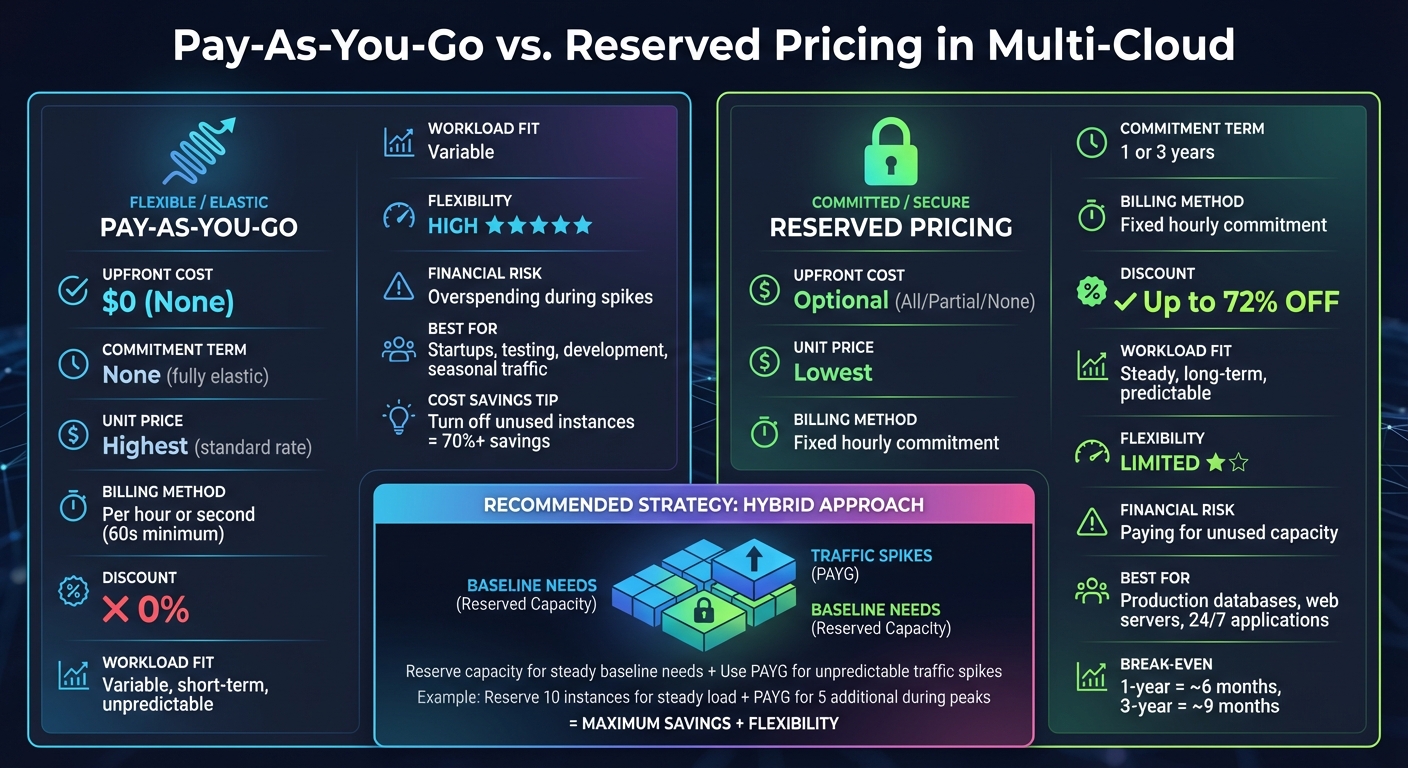
Pay-As-You-Go vs Reserved Pricing: Complete Comparison Guide
Pay-as-you-go (PAYG), also known as on-demand pricing, works a lot like your utility bills - you only pay for what you use, when you use it. There are no upfront costs or long-term contracts, and charges stop as soon as you stop using the service [4][7]. It’s a straightforward, consumption-based model.
"AWS pricing is similar to how you pay for utilities like water and electricity. You only pay for the services you consume, and once you stop using them, there are no additional costs or termination fees." - AWS [1]
In multi-cloud setups, PAYG allows businesses to deploy resources across various providers, enabling them to reach global markets while maintaining high availability [4]. However, this flexibility comes with the challenge of managing different pricing structures, billing methods, and terminologies across providers [7]. Many providers now offer per-second billing (with a 60-second minimum) for compute resources [4][5][6].
Costs in the PAYG model are influenced by factors like compute usage (billed hourly or per-second), storage (per GB), and data transfer (per GB) [5]. While transferring data into most cloud platforms is free, moving data out incurs fees that decrease as volumes increase [5]. This is particularly critical in multi-cloud scenarios, where high egress fees can make shifting workloads between providers expensive [4]. Understanding these nuances is key to grasping both the benefits and challenges of PAYG compared to reserved pricing.
Several defining features set PAYG apart from traditional infrastructure models. With on-demand self-service, you can instantly provision resources like compute power, storage, and networking without waiting for manual approvals. Rapid elasticity ensures that resources scale up automatically during traffic spikes and scale down during quieter times [4].
Another cornerstone is resource pooling, which dynamically allocates shared resources based on real-time demand [4]. Billing is based on a measured service approach, where providers track your usage to ensure transparent, usage-based charges [4].
In multi-cloud environments, PAYG offers multi-cloud agility, allowing businesses to mix and match services from different vendors - such as compute from one and databases from another - to optimize performance, meet compliance needs, or improve proximity to end-users [8]. These features provide not only flexibility but also significant financial advantages.
PAYG is particularly suited for businesses with unpredictable or fluctuating workloads. It lets you scale resources instantly to handle sudden traffic surges without committing to more capacity than you need. This eliminates the need for large upfront investments in physical hardware, freeing up funds for innovation instead of infrastructure [4][1].
For startups or businesses experimenting with new products, PAYG minimizes financial risk. There’s no need for long-term commitments before understanding your actual resource needs. This model shifts IT spending from Capital Expenditure (CapEx) to Operational Expenditure (OpEx), making costs more flexible and directly tied to business activity [4].
"Pay-as-you-go (PAYG) cloud computing is a flexible model that allows businesses to consume and pay for computing resources based on actual usage, enabling scalability and cost optimization." - Sujatha R, Technical Writer, DigitalOcean [4]
Another major perk? Turning off unused cloud instances can lower costs by 70% or more, compared to running them continuously [5]. This level of cost control is nearly impossible with traditional fixed infrastructure.
Despite its flexibility, PAYG can be expensive. The per-unit cost is higher than reserved pricing options. For workloads that run continuously, you could end up spending 72-75% more compared to committing to reserved capacity [4][7][5].
Another drawback is the risk of unpredictable monthly bills. Without close monitoring, usage spikes can lead to "bill shock" - unexpected charges that exceed budgets [4]. To avoid this, businesses often need to set up billing alerts, spending limits, and continuous cost monitoring, especially in multi-cloud setups [4].
Managing PAYG across multiple providers requires specialized cloud expertise. Teams need to monitor usage patterns, rightsize instances, and navigate complex pricing structures and discount programs offered by each provider [4][7]. Without proper governance and automated scaling tools, costs can quickly spiral out of control [7].
Reserved pricing is a cost model that requires upfront commitment for a set amount of resource usage over a fixed term - usually 1 or 3 years. Unlike the pay-as-you-go (PAYG) model, which charges based on actual consumption, reserved pricing provides discounted rates in exchange for this commitment. It's not tied to physical resources but is instead a billing discount applied to resources that match specific criteria like instance type, region, or operating system. For multi-cloud setups, separate contracts are often needed for each provider (e.g., AWS Reserved Instances for compute or Azure Reservations for databases) [11]. This model works best for workloads that are predictable and run continuously.
Providers typically offer three payment structures for reserved pricing:
Some providers, like Azure, allow refunds for reservations - up to $50,000 within a 12-month rolling window [9].
Reserved pricing also guarantees capacity in specific zones during periods of high demand [11]. However, it operates on a "use it or lose it" basis, meaning you're billed for the entire term, even if the resources aren't actively utilized [11].
Reserved pricing is built around a discount structure that rewards commitment. Discounts can range from 66% to 72%, depending on the type of reservation you choose:
A standout feature is the automatic allocation of unused discounts. For example, if you purchase a reservation under a central billing account and don't use it, the discount can automatically apply to matching usage in other linked accounts within your organization [11].
You can also choose between regional and zonal scopes:
AWS even offers additional volume discounts. If your active Reserved Instances in a single region exceed $500,000, you can receive an extra 5% or more in savings [2].
One of the biggest advantages of reserved pricing is the ability to plan your budget with precision. By locking in costs for 1–3 years, you eliminate the unpredictability of fluctuating usage rates.
This model is ideal for workloads that run continuously, such as production databases, web servers, or always-on applications. The savings can be significant - up to 72% compared to on-demand rates. For example, a 1-year commitment often pays for itself in about 6 months of constant use, while a 3-year term typically breaks even around the 9-month mark [11].
Additionally, reserved pricing ensures resource availability during peak demand when configured with a zonal scope. For maximum efficiency, you can combine Standard reserved instances for stable workloads with Convertible options or Savings Plans to cover variable usage [11].
While reserved pricing offers substantial cost savings, it comes with its own set of challenges. The most notable downside is the lack of flexibility. Once you commit, you're locked in for the entire term, and cancellation options are limited. Some providers do offer a Reserved Instance Marketplace to resell Standard reservations, but this is not always a straightforward process [11].
Upfront payments, especially for All Upfront plans, can be a financial strain for smaller organizations [2].
Another drawback is the "use it or lose it" nature of the model. You're billed for every hour of your commitment, whether or not the resources are fully utilized. This makes over-provisioning or workload changes costly [11].
Managing reservations across multiple providers can also be complex. Each provider has its own terminology, rules, and scoping options (e.g., AWS Reserved Instances versus Azure Reservations). Without unified tools like Azure Arc or VMware Tanzu CloudHealth, tracking usage and optimizing reservations can become a logistical headache [10][11].
Finally, committing to oversized instances without proper planning can lock you into inefficiencies for the entire term [11].
When deciding between pay-as-you-go and reserved pricing models, the choice often boils down to flexibility vs. commitment. Let’s break it down and see how these two options measure up based on key factors.
Here’s a side-by-side look at the main differences:
| Factor | Pay-As-You-Go (On-Demand) | Reserved Pricing |
|---|---|---|
| Upfront Cost | None [6] | Optional: All, Partial, or No Upfront [6] |
| Commitment Term | None - fully elastic [1] | 1 or 3 years [6][7] |
| Unit Price | Highest (standard rate) [7] | Lowest (up to 72% discount) [6][7] |
| Billing Method | Billed per hour or second (minimum 60 seconds) [6][5] | Fixed hourly commitment amount [6] |
| Workload Fit | Best for variable, short-term needs [6] | Ideal for steady, long-term workloads [6][7] |
| Financial Risk | Risk of overspending during usage spikes [7] | Paying for unused capacity [6] |
| Flexibility | High - scale up or down instantly [4] | Limited - tied to specific spend or instance type [7] |
With pay-as-you-go, you’re paying full price for maximum flexibility. Reserved pricing, on the other hand, offers discounts as high as 72% [6][7], but it locks you into a fixed hourly rate, whether or not the capacity is fully used [6].
The best pricing model for your business depends on your workload patterns. For predictable, always-on tasks - like running production databases, web servers, or core applications around the clock - reserved pricing is a logical choice. Its cost savings over the long term can make a big difference for steady-state operations.
On the flip side, irregular or fluctuating workloads are better suited for pay-as-you-go. This model shines in scenarios like development environments, testing servers, seasonal traffic surges, or new projects where usage patterns are still uncertain [6][7].
"Pay-as-you-go pricing allows you to easily adapt to changing business needs without overcommitting budgets and improving your responsiveness to changes" [1].
For many organizations, a hybrid approach works best. For instance, you could reserve capacity for your baseline needs - say, 10 instances - and rely on pay-as-you-go for any additional demand during peak periods. This way, you balance cost savings with the flexibility to handle unexpected spikes.
Also, keep in mind that turning off unused instances under pay-as-you-go can save up to 70% or more [5]. Meanwhile, reserved pricing charges for idle time, making it less forgiving if your usage doesn't match your commitment [6].
Pay-as-you-go pricing works best for scenarios like development, testing, startups, and short-term projects. Its appeal lies in the absence of upfront costs and the flexibility to adapt usage as needed. For instance, shutting down resources during non-business hours can lead to noticeable cost reductions [5].
Take Black Friday as an example: pay-as-you-go instances can automatically scale to manage massive traffic spikes and then scale back down once the rush is over. For workloads that are fault-tolerant - like batch processing or big data analytics - spot instances, a variation of pay-as-you-go pricing, offer discounts of up to 90% compared to standard rates. These spot instances typically experience interruptions in less than 5% of cases [6][7], making them a cost-effective option for tasks where occasional interruptions aren’t a dealbreaker.
However, for workloads that require steady and predictable resource use, another pricing model may deliver better savings.
Reserved pricing is ideal for applications that run continuously and have predictable usage patterns. This includes production databases, core applications such as web servers, APIs, authentication services, and ongoing big data projects. By analyzing usage over 30 days, you can estimate the baseline capacity needed, allowing reserved commitments to save up to 72% [6][7]. For instance, data warehouses or analytics platforms that operate 24/7 benefit greatly from a 3-year reserved commitment, especially if your tech stack remains stable [3].
A smart strategy combines reserved pricing for consistent demand with pay-as-you-go for occasional spikes. For example, if your application consistently requires 10 instances but occasionally scales up to 15 during peak times, you can reserve the baseline 10 instances and use on-demand instances to handle the additional 5 during those busy periods. This approach ensures both cost efficiency and flexibility.
To get the most out of your multi-cloud strategy, combine different pricing models with operational tweaks to keep costs in check. A great example is the baseline–burst approach: reserve capacity for critical, always-on tasks like production databases or web servers, and lean on pay-as-you-go options for sudden spikes in demand.
For non-critical workloads, consider using spot instances - they can offer discounts of up to 90%. And here's the kicker: they're interrupted less than 5% of the time, making them a solid choice for tasks that can handle occasional disruptions [6].
Before committing to reservations, take a close look at your usage data from the past 30 days. This ensures you're not locking yourself into paying for capacity you don't actually need. When purchasing Savings Plans, do so at the management account level to spread discounts across all consolidated usage [6].
These foundational strategies pave the way for more detailed cost-saving measures outlined below.
Once you've nailed down your pricing models, fine-tuning your operations can push your cost savings even further.
Regular audits of your infrastructure can uncover hidden inefficiencies. For example, you might find idle load balancers handling fewer than 100 requests over a week or storage volumes with less than 1 IOPS per day [12]. Deleting or snapshotting these underutilized resources can cut unnecessary expenses. Additionally, automated lifecycle policies can help by moving infrequently accessed data to cheaper storage tiers as your needs evolve.
Another key tip? Conduct cost modeling every two to four weeks. These smaller, frequent adjustments are often more effective than waiting for an annual review. Instead of focusing solely on coverage percentages, look at the net savings to understand the real financial impact of your efforts. With enterprise spending on public cloud services expected to exceed $1 trillion by 2026 [13], these strategies can make a big difference in staying competitive.
Tailor your pricing strategy to fit your workload. Opt for pay-as-you-go pricing when dealing with fluctuating demand, and switch to reserved pricing for steady, ongoing workloads. This combination can lead to savings of up to 72% [7].
The most effective multi-cloud setups embrace a hybrid approach. For consistent needs, like production databases or 24/7 web servers, reserve capacity. When demand spikes, use pay-as-you-go or spot instances to fill the gap. This layered approach balances cost savings from commitments with the flexibility to adapt to changing business needs. It also creates opportunities for regular evaluation and fine-tuning.
As part of your hybrid strategy, keep your pricing model flexible. When usage patterns stabilize, review your consumption every 2–4 weeks to identify opportunities to shift from pay-as-you-go to reserved pricing [6].
Keeping expenses under control in a multi-cloud setup requires businesses to focus on cost governance - essentially tracking, analyzing, and fine-tuning spending across all cloud providers. Start by gaining a clear understanding of your usage. This includes metrics like compute hours, storage, and data transfer. Consistently tagging resources is also key to identifying inefficiencies and aligning your spending with business priorities.
For workloads that fluctuate, the pay-as-you-go (PAYG) model offers the flexibility to scale up or down as needed. However, keeping a close eye on usage is essential to prevent any surprise costs. On the other hand, for workloads with steady demands, reserved pricing can be a smart way to secure discounts and reduce overall expenses. Regularly reviewing your usage and adjusting your commitments helps ensure you’re always leveraging the most cost-efficient options.
SurferCloud makes cost management easier with its straightforward pricing options, including hourly PAYG rates (e.g., $0.02 per hour) and monthly plans (e.g., $10.93 per month). By combining real-time usage insights, workload optimization, and strategic pricing models, businesses can keep multi-cloud costs in check while channeling their savings into growth and innovation initiatives.
Choosing between Pay-As-You-Go (PAYG) and Reserved Pricing comes down to how predictable your workloads are, how much flexibility you need, and where your budget priorities lie.
PAYG is a great match for workloads that are unpredictable or seasonal. You’re charged only for the resources you actually use, which makes it a smart pick for short-term projects or environments where demands change quickly.
Reserved Pricing, by contrast, can save you up to 72% if you’re able to commit to a specific resource type and term (like 1 or 3 years). This option works best for stable, long-term workloads where you can accurately forecast your needs.
Here are a few key points to consider:
By analyzing your usage patterns and financial goals, you can determine whether SurferCloud’s PAYG or Reserved Pricing aligns better with your multi-cloud strategy.
A hybrid pricing model blends the predictability of reserved capacity with the flexibility of pay-as-you-go billing. Businesses commit to a consistent level of resources - such as compute or storage - at a discounted monthly or yearly rate. At the same time, any unexpected or additional usage is charged on-demand, often calculated by the hour or second. This setup balances cost efficiency for regular workloads with the ability to handle sudden traffic surges.
In practical terms, companies assess their usage patterns to identify a baseline workload they can reserve, while leaving room for extra capacity to be billed on-demand. Take SurferCloud as an example: they offer Elastic Compute Servers starting at $10.93 per month for predictable needs, alongside an hourly rate of $0.02 per hour for unexpected spikes. This model provides a smart combination of cost control and scalability, making it a great fit for dynamic, multi-cloud setups.





