Global Expansion Made Easy: How SurferCloud C
For international businesses, the challenge is often "T...









Elastic compute scaling automatically adjusts computing resources to match demand, ensuring performance during traffic surges and reducing costs during low usage. It uses two main strategies: vertical scaling (upgrading a single machine) and horizontal scaling (adding more machines). Combining reactive scaling (real-time adjustments) and predictive scaling (forecasting future needs) creates a balanced, efficient system.
Key highlights:
SurferCloud’s elastic compute servers offer dynamic scaling across global data centers, billed by the second or minute, making it a practical solution for businesses of all sizes. Whether handling predictable traffic patterns or unexpected spikes, elastic compute ensures consistent performance and cost efficiency.
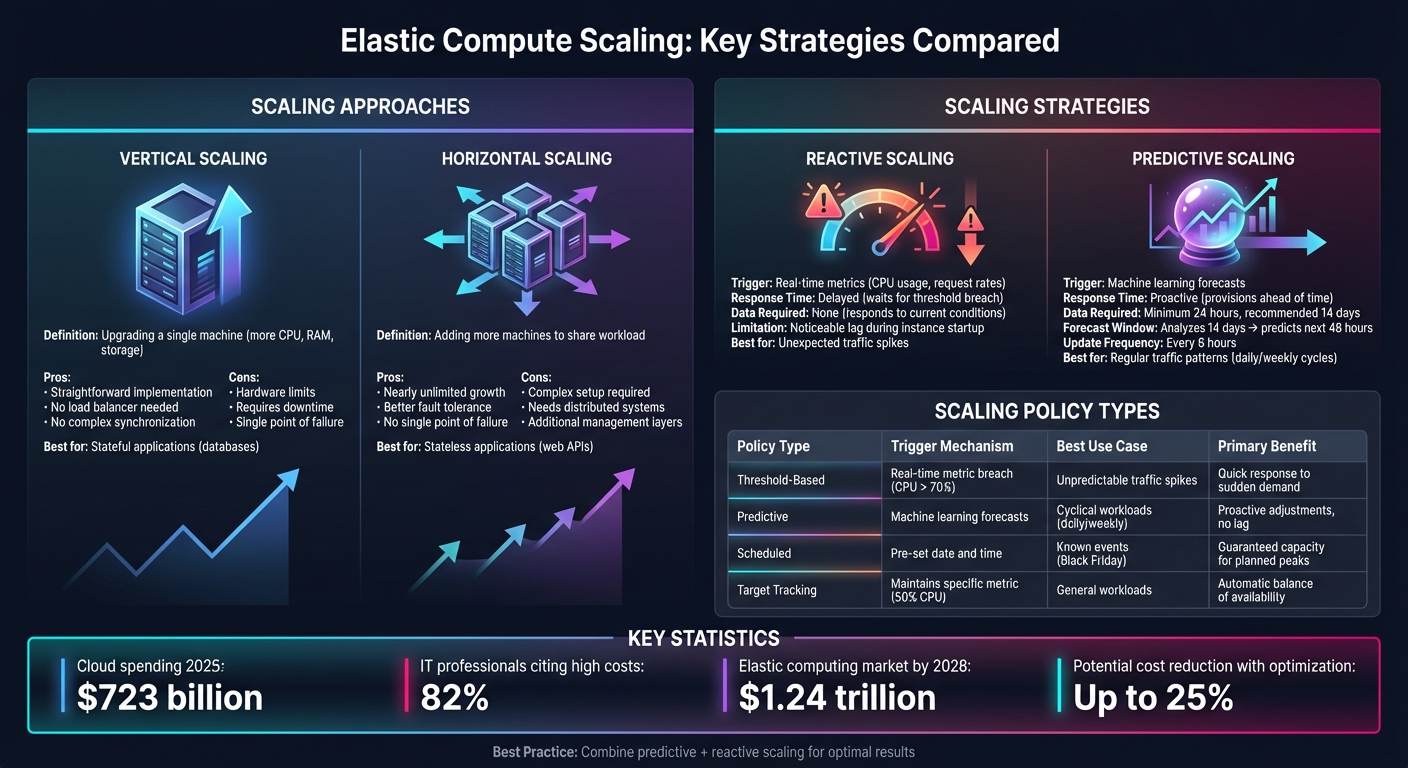
Elastic Compute Scaling Strategies Comparison: Vertical vs Horizontal and Reactive vs Predictive
When it comes to scaling, there are two main approaches: vertical scaling and horizontal scaling. Vertical scaling involves upgrading a single machine by adding resources like more CPU power, RAM, or storage. Think of it as replacing your current computer with a more powerful one. On the other hand, horizontal scaling means adding more machines to share the workload, similar to hiring additional team members instead of overburdening one person.
Both methods have their advantages. Vertical scaling is straightforward - it avoids the need for load balancers or complex synchronization. However, it has its limits, as hardware upgrades can only go so far, and downtime is often required during these upgrades. Horizontal scaling, meanwhile, offers nearly endless growth potential and better fault tolerance. If one machine fails, others can take over. But it does require a more sophisticated setup, including distributed systems and additional management layers.
Many organizations use a mix of both approaches to strike a balance between performance and cost. For instance, stateless applications like web APIs are well-suited for horizontal scaling because any machine can handle any request. Stateful applications, such as databases, often lean toward vertical scaling due to the need for consistent data handling. Designing applications to be stateless - such as by offloading session data to external systems - can help unlock the full potential of horizontal scaling.
Scaling strategies can also be categorized as reactive or predictive. Reactive scaling adjusts resources in real time by monitoring metrics like CPU usage or request rates. When thresholds are breached, it triggers scaling actions. Predictive scaling, on the other hand, uses machine learning to analyze historical data and forecast future demand, provisioning resources ahead of time.
Reactive scaling has a noticeable lag because it only kicks in after demand increases, meaning there’s a delay while new instances start up. Predictive scaling avoids this by pre-launching resources based on expected demand. However, it requires at least 24 hours of historical data to begin functioning, with two weeks of data recommended for more accurate forecasts. Typically, predictive algorithms analyze 14 days of data to predict demand for the next 48 hours, updating these forecasts every six hours.
In practice, combining both strategies works best. Predictive scaling can handle regular traffic patterns - like daily or weekly surges - while reactive scaling manages unexpected spikes. Adding a pre-launch buffer ensures new instances are ready to go before traffic increases. Configuring appropriate warmup periods also prevents newly launched instances from being scaled down too quickly.
Auto scaling policies dictate how your system adjusts to changing demand. For example:
"A target tracking scaling policy prioritizes availability during periods of fluctuating traffic levels by scaling in more gradually when traffic is decreasing." - AWS
To avoid premature scale-in, instances are removed only when all target tracking policies agree it’s safe to do so. Cooldown periods help prevent rapid back-and-forth scaling by pausing actions after a change, while warmup periods ensure new instances aren’t counted in metrics until they’re fully operational. Setting minimum and maximum capacity limits also acts as a safeguard, preventing under-provisioning during traffic dips and capping expenses during spikes.
For applications with highly variable traffic, enabling detailed monitoring with one-minute intervals (instead of the default five-minute intervals) allows for faster scaling responses.
These scaling strategies provide a foundation for creating resilient architectures that can handle fluctuating workloads while maintaining optimal performance.
Designing applications to be stateless is a cornerstone of elastic scalability. When state is tied to individual servers, those servers become critical points of failure, making scaling and maintenance a challenge. To prevent this, shift all state management to external systems like distributed caches, databases, or specialized session storage services. This "share-nothing" approach ensures that any server in your system can handle any incoming request without dependencies on specific instances.
A great example of this is Wix, which in 2024 transitioned its infrastructure from Redis and HBase to Aerospike. This change enabled 100% real-time data availability, reduced response times by sixfold, and cut infrastructure costs by 45% annually through effective horizontal scaling [6]. Similarly, Adobe incorporated Aerospike into Adobe Experience Cloud, allowing them to manage millions of customer profiles. Their new architecture now processes millions of requests per second with an impressive 99.999% uptime [6].
It's also essential to avoid session affinity, where users are tied to specific servers. While it might seem convenient to store session data locally, this setup creates bottlenecks and hampers the ability of load balancers to evenly distribute traffic [11].
Once your services are stateless, the next step is ensuring smooth traffic management with robust load balancing.
Building on a stateless architecture, effective load balancing ensures that your system remains resilient and responsive during scaling events. Load balancers distribute traffic across servers, monitor their health, and redirect requests when instances fail or become overloaded. They also handle connection draining, which allows instances to gracefully finish active connections before being removed from the rotation [3].
Choosing between Layer 4 and Layer 7 load balancers depends on your traffic management needs. Layer 4 operates at the transport layer, making decisions based on IP addresses and TCP ports, offering high performance with minimal overhead. On the other hand, Layer 7 works at the application layer, analyzing HTTP headers, URLs, and cookies. This allows for smarter routing, such as directing API requests to one server pool and static content to another.
It's also crucial to review your load balancing algorithms to avoid "artificial client pinning", where too many requests end up targeting a single server despite others being available. Spreading instances across multiple Availability Zones can further protect against regional outages and improve resource utilization [13].
Message queues and event-driven architectures serve as buffers between unpredictable traffic spikes and your compute resources. In this setup, frontend servers quickly push tasks to a queue and respond immediately to users. Meanwhile, backend workers process these tasks at their own pace, scaling independently based on the size of the queue rather than just CPU usage.
This queue-based approach helps smooth out sudden traffic surges [4]. For instance, in CPU-heavy tasks like video transcoding, the number of pending items in the queue determines how many workers are needed. If a queue grows to 1,000 tasks and each worker can handle 10 tasks per minute, you’d need 100 workers to clear the backlog in 10 minutes.
A real-world example of this is Flipkart, India’s leading e-commerce platform. During their 2024 "Big Billion Days" sale, they used a real-time data platform with asynchronous processing to handle massive spikes in concurrent users and transactions. Their decoupled architecture allowed frontend servers to manage user interactions while backend workers processed orders and payments at a pace aligned with actual demand. This setup not only kept latency low but also optimized costs [6].
Once you've established a strong, stateless architecture, the next step is pinpointing the right metrics to guide your auto scaling decisions.
The key to effective auto scaling lies in selecting metrics that inversely correlate with capacity. For example, if you double the number of servers, the metric you're monitoring should drop by half [9][10]. This ensures your scaling policies accurately reflect real demand.
For standard workloads, focus on metrics like Average CPU Utilization, Average Network In/Out (in bytes), and Application Load Balancer Request Count Per Target. For specialized tasks, such as video transcoding, custom metrics - like job queue depth - are more effective [1][10][16].
To handle traffic spikes more efficiently, enable detailed monitoring at one-minute intervals instead of the default five minutes [10][16].
Avoid relying on metrics like "Total Request Count" or "Latency" as primary scaling triggers. These metrics don’t scale proportionally when instances are added or removed, making them less reliable [10].
Threshold-based scaling is straightforward and reacts to real-time conditions. For instance, if CPU utilization exceeds 70%, an alarm triggers, and your system adjusts capacity. Target tracking takes this further by maintaining a specific utilization level, like 50% CPU, automatically scaling up or down to match demand [10][14].
Step scaling allows for more nuanced adjustments. You can set multiple thresholds with varying responses - such as scaling out by 10% at 60% CPU utilization and adding 40% more capacity at 85% [14]. To avoid rapid, repeated scaling (or "flapping"), leave enough margin between scale-out and scale-in thresholds.
Predictive scaling uses machine learning to forecast demand based on historical data - ideally 14 days’ worth - and predicts the next 48 hours. These forecasts update every six hours [8][17]. Before fully deploying predictive scaling, test it in "forecast only" mode to validate its accuracy [8][17].
The best strategy often combines these methods. Use predictive scaling for predictable demand patterns, such as daily or weekly cycles, and dynamic scaling to handle unexpected traffic surges [8][15]. SurferCloud employs this hybrid approach to adjust compute resources dynamically and efficiently.
| Scaling Policy Type | Trigger Mechanism | Best Use Case | Primary Benefit |
|---|---|---|---|
| Threshold-Based | Real-time metric breach (e.g., CPU > 70%) | Unpredictable traffic spikes | Quick response to sudden demand |
| Predictive | Machine learning forecasts | Cyclical workloads (e.g., daily or weekly) | Proactive adjustments to avoid lag |
| Scheduled | Pre-set date and time | Known events (e.g., Black Friday sales) | Guaranteed capacity for planned peaks |
Scheduled scaling ensures your system is ready for predictable demand spikes by adjusting capacity at pre-set times [1][15]. This eliminates the lag associated with reactive scaling during high-traffic events.
No matter the scaling policy, resilience buffers are crucial. These buffers provide extra capacity to handle sudden traffic surges without compromising performance. For example, targeting 50% CPU utilization leaves room for unexpected spikes, creating a safety net [10].
"To use resources cost efficiently, set the target value as high as possible with a reasonable buffer for unexpected traffic increases."
– Amazon EC2 Auto Scaling Documentation [10]
Another important consideration is the instance warmup period - the time it takes for new servers to boot up and become fully operational. Without accounting for this, your system might over-scale by including metrics from instances that aren’t ready to handle traffic yet [10][14]. Target tracking policies help mitigate this by scaling out aggressively when needed and scaling in more gradually, maintaining a safety margin during demand fluctuations [10].

To get started with SurferCloud, choose the right service for your workload - options include UHost, ULightHost, or GPU UHost [18]. Once you've selected the service, configure your setup by specifying the Zone, CPU, Memory, Storage type, and Operating System [18].
It's essential to tailor your instance specifications to fit your application's needs right from the beginning. Properly sizing your resources ensures efficient scaling and avoids wasteful over-provisioning [1][20]. These initial settings are the backbone of a scalable and responsive system.
Auto scaling groups make it easy to handle fluctuating demand. Start by creating a launch template that standardizes key settings like machine type, boot disks, and startup scripts [5].
Set capacity limits carefully - for instance, define a minimum of three instances and a maximum of twelve. This keeps your costs in check while ensuring you have enough resources to handle spikes in demand [5][13]. To boost reliability, distribute instances across multiple Availability Zones, which helps maintain high availability and minimizes the impact of potential failures [5][13].
Enable health checks to monitor your instances. If an instance becomes unhealthy, the auto scaling group can terminate it and automatically launch a replacement to maintain your desired capacity [13]. For applications with longer boot times, configure warmup periods to prevent scaling too quickly before new instances are fully initialized [2]. You might also consider using warm pools, which keep instances in a stopped state, ready to launch quickly during scale-out events. This can significantly reduce latency and improve responsiveness during periods of high demand [13].
Cost efficiency starts with selecting the best region and instance type for your workload. SurferCloud's pay-as-you-go pricing ensures you only pay for resources when they're actively in use, making it easier to save during off-peak hours [5][19]. For example, proper scaling strategies can reduce daily compute costs from $12 to $7.80 [19].
To keep your resources optimized, use target-tracking scaling policies. For typical workloads, aim to maintain an average CPU utilization of 70% [1][20]. However, for tasks like background processing or data handling, consider using queue depth as your scaling metric. In these cases, 100% CPU usage might be normal and not necessarily a sign to scale [1].
Regularly review performance metrics to ensure your instance types align with actual workload demands. Automated tools can help identify overprovisioned resources, potentially lowering costs by up to 25% [21]. By combining predictive scaling with dynamic scaling, you can plan for traffic surges in advance, reducing the risk of being under-resourced while avoiding unnecessary expenses [15][1].
Expanding on the earlier discussion of scaling policies and cost strategies, managing elastic compute resources effectively requires a focus on optimization, reliability, and governance. These elements work together to ensure efficient operations without compromising performance or control.
Right sizing is all about aligning instance types and sizes with workload requirements while keeping costs in check. Regularly review performance data and leverage automated tools to spot underutilized or idle instances [22][23]. These reviews help identify opportunities to adjust resources and reduce waste.
When deciding on scaling metrics, choose ones that reflect the nature of your workload. For instance, a video transcoding application should scale based on job queue depth rather than CPU usage, as 100% CPU utilization is typical for such tasks [4][24]. Also, test scale-down scenarios to ensure your system handles capacity reductions smoothly [24].
These practices enhance resource efficiency and lay a solid foundation for maintaining availability and fault tolerance.
To guard against zone failures, spread instances across multiple Availability Zones [13][7]. Automated health checks can identify and replace unhealthy instances, ensuring your system remains at its desired capacity [13][7].
For web-facing applications, implement both system-level and application-level health checks. Application-level checks are especially useful as they can detect issues like an unresponsive web server, which hardware checks might miss [7]. Use lifecycle hooks to manage graceful shutdowns and connection draining before removing instances [7]. Additionally, set cooldown periods to avoid rapid fluctuations in instance count caused by minor metric changes [7].
Effective governance goes beyond technical tweaks - it’s about keeping costs under control and maintaining accountability.
Assign a directly responsible individual (DRI) to oversee each cost item, ensuring someone is accountable for optimization and budget adherence [25]. Tag all instances to simplify cost tracking by team, department, or project [25].
Set budget alerts at key thresholds - 90%, 100%, and 110% of your target spend. Forecast alerts at 110% can help you address potential overruns before they escalate [25]. Define minimum and maximum instance counts in auto-scaling groups to balance cost control with availability [3]. You might also consider implementing "Showback" for cost transparency or "Chargeback" to allocate expenses to internal teams based on actual usage [25].
Elastic compute scaling has become a cornerstone for balancing performance and cost in today’s cloud environments. With cloud spending expected to surpass $723 billion by 2025 and 82% of IT professionals highlighting high cloud costs as a major concern [12], the ability to adjust resources automatically to meet demand is no longer just a performance enhancer - it’s a necessity for operational success.
Key advantages like dynamic scalability, cost efficiency, and high availability are the building blocks of modern cloud infrastructure. SurferCloud’s elastic compute servers bring these benefits to life, offering flexible pricing that starts at $5.90 per month for basic configurations and scales up to $68.90 per month for enterprise-level solutions.
Success lies in combining the right strategies. The elastic computing market is projected to hit $1.24 trillion by 2028 [19], underscoring the growing importance of these solutions. SurferCloud takes the complexity out of adoption with automation, enabling IT teams to focus on innovation rather than the tedious task of infrastructure management [19][5]. Whether you’re a startup navigating your first surge in traffic or an enterprise managing multi-region deployments, the principles remain the same: align resources with demand and ensure robust health monitoring.
Getting started is straightforward. Set up an auto-scaling group, define metrics, and test your policies under realistic scenarios. As your requirements evolve, you can integrate predictive capabilities, multi-region setups, and advanced lifecycle management. By implementing these strategies, you can unlock the full potential of your cloud infrastructure.
Scaling up, often called vertical scaling, involves boosting the power of a single server or virtual machine by adding resources like CPU, memory, or storage. This method is simple to implement since everything stays on one machine. However, it’s limited by the hardware's capacity and might require downtime to make the upgrades. Plus, depending on a single machine introduces a potential single point of failure.
On the other hand, scaling out, or horizontal scaling, means expanding capacity by adding more servers or instances and balancing the workload across them with a load balancer. This method provides almost limitless capacity, improves fault tolerance, and accommodates sudden demand surges without disruptions. That said, it comes with added complexity, such as managing data synchronization and ensuring smooth communication between the multiple instances.
Predictive scaling leverages historical data and usage patterns to forecast future demand, allowing it to adjust compute resources before a surge in traffic happens. By anticipating these changes, it eliminates delays caused by the startup time of reactive scaling, ensuring consistent performance even during peak periods.
On the other hand, reactive scaling kicks in only after demand surpasses a certain threshold. This delay can lead to short-term performance dips as additional resources are brought online. Predictive scaling avoids these hiccups, ensuring smoother operations and more efficient resource allocation, making it a smart choice for managing workloads that fluctuate frequently.
A stateless design is crucial for elastic compute scaling because it ensures that any compute instance can handle any request without relying on stored session data. This setup allows for the seamless addition or removal of instances, making load balancing smooth and eliminating the need for "sticky" sessions that tie users to specific servers.
Stateless systems also offer greater resilience. If an instance fails, it can be replaced immediately without disrupting functionality, adhering to the "design for failure" principle. This design brings key advantages, including cost savings - you only use the resources you need - steady performance during traffic spikes, and improved reliability since all instances are interchangeable. For businesses, this means predictable expenses, quicker responses during high-demand periods, and a more robust cloud infrastructure built to handle failures gracefully.





