Why the 2025-2026 Holiday Season Traffic Surg
Every year, the global holiday shopping season pushes w...








Edge cache invalidation is the process of removing or updating outdated files stored on a CDN's edge servers. This ensures users always access the latest content without waiting for the cache's Time-to-Live (TTL) to expire. It’s a critical step for situations where immediate updates are necessary, such as breaking news, price changes, or security patches.
Here’s how it works:
Key invalidation methods include:
Modern CDNs process invalidation requests quickly, often under 10 seconds, ensuring accurate and consistent content delivery. This process helps maintain performance, reduce origin server load, and provide a seamless user experience.
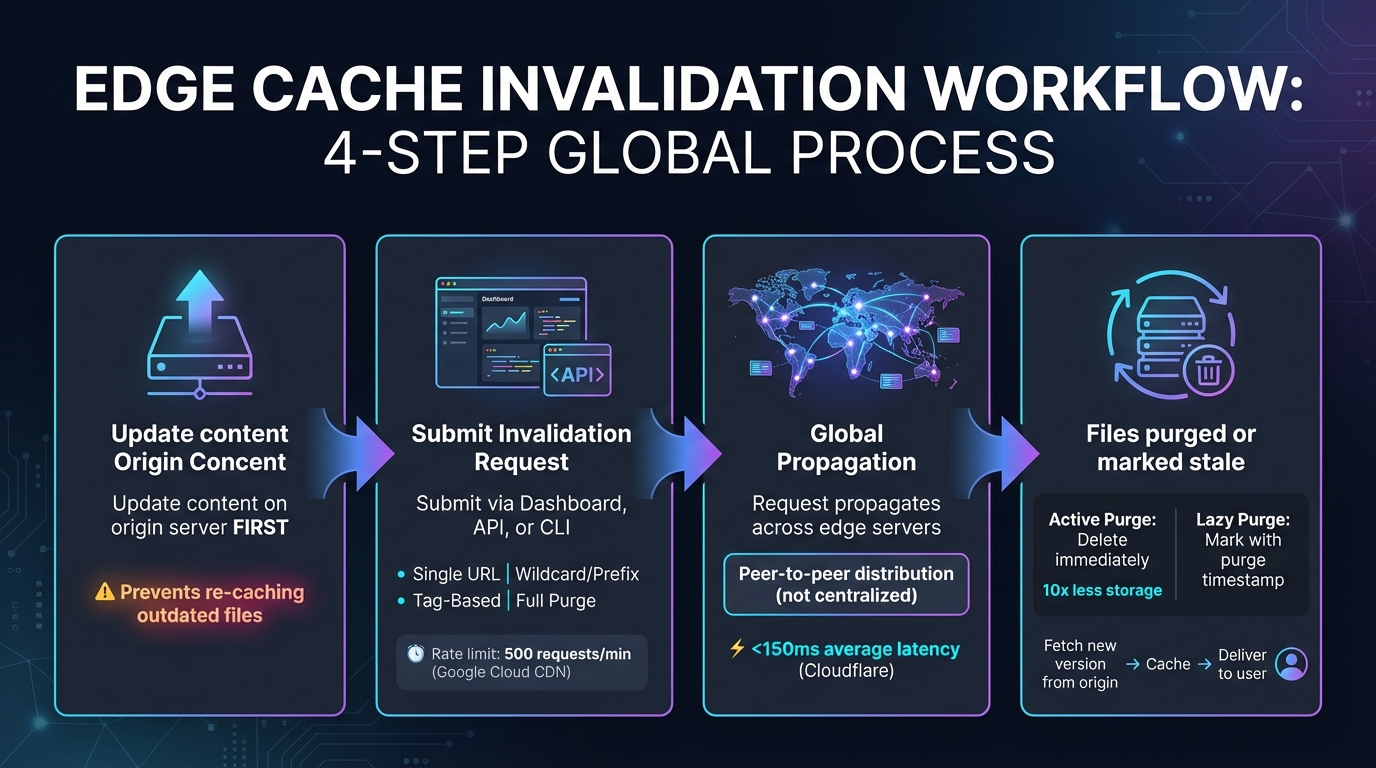
Edge Cache Invalidation Process: 4-Step Workflow from Content Update to User Delivery
Edge cache invalidation follows a structured approach to ensure updated content is delivered efficiently. Start by updating your origin content. If you initiate invalidation before the new version is live, the CDN might re-cache the outdated file instead [2].
Next, submit an invalidation request through your CDN's dashboard, API, or CLI. You can target specific URLs, directories (like /images/*), or cache-tagged groups [2][8]. Keep in mind, platforms like Google Cloud CDN limit invalidations to 500 requests per minute to maintain network stability [2].
Once submitted, the invalidation request propagates globally across the CDN's network of edge servers. Modern CDNs rely on peer-to-peer distribution rather than routing through a central hub, which significantly reduces latency. For example, Cloudflare's coreless architecture achieves average global purge latency in under 150 milliseconds [4].
At the edge server level, files are either deleted (active purge) or marked as stale using a "purge timestamp" (lazy purge) [4]. When a user requests the content, the edge server checks the timestamp. If the file is outdated, it fetches the new version from the origin server, caches it locally, and delivers it to the user [2][5].
This process ensures that updated content is distributed efficiently, and there are several ways to trigger invalidation.
Manual invalidation triggers allow you to clear specific URLs or patterns directly through your CDN's dashboard [2][11]. Alternatively, you can use API calls or CLI commands (e.g., vercel cache invalidate --tag [name]) to automate the process and integrate it into CI/CD pipelines [10][11].
Application-level triggers are especially useful for handling dynamic content. Frameworks like Next.js offer functions such as revalidatePath or revalidateTag, enabling your application to automatically initiate invalidation when database or CMS content changes [11]. Similarly, tag-based triggers allow you to assign "Cache-Tags" to responses at the origin server. By sending a single invalidation request for a tag, all related objects across the CDN's edge network can be cleared instantly [2][5].
Some CDNs also support metadata-based triggers, which invalidate content based on factors like HTTP status codes, MIME types, or specific origin names [5]. To prevent overloading your origin server, focus on invalidating only the necessary files and ensure the updated content is live before initiating the process [2][11].
When it comes to refreshing cached content, CDNs provide several methods to ensure your updates are applied efficiently. These options allow you to control how specific or broad your cache invalidation needs to be.
Granular Invalidation focuses on specific URLs or path prefixes, such as /images/*. It even allows you to target an entire hostname like media.example.com without affecting other domains. This method is perfect for precise updates without disrupting unrelated content.
Tag-Based Invalidation takes a more organized approach by using metadata labels defined in the Cache-Tag HTTP header. You can group related content under a single tag (e.g., "product-123") instead of listing multiple URLs. A single request targeting that tag clears all associated content across the CDN. For instance, a no-code conversion platform used Fastly's tag-based purging to invalidate related content in less than 200 milliseconds, ensuring updates like personalized banners disappeared instantly.
Full Cache Purge wipes out all cached content for an entire site or zone in one sweep. While effective, it resets the cache hit ratio to zero and can overwhelm the origin server if traffic spikes. This method should be reserved for emergencies, such as security breaches or major site redesigns, rather than routine updates.
| Invalidation Type | Scope | Performance Impact | Best Use Case |
|---|---|---|---|
| Single URL | Individual file | Minimal | Updating a specific image or document |
| Wildcard/Prefix | Directory or group | Moderate | Refreshing all assets in a folder (e.g., /v1/assets/*) |
| Tag-Based | Logical groups | Variable | Purging all pages related to a product or category |
| Full Purge | Entire Cache | High (risk of origin overload) | Emergency fixes or major site-wide redesigns |
Selecting the right invalidation method depends on how often your content changes and its importance. For assets that are updated frequently, versioned filenames (e.g., style.v2.css) can be a smarter, more efficient approach. This strategy avoids repeated manual invalidations and ensures users always see the latest version of your content [1].
Edge cache invalidation plays a key role in maintaining content accuracy. By ensuring that every user accesses the most up-to-date content, it eliminates the risk of inconsistencies where some users see outdated information while others see the latest updates. This is particularly important for time-sensitive content like breaking news, pricing updates, or product availability changes.
When invalidation is triggered, the CDN immediately fetches the updated content from the origin server. This prevents issues like a new HTML file referencing an updated JavaScript library while the edge cache continues to serve an older, incompatible version.
Carefully planned invalidation can significantly enhance CDN performance. Instead of purging everything at once, selective invalidation ensures that only outdated content is removed. This avoids the "thundering herd" problem, where a flood of simultaneous requests overwhelms the origin server [6][2].
"Webmasters' origins could be knocked over by a thundering herd of requests, if they choose to purge all content needlessly. It's a delicate balance of purging just enough." - Alex Krivit, Cloudflare [6]
By targeting specific assets for invalidation, bandwidth usage is reduced, and overall performance improves. Modern "active" invalidation systems, which delete files immediately, use up to 10x less storage space compared to older "lazy" purging methods, allowing more room for other cached assets [4]. For example, Google Cloud CDN processes invalidation requests in about 10 seconds [2], while some advanced networks can achieve a global purge latency of under 150 milliseconds [4].
The performance improvements from edge cache invalidation directly enhance the user experience. Faster, more accurate content delivery builds trust and keeps users engaged. When invalidation happens in less than 150 milliseconds, all regions display the most current information, eliminating confusion caused by outdated data [4]. This speed is critical in situations like live sports scores, pricing updates, or breaking news, where delays can harm user trust.
Additionally, efficient invalidation prevents slowdowns caused by fetching fresh content from the origin server. By using lightweight revalidation checks that consume less than 1KB of data, rather than reloading entire assets, you maintain quick load times without sacrificing content accuracy [7]. These optimizations ensure that CDNs deliver secure, up-to-date content, creating a seamless experience for users.

Start by pinpointing the resources you need to refresh. This could mean targeting specific URLs like /images/logo.png or using wildcards to cover broader directories such as /videos/* or /assets/v1* [2][5][9]. Being precise here helps avoid unnecessary cache clearing and ensures your origin server isn't overwhelmed by excess requests.
SurferCloud's UCDN offers a Content Refresh feature designed to purge selected files or directories across its extensive network of over 250 self-built nodes and 500+ global fusion nodes. This supports a variety of use cases, including Page Acceleration, Large File Download, Video On-Demand, and Whole Site Acceleration [12].
To set up your invalidation rules effectively, align them with the type of content you're dealing with:
| Functionality | Page Acceleration | Large File / Video VOD | Whole Site Acceleration |
|---|---|---|---|
| Content Refresh | Yes | Yes | Yes |
| Pre-fetch File | Yes | Yes | Yes |
| Cache Configuration | Yes | Yes | Yes |
| Primary File Types | html, css, js | apk, exe, mp4, m3u8 | Dynamic + Static mixed |
Once you've configured your rules, test them immediately to ensure they work as planned.
After initiating invalidation, check its success by reviewing the API response ID [10]. Examine HTTP cache headers - after a purge, you should see MISS or EXPIRED instead of HIT [8]. SurferCloud's network typically updates within 10 seconds to 1 minute [3][2][5]. To confirm everything is functioning correctly, ensure your origin server is serving updated content and not re-caching outdated files [2]. Tools like curl can be incredibly useful for inspecting headers and verifying changes [3].
Edge cache invalidation plays a key role in keeping content up-to-date and accurate across a global CDN. By ensuring that visitors always receive the latest information, it prevents outdated or incorrect content from being served to users [4].
But the benefits go beyond just accuracy. Thanks to modern invalidation architectures, global purge latencies now average under 150ms [4]. Instead of clearing the entire cache, selectively purging only the modified content helps protect your origin server from sudden traffic surges while maintaining high cache hit ratios. These improvements are the foundation of SurferCloud's UCDN advanced tools.
SurferCloud's UCDN offers everything you need to manage effective invalidation strategies across its network of over 17 global data centers. Whether you're handling page acceleration, large file downloads, or video streaming, the platform’s Content Refresh feature gives you precise control over which assets to purge and when. This minimizes latency while ensuring content accuracy.
That said, edge cache invalidation should be used thoughtfully. For regular updates, consider using versioned URLs (like image_v2.jpg) and confirm that your origin server provides the updated content to avoid accidental re-caching [2]. This approach complements invalidation efforts, ensuring fast and reliable content delivery. When used strategically, edge cache invalidation becomes a powerful tool for delivering accurate, high-speed content to users worldwide.
Edge cache invalidation refers to the process of clearing out old or outdated content from edge servers within a Content Delivery Network (CDN). This ensures that users receive the latest and most accurate version of content directly from the origin server when they make a request.
Keeping cached content updated plays a key role in maintaining content reliability, improving the experience for users, and ensuring businesses provide timely and dependable information. This process is especially critical for dynamic websites or platforms with content that changes frequently.
Edge cache invalidation refers to the process of clearing outdated or unnecessary content from a CDN's edge servers. This ensures that users always access the most current version of your assets, helping to maintain fast and accurate content delivery while boosting overall performance.
There are a few different ways to handle edge cache invalidation, depending on how specific you need to be. Here are some common methods:
/css/style.css./images/*.SurferCloud’s CDN supports all these methods, giving you the flexibility to invalidate content through its console or API. For example, you can use tag-based purges to target specific asset types, ensuring efficient cache management while reducing strain on your origin servers. With this approach, users consistently receive the freshest content across SurferCloud’s global edge network.
When you make updates to content on your origin server, edge caches might still deliver old versions to users. By submitting a cache invalidation request, you can clear out these outdated copies, ensuring users see the most current and accurate content. This step is crucial for maintaining data accuracy, enhancing the user experience, and keeping your content delivery smooth and dependable.





