Best VPNs for ChatGPT Access: Reliable Soluti
Accessing ChatGPT smoothly can sometimes be challenging...









Function-as-a-Service (FaaS) simplifies development by letting you deploy event-driven code without managing servers. But with its convenience comes unique security risks. Here's what you need to know:
*) in policies and enforce MFA for sensitive actions. Use private subnets and security groups to limit network exposure.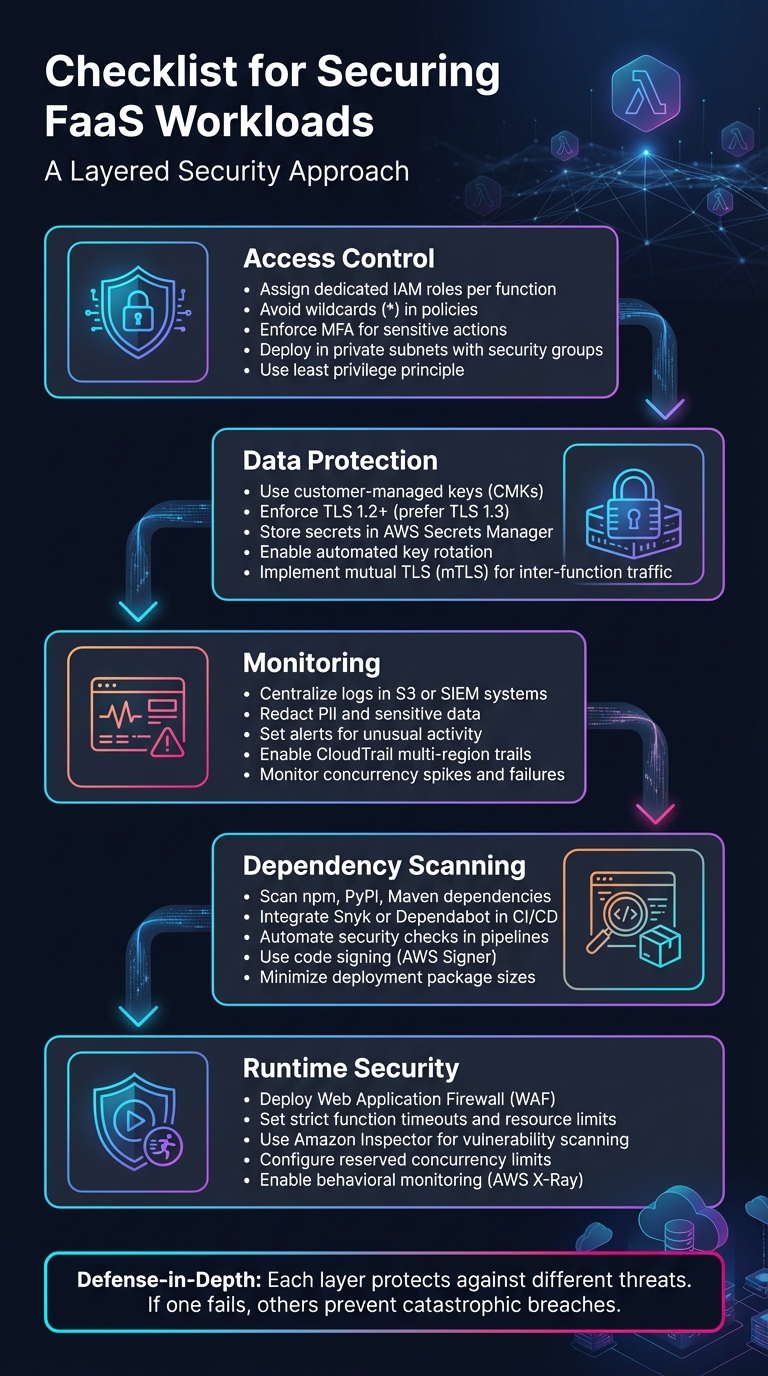
5-Layer Security Checklist for FaaS Workloads
Access control is a critical step in securing your FaaS (Function as a Service) workloads. Start by assigning each function its own dedicated IAM role with only the permissions it needs to perform its specific task. This minimizes the risk of potential breaches by isolating permissions for each function [1][5]. Avoid using wildcards like * in your policies. Instead, explicitly define the allowed actions (e.g., dynamodb:GetItem) and specify the exact resource ARNs [1]. Designing functions for single, focused tasks helps limit permissions and reduces the potential impact of a breach [5]. To make this process even easier, tools like IAM Access Analyzer can create detailed policies based on access activity from your logs, eliminating the guesswork [6].
For human users - especially administrators and developers - multi-factor authentication (MFA) should be non-negotiable [8][9]. Functions themselves should rely on temporary credentials and IAM roles for programmatic access, but human accounts need this extra layer of security. Use JSON policy conditions to enforce MFA for sensitive actions like lambda:UpdateFunctionCode or lambda:DeleteFunction. This ensures such actions are only allowed when MFA is active [9]. To simplify enforcement, AWS IAM Identity Center allows you to manage MFA requirements across all accounts and permissions from one centralized location [8][9].
Once you’ve tailored individual permissions, take it a step further by securing your environment through network segmentation. Deploy functions within a Virtual Private Cloud (VPC) and place them inside private subnets [1][7]. For sensitive functions - like those involved in authentication or payment processing - keep them isolated from general-purpose functions. This separation reduces the blast radius in case of a breach [1]. Use security groups and routing tables to control egress traffic, ensuring it only reaches authorized endpoints like specific database clusters or internal APIs [5]. The AWS Well-Architected Framework emphasizes this approach:
"Credentials and permissions policies should not be shared between any resources in order to maintain a granular segregation of permissions" [5].
Additionally, configure resource-based policies to block public access. Use conditions like AWS:SourceAccount to prevent unauthorized cross-account invocations [7].
To further strengthen your system, consider integrating these access control measures with secure cloud infrastructures, such as SurferCloud (https://surfercloud.com), for added resilience.
Protecting data at every stage is non-negotiable. While platforms like AWS Lambda provide managed keys, opting for customer-managed keys (CMKs) offers greater control over key rotation and auditing processes [10]. When it comes to data in transit, always enforce TLS 1.2 or higher for API communications, though TLS 1.3 is the preferred choice. Use cipher suites that include Perfect Forward Secrecy (PFS), such as DHE or ECDHE, to ensure robust encryption [12] [13].
Take precautions to avoid exposing sensitive data in request paths, query strings, or tags. Instead, rely on HTTP POST payloads for transmitting confidential information, and consider pre-encrypting this data to prevent it from appearing in logs. For credentials like API keys or database passwords, AWS Secrets Manager provides automated rotation and fine-grained access control, making it an effective solution [14].
Centralizing your key management strategy further solidifies these encryption practices.
Centralizing key management not only simplifies operations but also strengthens security. AWS Key Management Service (KMS) secures key material using validated hardware security modules (HSMs). As noted in AWS documentation:
"AWS KMS uses FIPS 140-3 Level 3 validated hardware security modules to protect your keys. There is no mechanism to export AWS KMS keys in plain text." [16]
With centralized key management, you can automate key rotation and maintain a detailed audit trail through CloudTrail logs. Key deletion events come with a mandatory waiting period - at least 7 days, with a default of 30 days - to prevent accidental or intentional data loss [16]. To boost performance and reduce costs associated with frequent API calls, consider using the AWS Parameters and Secrets Lambda Extension to cache secrets locally within your function’s execution environment [15].
Once encryption and key management are in place, securing communication between functions requires additional safeguards.
While standard TLS secures data in transit, mTLS adds an extra layer by enabling two-way authentication. This ensures both endpoints are verified, reducing the risk of unauthorized access or function chaining abuse [1]. In serverless environments, you can build mTLS-like security by assigning unique IAM roles to each function and validating inter-function calls with signed tokens or workload identities [1] [5]. The OWASP Serverless / FaaS Security Cheat Sheet highlights this best practice:
"Validate function-to-function calls with signed tokens or workload identities." [1]
To further secure inter-function communication, place functions in private subnets and use security groups to limit outbound traffic to only authorized service endpoints. Additionally, configure resource-based policies on receiving functions to allow invocations solely from specific source ARNs, versions, or aliases [5]. Pairing mTLS with event data validation adds another layer of protection, ensuring even authenticated functions cannot send malformed or malicious payloads [1].
Once you've implemented access control and data protection, the next step is to continuously monitor and scan for emerging threats. Even with encryption and strict access measures, new vulnerabilities can surface. Regular vulnerability scans help identify these issues early, reducing the risk of breaches or costly downtime.
Centralizing logs in one location - such as an S3 bucket or a Security Information and Event Management (SIEM) system - makes it much easier to perform forensic audits and respond to incidents effectively [17][18]. The AWS Well-Architected Framework highlights the importance of this approach:
"The AWS Well-Architected Framework recommends that you integrate AWS security events and findings into a notification and workflow system, such as a ticketing, bug, or security information and event management (SIEM) system." [17]
Before storing logs, ensure that sensitive information like Personally Identifiable Information (PII) and secrets are redacted [11][18]. Use a write-once-read-many (WORM) model, such as Amazon S3 Object Lock, to safeguard logs from tampering [18]. Additionally, enable multi-region trails in CloudTrail to capture global service events, regardless of their location [17].
Set up automated alerts to detect unusual activity, such as spikes in concurrency, surges in failures, or unexpected changes to security groups - potential indicators of a Denial-of-Service (DoS) attack [17][2]. Advanced tracing tools can further enhance monitoring by mapping data flow across functions. However, as Sysdig cautions:
"Relying solely on the logging and monitoring tools provided by the CSP is not sufficient, since it does not cover the application layer." [2]
To address this gap, extend your monitoring to include the application layer, ensuring you catch potential attack vectors that infrastructure-level tools might overlook. This broader visibility strengthens your vulnerability scanning and CI/CD security processes.
While cloud providers handle operating system patches, securing application-level dependencies - like those pulled from npm, PyPI, or Maven - is your responsibility [4]. Serverless functions often rely on dozens of dependencies, which can increase supply chain risks. As Liran Tal and Guy Podjarny from Snyk explain:
"Function as a Service (FaaS) platforms take on the responsibility for patching your operating system dependencies for you, but do nothing to secure your application dependencies, such as those pulled from npm, PyPI, Maven and the likes." [4]
Integrate tools like Snyk or Dependabot into your GitHub or GitLab repositories to automatically create pull requests when vulnerabilities are identified [4]. Scanning should occur at multiple stages: in your IDE, during pull requests, as part of CI/CD builds, and continuously for deployed functions [4][19]. To further reduce risks, eliminate unused dependencies, minimize deployment package sizes [1][19], and use code signing tools like AWS Signer to ensure only authorized, untampered code is deployed [11].
Embedding these scans into your CI/CD pipelines ensures vulnerabilities are caught early, bolstering your overall security posture.
Automating security checks in your deployment pipeline helps catch vulnerabilities before they reach production. Include Software Composition Analysis (SCA) to detect package vulnerabilities and Infrastructure as Code (IaC) scanning to flag deployment misconfigurations, halting builds if high-severity issues are found [21][22][4].
Framework plugins, such as the Snyk Serverless plugin, can integrate security reviews directly into your deployment commands [4]. To maintain pipeline efficiency, run security audits, functional tests, and preview deployments in parallel [21]. Confirm that your functions use only supported runtimes during the build process, as deprecated runtimes no longer receive critical security updates from cloud providers [20][7]. Finally, sign deployment packages with checksums to verify their integrity [1].
Building on the foundation of access control, encryption, and monitoring, runtime protection focuses on safeguarding functions during their execution. This layer defends active functions against attacks and misconfigurations, ensuring they operate securely. Here are some strategies to strengthen runtime security.
A Web Application Firewall (WAF) acts as a protective shield, filtering out malicious requests before they can interact with your code. By configuring WAF rules based on the OWASP Top 10, you can block threats like SQL injection, cross-site scripting (XSS), and DDoS attacks. For API-driven workloads, WAFs can validate incoming payloads, enforce rate limits, and reject improperly formatted data that could exploit vulnerabilities in data parsing.
Setting strict execution timeouts and resource limits is critical to prevent processes from running out of control. Load testing can help determine the minimum timeout needed for proper function execution. As Sysdig advises:
"Function timeouts should also be set to the minimum to ensure that the execution calls are not interrupted by DoS attackers" [2].
Additionally, configuring reserved concurrency limits how many function instances can run at the same time, protecting downstream systems that may scale more slowly [23]. Keep an eye on other quotas, such as payload size (e.g., AWS Lambda supports event source mappings as low as 6 MB [23]), file descriptors, and temporary storage in /tmp. If abnormal invocation activity is detected, setting reserved concurrency to 0 can immediately stop executions, allowing time for investigation. Tools like AWS Lambda Power Tuning can help optimize memory, CPU allocation, and cost efficiency [23].
Beyond these limits, continuous monitoring and scanning play a key role in runtime security.
Traditional network-based security tools often fall short in serverless environments. Instead, focus on behavioral monitoring and platform-native scanning services. For instance, Amazon Inspector scans AWS Lambda functions for software vulnerabilities and unintended network exposure [24]. Similarly, Microsoft Defender for App Service and Google Security Command Center provide comparable functionality for Azure Functions and Cloud Run [25][26]. These tools work without adding latency to your function's execution, ensuring seamless protection.
Assume that residual data might persist between function invocations. Monitor for potential cold start data leakage [1]. Enable tracing tools like AWS X-Ray for full visibility into data flow, which can help pinpoint the source of injection attacks or compromised functions [7]. For containerized serverless workloads such as AWS Fargate, specialized agents can monitor security events without impacting performance [2].
These measures collectively strengthen runtime protection, ensuring that your serverless functions remain secure and resilient.
This checklist weaves together identity management, encryption, monitoring, and runtime defenses into a layered security approach. While cloud providers, like AWS, handle the security of the infrastructure, you are responsible for safeguarding your application code, data, and configurations. As AWS explains:
"Security is a shared responsibility between AWS and you. The shared responsibility model describes this as security of the cloud and security in the cloud." [3]
To start, focus on essential controls: assign the least privilege possible to IAM roles for each function, store sensitive information in a secure vault like AWS Secrets Manager, and treat all incoming data as untrusted. Strengthen your operational visibility by centralizing logging and monitoring to catch unusual activity early. For added protection, integrate dependency scanning into your CI/CD pipelines and deploy Web Application Firewalls (WAFs) to guard against potential threats.
A layered security model minimizes the damage if one defense fails. For example, if a vulnerable function is exploited, strict IAM permissions can block attackers from accessing other resources. At the same time, network segmentation ensures compromised functions stay isolated from critical data. This "defense-in-depth" approach prevents a single failure from leading to a catastrophic breach.
Every security measure outlined in this checklist - whether it’s access control, data protection, monitoring, or runtime defenses - works together to create a strong, multi-layered defense. Regularly review and refine these strategies to keep your FaaS environment secure and resilient.
When managing access control for your serverless (FaaS) workloads, it's crucial to stick to the principle of least privilege. This means assigning each function its own set of minimal-scope permissions - whether through specific IAM roles or temporary credentials - ensuring it only has access to what’s absolutely necessary. This approach minimizes the risk of unauthorized access.
To further secure privileged access, implement multi-factor authentication (MFA). This extra layer of security makes it significantly harder for attackers to gain entry, even if credentials are compromised.
Take advantage of fine-grained resource policies to tightly control permissions. Tools like IAM Access Analyzer can help you monitor these policies continuously, flagging any potential risks. Regularly reviewing and updating your access policies is also essential to keep up with evolving security requirements and to close any gaps that could expose your workloads to vulnerabilities.
To keep your data secure in serverless environments, it's essential to safeguard both data at rest and data in transit.
When it comes to data at rest, enable server-side encryption using a customer-managed key. This approach gives you complete control over key rotation, auditing, and access policies. For sensitive information like environment variables, rely on a dedicated secrets management service for secure storage. If you must use environment variables, ensure they’re encrypted with the same customer-managed key.
For data in transit, enforce TLS 1.2 or higher for all communication between functions, APIs, databases, and external services. If you’re handling highly sensitive data, consider adding an extra layer of protection with client-side encryption before transmitting it. To further strengthen your security, enable detailed logging to maintain an audit trail of encryption activities, such as key usage and secret access.
SurferCloud makes this process easier by offering built-in encryption tools, including customer-managed keys, a native Secrets Manager for secure storage, and mandatory TLS 1.3 for all traffic - ensuring strong data protection by default.
To keep a close eye on security incidents in serverless (FaaS) workloads, start by ensuring constant visibility into all function activities. Leverage the platform's built-in tools to gather logs, metrics, and traces, and send this data to a centralized, secure location. Make sure detailed logging is enabled for critical events like function executions, permission checks, and network interactions. Use log management or security tools to analyze this data for unusual behavior, such as unexpected IAM role activity or sudden traffic surges. Additionally, set up real-time alerts to quickly notify your team of any potential threats.
If an incident is identified, follow a clear and structured response plan. Start by containing the issue - this could mean disabling the affected function or restricting its permissions. Next, investigate the root cause using the collected logs. Once the issue is understood, remediate by addressing vulnerabilities and updating permissions as needed. Finally, recover by deploying a clean, secure version of the function. After resolving the incident, take time to review what happened, refine your security practices, and automate any repetitive tasks to improve efficiency. Platforms like SurferCloud streamline this entire process with features like built-in monitoring, alerting, and automated response workflows, allowing you to maintain security without the hassle of managing complex infrastructure.





