PowerShell vs. Command Prompt: A Comprehensiv
When it comes to managing and automating tasks on a Win...









A regional outage can halt your business operations, but a multi-region disaster recovery (DR) strategy ensures you stay online. Here's the quick breakdown:
Pro Tip: Regularly test your DR plan with simulated outages to ensure you're prepared when disaster strikes.
This guide walks you through planning, designing, and maintaining a multi-region DR setup to safeguard your operations.
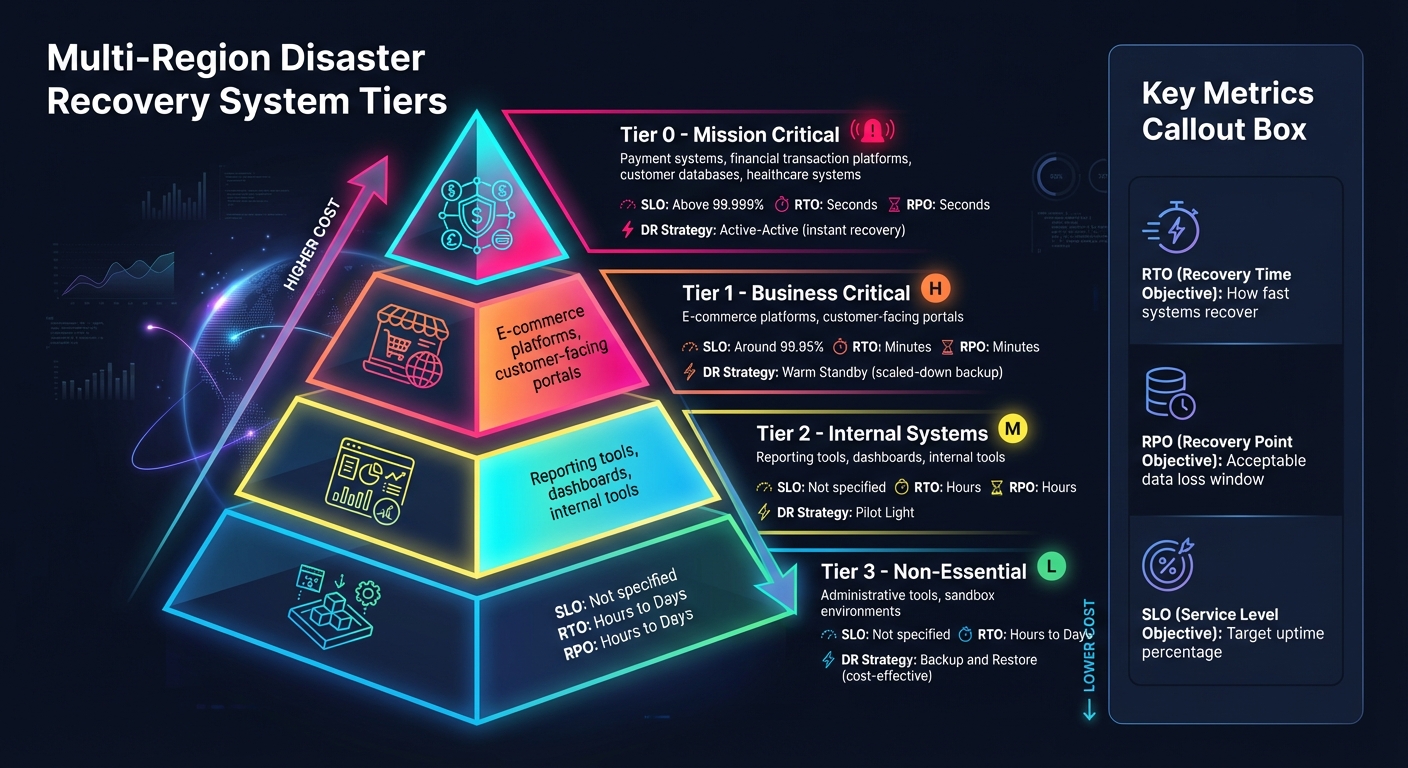
Multi-Region Disaster Recovery System Tiers and Recovery Objectives
Before rolling out a multi-region infrastructure, it’s crucial to identify what needs to be protected. Disaster recovery (DR) investments should align closely with business priorities. This initial planning phase connects the dots between business objectives and technical execution, creating a foundation for an effective multi-region DR strategy.
Start with a Business Impact Analysis (BIA) to assess systems based on factors like financial risk, downtime, legal exposure, and reputational harm [5]. Not every system warrants the same level of protection - critical systems, like payroll, should take priority over less essential tools.
Group your systems into impact tiers:
Understanding how systems depend on one another is equally important. For example, a payment gateway might rely on databases, authentication services, and fraud detection tools. Mapping these dependencies helps prevent chain reactions during outages [6]. Automated monitoring tools can provide visibility into how applications, servers, vendors, and users interact, reducing surprises when disasters strike.
"If an outage would hit your revenue, damage customer trust, or put you out of compliance, then that's a critical system. Own that decision, and design with it in mind." - Microsoft Azure [1]
Once you’ve identified critical systems, ensure they meet all applicable legal and regulatory requirements.
Regulations often dictate where data can reside and how quickly it must be restored. For instance, data residency laws may require customer information to remain within specific regions, directly influencing your choice of recovery locations [1][9]. Industries like healthcare and finance face particularly stringent rules - healthcare organizations must comply with HIPAA, while financial institutions are bound by Sarbanes-Oxley [5].
Work closely with legal teams and regulatory bodies to define mandated restoration timelines [1]. Maintain a risk register to document potential compliance issues and past incidents [4]. Your DR environment should mirror the security controls and network isolation of your production setup, ensuring compliance even during failover scenarios [8][3].
Backup schedules and retention policies in your secondary region should align with both your RPO and any data preservation regulations [1]. Automate log exports so that audit logs from the DR environment are synced back to your primary archive after recovery [8]. This ensures an auditable process and safeguards Personally Identifiable Information (PII) with the same level of encryption and data protection as your production systems [8].
Effective disaster recovery requires coordination across the entire organization. Key roles include:
"One of the most critical roles when preparing for a disaster is defining the individual(s) who will make the final decision on declaring a disaster and initiating the Business Continuity/Disaster Recovery Plan." - AWS [4]
A RACI matrix can clarify responsibilities by identifying who is Responsible, Accountable, Consulted, and Informed at each stage of the DR plan [4]. Maintain an updated stakeholder registry with 24/7 contact information and clear escalation paths [4][1]. Don’t overlook non-technical roles, such as marketing, customer support, and HR, as they play a vital part in managing reputational and human aspects during a disaster [10][4].
After completing your planning, it's time to design a multi-region architecture that aligns with your recovery goals. This process involves balancing speed, data protection, and cost while ensuring your disaster recovery (DR) setup is both efficient and reliable. Below, we’ll explore key decisions like disaster recovery strategies, region selection, and data replication methods.
The DR strategy you choose will significantly impact your recovery objectives and budget. Here’s a breakdown of common strategies:
Your choice should align with the impact tiers identified during the planning phase. For instance, a payment processing platform (Tier 0) would require an active-active setup, while a less critical internal dashboard (Tier 2) could rely on backup and restore. Most organizations use a mix of these strategies, tailoring them to each application tier’s RTO and RPO needs. Once your strategy is clear, you can move on to selecting regions and managing traffic for smooth failover operations.
Selecting regions for your multi-region architecture involves balancing latency, compliance needs, and risk isolation. For U.S.-based businesses, typical choices include primary regions like us-east-1 or us-west-2, paired with geographically distant secondary regions. The secondary region should be far enough to avoid shared risks, like natural disasters, but close enough to meet replication requirements [9].
Before finalizing a secondary region, confirm it supports all necessary services and instance types for your workload. Not all cloud providers offer identical features across regions [13][2]. Additionally, consider cost differences. U.S. regions often have lower pricing, but cross-region data transfer fees can quickly add up compared to intra-region transfers [13]. Providers like SurferCloud, with 17+ global data centers, offer the geographic flexibility needed for robust multi-region architectures while maintaining consistent service availability.
For traffic management, choose routing policies that align with your DR strategy:
"For maximum resiliency, you should use only data plane operations as part of your failover operation." - AWS Whitepaper [2]
Health checks are essential for automating failovers. Configure monitoring to detect endpoint failures and trigger DNS updates or reroute traffic without manual intervention. For critical systems, consider adding routing controls that allow manual traffic redirection during planned maintenance or when automated systems need oversight [14][2]. Tools like Terraform and CloudFormation can help ensure your secondary region mirrors your primary environment exactly [13][3].
Your replication approach should reflect your RPO requirements.
The write strategy you choose also plays a critical role:
Ensure your network supports continuous replication within the defined RPO [15]. Follow the 3-2-1 rule: maintain three copies of data on two types of media, with one copy stored offsite [7]. Use immutable backups to protect against ransomware and encrypt all data - both in transit (using TLS 1.2 or higher) and at rest (using managed encryption keys) [15][5].
Monitor replication lag constantly and set up alerts if the secondary region falls behind your RPO window. Conduct quarterly audits to verify backups are uncorrupted and can be restored within your RTO targets [1][5]. Finally, plan your failback process - the transition back to the primary region after recovery - with the same level of detail as your failover plan to ensure data integrity during the switch [1][11].
Building a multi-region disaster recovery (DR) system requires setting up identical environments that can automatically redirect traffic during failures. Once established, each component must be thoroughly configured and tested to ensure a smooth failover process.
Start by deploying your environments using Infrastructure as Code (IaC) tools like Terraform, AWS CloudFormation, or Bicep. These tools help maintain consistent configurations across regions and prevent configuration drift [1][2]. To standardize deployments, use a centralized image builder to distribute uniform images or container images across all regions [2].
Network settings should mirror those of your primary region. This includes replicating Identity and Access Management (IAM) roles and Role-Based Access Control (RBAC) policies to avoid security vulnerabilities during failover [1][3]. For businesses with global operations, providers such as SurferCloud offer 17+ data centers worldwide, enabling you to create geographically distributed architectures with reliable service availability.
Set up centralized logging and monitoring using tools like CloudWatch. This ensures you can track metrics and application performance independently across regions [18]. During a failover, this visibility is critical - you’ll need to monitor both regions simultaneously to confirm the secondary environment is ready before routing traffic.
To meet your Recovery Point Objective (RPO), configure data replication appropriately. Asynchronous replication is a common choice, often achieving sub-second latency. For example, Amazon Aurora Global Database can promote a secondary region in under a minute. On the other hand, synchronous replication eliminates data loss but introduces additional write latency, as data must be committed to both regions simultaneously [2][3].
Enable object versioning in your storage systems to safeguard against accidental deletions or corruption [2]. For databases, set up point-in-time recovery (PITR) by scheduling frequent full backups and capturing transaction logs every five minutes [16]. Amazon RDS, paired with AWS Backup, automates daily snapshots and transaction log storage, supporting efficient PITR [16]. For services without continuous replication, automate cross-region snapshot copying to ensure data availability [16].
Monitor replication lag with real-time alerts to avoid unexpected delays. For instance, Amazon OpenSearch Service performs hourly automated snapshots, retaining up to 336 snapshots for 14 days [16]. Also, verify that your network bandwidth can handle continuous replication, especially during peak usage, to avoid missing recovery targets [15].
Use DNS-based failover for active-passive setups and latency-based routing for active-active architectures [2][19]. In an active-passive configuration, failover routing directs all traffic to the primary region and switches to the secondary only when health checks detect an issue [19]. For active-active systems, latency-based routing ensures users are directed to the quickest available region [2].
"For maximum resiliency, you should use only data plane operations as part of your failover operation. This is because the data planes typically have higher availability design goals than the control planes." - AWS [2]
Health checks should cover the entire application stack, including the UI, APIs, and databases - not just server heartbeats [18]. This ensures that traffic only routes to a fully operational region. For critical systems, consider Anycast IP-based services like AWS Global Accelerator to avoid DNS caching delays during traffic redirection [2].
Leverage serverless orchestration tools like AWS Step Functions to manage recovery workflows. These tools help sequence actions, ensuring dependencies are addressed - databases, for example, should be verified before application servers go live [20]. Automate post-launch validation to check process status, network connectivity, and volume integrity, confirming the recovery site is ready for production traffic [20]. Additionally, configure safety rules in your traffic management tools to prevent split-brain scenarios where both regions act as the primary simultaneously [19].
While failover should be automated to meet tight Recovery Time Objectives (RTOs), failback should remain a manual process. This allows you to ensure the primary region is stable and data is fully synchronized before shifting traffic back [1][3].
Once your multi-region infrastructure is up and running, the work doesn’t stop there. Ongoing testing, thorough documentation, and constant monitoring are key to keeping everything ready for action when it matters most.
Schedule disaster recovery (DR) drills every quarter to ensure your multi-region setup is functioning as expected [5]. If you’ve made major changes to your infrastructure, updated applications, or conducted post-incident reviews, increase the frequency of these tests to ensure your DR plan stays in sync with your current environment [5].
Leverage chaos engineering tools like AWS Fault Injection Simulator or Azure Chaos Studio to simulate regional outages and stress-test your system [1]. During these drills, measure your Recovery Time Objective (RTO) by timing how long it takes to restore services, and verify your Recovery Point Objective (RPO) by checking the timestamp of the last successful data synchronization [24]. As AWS puts it:
"Our experience has shown that the only error recovery that works is the path you test frequently" [21].
Don’t just focus on failover processes; test failback procedures as well to ensure the entire disaster recovery lifecycle is covered [23]. To avoid surprises, run smaller preliminary tests a week or two before large-scale drills to catch any misconfigurations early [23]. After each drill, confirm data integrity by comparing database snapshots from before and after the test. This ensures no data corruption occurred during the process [1]. Finally, remember to terminate any test instances after the drill to avoid unnecessary infrastructure costs [23].
The results of these drills should directly feed into updates for your DR runbooks and process improvements.
After every test, update your DR runbooks with the latest findings, revisions, and architecture diagrams. Store these documents in version-controlled systems and ensure they’re available offline and in printable formats, so they remain accessible even if your primary cloud control plane is down [1][3]. If team members appear uncertain or confused during drills, refine those procedures to make them clearer and easier to follow under pressure [3].
Treat your runbooks like production code - use tools like Git for version control. Update your risk register with any new failure scenarios discovered during drills, and adjust escalation paths if gaps in the chain of command become apparent. Microsoft emphasizes this point:
"A DR plan that's never tested stays theoretical and unproven" [1].
Keep a close eye on replication lag - such as using mysql_slave_seconds_behind_master for MySQL - to ensure your data stays within your RPO targets [22]. Track failover success rates and document any delays caused by manual interventions. Set up alerts for replication stalls or health check failures using tools like Amazon EventBridge [24].
Regularly review service quotas in your DR region to confirm they match the capacity of your primary region. Quotas can change over time, and mismatches could lead to scale-up failures during a real disaster [21]. As your DR strategy matures, look for ways to execute recovery steps in parallel instead of sequentially to further reduce RTO. Also, monitor changes in latency, error rates, and throughput during failover tests to identify any potential impact on user experience [24].
Setting up a multi-region disaster recovery (DR) strategy goes beyond simply deploying infrastructure across different locations. It’s about focusing on business needs, creating a robust design, and maintaining operational rigor. As Microsoft aptly states:
"The quality of that plan influences whether the event is a temporary setback or becomes a reputational and financial crisis" [1].
To ensure an effective DR strategy, start by categorizing workloads into tiers. This helps align recovery objectives with both business priorities and budget constraints. Keep in mind that achieving lower RTO (Recovery Time Objective) and RPO (Recovery Point Objective) values often comes with higher infrastructure costs [17].
Choose a DR approach that matches your business requirements and financial limitations. For instance, Active-Active DR provides near-zero RTO but comes with higher costs, while Backup and Restore is a more economical option for less critical workloads [1]. Tools like Terraform or Bicep can be invaluable for maintaining a consistent secondary environment that mirrors your primary setup [1].
Remember, your disaster recovery plan isn’t a one-and-done effort - it’s a dynamic document. Regular updates and frequent testing are essential. AWS underscores this with their insight:
"Our experience has shown that the only error recovery that works is the path you test frequently" [21].
Strengthen your DR plan by ensuring you have updated runbooks, secure offline backups, and clear activation protocols. These become critical when internal systems are unavailable during an outage [3]. Additionally, establish well-defined criteria for declaring a disaster and recognize that the failback process requires its own set of thoroughly tested procedures [1].
When it comes to disaster recovery, two popular strategies - Active-Active and Warm Standby - stand out, each with its own set of benefits and challenges.
Active-Active setups run workloads at full capacity across multiple regions simultaneously, distributing traffic between them. This approach ensures almost instant failover with minimal downtime (RTO) and virtually no data loss (RPO ≈ 0). While it delivers top-tier availability, it demands significant resources, making it more expensive and complex to manage.
On the other hand, Warm Standby operates a scaled-down version of the primary system in a secondary region. If the primary region fails, the standby system is scaled up, and traffic is rerouted. While this method involves a longer recovery time (RTO ranging from minutes to hours) and a higher risk of data loss compared to Active-Active, it is a more budget-friendly option and easier to maintain under normal conditions.
To figure out the right Recovery Time Objective (RTO) and Recovery Point Objective (RPO) for your business, the first step is conducting a Business Impact Analysis (BIA). This process helps you pinpoint critical applications, services, and data while assessing the financial and operational consequences of downtime or data loss. With this information, you can prioritize workloads based on their importance to your operations.
When setting your RTO, think about how much downtime your business can handle for each workload before it leads to major issues like lost revenue or a damaged reputation. For RPO, consider how much data loss is manageable by determining how far back you can restore data without disrupting your operations. Once these objectives are clear, you can align them with recovery strategies like replication or failover systems.
SurferCloud’s global network of 17+ data centers is designed to help you achieve your RTO and RPO targets. Their scalable, low-latency solutions are ideal for multi-region disaster recovery. Be sure to document your RTO and RPO within your disaster recovery plan and review them regularly to ensure they continue to meet your business needs.
To ensure compliance with U.S. data residency and industry regulations in a multi-region disaster recovery (DR) setup, here’s a practical approach:
By taking these steps, you can create a secure and compliant multi-region DR setup using SurferCloud’s scalable infrastructure.





