Why Secure Cloud Hosting Matters More Than Ev
Security Is Now the Foundation of Development In 202...









Hybrid cloud architecture combines on-premises infrastructure, private cloud, and public cloud services into a unified system. It allows businesses to run workloads where they perform best - on-premises for sensitive data, in the public cloud for scalability, or across both for flexibility. This setup is managed through a central control plane, enabling seamless operations across environments.
With 88% of organizations adopting hybrid IT, this approach balances control, compliance, and scalability. By understanding deployment patterns and models, businesses can align their IT strategy with operational goals, ensuring performance and resilience across environments.
Hybrid cloud architecture connects on-premises systems with public cloud resources, creating a unified environment for running applications, moving data, and ensuring secure communication. These essential components form the backbone of hybrid cloud deployment strategies.
At the heart of hybrid cloud computing are virtual machines (VMs) and containers, which provide the foundation for compute resources. VMs allow multiple operating systems and applications to run on a single physical server, maximizing resource efficiency [14]. Containers, powered by tools like Docker and Kubernetes, package applications along with their dependencies, ensuring they run consistently across different environments [12][14].
"Containerization with Kubernetes or Docker ensures application portability, while service mesh solutions like Istio help manage communication between services." - Tony Kelly, DevOps Marketing Leader [12]
One of the biggest benefits of containerization is workload portability. By reworking legacy applications into microservices, you can update individual components without disrupting the entire system [12]. For example, you might host a database on-premises to meet compliance requirements while running the application frontend in a public cloud. Standardizing on container runtimes helps create a uniform environment, making it easier to shift workloads between private data centers and public clouds. This portability is key to enabling flexible deployment models.
The unified management layer, often referred to as the control plane, acts as the central hub for managing resources across hybrid environments. This layer provides a single set of APIs to provision, monitor, and operate resources seamlessly [10]. Tools like Terraform and AWS CloudFormation bring automation into the mix, ensuring that workloads - whether virtualized or containerized - are deployed consistently across on-premises clusters and cloud regions [12].
Networking serves as the glue that binds on-premises data centers, remote locations, and cloud providers into a cohesive infrastructure [9]. To secure these connections, organizations use VPNs, dedicated physical links like AWS Direct Connect or Google Interconnect, and software-defined networking (SDN) [9][11]. Unified DNS resolution, achieved through conditional forwarding between on-premises and cloud-based DNS servers, simplifies service discovery [10]. Additionally, load balancers help manage access and distribute traffic efficiently across environments [10].
For high availability, deploy redundant interconnects across multiple edge availability domains, aiming for 99.99% uptime [11][15]. SurferCloud, for instance, offers networking and CDN capabilities to reduce latency and improve performance, with its 17+ data centers providing multiple connection points for building resilient hybrid networks.
Data synchronization tools play a crucial role in managing data movement between environments. These tools include file gateways for unstructured data, database migration services for transactional workloads, and specialized synchronization solutions for real-time updates [10]. Security remains consistent across layers through unified policies, with Web Application Firewalls (WAF) and Network ACLs providing robust protection [10]. Mastering these networking essentials ensures a smooth and secure hybrid cloud deployment.
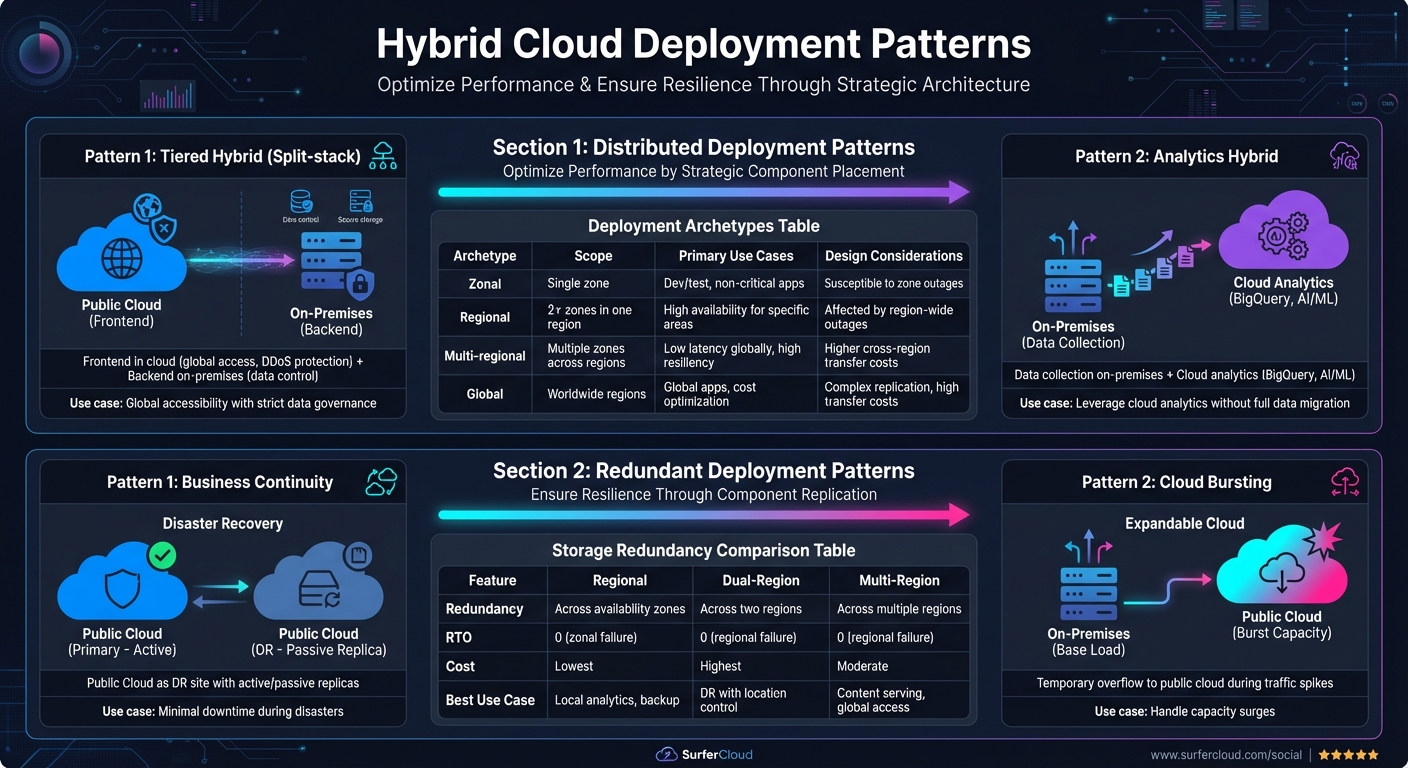
Hybrid Cloud Deployment Patterns: Distributed vs Redundant Architectures
Hybrid cloud deployment patterns generally fall into two main types: Distributed patterns, which allocate application components to the most suitable environment for performance and efficiency [6][18], and Redundant patterns, which replicate components across environments to ensure resilience [6][19]. For instance, the Tiered Hybrid (Split-stack) Pattern places the frontend in the cloud for global accessibility and enhanced DDoS protection, while keeping the backend on-premises to maintain strict control over sensitive data [2]. Similarly, the Analytics Hybrid Pattern collects data from on-premises systems but utilizes cloud-based tools like BigQuery for advanced analysis, including AI and machine learning [2]. Both patterns rely on deployment archetypes - zonal, regional, multi-regional, and global - to define failure domains and operational scopes [16][17]. Let’s explore how these patterns function in real-world scenarios.
Distributed deployment patterns aim to optimize workload performance and reliability by strategically placing application components in the best-suited environment. This approach balances operational flexibility with control.
The Tiered Hybrid (Split-stack) Pattern is a great choice for organizations needing both global accessibility and stringent data governance [2]. In this setup, web servers and content delivery systems operate in the cloud to serve users worldwide, while sensitive backend systems and databases stay on-premises to meet compliance requirements.
The Analytics Hybrid Pattern works well for businesses that want to leverage powerful cloud-based analytics and machine learning tools without fully migrating their operational data to the cloud [2]. Data flows from on-premises systems into the cloud, where scalable analytics services handle large datasets while maintaining local production systems.
When designing distributed patterns, consider latency and data movement requirements early in the planning process [18]. Evaluate communication needs, classify data appropriately, and ensure consistency across environments. The table below outlines common deployment archetypes for distributed hybrid models:
| Archetype | Scope | Primary Use Cases | Design Considerations |
|---|---|---|---|
| Zonal | Single zone | Dev/test environments; non-critical applications | Susceptible to downtime during zone outages |
| Regional | 2+ zones in one region | High availability for specific geographic areas | Affected by region-wide outages |
| Multi-regional | Multiple zones across regions | Low latency for global users; high resiliency | Higher costs for cross-region data transfers |
| Global | Worldwide regions | Global applications; cost optimization across regions | Complex data replication; high transfer costs |
For latency-sensitive applications like retail kiosks or telecom networks, distributed patterns can incorporate edge computing to process data closer to its source [20]. For example, SurferCloud’s network of 17+ data centers enables edge deployments that minimize latency and improve user experience.
While distributed patterns focus on workload placement, redundant deployment patterns emphasize resilience by duplicating application components across environments. These patterns are essential for maintaining operations during disruptions such as natural disasters, cyberattacks, or system failures [22].
The Business Continuity Pattern uses the public cloud as a disaster recovery site for on-premises workloads, with active or passive replicas ensuring minimal downtime [2]. Similarly, the Cloud Bursting Pattern allows systems to handle traffic spikes by temporarily "bursting" into the public cloud when on-premises capacity is exceeded [21].
Implementing redundancy involves added complexity and requires expertise across both cloud and on-premises platforms [22]. To avoid issues like the "split-brain" problem in bidirectional replication, consider using a third-party quorum to validate data modifications [22]. Tools like Terraform can automate disaster recovery provisioning, while short TTL settings for DNS records enable rapid traffic redirection during outages. Regular failover testing is crucial to maintain Recovery Point Objective (RPO) and Recovery Time Objective (RTO) targets [22]. Additionally, containers and Kubernetes simplify workload portability, ensuring consistency when switching between environments [22].
The table below compares storage redundancy options for disaster recovery:
| Feature | Regional | Dual-Region | Multi-Region |
|---|---|---|---|
| Redundancy | Across availability zones | Across two regions | Across multiple regions |
| RTO | 0 (zonal failure) | 0 (regional failure) | 0 (regional failure) |
| Cost | Lowest storage price | Highest storage price | Moderate storage price |
| Best Use Case | Local analytics, backup | Disaster recovery with location control | Content serving, global access |
Dual-region turbo replication ensures data is synchronized across regions within 15 minutes [23]. However, keep in mind that replicating large databases between cloud providers or back to on-premises systems can result in significant outbound data transfer costs [22][23]. By combining redundancy with performance-driven strategies, hybrid cloud deployments can meet diverse operational demands while ensuring reliability and continuity.
Selecting the right deployment model depends on factors like data sovereignty, workload demands, and vendor requirements. Recent statistics reveal that 88% of organizations are adopting a hybrid IT approach, and 89% have integrated a hybrid cloud strategy into their operations [13]. These models expand on earlier deployment strategies by detailing how different environments are interconnected.
This model merges the scalability of public cloud services with the security and control of private cloud infrastructure. For instance, sensitive data remains on-premises or within private clouds to comply with regulations like GDPR, HIPAA, or DORA, while less sensitive workloads utilize public cloud resources [13]. A unified control plane ties the two environments together, enabling centralized management while ensuring execution occurs near the data source.
A key feature of this model is cloud bursting, which allows private infrastructure to handle stable workloads while shifting overflow to the public cloud during demand spikes. Many organizations adopt outbound-only TLS sessions from private networks to public control planes, minimizing risks by eliminating inbound firewall rules.
"Hybrid cloud is like blending apples and oranges, while multi-cloud is more like blending two different kinds of apples - say Red Delicious and Gala." - Lee Atchison, Author and Thought Leader [13]
The rise of generative AI workloads has accelerated hybrid cloud adoption. These workloads often require massive datasets that are too costly or restricted by compliance to move entirely to the public cloud. Yet, they benefit from the immense computational power that public clouds provide for training. When adopting this model, ensure feature consistency across environments by choosing platforms with uniform connectors and governance tools to avoid version mismatches.
This approach integrates public cloud resources with existing on-premises infrastructure, making it a great fit for organizations with substantial investments in their data centers. Data sovereignty and reduced latency are key drivers for this model. Sensitive data remains on-premises to meet regulatory requirements, while non-sensitive workloads leverage public cloud services [1][7].
Tools like Azure Arc offer centralized management for on-premises and cloud resources, helping organizations streamline operations. Many aim for a 20% reduction in operational overhead, while hybrid designs often target 99.99% availability by distributing workloads across environments [1].
This model also supports legacy system integration, allowing older, custom applications to coexist with modern cloud-based solutions like ERP or CRM systems without requiring extensive rewrites [7]. However, before implementing features like cloud bursting or real-time data synchronization, assess data transfer and synchronization costs to avoid unexpected expenses [1]. For connectivity, organizations can use VPNs for encrypted communication over the internet or opt for dedicated connections to ensure consistent performance and guaranteed bandwidth [7].
The multi-cloud hybrid model takes flexibility a step further by incorporating multiple public cloud providers alongside private environments, such as on-premises data centers or colocation facilities [5][8]. This approach allows organizations to avoid vendor lock-in while leveraging their existing infrastructure investments. For example, one cloud provider might handle specialized AI/ML workloads, while another supports core processing tasks [6][24].
This model facilitates gradual modernization, enabling organizations to update applications incrementally as resources allow [5][8]. It also enhances performance and resiliency by deploying applications redundantly across different failure domains [6][19]. However, managing multiple clouds independently can lead to fragmented operations and inconsistent security practices [24].
To succeed, organizations should implement a comprehensive management strategy rather than managing each cloud in isolation. Use consistent tools and processes to secure and monitor all environments holistically [24]. Start with non-critical workloads that have minimal dependencies to create a blueprint for more complex migrations [24]. Establish clear APIs and unified monitoring to maintain visibility across all systems [24].
Selecting the right hybrid cloud deployment pattern involves balancing technical needs with business goals. With 95.7% of organizations adopting cloud technology due to executive directives[25], it’s clear that aligning technical strategies with business objectives is essential. Below are some key steps to help you refine your deployment approach, focusing on workload demands, provider compatibility, and security measures.
Security and performance play a critical role in deciding where workloads should reside. According to an IDG survey, 76.4% of organizations rank security as their top priority, while 70% identify performance as the second most important factor[25]. Additionally, 33.3% of IT leaders prioritize availability, with the "four nines" (99.99%) standard serving as the benchmark for cloud data availability[25].
Start by evaluating how your workloads and data flows align with these priorities. Map out application dependencies and communication needs to avoid latency issues, especially in split-stack setups[28]. For latency-sensitive applications - like real-time analytics or IoT processing - keeping them on-premises or at the edge is typically the best choice. On the other hand, variable workloads that require scalability can benefit from public cloud resources[12][27].
To optimize costs, use public clouds for unpredictable, high-scale workloads while reserving private clouds for steady, predictable operations[26][27]. A popular strategy is data tiering, where less frequently accessed data is stored in low-cost public cloud tiers, while high-performance data remains on-premises[12].
Ensuring that your existing infrastructure integrates smoothly with your chosen cloud provider is crucial to avoid vendor lock-in and operational headaches. Begin with a fit assessment to determine if current virtual machine (VM) workloads should be modernized into containers or migrated as they are[28].
Choose a provider that meets your geographic and operational needs. For instance, SurferCloud offers 17+ global data centers, enabling low-latency application placement closer to users while ensuring high availability. Use high-speed, dedicated connections like AWS Direct Connect or Azure ExpressRoute to create low-latency links between your on-premises systems and cloud environments[12][13].
A unified security framework is essential across all environments. This includes implementing Multi-Factor Authentication (MFA) and Role-Based Access Control (RBAC) for both cloud and on-premises resources[12][26]. Consistent authentication, authorization, and auditing processes are key for maintaining governance[24][28]. For organizations with strict regulatory requirements, sensitive data should remain in sovereign data centers or on-premises, while compute-heavy tasks like AI training can leverage the cloud[3][4].
"Security is the single most important consideration for organizations determining workload placement in the hybrid cloud." – IDG Survey[25]
To reduce downtime during outages, automate failover mechanisms with tools like Azure Site Recovery or AWS Elastic Disaster Recovery[12]. Management simplicity is also crucial, with 62.4% of organizations emphasizing its importance in deployment decisions[25]. Use clear APIs and unified monitoring tools to maintain visibility and ensure consistent security policies across all environments[24].
Hybrid cloud architecture offers a way for organizations to strike a balance between control, compliance, and scalability. By combining on-premises infrastructure with public cloud resources, businesses can protect sensitive data while taking advantage of the latest cloud technologies. The deployment patterns discussed - ranging from geographically distributed workloads to redundant setups for business continuity - provide actionable strategies to align IT infrastructure with business goals.
With 88% of organizations adopting hybrid IT and 89% implementing dedicated hybrid cloud strategies [13], it's clear that this approach delivers tangible benefits. These include shifting capital expenses to predictable operating costs and enabling cloud bursting to handle traffic surges. As Chris Murphy, Oracle Content Director, explains:
"A hybrid cloud lets a company tap some of the best features of the public cloud, such as accessing the most up-to-date technology and responding quickly to new business needs, while keeping the control afforded by an on-premises data center" [7].
To successfully implement a hybrid cloud strategy, focus on three key steps: evaluate your workload and latency requirements, ensure compatibility between providers and your existing systems, and create a unified security framework. These steps are essential for aligning technical needs with the deployment patterns outlined earlier.
SurferCloud’s infrastructure is built to meet these hybrid cloud demands. With more than 17 data centers, it supports distributed deployment models that bring applications closer to users while maintaining centralized oversight. Elastic compute servers handle cloud bursting, and flexible networking options deliver the high-speed connections critical for seamless operations. Whether you're setting up disaster recovery, managing multi-region deployments, or implementing tiered architectures, working with a provider that offers both global reach and scalable resources simplifies the process.
Hybrid cloud isn’t about choosing between on-premises and cloud - it’s about using both in a way that complements your business needs. Start by analyzing where workloads should reside, ensuring smooth communication between environments, and applying consistent security measures. This approach transforms hybrid cloud into a strategic advantage.
Adopting a hybrid cloud setup brings a balance of adaptability and reliability to your IT infrastructure. It lets you manage new workloads in the public cloud while maintaining critical or legacy applications on-premises. This way, you can position your resources where they serve your needs best.
On top of that, hybrid cloud serves as a strong disaster recovery option by securely backing up on-premises data to the cloud. This strategy not only helps you manage costs and scale efficiently but also keeps your business running smoothly during unforeseen disruptions.
Distributed deployment patterns are all about spreading application components across various environments - like on-premises setups and public cloud platforms - to improve performance and scale more effectively. This setup works well for workloads that benefit from the strengths of different environments while ensuring everything integrates smoothly.
On the other hand, redundant deployment patterns are centered on duplicating crucial components or systems across multiple environments. The goal here is to guarantee high availability and enable disaster recovery. By having backup systems ready to step in during a failure, this approach is critical for keeping mission-critical applications running without significant downtime.
Choosing between a public cloud and an on-premises solution comes down to a few key factors: cost, control, and compliance. Public clouds typically have a lower upfront cost since you only pay for what you use. They also offer perks like automated scaling and global accessibility. On the other hand, on-premises systems demand a larger initial investment in hardware, power, and maintenance, but they give you full control over your infrastructure and security.
Compliance requirements can also heavily influence your decision. Whether it’s adhering to data sovereignty laws, industry regulations like HIPAA or GDPR, or meeting specific audit standards, these factors may push you toward on-premises systems or hybrid setups. These options are particularly valuable for workloads that require strict data residency or isolation. Other considerations, like applications sensitive to latency, legacy systems, or the in-house expertise to manage infrastructure, might also play a role in your choice.
If your focus is on scalability, adaptability, and minimizing operational headaches, public cloud platforms such as SurferCloud are worth considering. With secure, scalable infrastructure spread across 17+ global data centers, they can handle a wide range of needs. However, for workloads that demand tight control, consistent performance, or seamless integration with existing systems, an on-premises or hybrid approach might be the better route.
Security Is Now the Foundation of Development In 202...

Edge computing is transforming autonomous vehicles by e...
For SaaS companies expanding across Pakistan, the UAE, ...





