Cloud Hosting for Nigerian Cross-Border Store
Nigerian cross-border eCommerce stores are increasingly...








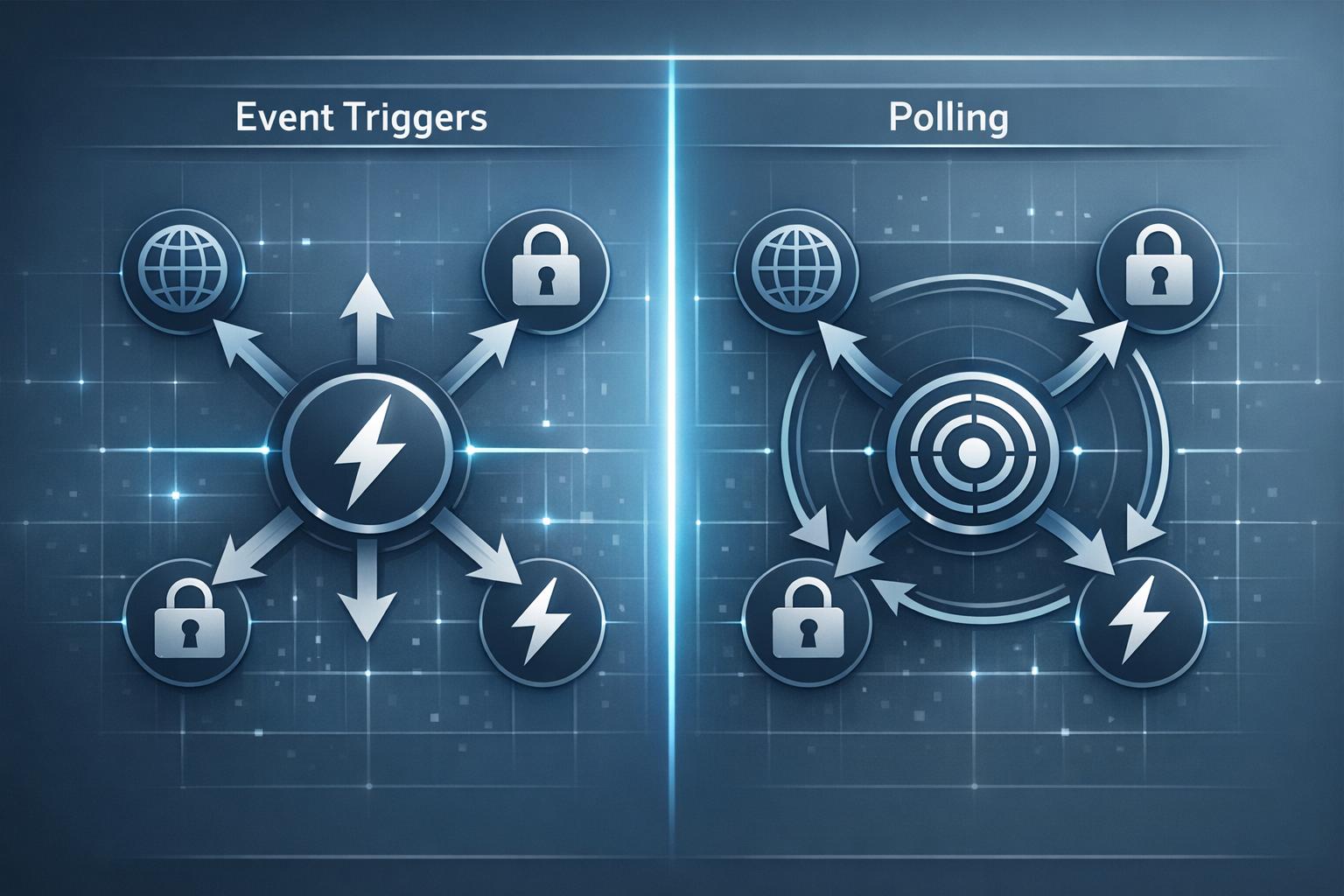
When working with Function-as-a-Service (FaaS), there are two primary ways to execute functions: event triggers and polling. Each has distinct strengths and is suited to specific workloads. Here's what you need to know:
| Feature | Event Triggers (Push) | Polling (Pull) |
|---|---|---|
| Invocation | Triggered by event source | FaaS platform checks for data |
| Latency | Immediate | Variable (based on intervals) |
| Best Use Case | Real-time events | High-volume data streams |
| Cost Efficiency | Better for infrequent events | Better for batch processing |
| Scaling | Automatic with event volume | Managed via pollers |
Choosing the right approach depends on your application's performance needs, traffic patterns, and cost considerations. Event triggers excel in scenarios requiring instant responses, while polling works well for continuous, high-throughput data streams.
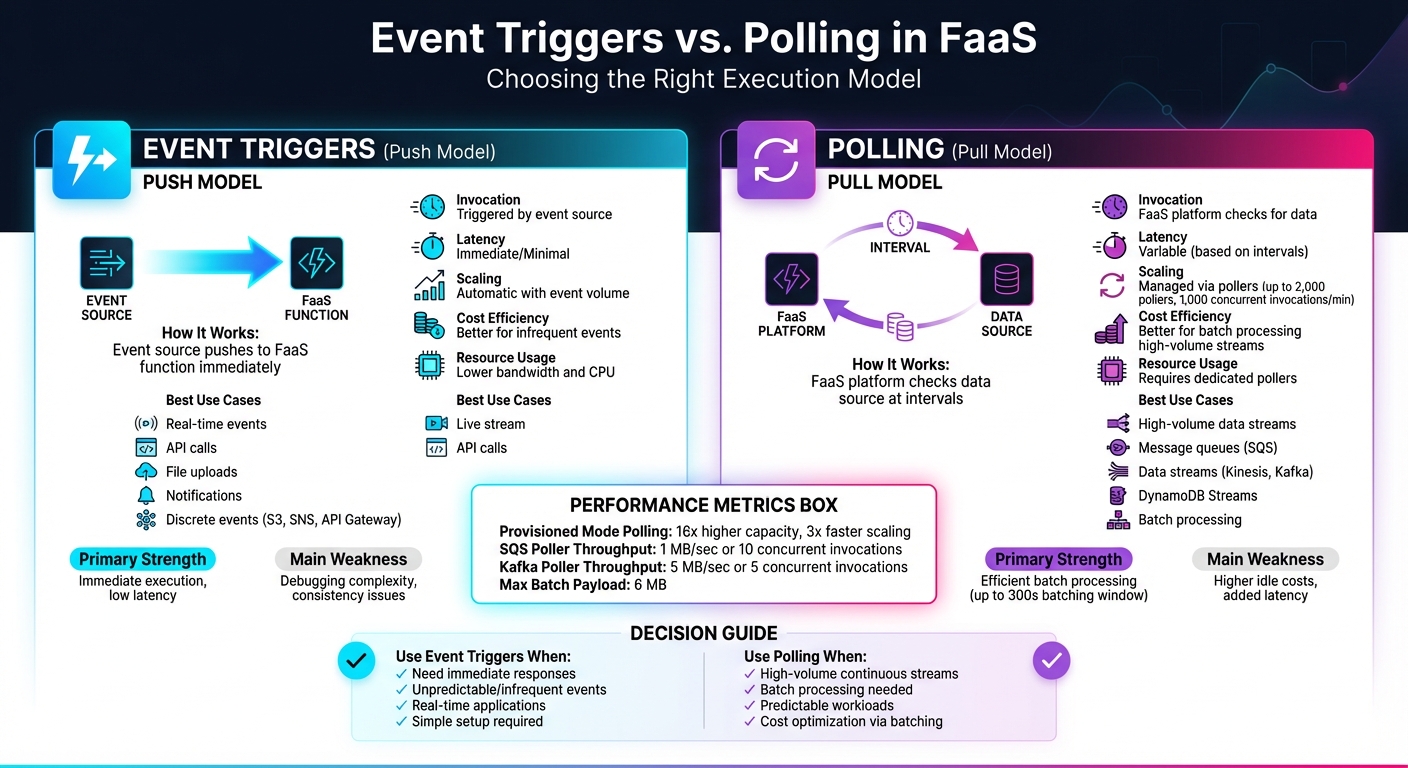
Event Triggers vs Polling in FaaS: Complete Comparison Guide
An event trigger is like a signal that sets off a FaaS function whenever a specific action or change happens in your cloud environment. Essentially, it's an automated response system - when an event occurs, the corresponding function runs instantly, without needing any manual input [3].
"An event is anything that triggers a Lambda function to run." - AWS Lambda Documentation [3]
This setup works on a push model, where the event producer and consumer are independent of each other. The event source sends the event directly to the function as soon as it happens. These events are formatted as JSON documents, which the FaaS runtime turns into an object for your function to process [3]. This seamless process forms the backbone of how triggers operate.
Event triggers follow a straightforward mechanism. In a direct trigger model, the event source immediately pushes the event to the function, eliminating the need for constant polling or checks [2].
Event triggers generally operate in two modes:
While standard function invocations can last up to 15 minutes, event-driven functions are optimized for quick tasks, often completing in under a second [3]. For even faster execution, AWS Lambda SnapStart minimizes cold-start delays, delivering sub-second performance [5].
Here are some practical examples of event triggers in action:
In all of these scenarios, the core idea remains the same: when an event occurs, the corresponding function is triggered to take action immediately. This makes event triggers an essential part of automating workflows in serverless environments.
Polling takes a different approach compared to event triggers. Instead of waiting for an external signal, your FaaS function actively checks external resources - like message queues or data streams - at regular intervals to see if there’s new data to process [1][3]. Essentially, it’s a method of continuously monitoring for updates.
"The polling model is typically used with event sources that provide a stream of data. In this model, AWS Lambda polls the event source at regular intervals to check for new data." - Cursa.app [1]
This pull-based model is handled entirely by the FaaS platform. The platform uses "event pollers" to query sources, manage checkpoints, and trigger functions when data is available [2]. This means you don’t have to create custom polling loops or worry about the technical details of how it works.
The polling process involves the FaaS platform repeatedly setting a time interval, querying the data source, processing any responses, and then repeating the cycle [7]. In AWS Lambda, this is achieved through an "event source mapping", which is a managed resource that keeps an eye on services like Amazon Kinesis, DynamoDB Streams, or Amazon SQS [1][2].
When data is retrieved, the poller collects multiple records into a batch. Your function gets triggered when one of these conditions is met: the batching window expires (up to 300 seconds), the batch size limit is reached, or the payload size hits 6 MB [2]. Batching records together like this is more efficient than handling each record individually.
The way batching works can vary depending on the service. For Amazon SQS and Kinesis, the default batching window is 0 seconds, meaning your function is triggered as soon as records are available. On the other hand, services like Amazon MSK, Apache Kafka, and Amazon DocumentDB have a default window of 500 milliseconds [2]. This slight delay allows the platform to gather more records, reducing the overall number of function invocations.
Polling is particularly useful for handling continuous data streams that require regular monitoring. Services like Amazon Kinesis and DynamoDB Streams are great examples since they generate a constant flow of data that needs to be processed and checkpointed [1]. For example, you could use polling to process real-time analytics data or monitor database changes to update a search index whenever a table is modified.
Message queues, such as Amazon SQS, are another ideal use case. These queues act as buffers between systems that produce and consume data at different rates - like a high-volume order system feeding into a slower payment processor [2]. Polling ensures your function processes messages in batches, making it a great choice for scenarios where efficiency is more important than immediate responses.
In financial services, provisioned mode polling is often used for processing market data feeds, where consistent low-latency processing is crucial [2]. In this setup, AWS Lambda maintains a pool of event pollers capable of scaling up to 1,000 concurrent executions per minute to handle sudden spikes in activity [2]. While this approach may increase costs, it provides the speed and reliability needed for real-time applications.
Understanding polling highlights how its approach to triggering functions, managing performance, and optimizing resources is quite distinct from the event-triggered model.
The key distinction between event triggers and polling lies in how actions are initiated. Event triggers follow a push model, where the source service actively sends an event to your FaaS (Function-as-a-Service) function as soon as an event occurs [1]. On the other hand, polling operates on a pull model, with the FaaS platform using dedicated compute units (known as event pollers) to periodically check your data source for new records [2]. With event triggers, the source takes care of the invocation, streamlining the process. Polling, however, requires the platform to manage the overhead of checking for updates. This fundamental difference influences both performance and resource allocation, as explained below.
The invocation models of event triggers and polling lead to distinct behaviors in terms of performance and cost. Event triggers are designed for immediate action, making them ideal for real-time applications like API backends or notification systems. In contrast, polling supports batching, which can reduce costs when processing large volumes of data. However, this approach introduces variable latency, as the timing depends on the polling intervals and batching configurations. These delays are typically minor but can vary based on the setup [1][2]. For high-volume data streams, the ability to batch multiple records into a single function invocation can significantly lower processing costs.
Scalability is another area where these models differ. Event triggers automatically scale with the volume of incoming events - functions are dynamically spun up as needed and scale back down during quieter periods, all without requiring additional configuration. Polling, however, demands more deliberate resource management. Managed pollers are responsible for handling different throughput levels, and in provisioned mode, systems can maintain a set number of pollers (ranging from 2 to 200 for SQS). During traffic spikes, polling can scale up to 2,000 pollers, enabling as many as 1,000 concurrent invocations per minute. While this setup provides up to 16x higher capacity, it does come with added costs [2].
| Feature | Event Triggers (Push) | Polling (Pull) |
|---|---|---|
| Communication | Source pushes to FaaS | FaaS retrieves data from the source |
| Latency | Minimal/Immediate | Variable (based on polling intervals) |
| Best Use Case | Discrete events (e.g., S3, API Gateway) | Streams and queues (e.g., Kinesis, SQS) |
| Cost Efficiency | High for infrequent events | High for high-volume via batching |
| Scaling | Automatic with event volume | Managed via pollers |
Event triggers shine when immediate responses are essential, making them a great choice for real-time applications. They work well with infrequent events, helping to keep costs down, and their ability to decouple services simplifies system design. Since they use fewer resources, like bandwidth and CPU, event triggers are often more efficient than traditional polling methods [3].
But, they’re not without their challenges. Because they rely on network communication, latency can vary, which might impact performance. Handling state across multiple events can get tricky, leading to eventual consistency issues, especially when dealing with transactions or trying to determine the system's exact state. Debugging can also be a headache, as logs are spread across multiple services. Additionally, returning values to the caller is more complex. There's even a risk of recursive loops - if a function accidentally triggers itself, it can quickly drain resources.
Now, let’s see how polling stacks up in comparison.
Polling is well-suited to high-volume data streams, where processing multiple records in a single batch reduces costs and boosts efficiency. It offers predictable behavior, giving you control over how data is processed by letting you tweak batch sizes and timing windows (up to 300 seconds) [2]. In provisioned mode, polling can scale up to 16 times its normal capacity, handling millions of events with ease. Plus, it can scale three times faster during sudden traffic surges [2].
"Processing records from a stream or queue in batches is more efficient than processing records individually." - AWS Documentation [2]
However, there are downsides. For low-traffic streams, polling can get expensive since it continuously checks for data, even when none is present [3]. It also introduces variable latency, depending on the polling interval and batch settings, making it less ideal for applications that need instant responses. Achieving optimal performance requires fine-tuning, which can add complexity [2].
| Aspect | Event Triggers | Polling |
|---|---|---|
| Primary Strength | Immediate execution, low latency | Efficient batch processing |
| Cost Profile | Best for infrequent events | Best for high-volume streams |
| Configuration | Simple, managed by the source | More complex, requires tuning |
| Main Weakness | Debugging complexity, consistency issues | Higher idle costs, added latency |
| Resource Usage | Lower bandwidth and CPU | Requires dedicated pollers |
Choosing between event triggers and polling depends on your workload's characteristics, traffic patterns, and performance needs. The decision can be tricky, but understanding a few critical factors can make the process clearer.
Start by examining your event source. If you're working with discrete events - like those from Amazon S3, SNS, or API Gateway - event triggers are usually the better choice. On the other hand, continuous data streams from services like Kinesis, SQS, or Kafka are designed for polling, where batching records together improves processing efficiency.
If your application requires near-instant responses, such as real-time notifications or API calls, event triggers are ideal. Polling, by its nature, introduces delays due to its batching windows (which can extend up to 300 seconds) and polling intervals, making it less suitable for time-sensitive tasks.
For workloads with low traffic, event triggers are cost-efficient - you only pay per event. Polling, however, incurs ongoing costs, even when no events are being processed. Yet, for high-volume streams, polling's ability to batch records reduces per-record overhead, making it more efficient.
Let’s break down when to use each model based on these considerations.
Event triggers are perfect for scenarios where immediate processing with minimal latency is essential. This makes them a natural fit for real-time applications, such as user authentication, API requests, or IoT device alerts, where every millisecond counts. Since event triggers only activate when an event occurs, they’re also great for unpredictable or infrequent workloads, ensuring you don’t pay for idle time.
Another advantage is simplicity. Event triggers are service-managed, so there’s no need to configure batch sizes or polling intervals manually. This streamlined setup helps keep your architecture clean and decoupled. However, you’ll need to watch out for potential recursive loops - like when a function writes to an S3 bucket that then triggers the same function. If left unchecked, this could lead to runaway costs.
Polling stands out in high-throughput environments where batch processing is key. For example, if your workload involves Kinesis streams, DynamoDB Streams, or SQS queues, polling is often the better option. A single Amazon SQS poller can handle up to 1 MB/sec of throughput or 10 concurrent invocations, while Kafka pollers manage up to 5 MB/sec or 5 concurrent invocations [2].
Polling also offers fine-grained control over processing rates, which is useful for preventing downstream systems from being overwhelmed. By tweaking batch sizes and batching windows, you can balance cost and latency to suit your specific needs. For workloads with strict performance requirements, provisioned mode scales faster during traffic spikes and provides significantly higher capacity to manage millions of events. However, this comes with added costs for dedicated pollers [2].
"Processing records from a stream or queue in batches is more efficient than processing records individually." - AWS Documentation [2]
Polling is also a smart choice for workloads with predictable schedules or when periodic checks on external systems are needed - especially if those systems don’t support webhooks. By fine-tuning settings like MaximumBatchingWindowInSeconds, you can minimize latency (setting it to 0 starts the next batch immediately after the previous one finishes). Keep in mind, though, that reducing latency this way may lower batching efficiency [2].
Deciding between event triggers and polling can significantly influence your system's performance, scalability, and overall costs. Event triggers shine when you need quick responses to specific actions, such as API calls or file uploads. They’re straightforward to set up, budget-friendly for low-traffic scenarios, and avoid the constant resource usage of continuous monitoring. On the other hand, polling is better suited for high-throughput tasks, as it can batch records to lower costs and improve efficiency.
The nature of your workload dictates which approach works best. For tasks requiring minimal delay and handling unpredictable traffic, event triggers are ideal. Meanwhile, polling is a better choice for steady, high-volume data streams - like processing millions of records from services like Kinesis or SQS. In provisioned mode, polling can scale 3 times faster and deliver 16 times higher capacity during sudden traffic surges [2].
Event-driven triggers can save you money because you’re only charged for the times the function is actually executed and the duration it runs. On the other hand, polling mechanisms require constant resource use to repeatedly check for new data, which can lead to higher expenses - even when there’s no significant activity.
Using event triggers removes the need for always-on resources, making them a cost-effective choice for many scenarios.
Event-driven triggers are designed to scale effortlessly, activating functions immediately when an event happens. The serverless platform takes care of scaling by automatically adjusting the number of function instances to meet increased demand. This ensures quick scalability without the need for extra infrastructure.
Polling works differently - it continuously monitors a queue or stream for events. While it can also scale by increasing the number of pollers, this approach relies on a separate polling layer, which can add latency and overhead. Compared to polling, event-driven triggers generally provide faster response times and higher throughput since they skip the polling step entirely. Polling, however, often requires careful adjustments, like managing concurrency and batch sizes, to perform well in high-demand situations.
Event-driven triggers are perfect when your application demands quick action as events happen. They automatically activate functions in response to specific actions - like a file upload, a database update, or a new message - without needing constant oversight. This not only cuts down on delays but also helps conserve resources by eliminating unnecessary monitoring.
In contrast, polling works by repeatedly checking for updates or new data. While functional, this method can create extra overhead and slow down response times. If your system supports push-based notifications and you need real-time performance - especially for tasks with high data flow or tight time constraints - event-driven triggers are the way to go.
Nigerian cross-border eCommerce stores are increasingly...
The cloud computing market is entering a new phase. ...

AI is transforming cloud anomaly detection by identifyi...





