Choosing the Best Linux Distribution for Your
Linux offers a wide variety of distributions (distros),...









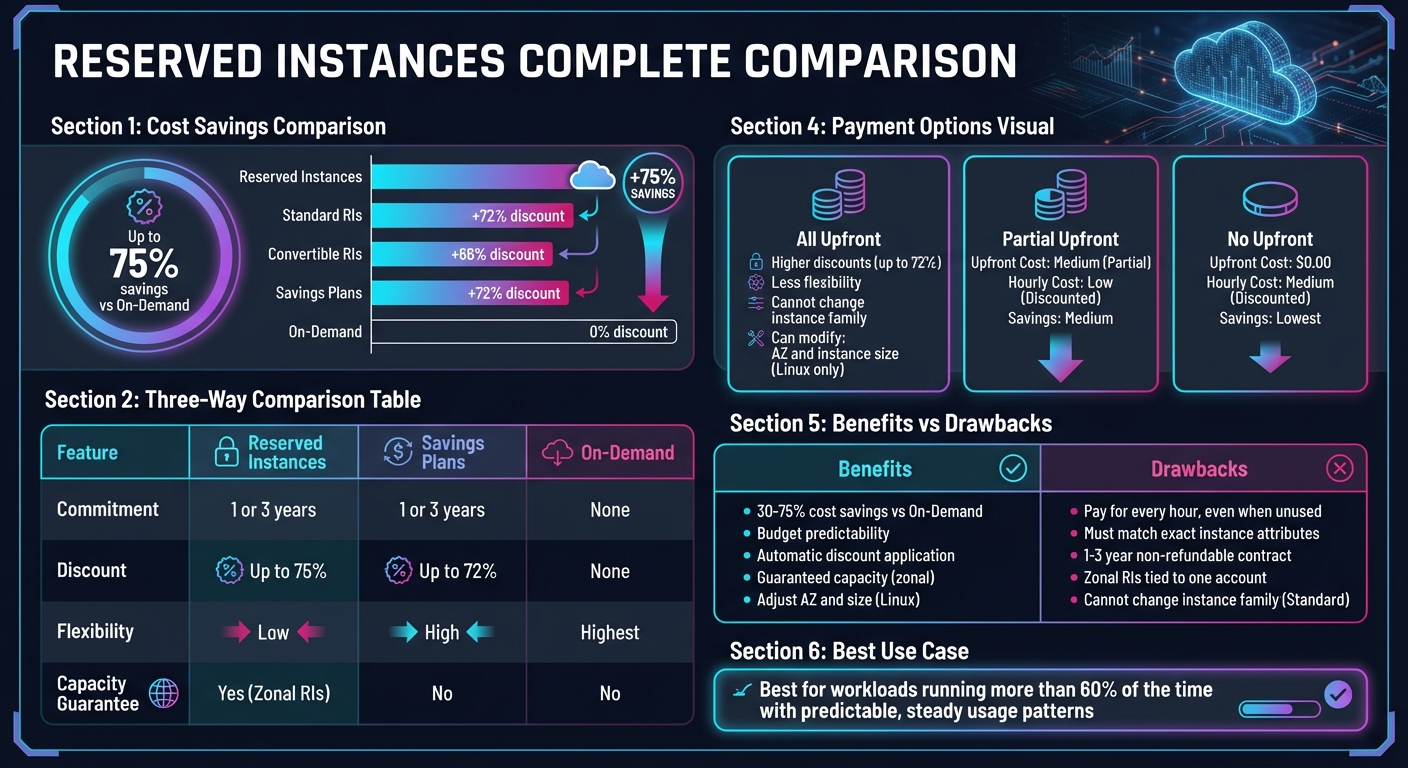
Reserved Instances (RIs) are a cost-saving option for cloud computing that lets you commit to using specific resources for 1 or 3 years, offering discounts of up to 75% compared to On-Demand pricing. They’re best for steady, predictable workloads like databases or web servers.
Here’s what you need to know:
RIs work well for businesses with clear, consistent usage patterns but require careful planning to avoid overcommitting or underutilizing resources.
| Feature | Reserved Instances | Savings Plans | On-Demand |
|---|---|---|---|
| Commitment | 1 or 3 years | 1 or 3 years | None |
| Discount | Up to 75% | Up to 72% | None |
| Flexibility | Low | High | Highest |
| Capacity Guarantee | Yes (Zonal RIs) | No | No |
Reserved Instances are a great way to save money, but only if your workloads run consistently and match the RI’s configuration. For more flexibility, consider Convertible RIs or Savings Plans.
Reserved Instances vs Savings Plans vs On-Demand: Complete Comparison Guide
Reserved Instance (RI) pricing helps forecast costs and determine the level of commitment that makes the most sense for your needs. The price of an RI depends on several factors, including the instance type, region, operating system, and term length.
Several key elements influence the cost of Reserved Instances:
The offering class also affects potential savings. Standard RIs can provide discounts of up to 72%, though they limit you to specific instance families. Convertible RIs, on the other hand, offer up to 66% savings and allow flexibility to switch between instance types, operating systems, or tenancies as your needs evolve [8, 1].
Another factor to consider is how payment structures influence your overall savings.
RI payments can be structured in three ways, balancing upfront costs with potential savings:
| Payment Option | Upfront Cost | Hourly Recurring Cost | Savings Potential |
|---|---|---|---|
| All Upfront | High (Full term) | $0.00 | Highest |
| Partial Upfront | Medium (Partial) | Low (Discounted) | Medium |
| No Upfront | $0.00 | Medium (Discounted) | Lowest |
Organizations with available capital often choose the All Upfront option to maximize savings. Meanwhile, teams prioritizing cash flow tend to favor No Upfront, accepting slightly smaller discounts in exchange for spreading the cost over time.
Once you select a payment option, it’s crucial to understand how billing applies discounts. Reserved Instances are not physical servers but rather billing discounts that automatically apply when your running instances match the reservation attributes [1]. You are billed for every clock-hour during the term, regardless of whether your instances are running [7, 13]. A clock-hour spans from the start of the hour (e.g., 1:00:00) to its end (1:59:59), and the RI covers up to 3,600 seconds within that period [5].
When your usage aligns perfectly with your RIs, the discounts are applied automatically. However, if you run more instances than you have RIs for, the excess usage is billed at standard On-Demand rates [6]. Conversely, if fewer instances are running - or if they are shut down - the RI discount for that hour goes unused, but you are still charged [7, 12]. This model is designed to optimize savings for steady, predictable workloads.
For organizations using consolidated billing, RI benefits are shared automatically across all member accounts, ensuring maximum utilization [7, 13]. Additionally, if your active Standard RI portfolio in a single region reaches a list value of $500,000, you qualify for volume discounts, which provide an extra 5% off both upfront and hourly fees [6].
Now that we've covered pricing models, let's dive into the pros and cons of Reserved Instances. While they can significantly reduce costs and bring predictability to your budget, they also come with risks and management hurdles. Weighing both sides is essential to determine if they align with your infrastructure needs.
One of the biggest advantages of Reserved Instances is their ability to cut compute costs by 30%–75% compared to On-Demand pricing [2]. Standard Reserved Instances can save you up to 72%, while Convertible Reserved Instances offer savings of up to 66% [6].
Another major perk is budget stability. Reserved Instances lock in fixed costs over their term, making it easier to forecast expenses and meet long-term financial planning requirements [2].
On top of that, the billing system automatically applies Reserved Instance discounts to matching running instances, so there's no need for manual intervention [6].
"Buy reserved instances only if you'll be using it nearly 24 hours a day, seven days a week (or at least more than 75 percent of the time)."
- Velez Vasquez, CEO, Home Security [10]
While these benefits are attractive, Reserved Instances also come with notable challenges.
The biggest downside? Paying for unused capacity. You're billed for every hour of the term, regardless of whether the instance is actually running [5]. This means if you scale down operations or terminate a workload, you’ll still be on the hook for the full cost [5].
Flexibility is another limitation. Standard Reserved Instances, while offering the highest discounts, can't be exchanged for different instance families. The only adjustments allowed are changes to the Availability Zone or instance size for Linux [4][7]. To benefit from the discount, your running instances must exactly match the Reserved Instance's attributes, such as instance type, region, platform, and tenancy [1]. Managing multiple reservations across varied workloads can quickly become a logistical headache.
Additionally, the commitment is binding. Once you purchase a Reserved Instance for one or three years, the contract is non-refundable [1]. While Standard Reserved Instances can be resold on the Reserved Instance Marketplace if your needs change, Amazon RDS Reserved Instances are non-transferable and cannot be sold at all [3].
| Aspect | Benefits | Drawbacks |
|---|---|---|
| Cost | 30–75% savings vs. On-Demand [2] | Pay for every hour, even when unused [5] |
| Flexibility | Automatic discount application [6] | Must match exact instance attributes [1] |
| Commitment | Budget predictability [2] | 1–3 year non-refundable contract [1] |
| Capacity | Guaranteed availability (zonal) [6] | Zonal Reserved Instances tied to one account [5] |
| Modifications | Adjust AZ and size (Linux) [7] | Cannot change instance family (Standard) [4] |
"Reserved instances are a strategic tool, not a set-it-and-forget-it solution. They work best when you've got a clear view of your workload patterns."
- Jesse Sumrak, Sr. Content Marketing Manager, DigitalOcean [9]
To get the most out of Reserved Instances (RIs), focus on understanding your usage patterns, managing your budget effectively, and keeping track of your commitments.
Start by reviewing 3 to 6 months of historical usage data to identify which instances are consistently active versus those that experience spikes or remain idle [11].
Prioritize RIs for "always-on" production services and databases with steady, predictable workloads [11]. RIs are most beneficial when applied to instance groups that operate more than 60% of the time [7]. Anything less, and the savings might not justify the commitment.
Before locking in, rightsize your infrastructure. AWS emphasizes that "Rightsizing is the most effective way to control cloud costs" [2]. Evaluate performance metrics to identify overprovisioned instances, then either downsize or terminate them. Avoid committing to discounts for capacity that will go unused [2][13].
Choose the right RI type based on your workload certainty. Opt for Standard RIs for workloads with no expected changes - they can save up to 72% [11][12]. For environments that may evolve, such as changes in instance families, operating systems, or regions, Convertible RIs offer flexibility, though with a slightly lower discount of up to 66%. For services like RDS or ElastiCache, consider staggering commitments monthly throughout the year. This approach creates regular opportunities to reassess and adjust as older reservations expire [11][12].
These strategies lay a strong foundation for managing costs effectively.
Your payment choice impacts both discounts and cash flow. All Upfront (AURI) payments provide the largest savings but require full payment at the start. Partial Upfront (PURI) splits the cost between an initial payment and discounted monthly charges, while No Upfront (NURI) frees up cash flow but offers the smallest savings [2][11].
Take advantage of consolidated billing to share RI benefits across multiple accounts within your organization [5][14]. This ensures that unused capacity in one account can offset usage in another, maximizing overall efficiency.
Instead of focusing solely on metrics like utilization or coverage, monitor your Effective Savings Rate (ESR). This metric gives a clearer picture of whether your RI strategy is genuinely cutting costs [11].
If your needs change, the RI Marketplace allows you to sell unused Standard RIs, helping you recover part of your investment. You can also purchase RIs with shorter remaining terms from third-party sellers, which is a good option if you're uncertain about long-term commitments [7][14].
When your RI portfolio's list value reaches $500,000 USD in a single region, you automatically qualify for a 5% discount on all future upfront and hourly fees. At $4,000,000 USD, the discount increases to 10% [6].
Once your cost and risk strategies are in place, managing your RI portfolio becomes essential to maintaining savings.
RIs don’t renew automatically; they simply expire [1][8]. Keep a close eye on expiration dates to avoid a sudden return to higher On-Demand rates. Use the "Queue your purchase" feature to schedule new RI purchases up to three years in advance, ensuring uninterrupted savings. A rolling purchase strategy can help spread out expirations and renewals, avoiding the risks of a single annual purchase [5][11].
Organize instances by type, platform, and region using EC2 Usage Reports [7]. This makes it easier to identify where RIs are needed and where you might be overcommitted.
Tagging all instances is another key step. Tags help you track which departments or projects are using RI capacity, making it easier to plan future reservations [2].
For Standard RIs, remember that you can modify attributes like Availability Zone and instance size (for Linux) without losing your discount [1][7]. This flexibility allows you to adjust to changes in your infrastructure while maintaining cost savings.
"Your usage is dynamic; your commitments are not."
Reserved Instances can slash costs by as much as 72–75% compared to On-Demand rates [1][2]. However, achieving these savings requires careful planning and active management of your portfolio.
The foundation of a strong RI strategy lies in rightsizing. Start by analyzing your usage patterns - focus on workloads that run more than 60% of the time and eliminate any overprovisioned capacity before committing [2][7].
Once you have a clear understanding of your usage, choose the RI type and payment model that aligns with your needs. Standard RIs are ideal for predictable workloads and offer the highest savings, while Convertible RIs provide flexibility with discounts of up to 66% [6][15]. For payment options, All Upfront delivers the largest discount, while No Upfront helps maintain cash flow with slightly reduced savings [2][8].
Keep in mind that Reserved Instances don’t renew automatically. To avoid lapses, track expiration dates and use the Queue Purchase feature to schedule renewals up to three years in advance [1][8]. Additionally, take advantage of consolidated billing to share discounts across accounts. If your active Standard RIs in a single region exceed $500,000 USD, you’ll unlock volume discounts starting at 5% [6].
Think of Reserved Instances as a flexible tool that evolves with your needs. By adapting your strategy as usage patterns shift, you can maintain maximum savings while staying operationally agile.
Standard Reserved Instances come with bigger discounts but are less flexible. Once purchased, you can't exchange them, though you do have the option to sell them on the Reserved Instance Marketplace. In contrast, Convertible Reserved Instances offer greater flexibility, allowing you to exchange them for other Convertible RIs with different configurations during their term. However, this flexibility usually comes at the cost of lower discounts, and they cannot be sold.
Both options let you make limited changes to certain attributes, like adjusting the instance size within the same family, giving you some room to adjust based on your needs.
When it comes to Reserved Instances, the payment plan you select plays a big role in how much you save. With All Up-Front payments, you’ll get the largest discount, maximizing your savings. Partial Up-Front payments strike a balance, offering a decent discount while keeping upfront costs manageable. On the other hand, No Up-Front payments let you pay over time, but they come with the smallest discount. The best choice depends on your budget and how you prefer to manage your finances.
To get the most out of Reserved Instances (RIs), start by examining your workload patterns. Look for consistent usage by grouping your computing needs based on instance type, operating system, and region. This approach helps you choose RIs that align with your most stable workloads, reducing the risk of over-provisioning or incurring unnecessary expenses.
Next, pick the RI type that suits your flexibility requirements. Standard RIs offer the biggest discounts but come with limited flexibility. On the other hand, Convertible RIs let you switch instance types during the term, giving you more room to adapt. If you need specific capacity within a zone, go for zonal RIs. Otherwise, regional RIs offer the advantage of flexibility across multiple zones.
Finally, choose a payment option that aligns with your financial strategy. Paying All-Up-Front secures the largest discount, while Partial-Up-Front and No-Up-Front options help with cash flow management. Make it a habit to regularly review your RIs to ensure they align with your actual usage. Adjust as necessary to keep costs in check. SurferCloud’s elastic compute services can support similar RI strategies, helping you maintain cost efficiency while leveraging a secure, scalable global infrastructure.





